Wordpress-android: Add Ability to Change Username
We receive questions around changing usernames frequently in support.
At the moment, we have to guide users away from the app and to a web browser to change their username.
It'd be convenient if users were able to edit their usernames directly from the app itself, and it may also reduce the volume of requests we receive.
Further discussion can be found at p7cLQ7-uk-p2.
 SiobhyB
All 6 comments
SiobhyB
on 5 Jul 2018
Hi ,
I have a small question here. can i use this app code for my customers of commercial use. Can i also modify this code as per my needs like add new features for this app etc.. is there any copyright issue in feature to use this app for commercial use ....
Thanks
 ramakrishnabest
on 7 Jul 2018
ramakrishnabest
on 7 Jul 2018
👋@ramakrishnabest. WordPress for Android is covered by the GNU General Public License version 2 (GPL). The GPL allows you the freedom to modify the app's code as you wish, as long as the code you produce also abides by the GPL. You can find more info here:
https://github.com/wordpress-mobile/WordPress-Android/blob/develop/LICENSE.md
If you have further questions, please go directly through the app's support rather than posting here. You can access support in the app by navigating to Me (the icon of a person in the app's toolbar) > Help & Support > Contact Us.
SiobhyB
on 10 Jul 2018
We continue to get a lot of questions from users who'd like to know how to change their username from the app. An example from a recent two star review on Google Play:
i am not able to change my username as it was opted by the app itself.
SiobhyB
on 7 Jan 2019
@SiobhyB can you continue to document these requests as you find them so I can use that info as part of prioritizing issues?
The format I find most helpful is to include the shorthand (internal reference) and a small quote from the user mentioning the pain point or (especially helpful) why they want the change in one note per comment (this helps with searching by number of comments later). In this case specifically, I think it would also be interesting to know if the users most commonly requesting to be able to change their username from the WP apps are brand new users who have made a mistake in spelling or just changed their mind about a username or if they have come back to blogging after a break or if they're asking because of another reason I haven't thought of yet.
Thank you for raising the issue! I've added it to Groundskeeping To Do and it will be considered for prioritization within the next few months.
 designsimply
on 8 Jul 2019
designsimply
on 8 Jul 2019
The proposed plan of action(p77Llu-csD-p2) for this functionality to be implemented in Android has taken alot of inspiration from the iOS implementation.
Below is a user flow diagram created by @osullivanchris. It's a combination of the existing suggestions screen that's used within the app during the sign-up flow and the last screen in the screenshot is of the dialog that's displayed in the iOS implementation when the user is confirming the change.
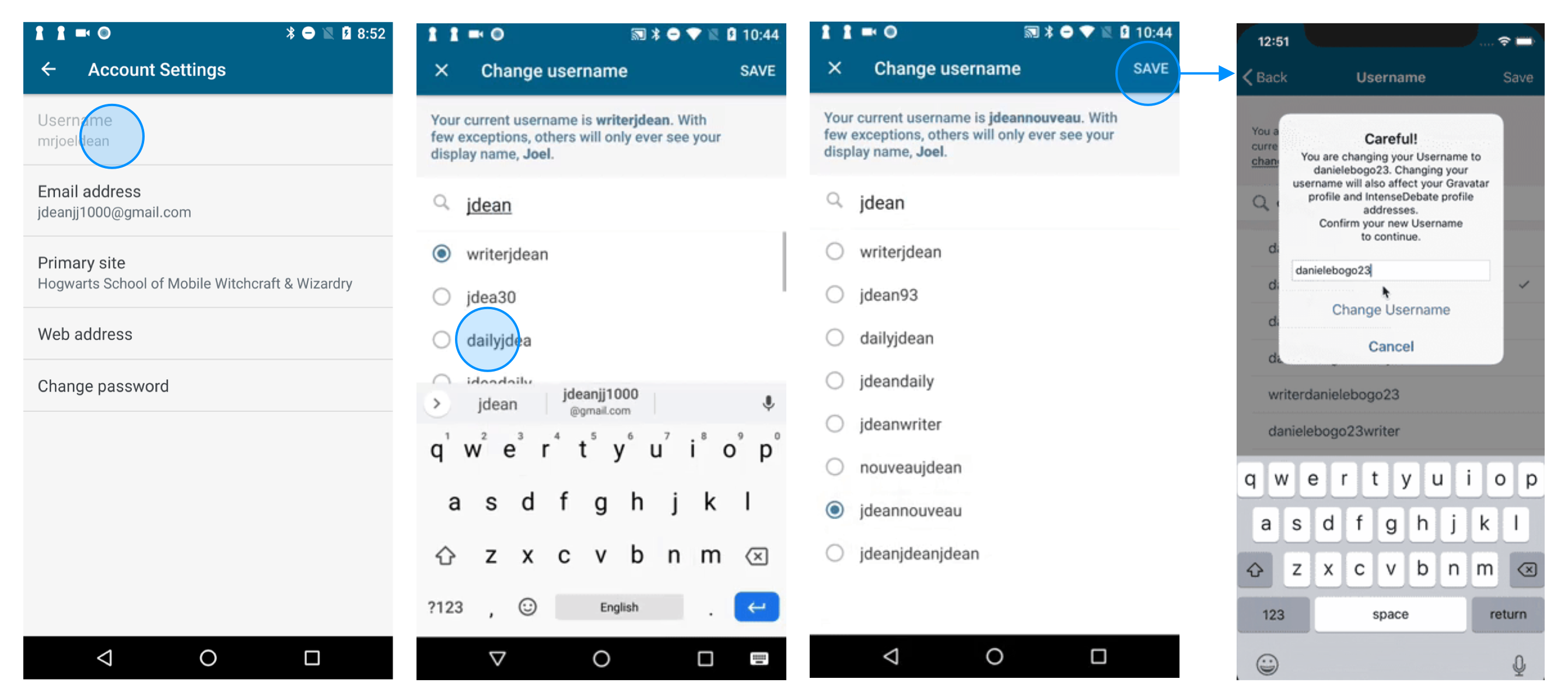
The proposed flow based on several discussions with @maxme and @osullivanchris is as follows.
- The user enters the flow on the settings screen
- User searches for a name in the ‘change username’ screen you showed. Taps radio button to select the name (nothing actually happens at this point)
- User taps ‘Save’ (this is when we actually commit the change)
- Show loading state while change commits
- If unsuccessful show error within the view
- If successful User returns to the Account Settings Screen
- A toast is shown that the username was just successful updated.
For this to be accomplished this is the work that will be done :
[x] [Add
usernameCanBeChangedproperty to WordPress FluxC Android](https://github.com/wordpress-mobile/WordPress-FluxC-Android/issues/1346) - This will be utilized by the settings view to determine if the username setting can be changed and if so only then will it appear enabled and a click will take the user to the username changer screen.[x] [Make UsernameChangerFullScreenDialogFragment abstract](https://github.com/wordpress-mobile/WordPress-Android/pull/10409) and refactor current signup flow to utilize it. - Will allow common functionality to be shared but for specifics such as header text live updates & analytics tracking that need to be different, there will be abstract methods to implement them.
[x] Refactor FullScreenDialogFragment so that dismissal of fragment is optional on the save/confirm click. - Currently, as soon as you click save the fragment gets dismissed. With the change username functionality, clicking save will trigger a server request and the app will be waiting on the result on the suggestions screen and will only be doing a dismissal once the request was successful.
[x] Add analytics events that are able to track when the suggestions screen is used and when there's a success or failure event. - This was done in the iOS implementation.
[x] Implement Change Username Functionality and explore testability. - The new abstract suggestions class will be extended to create the functionality that will be tied to the settings screen. Once completed, exploration will be done to see if the fragment's behavior can be verified with tests using a test approach I discovered that has a small footprint.
 jd-alexander
on 16 Aug 2019
jd-alexander
on 16 Aug 2019
Related issues
 guarani
·
3Comments
designsimply
·
3Comments
guarani
·
3Comments
designsimply
·
3Comments
 wptester9845
·
3Comments
guarani
·
3Comments
wptester9845
·
3Comments
guarani
·
3Comments
 jkmassel
·
3Comments
jkmassel
·
3Comments
Most helpful comment
The proposed plan of action(p77Llu-csD-p2) for this functionality to be implemented in Android has taken alot of inspiration from the iOS implementation.
Below is a user flow diagram created by @osullivanchris. It's a combination of the existing suggestions screen that's used within the app during the sign-up flow and the last screen in the screenshot is of the dialog that's displayed in the iOS implementation when the user is confirming the change.
The proposed flow based on several discussions with @maxme and @osullivanchris is as follows.
For this to be accomplished this is the work that will be done :
[x] [Add
usernameCanBeChangedproperty to WordPress FluxC Android](https://github.com/wordpress-mobile/WordPress-FluxC-Android/issues/1346) - This will be utilized by the settings view to determine if the username setting can be changed and if so only then will it appear enabled and a click will take the user to the username changer screen.[x] [Make UsernameChangerFullScreenDialogFragment abstract](https://github.com/wordpress-mobile/WordPress-Android/pull/10409) and refactor current signup flow to utilize it. - Will allow common functionality to be shared but for specifics such as header text live updates & analytics tracking that need to be different, there will be abstract methods to implement them.
[x] Refactor FullScreenDialogFragment so that dismissal of fragment is optional on the save/confirm click. - Currently, as soon as you click save the fragment gets dismissed. With the change username functionality, clicking save will trigger a server request and the app will be waiting on the result on the suggestions screen and will only be doing a dismissal once the request was successful.
[x] Add analytics events that are able to track when the suggestions screen is used and when there's a success or failure event. - This was done in the iOS implementation.
[x] Implement Change Username Functionality and explore testability. - The new abstract suggestions class will be extended to create the functionality that will be tied to the settings screen. Once completed, exploration will be done to see if the fragment's behavior can be verified with tests using a test approach I discovered that has a small footprint.