Wordpress-android: Login: Edit error message to reference self-hosted site
The error message shown after entering an email address that is not associated with a WordPress.com account reads:
"This email is not registered on WordPress.com."
Assuming the user is not in a wpcom-only flow, let's edit the message to ask if the user is trying to log in to their self-hosted site.
Something like: "Are you trying to log in to your self-hosted site?" might work, but would it also make sense to reference the button to the site address screen?
Refs p4a5px-20t-p2
cc @folletto
 aerych
All 10 comments
Same reply as iOS -- the phrasing sounds fine, but it'd be good to see a screenshot; I'm not sure what button you're referencing.
 michelleweber
on 31 Oct 2017
michelleweber
on 31 Oct 2017
Thanks @michelleweber! I pinged you in chat with a link to a blog post with more details about this issue, including a screen shot. :)
aerych
on 31 Oct 2017
I would do something with a tappable link inside (the whole text can be tappable, even if only part of the text is underlined):
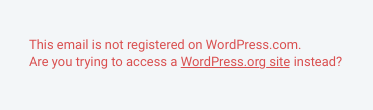
This email is not registered on WordPress.com.
Are you trying to access a _WordPress.org site_ instead?
The link accesses the same screen as the button below switching to .org. It would be great if the email typed in is preserved in the screen switch.
Also, this message must be in sync with the other one for iOS: https://github.com/wordpress-mobile/WordPress-iOS/issues/8080
 folletto
on 1 Nov 2017
folletto
on 1 Nov 2017
Thanks, @aerych! I think there should be as much detail we we can provide with the error message, and I also like the idea of making it tappable. I might go with something like:
Hmm, this email address isn't registered with WordPress.com.
Are you trying to access a self-hosted site? Log in with your site address.
Where "Log in with your site address" is underlined, and the whole thing is tappable.
michelleweber
on 1 Nov 2017
The view used for the error message on Android is an internal view which doesn't have any customizability (i.e. underline style or tap listener). See the screenshot below for illustration.
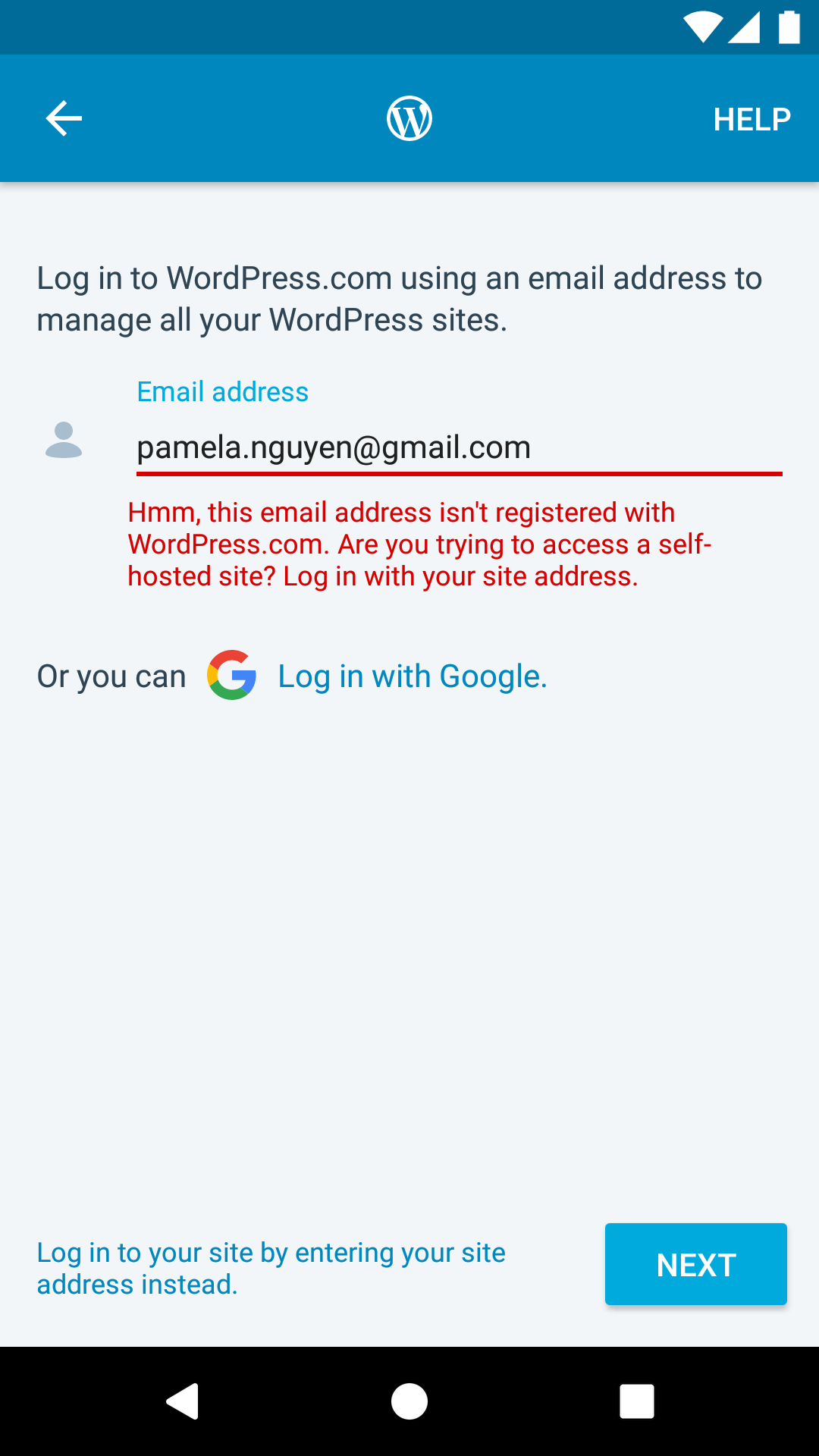
We could create a simple text view for the error message as a replacement to make it underlined and tappable, but we would lose the built-in features of the internal view (e.g. fade in/out animations, layout adjustments dismissing on text change). We can add those built-in features too with a custom text view, but that would involve much more than change the error message text. Another option would be to use some other user interface element for this error like an alert dialog.
 theck13
on 9 Nov 2017
theck13
on 9 Nov 2017
I'd argue that prompting for a .org site starts to enter the "too smart" realm by hinting to the wrong direction potentially. Email has higher chances to have a typo instead of being for a .org site but we will nudge for .org instead of "please, check the email again" for example. Besides, I think a hint to .org competes with the button already available on the screen (secondary action in the bottom).
I'd suggest we iterate on the secondary button's copy, perhaps by adding a "Have a self-hosted site? Log in by..." or something along those lines.
 hypest
on 9 Nov 2017
hypest
on 9 Nov 2017
I see what you mean, but this PR was created because we specifically had reports of people trying multiple times to login to self-hosted and getting frustrated by an error that wasn't clear enough (they didn't see the bottom link probably).
underline style or tap listener
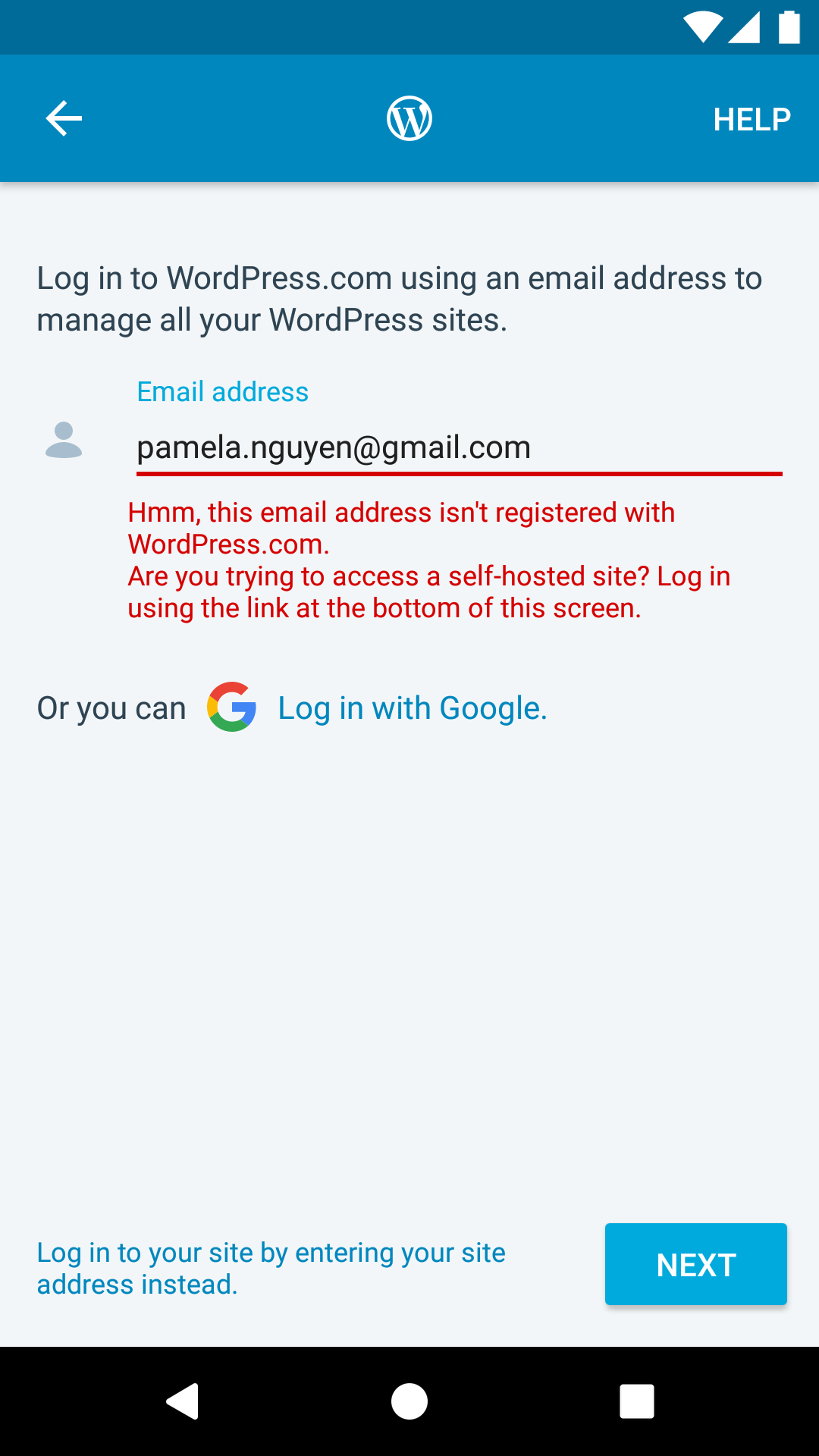
Ok. As we need a quick fix let's adjust the text then with:
Hmm, this email address isn't registered with WordPress.com.
Are you trying to access a self-hosted site? Log in using the link at the bottom of this screen
Makes sense for a quick fix?
folletto
on 9 Nov 2017
Just for clarification, you're suggesting skipping the underline style and tappable text in order to go with a quick fix, @folletto?
Hmm, this email address isn't registered with WordPress.com.
Are you trying to access a self-hosted site? Log in using the link at the bottom of this screen.
That text works for me. How about you, @michelleweber? See the screenshot below for illustration.
theck13
on 9 Nov 2017
Just for clarification, you're suggesting skipping the underline style and tappable text in order to go with a quick fix?
Correct, as this seems an issue at this stage. Let's change the text and review if we get more or less issues with it.
Let's keep our Happiness Engineers in the loop so we can mark clearly the moment the change go live and we can measure it.
folletto
on 9 Nov 2017
@theck13 yup, works for me.
michelleweber
on 9 Nov 2017
Related issues
 maxme
·
3Comments
maxme
·
3Comments
 roundhill
·
3Comments
maxme
·
3Comments
roundhill
·
3Comments
maxme
·
3Comments
 reginabally
·
3Comments
reginabally
·
3Comments
 mzorz
·
3Comments
mzorz
·
3Comments
Most helpful comment
Correct, as this seems an issue at this stage. Let's change the text and review if we get more or less issues with it.
Let's keep our Happiness Engineers in the loop so we can mark clearly the moment the change go live and we can measure it.