Woocommerce-services: First Class - Large Envelope being retuned when product can't fit.
1) Create a product that is too thick to got First Class - Large Envelope (anything over .75"):
Link to image: http://joelwills.com/oDNXrA
2) Set USPS to return First Class - Large Envelope:
Link to image: http://joelwills.com/rtGwvX
3) Get a shipping quote and First Class - Large Envelope is returned
Link to image: http://joelwills.com/Af2dGp
However based on thickness it shouldn't be anywhere near to fitting.
1044011-zen
 joelwills
All 8 comments
@jeffstieler what should we do about fixing this? Seems like high priority since the wrong envelope is showing up for customers at checkout
 v18
on 11 Apr 2018
v18
on 11 Apr 2018
On this page, it says that the maximum height for a first class large envelope is 0.75 inches:
https://www.usps.com/ship/preparing-domestic-shipments.htm
Did we get different information saying that it could be larger?
v18
on 11 Apr 2018
The customer's original issue was discussed here:
https://github.com/Automattic/woocommerce-services/issues/1157
v18
on 11 Apr 2018
what should we do about fixing this?
I honestly think the best solution is to stop using the USPS API.. though that isn't a quick fix.
I believe the problem stems from the USPS API ignoring dimensions for All and Online type requests, which is what we're using:
_From: https://www.usps.com/business/web-tools-apis/rate-calculator-api.htm#_Toc487632573_
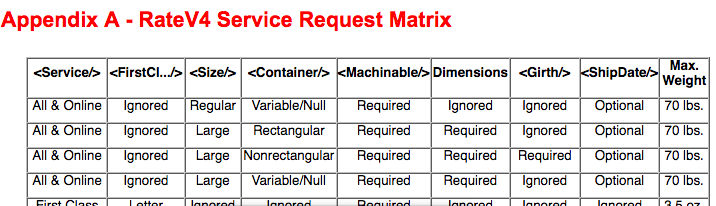
We might be able to make several requests with different <Service/> values to get around the problem.
No matter what, the fix for this will be server side.
 jeffstieler
on 11 Apr 2018
jeffstieler
on 11 Apr 2018
1113928-zen
Customer reached out with this issue in chat. Adding here so we can update them accordingly.
 ldr2273
on 23 Apr 2018
ldr2273
on 23 Apr 2018
1113928-zen is waiting for an update on this. Any news?
 iMazed
on 15 May 2018
iMazed
on 15 May 2018
1044011-zen is also still on-hold and awaiting a fix. Is there an ETA?
 amandasjackson
on 16 May 2018
amandasjackson
on 16 May 2018
@ldr2273 @iMazed @amandasjackson
We don't currently have an ETA for a fix, but I think I've identified a path forward and I've created a server issue to track this since that's where it will be fixed.
jeffstieler
on 17 May 2018
Related issues
 c-shultz
·
5Comments
c-shultz
·
5Comments
 DanReyLop
·
3Comments
DanReyLop
·
3Comments
 harriswong
·
4Comments
harriswong
·
4Comments
 budzanowski
·
4Comments
budzanowski
·
4Comments
 jessepearson
·
5Comments
jessepearson
·
5Comments