Woocommerce-ios: Disabled state on buttons not working
Describe the bug
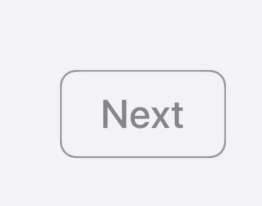
Our applyPrimaryButtonStyle method on UIButton seems to be applying the wrong style for the disabled state.
To Reproduce
Steps to reproduce the behavior:
- Apply
applyPrimaryButtonStyleto any button - Set it as disabled
button.isEnabled = false - See wrong style applied
Screenshots
Current | Expected
---- | ----
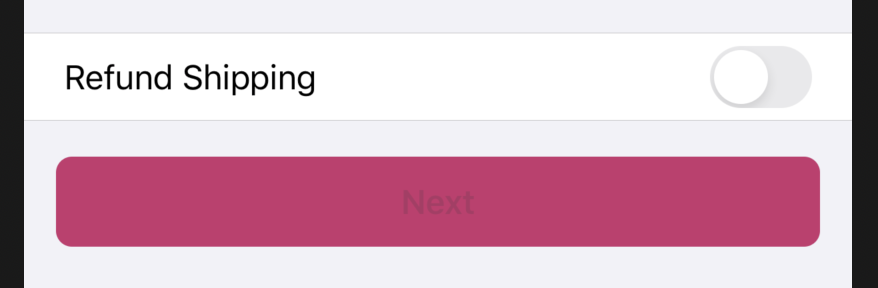 |
| 
Mobile Environment
Happening on iOS 13 and 14, both simulator and device
 Ecarrion
All 6 comments
I would like to do this if this task is still active ?
 Denpex
on 29 Oct 2020
Denpex
on 29 Oct 2020
Sure @Denpex, let us know if you need any assistance. 👍
Ecarrion
on 29 Oct 2020
I think the design for disabled primary button is the following (in "System - iOS Components" design board):
@Garance91540 feel free to correct!
\ | Light mode | Dark mode
-- | -- | --
Design | 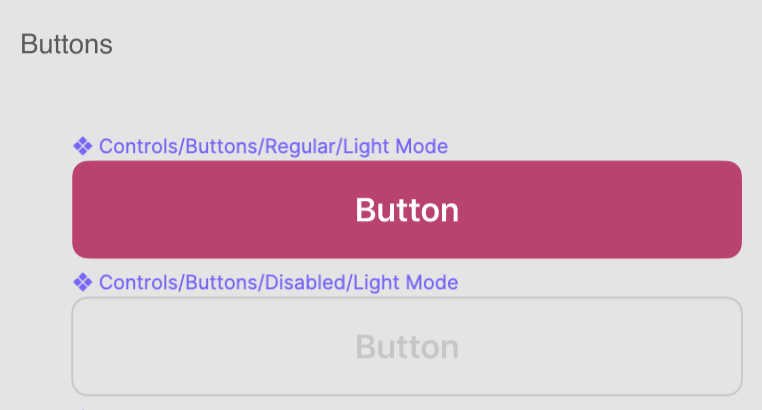 |
| 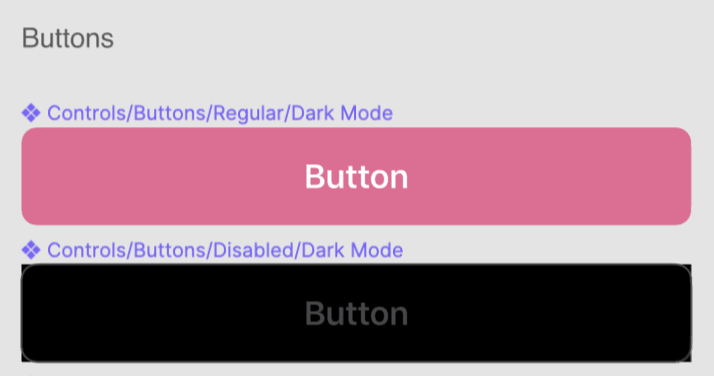
Text color | iOS System Quaternary Label Color | iOS System Tertiary Label Color
Border color | Same as text color | Same as text color
 jaclync
on 30 Oct 2020
jaclync
on 30 Oct 2020
@jaclync thanks for the heads up, I will make sure to follow these guidelines.
Denpex
on 30 Oct 2020
That's correct @jaclync , thank you!
 Garance91540
on 2 Nov 2020
Garance91540
on 2 Nov 2020
Hi @Denpex do you still plan to work on this?
Ecarrion
on 17 Nov 2020
Related issues
jaclync
·
3Comments
 pmusolino
·
4Comments
pmusolino
·
4Comments
![sentry-io[bot] picture](https://avatars.githubusercontent.com/in/12637?v=4&s=40) sentry-io[bot]
·
3Comments
sentry-io[bot]
·
3Comments
 allendav
·
3Comments
jaclync
·
3Comments
allendav
·
3Comments
jaclync
·
3Comments
Most helpful comment
I think the design for disabled primary button is the following (in "System - iOS Components" design board):
@Garance91540 feel free to correct!
\ | Light mode | Dark mode |
| 
-- | -- | --
Design |
Text color | iOS System Quaternary Label Color | iOS System Tertiary Label Color
Border color | Same as text color | Same as text color