Woocommerce-ios: Allow Testing of Localized Strings
There are times when you would like to test a localized string. For example, you may want to make sure that the quantity and price are the values attached to the final string of this:
    enum Localization {
        static func subtitle(quantity: String, price: String) -> String {
            let format = NSLocalizedString("%1$@ x %2$@", comment: "")
            return String.localizedStringWithFormat(format, quantity, price)
        }
    }
We can technically do this now. But if the tests are running on a non-English simulator, then the test would fail because the NSLocalizedString() call would return the localized value.
Possible Solutions
We'd probably have to create our own localization functions. These functions can probably allow overrides so that the tests can _expect_ a specific language to be used.
We'd probably also need to modify localize.py so it will not just look for NSLocalizedString() calls.
Stretch Goal
It'd probably be better if we can also organize our localized strings into a single file. Kind of like how SwiftGen does it.
 shiki
shiki
All 6 comments
I think we don't generally assume the language of the simulator to run unit tests?
Re stretch goal: I think our current way of localizing strings using the same key and value in Localizable.strings makes it harder to have an automated helper like the SwiftGen examples. In the SwiftGen example and my previous projects, the key is usually a semantic string in some format like products_title so that the codegen helper can make it to like L10n.productsTitle. With our localizable strings, I'm not sure how SwiftGen is going to map like %1$@ - %2$@ (System) 🤔
 jaclync
on 29 Jul 2020
jaclync
on 29 Jul 2020
I think we don't generally assume the language of the simulator to run unit tests?
@jaclync I'm not sure what you mean by this. Would you mind expanding?
I think our current way of localizing strings using the same key and value in Localizable.strings makes it harder to have an automated helper like the SwiftGen examples.
Yeah, that is a problem. I wonder if that's a GlotPress requirement. 🤔
How do you feel about having a public enum Localization containing all of our strings. We'll allow this enum to be accessible in the unit tests so the unit tests can use them directly.
    enum Localization {
        static func subtitle(quantity: String, price: String) -> String {
            let format = NSLocalizedString("%1$@ x %2$@", comment: "")
            return String.localizedStringWithFormat(format, quantity, price)
        }

        static let justATitle = NSLocalizedString("Products", ...)

        // all other `NSLocalizedString()` calls here
    }
func testThatTheSubtitleContainsTheQuantityAndPrice() {
    let cell = createCell()

    cell.configure(viewModel: aViewModel)

    // This may fail if the simulator is run in other languages and the translation has a different pattern.
    XCTAssertEqual(cell.subtitleLabel.text, "1000 x 1200")

    // This will always succeed in different languages because the `NSLocalizedString` call is inside `Localization.subtitle`.
    XCTAssertEqual(cell.subtitleLabel.text, Localization.subtitle(quantity: "1000", price: "1200"))
}
It feels weird because it assumes an understanding of the internal operations of configure(). But this solves the problem of unit tests failing if the simulator is in a different language.
This has a drawback of maintenance. Since the localized strings are no longer collocated with where they are used, we might forget to remove the unused strings.
shiki
on 29 Jul 2020
It looks like in the test plan configuration we can override the Application Language to force English. Perhaps that's the simplest way to address this?
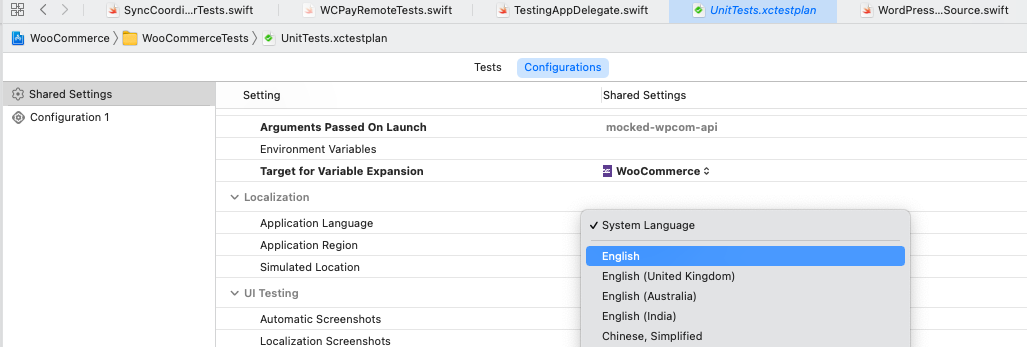
 koke
on 22 Apr 2021
koke
on 22 Apr 2021
@koke Sorry for the late response.
I don't know what the drawbacks are if we set the default to English. I guess we'll have to be more vigilant and test the app with other locales? Maybe @rachelmcr knows more.
That said, I can live with this solution so no arguments from me. 😄
shiki
on 30 Apr 2021
My thinking is that we all probably assumed the tests would be running with the simulator in English, and they will in CI. This would make that assumption explicit.
If we want tests to work with different languages, then we should ensure we test those languages in CI alongside English to catch any issues. Otherwise they just randomly fail for people after they switched their simulator to test something else.
koke
on 30 Apr 2021
I don't know what the drawbacks are if we set the default to English. I guess we'll have to be more vigilant and test the app with other locales?
I thought about this a bit while I was investigating failing unit tests in Arabic, where I concluded that setting them to run in English was probably the most straightforward solution (see https://github.com/woocommerce/woocommerce-ios/issues/2132#issuecomment-765437881). Since we run the tests in English in CI, and I expect most local test runs happen in English, we probably don't lose much by setting them to English in the test plan config.
I'm not really familiar with unit testing strategies for i18n, but it could be interesting to spend some time thinking about what that would look like. Not just for different languages, but also things like different timezones, different calendars, etc. We could also create a second test plan with a non-English language so we explicitly run the tests against different languages.
 rachelmcr
on 30 Apr 2021
rachelmcr
on 30 Apr 2021
Related issues
 eduardozulian
·
3Comments
eduardozulian
·
3Comments
 jkmassel
·
4Comments
jkmassel
·
4Comments
 allendav
·
3Comments
allendav
·
3Comments
 mindgraffiti
·
4Comments
mindgraffiti
·
4Comments
![sentry-io[bot] picture](https://avatars.githubusercontent.com/in/12637?v=4&s=40) sentry-io[bot]
·
3Comments
sentry-io[bot]
·
3Comments