Woocommerce-ios: Swipe Back Gesture does not trigger "Discard Changes" dialog
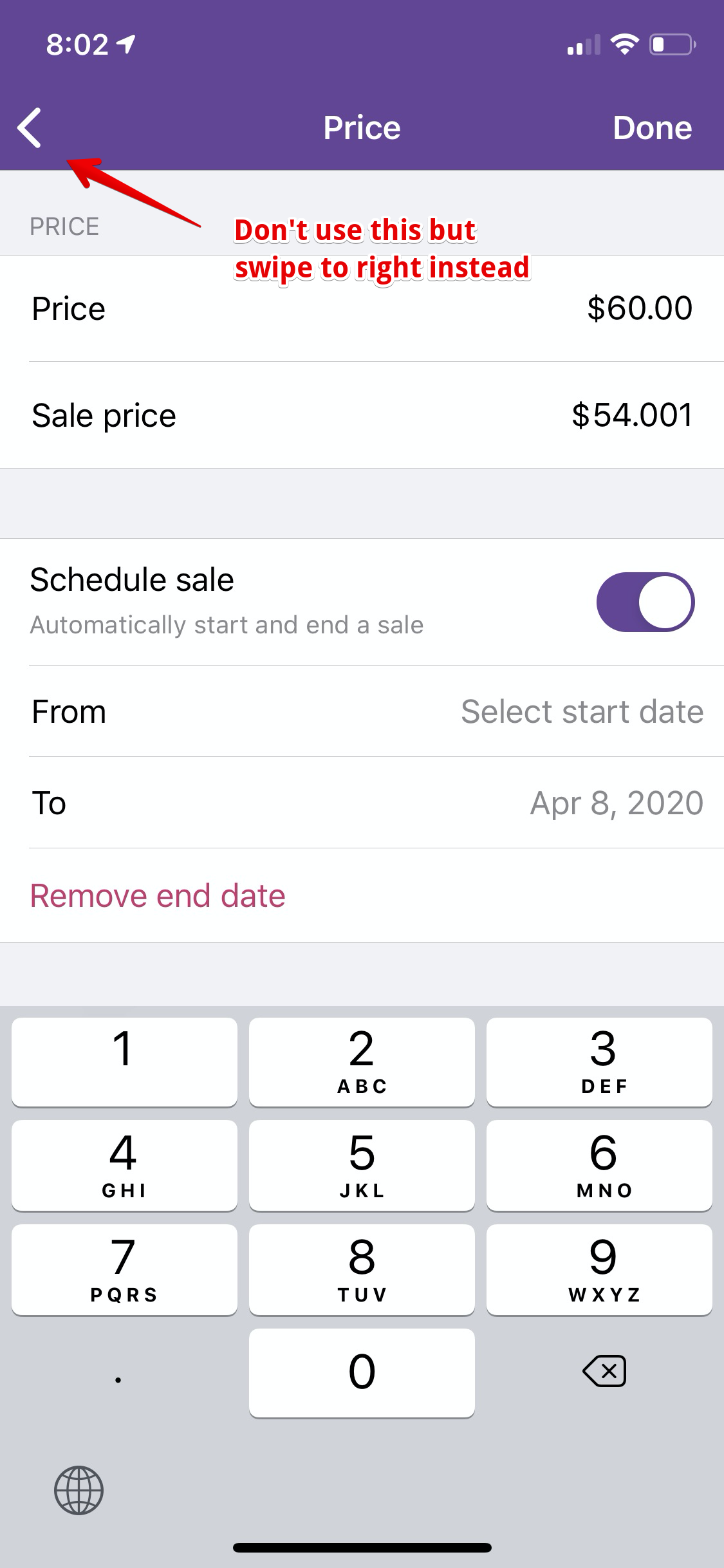
Describe the bug
When using the Swipe Back Gesture to exit a product details page, the Discard Changes confirmation dialog is not shown.
To Reproduce
- Navigate to a simple product
- Edit the price
- Swipe back
The Discard Changes confirmation dialog will not be shown.
Repeating the same steps while tapping on the Back button to exit instead while correctly show the confirmation dialog.
Expected behavior
In Android, using the device's back button or the navigation bar's back button will trigger the dialog. I expect the same with iOS.
I'm not sure if this has already been discussed. But it seems like a bug.
@Garance91540 @pmusolino @jaclync
Mobile Environment
Please include:
- Device: iPhone Xs
- iOS version: 13.1
- WooCommerce iOS version: 4.0-beta
 shiki
shiki
All 13 comments
I believe this is wanted.
You can't make a dialogue message appear while you're in a transition (you are dragging the view), it should appear in the screen you're ending upon, and it wouldn't make much sense.
 pmusolino
on 9 Apr 2020
pmusolino
on 9 Apr 2020
I had a guess that this is not technically achievable. I thought I'd just bring it up in case it's a concern for the user's experience.
I'm not sure but I guess it's "obvious" that the changes will be discarded when you swipe back? If it's obvious, perhaps we should be consistent all throughout and just remove the discard changes dialog?
shiki
on 9 Apr 2020
I'm not sure but I guess it's "obvious" that the changes will be discarded when you swipe back?
That's right, I think so, but I would like to hear the opinion of @Garance91540
pmusolino
on 9 Apr 2020
thanks for bringing this up @shiki that's an interaction I hadn't thought of. I looked at the WP app as a comparison and it seems like they disabled the Swipe Back gesture on all the screens that require saving. Could we do the same here?
 Garance91540
on 9 Apr 2020
Garance91540
on 9 Apr 2020
@Garance91540 they removed it only on the screens that require saving? Just because usually when the swipe back is removed, is because they customized the back button of Apple, which will remove the swipe gesture, and it's not easy to re-enable it with a custom back button. It may be unwanted.
pmusolino
on 9 Apr 2020
conclusion of slack convo with paolo:
On Android, when users swipe back on the product screen after making changes, we display the “Do you want to discard your changes” modal. @pmusolino is going to look to see if it's technically possible to implement this logic on iOS too.
Garance91540
on 13 Apr 2020
@Garance91540 I did some tests but seems impossible to stop the swipe back action and present the discard changes action sheet, so we don't have the same behavior of Android on iOS.
We, therefore, have two possibilities:
- Disable the swipe back only on some screens (following the WP app).
- In every screen which will present the discard action sheet, when there are some data that are changed, we can transform the back button to a "Cancel" button. Editing it will disable also the swipe back.
Since these screens are pushed, and not presented modally, I think that disable the swipe back is enough (it can be an anti-pattern to see the Cancel button and see that when the button is pressed the view is not dismissed but go back). What do you think?
pmusolino
on 13 Apr 2020
In every screen which will present the discard action sheet, when there are some data that are changed, we can transform the back button to a "Cancel" button. Editing it will disable also the swipe back.
Is this close to what you mean, @pmusolino?
Scenario | Are there changes? | Back Button | Is Swipe Back enabled? | Is Done button visible?
--------|-------|--|--|---
User opens Product → Price | no | standard back arrow | yes | no
User changes Sale Price | yes | "Cancel" text | no | yes
shiki
on 13 Apr 2020
Exactly @shiki, but the thing that sounds strange to me is that the cancel button goes back and doesn't dismiss a modal view.
pmusolino
on 13 Apr 2020
Exactly @shiki, but the thing that sounds strange to me is that the cancel button goes back and doesn't dismiss a modal view.
I also felt that "Cancel" action is usually for dismissing a modal and could complicate the view controller states. Disabling the swipe back only on the screens with outstanding changes check seems like a simple solution to me
 jaclync
on 14 Apr 2020
jaclync
on 14 Apr 2020
Thanks for looking into it @pmusolino !
The main issue with disabling the Swipe back gesture when the "Back" button is enabled on a page (when everywhere else in the experience we enable it when there's a back button) is that it creates an inconsistent behavior and can look like a bug. I think disabling the Swipe back gesture is definitely the way to go, but I don't think it we should do it with a back button still on the screen:
On other apps I looked at (including the WP app) when editing a post there's no "back" button, it's a close button, and the Swipe left gesture is disabled.
here's a quick video of both experience:
https://cloudup.com/cabnW5nkjMF
I think we should:
- Disable the swipe left gesture on the Product page once a change has been made.
- When a change has been made on a product, similarly to how the "Done" button appears in the top nav to save them, the "back" button updates to "Cancel" to discard them (similarly to the video)
Let me know your thoughts!
Garance91540
on 14 Apr 2020
I'm sorry @Garance91540 for coming back to you after 1 day, but it seemed really impossible to me that there was no trick to catch the swipe back. After spending several hours doing some tests, I found a working solution to present the Discard Changes action sheet during the swipe back 🤩
The solution works really well, and I'm going to open a PR!
pmusolino
on 15 Apr 2020
Oh nice, Great find @pmusolino !!!!
Garance91540
on 16 Apr 2020
Related issues
 webbbio
·
4Comments
webbbio
·
4Comments
 stephhjacq
·
3Comments
stephhjacq
·
3Comments
![sentry-io[bot] picture](https://avatars.githubusercontent.com/in/12637?v=4&s=40) sentry-io[bot]
·
3Comments
sentry-io[bot]
·
3Comments
 californiakat
·
5Comments
californiakat
·
5Comments
 jkmassel
·
4Comments
jkmassel
·
4Comments
Most helpful comment
@Garance91540 I did some tests but seems impossible to stop the swipe back action and present the discard changes action sheet, so we don't have the same behavior of Android on iOS.
We, therefore, have two possibilities:
Since these screens are pushed, and not presented modally, I think that disable the swipe back is enough (it can be an anti-pattern to see the Cancel button and see that when the button is pressed the view is not dismissed but go back). What do you think?