Woocommerce-ios: Support: Zendesk ticket fails to send during login (identity and/or token error)
Describe the bug
When I try to send a support ticket during the login flow, it fails to send. The logs show the following errors (name and email redacted - I can share privately if needed):
2020/02/14 12:45:05:234  Zendesk Enabled: true
2020/02/14 12:45:51:967  Zendesk - saving profile to User Defaults: ["email": "REDACTED", "name": "REDACTED"]
2020/02/14 12:45:51:984  Zendesk identity created with email 'REDACTED' and name 'REDACTED'.
2020/02/14 12:45:51:984  Using information from prompt for Zendesk identity.
2020/02/14 12:45:51:984  ☎️ [Zendesk] Missing Device Token!
2020/02/14 12:46:16:070  No user information to create Zendesk identity with.
2020/02/14 12:46:18:738  Using existing Zendesk identity: ,
2020/02/14 12:46:18:738  ☎️ [Zendesk] Missing Device Token!
To Reproduce
Steps to reproduce the behavior:
- Start logged out of the app (I was previously logged in during this testing).
- Select "Log in with Jetpack."
- On the first login screen, tap "Help" in the top right.
- Select "Contact Support."
- In the prompt that appears, enter your email and name and select OK.
- When the contact form appears, enter a message and send it.
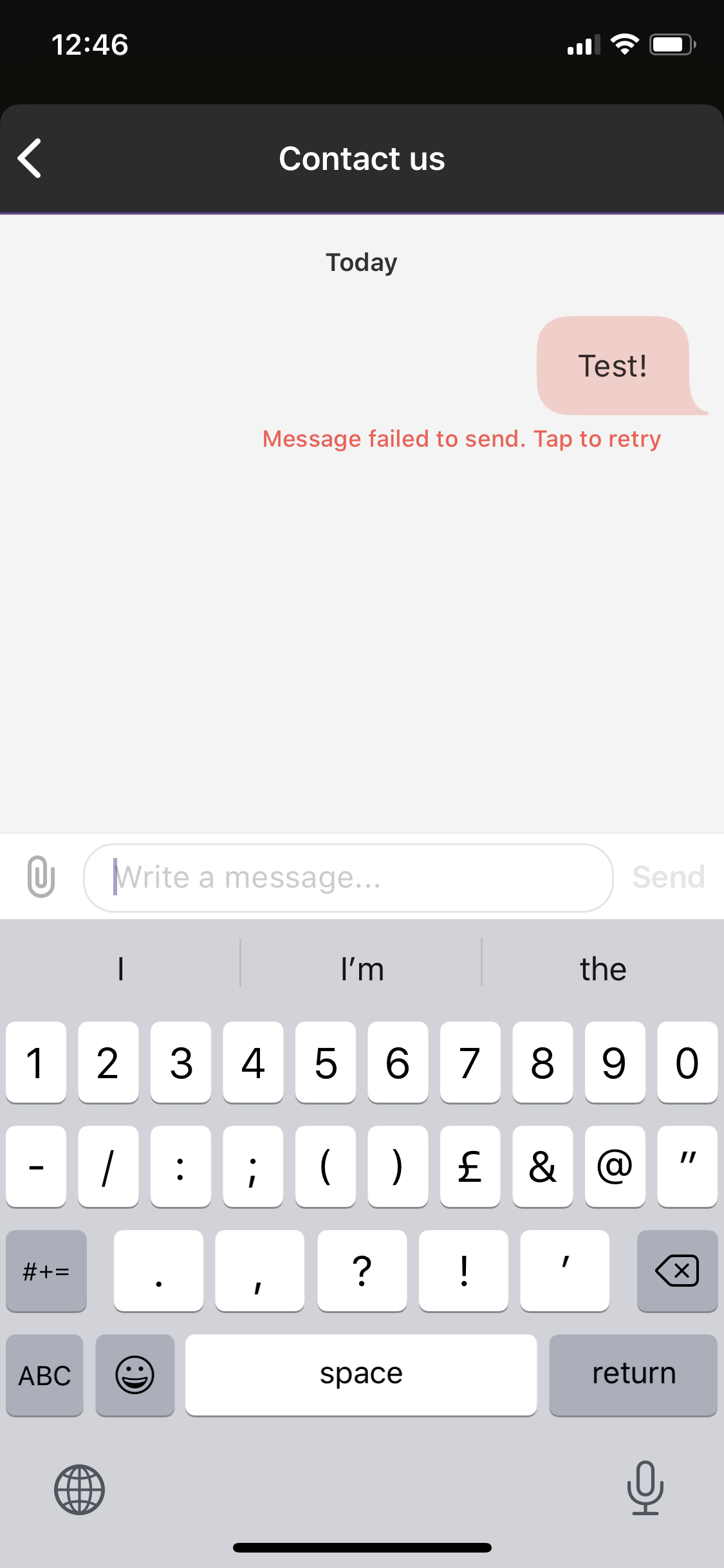
Result: A progress bar appears but the message ultimately fails to send with the error "Message failed to send. Tap to retry".
Screenshots
Expected behavior
I expect to be able to contact support from the login flow.
Isolating the problem (mark completed items with an [x]):
- [x] I have deactivated other plugins and confirmed this bug occurs when only WooCommerce plugin is active.
- [x] This bug happens with a default WordPress theme active, or Storefront.
- [x] I can reproduce this bug consistently using the steps above.
Mobile Environment
Please include:
- Device: iPhone XS
- iOS version: 13.3.1
- WooCommerce iOS version: 3.6.0.2 TestFlight Beta
 rachelmcr
All 7 comments
Okay since this happened to me as well last release, it must be not fixed. I'm wondering if the Zendesk SDK is expecting a push notification token to be available before their SDK will work? @jaclync
 astralbodies
on 14 Feb 2020
astralbodies
on 14 Feb 2020
hmm I wasn't able to reproduce this issue after deleting the Woo app and installing again from TestFlight beta 3.6.02 build on 2 devices. I also tried logging in and out, and still was able to submit a ticket after declining the push notifications request.
I don't think the push notification token was the issue, since I was able to submit a ticket after reinstalling the app (no notifications permission asked before logging in, and I double-checked the device settings). I also tried turning off the push notifications in the device settings and was able to submit a ticket. For example, in 2721096-zen , I had a similar log with missing token:
2020/02/17 12:45:50:149  Zendesk - saving profile to User Defaults: ["email": "**@gmail.com", "name": "***"]
2020/02/17 12:45:50:176  Zendesk identity created with email '**@gmail.com' and name '***'.
2020/02/17 12:45:50:176  Using information from prompt for Zendesk identity.
2020/02/17 12:45:50:177  ☎️ [Zendesk] Missing Device Token!
@rachelmcr you weren't using the a8c email for contacting support right when you had this issue right? @astralbodies were you able to reproduce this in 3.6.0.2? I'm pretty out of ideas now since I couldn't reproduce 😟not sure if there was something cached on my devices that Zendesk was using internally so that it worked on my end. maybe I can contact their developer support about this with our setup?
 jaclync
on 17 Feb 2020
jaclync
on 17 Feb 2020
you weren't using the a8c email for contacting support right when you had this issue right?
Nope, I tested with two different non-a8c emails.
It might be relevant to note that I had been previously logged in (I wasn't testing a fresh install). Could that possibly be a factor here?
rachelmcr
on 19 Feb 2020
I still wasn't able to reproduce this issue, after logging in, using the app for a while, and then logging out to submit a ticket on a device and simulators.
@rachelmcr were you able to reproduce this every time after logging in and out? I compared your log to mine and this is the only message that I didn't have:
No user information to create Zendesk identity with.
I looked into when this message might be shown, and saw 2 cases that seemed unlikely to occur:
- When tapping on the Cancel button of the email/name input alert
- When the text field or the text field's text cannot be found when tapping on the submit button of the email/name alert
But in either case, it looks like your Zendesk identity has been created previously from this log message: Zendesk identity created with email 'REDACTED' and name 'REDACTED'. 🤔
jaclync
on 21 Feb 2020
I just tried logging out again and now I'm not able to reproduce this at all. 🤔 I tried numerous times in different ways and couldn't reproduce it with the install I've been using, and then I deleted and reinstalled the latest beta and couldn't reproduce it.
Since it seems to only happen occasionally, and even when it's happening a reinstall seems to resolve it, it probably isn't a high priority to investigate this further. I'll make a note to carefully track all of my testing activity in the next beta cycle in case the issue reappears, in hopes of tracking down what steps might reliably reproduce it.
rachelmcr
on 21 Feb 2020
I think it's worth upgrading to the latest Zendesk SDK and let's hope this intermittent issue goes away.
astralbodies
on 27 Feb 2020
The Zendesk SDK was updated in https://github.com/woocommerce/woocommerce-ios/pull/1930 and I haven't seen this issue at all recently, even intermittently. I think it's safe to close this issue; we can reopen if we start seeing this again.
rachelmcr
on 10 Jun 2020
Related issues
 juliaamosova
·
3Comments
juliaamosova
·
3Comments
 shiki
·
3Comments
jaclync
·
4Comments
shiki
·
3Comments
jaclync
·
4Comments
![sentry-io[bot] picture](https://avatars.githubusercontent.com/in/12637?v=4&s=40) sentry-io[bot]
·
3Comments
sentry-io[bot]
·
3Comments
 eshurakov
·
3Comments
eshurakov
·
3Comments