Woocommerce-admin: Help panel: add a tooltip highlighting the panel
Description:
The Help Panel usage has been minimal, as the top-right corner can be a blind spot for users. On the other hand, there's a high % of users clicking in the support links when the open the panel. So we should have some additional investment highlighting the Help panel with a tooltip.
Acceptance criteria:
- [ ] Display the tooltip if the user visits a task for the 2nd time (if the task is not complete)
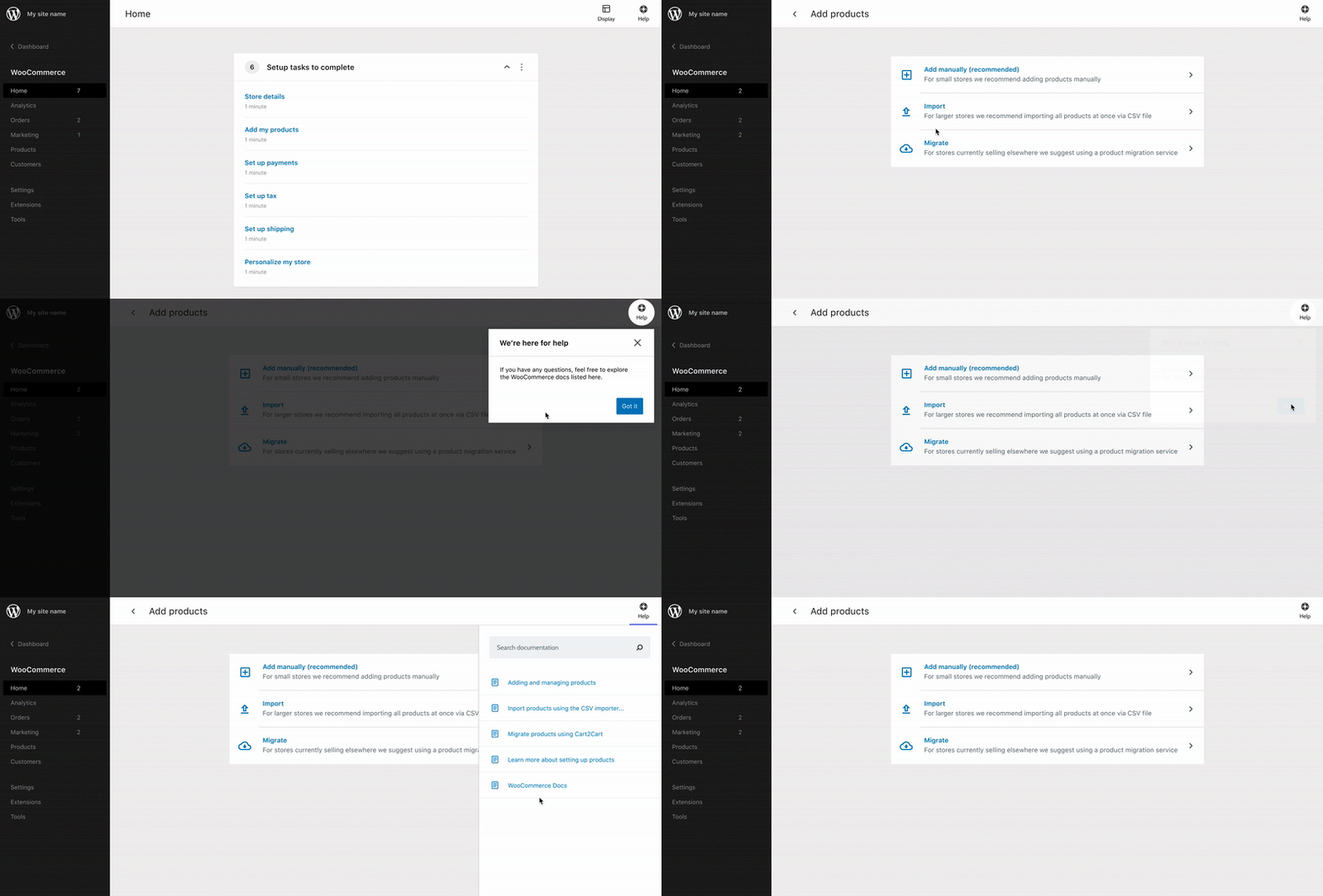
- [ ] The user should only see the tooltip once - if we already displayed the tooltip on the
Add Producttask we shouldn't display it again in other tasks, in order to avoid overwhelming users.
Event tracking:
View the tooltip:
wcadmin_help_tooltip_view
Prop: task - the task where the tooltip was displayed
Click the tooltip:
wcadmin_help_tooltip_click
Prop: task - the task where the tooltip was displayed
 pmcpinto
All 7 comments
@pmcpinto do you have any more information for this?
 becdetat
on 18 Sep 2020
becdetat
on 18 Sep 2020
@pmcpinto do you have any more information for this?
The tooltip still needs to be designed, so we'll move it to the next cycle.
pmcpinto
on 18 Sep 2020
Issue updated with the AC, tracking and design
pmcpinto
on 30 Sep 2020
@pmcpinto is the design in the above gif available in Figma? if so, would you have a link? :)
Also a quick question:
In the gif it appears that the popup shows up after you click the Import task, a nested task of the add products task. Is this as intended, or should the popup appear after the user enters the add products task again?
*of-course the add products can refer to any of the other uncompleted tasks.
 louwie17
on 4 Dec 2020
louwie17
on 4 Dec 2020
@pmcpinto is the design in the above gif available in Figma? if so, would you have a link? :)
@elizaan36 can you share the link? I'm not finding it 🙏
In the gif it appears that the popup shows up after you click the Import task, a nested task of the add products task. Is this as intended, or should the popup appear after the user enters the add products task again?
*of-course the add products can refer to any of the other uncompleted tasks.
Good question. I think that we should display the tooltip when the user visits the main screen of a task for the 2nd time. Elizabeth, what do you think?
pmcpinto
on 4 Dec 2020
hey @louwie17 and @pmcpinto
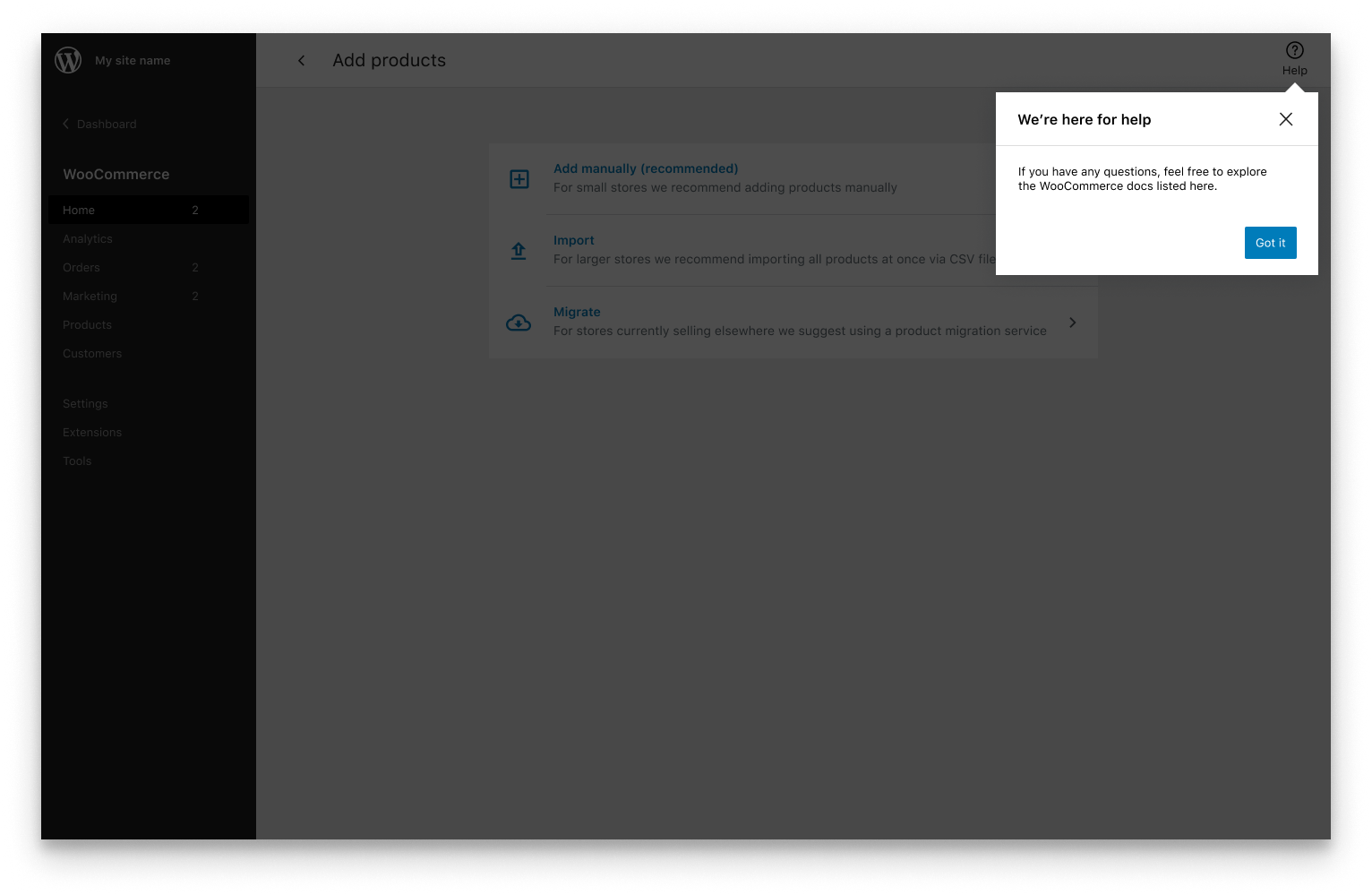
I just shared the Figma with Lourens in Slack. Also wanted to propose a slight tweak to the tooltip design (not a problem if the other design has already been implemented) because that circle on top of the modal started feeling strange. I updated it to a caret that points to the Help panel link.
I think that we should display the tooltip when the user visits the main screen of a task for the 2nd time.
Agreed.
 elizaan36
on 4 Dec 2020
elizaan36
on 4 Dec 2020
This is mostly just for future documentation, but @jeffstieler and I were chatting about task click vs task view.
Which goes hand in hand with the recorded tracks tasklist_click and task_view, currently we are increasing the count on tasklist_click and also adding this count to the tasklist_click event.
Some pros/cons of each:
Record on task list click:
Pro:
- User consciously decided to visit a task by click in the task list
- User could easily see if the item was completed or not (from the task list)
Cons:
- Doesn't record if a user refreshes on a task view
- Doesn't record if a user visits the task by a direct link, or some other way (if added)
- Very much attached to task list (could be pro or con I suppose)
Record on task view:
Pro:
- We correctly track task visit count, as it also increases when the user refreshes (goes back), or accesses it by direct link
- Would work well if tasks can be accessed from somewhere outside of the task list
Cons:
- Can't necessary tell if task visit was a conscious decision or just a random refresh
louwie17
on 17 Dec 2020
Related issues
 KZeni
·
4Comments
KZeni
·
4Comments
 timmyc
·
4Comments
timmyc
·
4Comments
 zhongruige
·
3Comments
zhongruige
·
3Comments
 jeffstieler
·
3Comments
jeffstieler
·
3Comments
 peterfabian
·
3Comments
peterfabian
·
3Comments
Most helpful comment
hey @louwie17 and @pmcpinto
I just shared the Figma with Lourens in Slack. Also wanted to propose a slight tweak to the tooltip design (not a problem if the other design has already been implemented) because that circle on top of the modal started feeling strange. I updated it to a caret that points to the Help panel link.
Agreed.