Woocommerce-admin: Notices: Screen Options Menu Displaced by Alerts
When a StoreAlert is being shown on a legacy Woo View ( i.e. the coupons listing page ) - the screen options and help menus from wp-admin are bumped below their standard position:
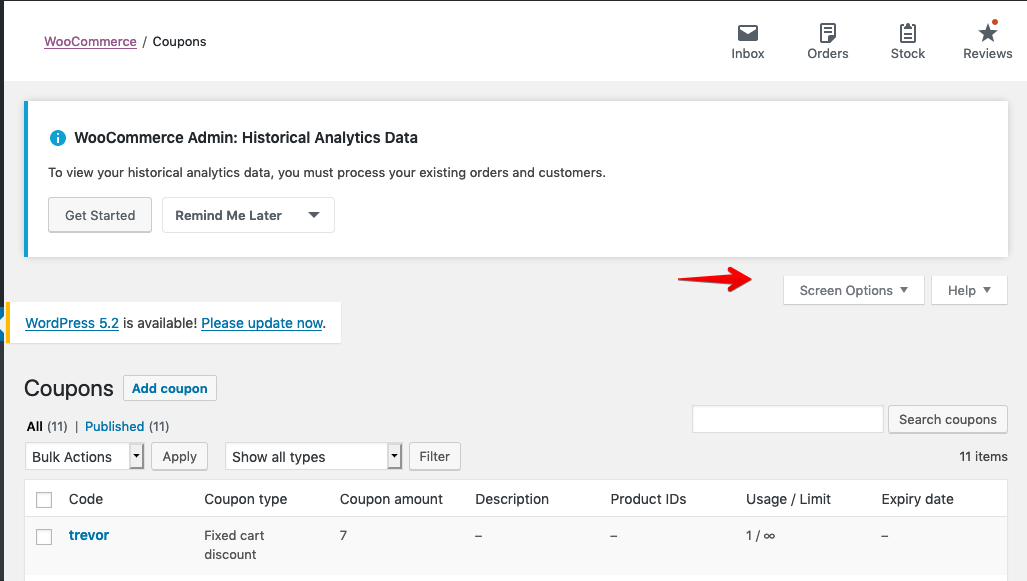
__To recreate bug__
- Do a clean install of wc-admin to trigger the alert to import historical data
- Visit a legacy Woo Screen ( order listing, coupons listing etc )
 timmyc
All 4 comments
Should they be attached to the bottom of the WooCommerce Admin nav bar below the panel buttons?
 jeffstieler
on 20 May 2019
jeffstieler
on 20 May 2019
Well we hide them completely on wc-admin powered pages, so not entirely certain. @josemarques thoughts?
timmyc
on 20 May 2019
Related #2210
 rrennick
on 20 May 2019
rrennick
on 20 May 2019
Should they be attached to the bottom of the WooCommerce Admin nav bar below the panel buttons?
@jeffstieler
This is the best place to display these, they were design to be attached to the wp-admin masterbar, so the admin nav bar is the next best thing.
 josemarques
on 21 May 2019
josemarques
on 21 May 2019
👍2
Was this page helpful?
0 / 5 - 0 ratings
Related issues
jeffstieler
·
3Comments
timmyc
·
4Comments
 pmcpinto
·
4Comments
pmcpinto
·
4Comments
 justinshreve
·
3Comments
timmyc
·
3Comments
justinshreve
·
3Comments
timmyc
·
3Comments
Most helpful comment
@jeffstieler
This is the best place to display these, they were design to be attached to the wp-admin masterbar, so the admin nav bar is the next best thing.