Woocommerce-admin: Task list - add a shortcut back to store setup
User story:
As a new merchant
I want to easily go back to the store setup checklist
So I don't feel lost when I'm exploring or setting up additional details
Description: there’s a lot to explore in WooCommerce, so it’s easy for people to become distracted during setup. For example, we noticed that when we were redirecting users to edit their homepage. By displaying a persistent widget we aim to remind people that store setup is incomplete and offer them a pathway back to the setup flow. As the wc-admin top bar has already been implemented across all WooCommerce screens, adding a tab here seems most sensible.

Acceptance Criteria:
- [x] Add a new item to the top bar that redirects the user to the home screen, when the setup task list is active
- [x] Hide the Orders, Stock, and Reviews tabs while the setup task list is active
- [x] Display the Orders, Stock, and Reviews tabs and hide the Store Setup item when the user finishes or hides the task list
Nice to have in this first iteration:
- [ ] The store setup icon should be updated depending on how close the user is to completing setup.
- [ ] Reuse the panel pattern employed by the other tabs in the activity panel, to display the task list on the current screen

Event tracking:
We can use the existing wcadmin_activity_panel_open event and add the store setup item as a new value of the tab prop. As an alternative, we can create a new event just for this case.
Additional links:
Design mockup
 pmcpinto
All 7 comments
MVP estimate: 1
Nice-to-haves estimate: 2
 becdetat
on 17 Jun 2020
becdetat
on 17 Jun 2020
Estimate: 2.
We can use the existing wcadmin_activity_panel_open event and add the store setup item as a new value of the tab prop. As an alternative, we can create a new event just for this case.
This should be tracked automatically as soon as we add a new tab here.
 joshuatf
on 17 Jun 2020
joshuatf
on 17 Jun 2020
Estimate 2, mainly because this will require building a new component/icon to show progress. I don't think there is a similar component available in wp-core. And we should open a pr upstream after we have built it.
 timmyc
on 18 Jun 2020
timmyc
on 18 Jun 2020
Agree with the estimates of 2.
Perhaps some inspiration can be taken from https://github.com/kevinsqi/react-circular-progressbar ?
 jeffstieler
on 18 Jun 2020
jeffstieler
on 18 Jun 2020
I estimate 2 if we need to create a new component. 3 if opening a PR in Gutenberg is part of the story (though, including that task/chore in this story makes it unclear when this story is "done"... is it when the upstream PR is opened, or is it when the upstream PR is merged? That's largely out of our control. I'd separate it out to chore we can track separately).
 mattsherman
on 19 Jun 2020
mattsherman
on 19 Jun 2020
This feature came up in a recent Woo Design call and some changes were suggested. Hopefully these are fairly minor 🤞
Change 1: Switch the icon from the progress indicator to something that better indicates a task list. Here's the SVG code to use in the Icon component:
<svg xmlns="http://www.w3.org/2000/svg" width="24" height="24">
  <defs/>
  <path fill-rule="evenodd" d="M5.546 10.977L8.53 6.964 7.326 6.07 5.237 8.88l-.869-.647-.895 1.204 2.073 1.541zM20 9.75h-8.889v-1.5h8.89v1.5zm0 7h-8.889v-1.5h8.89v1.5zM6 16.5a.5.5 0 100-1 .5.5 0 000 1zM6 18a2 2 0 100-4 2 2 0 000 4z" clip-rule="evenodd"/>
</svg>
Change 2: Add a Popover to highlight this feature the first time it is exposed in the top bar. It should animate in and include an arrow (these are props on the component). The result should look something like this:
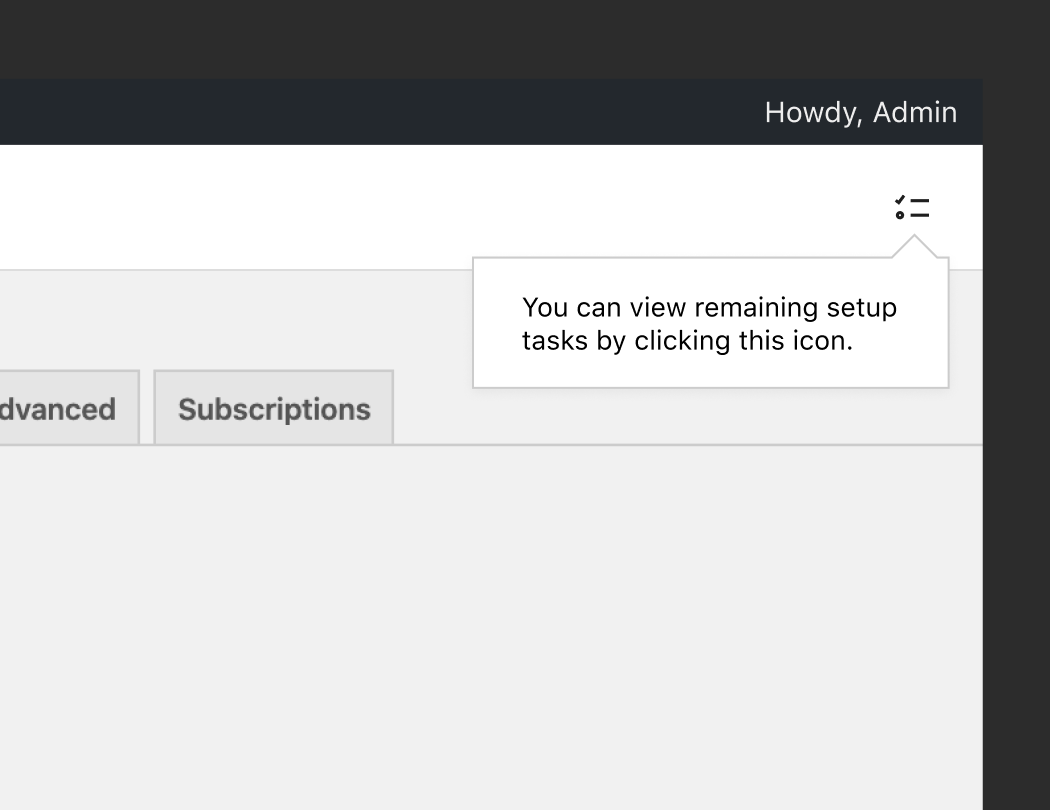
If it would be better to open a new issue for these changes just let me know :)
 jameskoster
on 3 Aug 2020
jameskoster
on 3 Aug 2020
@samueljseay just wanted to make sure you saw Jay's comment above about some design changes...
timmyc
on 5 Aug 2020
Related issues
 LevinMedia
·
3Comments
timmyc
·
4Comments
LevinMedia
·
3Comments
timmyc
·
4Comments
 justinshreve
·
3Comments
timmyc
·
4Comments
joshuatf
·
3Comments
justinshreve
·
3Comments
timmyc
·
4Comments
joshuatf
·
3Comments
Most helpful comment
MVP estimate: 1
Nice-to-haves estimate: 2