Woocommerce-admin: Extensibility: Ensure Multi-Currency Plugins can properly extend wc-admin
Describe the bug
If using WooComm Multi-Currency Plugin, under standard reporting you will see that reports are split. You get 1 report per currency that you have enabled.
In the new WooComm Analytics, you do not get this, instead, it is taking all orders from all currencies and grouping them together under a singular report.
It also does not attempt to convert those other currency amount orders into the main currency, (which would not be ideal), it actually takes the value of an order made in another currency and adds it to the revenue report in the main currency, for example, it will take 1,500 THB and add it into your revenue report as $1,500 USD
To Reproduce
Install WooComm multi currency
Create multi currency orders
Import the new data to WooComm analytics
View Analytics -> Revenue report
Expected behavior
It should have split reporting, one per currency, in the exact same way that the default WooComm -> Reports has had for a while.
Desktop (please complete the following information):
OS Name Microsoft Windows 10 Home Single Language
Chrome
Version 74.0.3729.169 (Official Build) (64-bit)
Additional context
Considering this feature already exists in basic reports, it will be a requirement for the seller to have it in the new Analytics otherwise anyone with WooComm Multi Currency plugin will have incorrect and unusable analytics data.
 APlusDesign
All 26 comments
Thanks for opening this issue @APlusDesign.
Pointing out another user has reported a similar issue with WooCommerce Currency Switcher in the support forums:
https://wordpress.org/support/topic/multi-currency-support-16/
 Aljullu
on 30 May 2019
Aljullu
on 30 May 2019
Thanks for the feedback @APlusDesign - as you stated in your initial issue:
Considering this feature already exists in basic reports, it will be a requirement for the seller to have it in the new Analytics otherwise anyone with WooComm Multi Currency plugin will have incorrect and unusable analytics data.
The Multi Currency Plugin is what has extended the legacy reports to make those reports function as expected. Likewise, if that plugin, or other currency plugins want to extend the new WooCommerce Admin reports, they will have to add support to their own code to do so.
While developing WooCommerce Admin, we have added in a variety of ways for extension developers to hook in / modify data in both the REST API / PHP side of things, along with options to manipulate items on the front-end. But ultimately it is up to the extension developers to add support.
We are more than happy to assist extension developers if they encounter issues with building/extending the new reports, but we can't add support for every extension ourselves.
As such I'm going to close this issue out here, but encourage you to reach out to the developers of the plugin to see if they have plans on adding support to the new reports.
 timmyc
on 18 Jun 2019
timmyc
on 18 Jun 2019
Too bad for closing this on this feature. Plugin developers don't seem to agree that you have hooks for them. At least this is what the developer for WooCommerce Currency Switcher v.2.2.8.1 plugin claims.
 beckos
on 26 Jul 2019
beckos
on 26 Jul 2019
Today @tivnet the developer of WooCommerce Multi Currency reached out to us via Slack to seek assistance with the best way to add support to WooCommerce Admin. While I still feel pretty strongly that much of this logic should exist in the extension, it is sounding like we might need to help expose more options to make multi-currency support a reality, so I'm reopening this issue to act as a place to plan/discuss/implement any changes required to help make this happen.
@tivnet shared that there are some distinct challenges with multi currency - for example on a summary style report like the Revenue Report, historically they have shown totals for all currencies, not a combined total. This obviously would have functional impacts to many of the current reports, so something we might need to determine if it even makes sense to have all reports support multi-currency, or perhaps the extension might be better off creating their own unique reports.
In other areas like the orders report - it seems reasonable to have the different currency data displayed. Obviously there are going to be challenges here since the data lives in meta, and one of our main goals is to deliver a more performant reporting system then the legacy reports. As such we will likely need to revisit the notion of allowing extensions to persist data in the report lookup tables, or perhaps via a meta-style table.
I haven't had a chance to check out the extension yet, and not being a user of it can't really comment more then what Gregory and I briefly talked about this morning. But @psealock and @dreiris I'll leave this in your capable hands as I head out on leave. This also aligns nicely with one of the sprint ideas of working on extensibility!
timmyc
on 26 Jul 2019
@psealock @dreiris - please contact me directly regarding the Multi-currency extension. Thank you!
 tivnet
on 26 Jul 2019
tivnet
on 26 Jul 2019
Email thread started @tivnet
timmyc
on 26 Jul 2019
@APlusDesign @tivnet, This is my first time using WooComm Multi-Currency Plugin so I'm trying to see how it works.
I'd like to see how the plugin handles multi currencies in Reports, but I'm unable to see this part:
If using WooComm Multi-Currency Plugin, under standard reporting you will see that reports are split. You get 1 report per currency that you have enabled.
- Install plugin and activate.
- Create one order in NZD ($350 NZD).
- Create another order in USD ($72.82 USD).
- Head over to Reports.
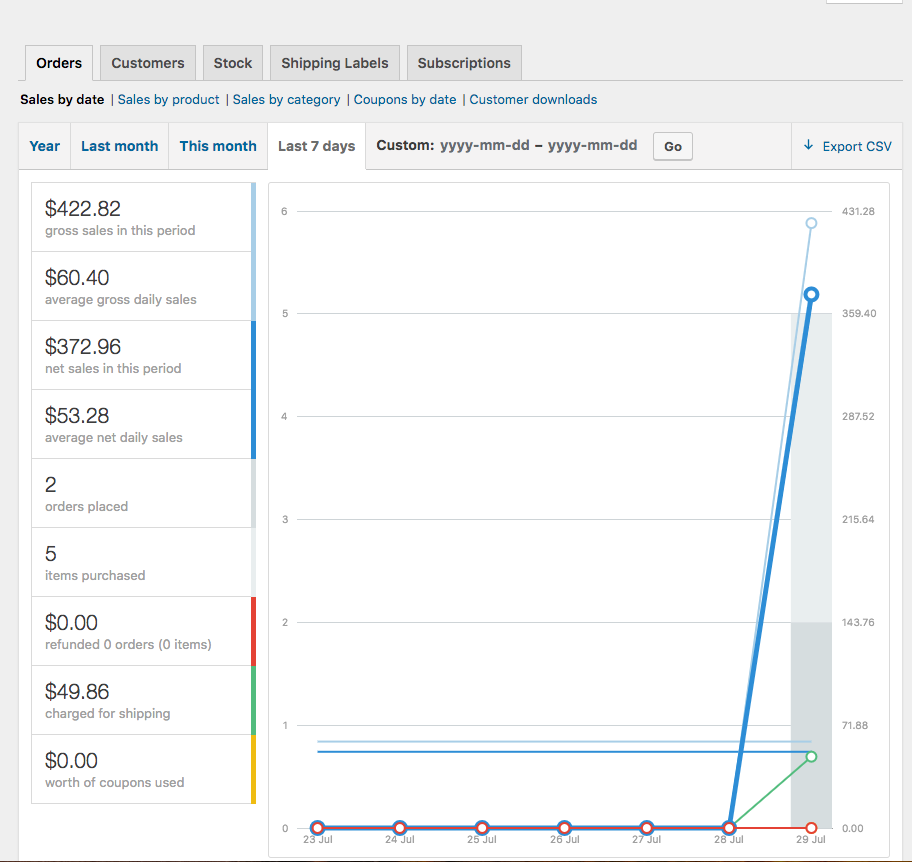
Have I missed a step? Is this the plugin in question? https://wordpress.org/plugins/woo-multi-currency/
It appears to combine both currency values in a similar way as wc-admin's Revenue Report, which is incorrect.
 psealock
on 29 Jul 2019
psealock
on 29 Jul 2019
No, @psealock , wrong plugin
https://woocommerce.com/products/multi-currency/ is the correct one
tivnet
on 29 Jul 2019
Have I missed a step? Is this the plugin in question? https://wordpress.org/plugins/woo-multi-currency/
Looks like I was using the wrong plugin.
psealock
on 29 Jul 2019
This came up also in https://a8c.slack.com/archives/C0E1AV8T0/p1565040313497700, related to https://woocommerce.com/posts/configure-woocommerce-multi-currency/#comment-9152384.
Given the fact that we store currency for orders in WC core already, we should perhaps look into how to approach it in woocommerce-admin itself, if it encounters orders in different currencies.
Based on this, it seems to me some multi-currency functionality should maybe be included in the wc-admin itself?
 peterfabian
on 7 Aug 2019
peterfabian
on 7 Aug 2019
@peterfabian Yes, that would be great. Let's discuss this on a8c slack.
tivnet
on 7 Aug 2019
Thanks @peterfabian this is on our radar. https://github.com/woocommerce/woocommerce-admin/issues/1964 and https://github.com/woocommerce/woocommerce-admin/issues/2714 go part of the way to solve the ability for extensions to fully manipulate reports.
The other missing piece is allowing extensions to persist data in the report lookup tables.
psealock
on 19 Aug 2019
Still following thread, glad to see progress.
Keep up the top efforts!
APlusDesign
on 19 Aug 2019
Requested in the support forum: https://wordpress.org/support/topic/multi-currency-support-17/
 rrennick
on 21 Aug 2019
rrennick
on 21 Aug 2019
I would also be looking for an update about the same topic, following my post in https://github.com/woocommerce/woocommerce-admin/issues/1964
I also would like to add that, in my case, my multi-currency solution also allows to see a single total of all sales, in shop's base currency. This is done by slightly altering the queries used to generate reports, so that they make a sum of totals in base currency, which are stored in parallel to the standard values (i.e. where reports take _order_total, the query is changed to take _order_total_base_currency instead. The same logic applies to other "total" meta).
To add the same logic to WC Admin, I would need a filter that allows to modify the queries used to fetch the amounts, like it's done with the default WooCommerce reports.
 daigo75
on 25 Sep 2019
daigo75
on 25 Sep 2019
One more request in the support forum:
Aljullu
on 11 Nov 2019
@Aljullu if I can help in any way, even just by providing information, please let me know. As the "pioneer" of multi-currency WooCommerce, I deal with countless scenarios and I might be able to save you some time. 😄
daigo75
on 11 Nov 2019
The release of 0.22.0 this week will include filters for manipulating the UI and modifying queries. I hope to create an example on exactly solve the issue here. I can update this issue with new info.
psealock
on 11 Nov 2019
Hi @daigo75, check out #3328. Some new hooks have been added to make this possible:
I would need a filter that allows to modify the queries used to fetch the amounts, like it's done with the default WooCommerce reports.
psealock
on 4 Dec 2019
@psealock should we close this out with #3328 landing?
timmyc
on 5 Dec 2019
Hi @daigo75, check out #3328. Some new hooks have been added to make this possible:
I would need a filter that allows to modify the queries used to fetch the amounts, like it's done with the default WooCommerce reports.
Thanks for the update. Now I would need to understand a "simple" aspect. How do you write an extension for WC Admin outside WC Admin? That is, as an external plugin, not directly linked to any of the built-in JS stuff, such as its NPM packages?
daigo75
on 6 Dec 2019
The extension examples do in fact operate outside of wc-admin. The are housed in the repo but built extension files are placed outside of the repo in the plugins folder by a script.
In order to take advantage of the modern js environment with good stuff like wordpress or woocommerce components, you'll need some basic scripts. https://github.com/WordPress/gutenberg/tree/master/packages/scripts gets you much of the way, but I hope to get an example starter pack for wc-admin extensions to simplify the development process. Thanks for the question.
psealock
on 9 Dec 2019
@psealock I'm not dealing with components or Gutenberg blocks (I'm strictly a backend developer, JavaScript is a marginal occupation). A starter pack will definitely be useful. Thanks.
daigo75
on 9 Dec 2019
Good to hear @daigo75 , here's that work in progress: https://github.com/woocommerce/woocommerce-admin/pull/3403
psealock
on 10 Dec 2019
@psealock Thanks for the progress. That will present an interesting challenge: how to create a module on an environment without NPM, and without knowledge of Gutenberg blocks or React. 😅
daigo75
on 30 Jan 2020
@daigo75 let us know if we can help at all - I'm on Woo slack @timmyc feel free to reach out there or via email
timmyc
on 5 Feb 2020
Related issues
 jessepearson
·
4Comments
Aljullu
·
3Comments
jessepearson
·
4Comments
Aljullu
·
3Comments
 joshuatf
·
3Comments
joshuatf
·
3Comments
 justinshreve
·
3Comments
timmyc
·
4Comments
justinshreve
·
3Comments
timmyc
·
4Comments
Most helpful comment
The release of
0.22.0this week will include filters for manipulating the UI and modifying queries. I hope to create an example on exactly solve the issue here. I can update this issue with new info.