Woocommerce-admin: Analytics: Add Setting to Disable New Analytics
Per discussions from recent meetings, we would like to add a new store setting that allows for turning off the new Analytics system. To capture the reasoning here a bit for those who haven't been involved in the conversations, the reasons for allowing analytics to be turned off are:
- Established stores may already have an analytics system in place that they like, and don't want the new reports.
- High volume stores don't want to have the added database writes that come along with the analytics lookup tables.
- Some stores may prefer to not opt-in for the new analytics right away, this allows control to turn the feature on when they would like to use it.
Tasks
The following items need to be completed:
- [ ] Create a new store setting, thinking we should create a new 'sub tab' under the Advanced section of Settings, but /cc @josemarques for thoughts
- [ ] Determine the verbiage to display, work with Pi for help
- [ ] If Analytics are turned off, add logic to turn off population of lookup tables
- [ ] If Analytics are turned off, default WooCommerce link back to the Orders Listing page.
 timmyc
All 11 comments
We also discussed turning off the old reports in new installs. The logic for that would mostly be added into the code for this.
 rrennick
on 15 May 2019
rrennick
on 15 May 2019
Create a new store setting, thinking we should create a new 'sub tab' under the Advanced section of Settings
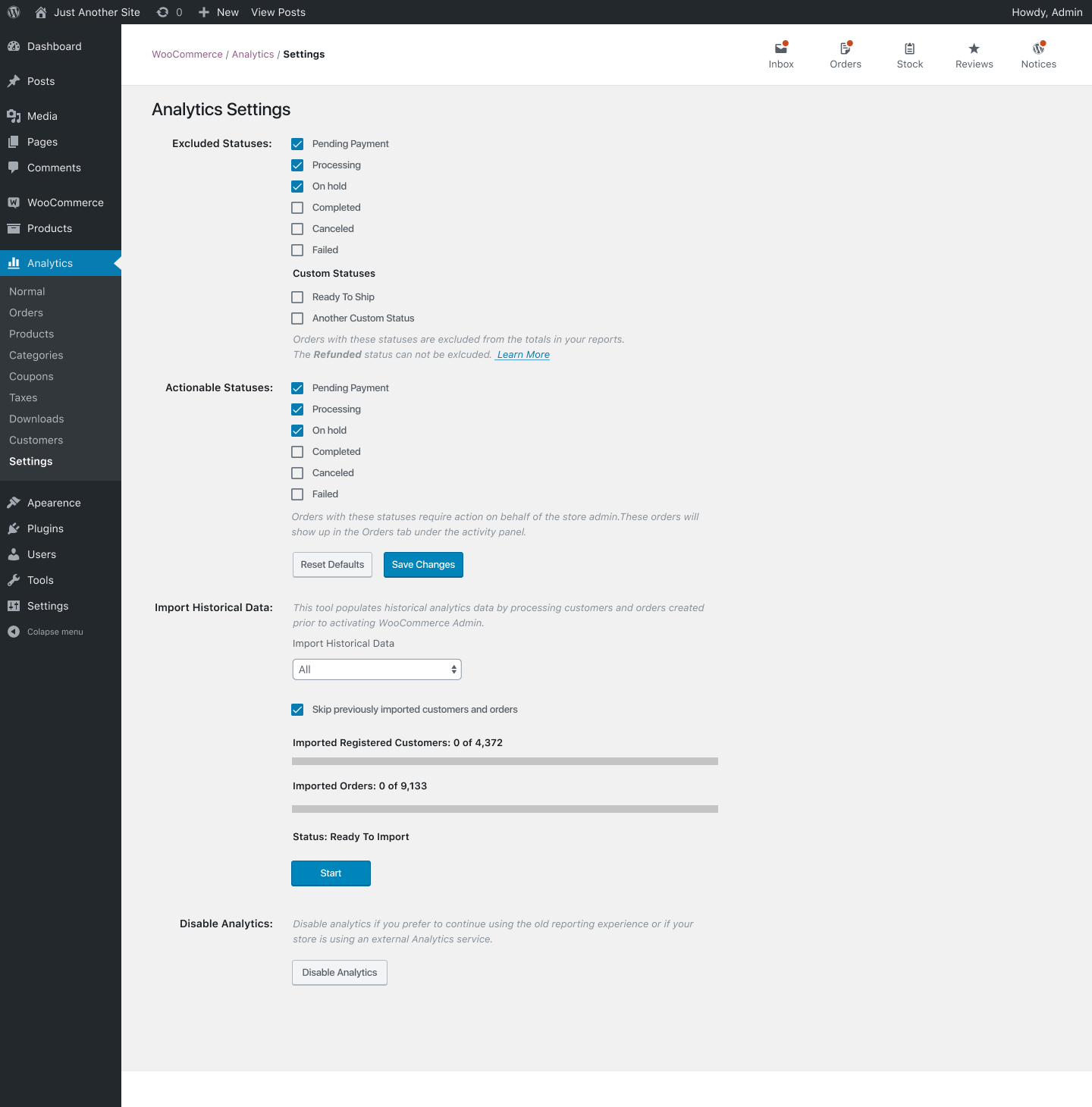
While working on this I realised that to allow enabling/disabling Analytics we need to add the option in a couple of places:
The Analytics settings:
A new Dashboard and Analytics tab in WooCommerce settings:
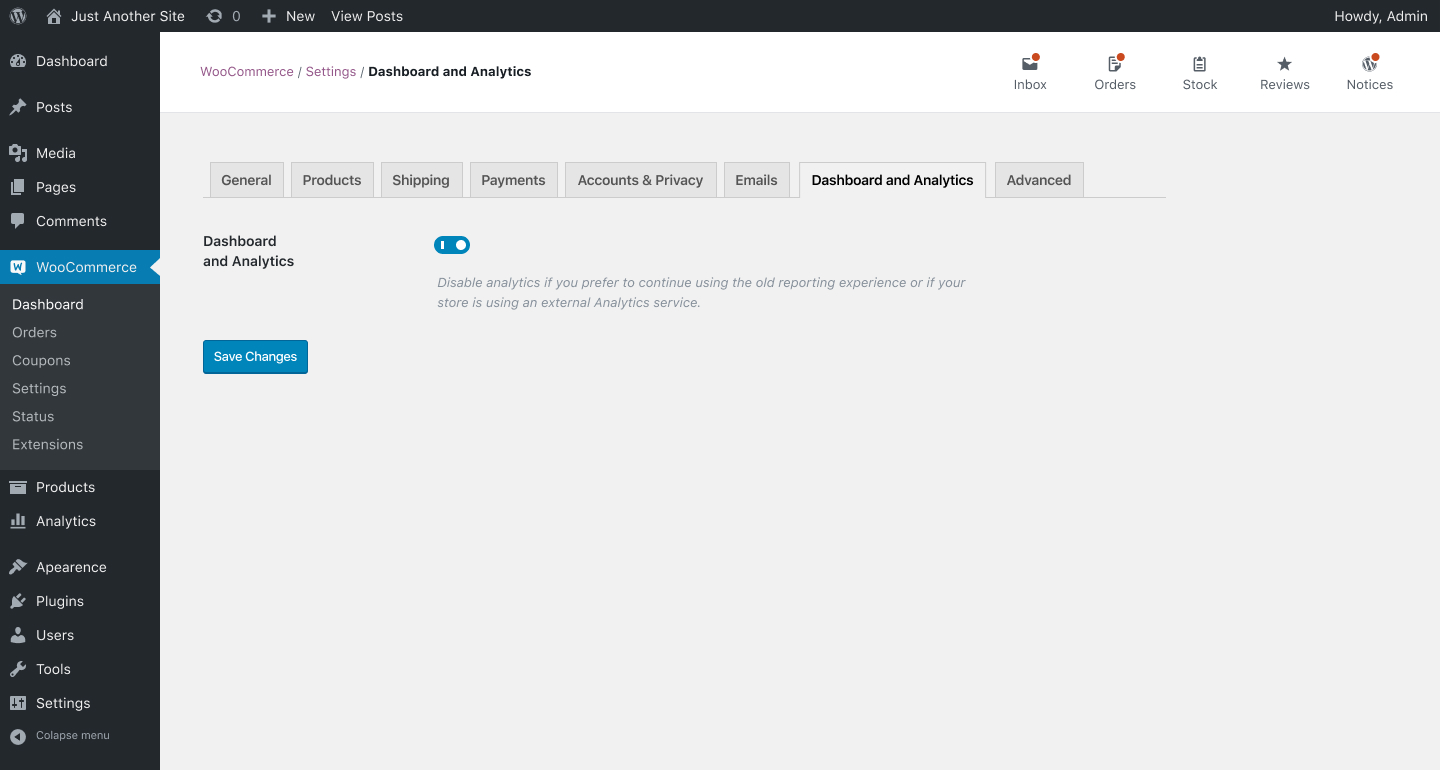
Why do we need a new screen under WooCommerce settings?
If the user disables Analytics in the Analytics settings screen the "Analytics" section in the wp-admin sidebar should be hidden since it's no longer functional, so this screen and the setting to re-enable it is no longer available.
I named it "Dashboard and Analytics" because the Dashboard should also be disabled if the Analytics are disabled. There will be no data to show in that screen if analytics are disabled.
Why is a button being used in the Analytics section to disable it instead of a checkbox or toggle?
Like mentioned before this screen becomes inaccessible after disabling Analytics, it would not make much sense to keep the Analytics section in the sidebar with only a Settings link.
Because the screen becomes inaccessible the user needs to be redirected to another screen, I suggest the new "Dashboard and Analytics" settings tab in case the user wants to revert.
Requesting confirmation
When disabling Analytics in both screens we should request for confirmation that the user really wants to perform this action. I suggest this copy:
_Are you sure you want to disable Analytics?
Disabling Analytics will remove access to the Dashboard screen and the Analytics section in the navigation, including access to the Revenue, Orders, Products, Categories, and other reports._
Established stores may already have an analytics system in place that they like, and don't want the new reports.
High volume stores don't want to have the added database writes that come along with the analytics lookup tables.
@timmyc is there a way to determine this by analysing the store status or plugins installed?
If so we could turn off analytics by default and display a message in the Inbox letting the user know why it's turned off and what they need to do to turn it on safely.
 josemarques
on 17 May 2019
josemarques
on 17 May 2019
@timmyc is there a way to determine this by analysing the store status or plugins installed?
If so we could turn off analytics by default and display a message in the Inbox letting the user know why it's turned off and what they need to do to turn it on safely.
I suppose we could come up with some criteria to base this off of, but I'm still keen to just have it disabled by default when 3.7 is first installed and allow established sites to opt-in / turn it on.
timmyc
on 17 May 2019
@timmyc I think to have in turned off by default for established stores we might need something a bit more obvious to turn in on than an Inbox message.
@jameskoster what do you think of having a task during onboarding that prompts the user to enable Analytics and run the historical data importer?
josemarques
on 20 May 2019
@jameskoster what do you think of having a task during onboarding that prompts the user to enable Analytics and run the historical data importer?
Only _new_ stores will see the Profiler, so in that case there won't be any historical data to import.
So this falls in to the territory of "a task we'd like folks to work through, but not necessarily right at the beginning of the stores life". Similar to how installing a new theme might prompt some set up tasks.
At the moment the best vehicle we have for communicating messages like this is the Inbox so that's what I think we should use. Here's a (very rough) example:
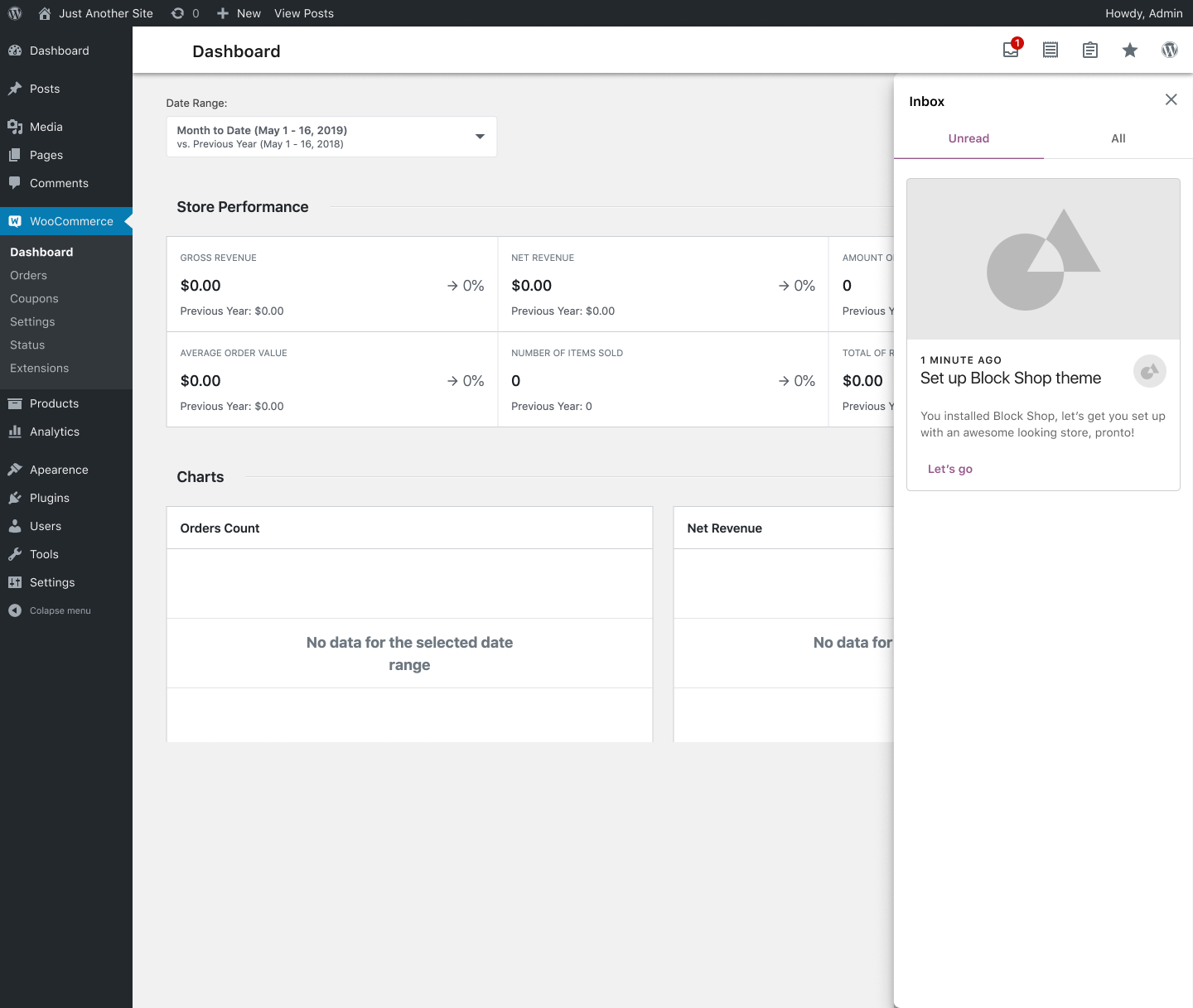
Having said that, I think there's a larger discussion to be had around Dashboards in general. This came up in p6q6po-a3L. Until we've a clearer direction there, I think the Inbox is the way to go, purely because it's visible on all WC screens.
 jameskoster
on 20 May 2019
jameskoster
on 20 May 2019
@jameskoster tell me more about the two tabs in the inbox there ;) Looks pretty cool.
timmyc
on 20 May 2019
Given that wc-admin has evolved significantly in performance over the last 6 months and does not remove functionality, do we still feel it is necessary to allow users to disable?
My opinion is no, based on the above reasons as well as it setting a precedent that we'll be maintaining two reporting systems for some time.
cc @LevinMedia @jameskoster @josemarques
 psealock
on 29 Oct 2019
psealock
on 29 Oct 2019
Given that wc-admin has evolved significantly in performance over the last 6 months and does not remove functionality, do we still feel it is necessary to allow users to disable?
My opinion is no, based on the above reasons as well as it setting a precedent that we'll be maintaining two reporting systems for some time.
Do we have a decision on this @psealock @timmyc @LevinMedia @jameskoster @josemarques
 jeffstieler
on 14 Nov 2019
jeffstieler
on 14 Nov 2019
do we still feel it is necessary to allow users to disable?
@psealock @jeffstieler @timmyc If we confident that the issues the new Analytics surfaced at the time are not longer a reality then let's remove it.
josemarques
on 14 Nov 2019
I feel confident, especially since wc-admin will ship in a major release including Action Scheduler 3.0. I know @timmyc has some thoughts about why we should allow opt out though.
psealock
on 17 Nov 2019
If we confident that the issues the new Analytics surfaced at the time are not longer a reality then let's remove it.
While I think we are in a much much more stable place, I still feel there are stores out there that will not want this functionality for one reason or another.
For a first iteration, lets just go with having a filter to allow disabling wc-admin. So essentially the same outcome that we do when a site doesn't meet the required WordPress version.
timmyc
on 2 Dec 2019
Related issues
 justinshreve
·
3Comments
justinshreve
·
3Comments
 joshuatf
·
3Comments
timmyc
·
4Comments
jeffstieler
·
3Comments
joshuatf
·
3Comments
joshuatf
·
3Comments
timmyc
·
4Comments
jeffstieler
·
3Comments
joshuatf
·
3Comments
Most helpful comment
Only _new_ stores will see the Profiler, so in that case there won't be any historical data to import.
So this falls in to the territory of "a task we'd like folks to work through, but not necessarily right at the beginning of the stores life". Similar to how installing a new theme might prompt some set up tasks.
At the moment the best vehicle we have for communicating messages like this is the Inbox so that's what I think we should use. Here's a (very rough) example:
Having said that, I think there's a larger discussion to be had around Dashboards in general. This came up in p6q6po-a3L. Until we've a clearer direction there, I think the Inbox is the way to go, purely because it's visible on all WC screens.