Wled: Touch buttons integration on ESP32
Sorry for the naive approach but I do not have much time to dig into this for now :)
Can someone please point me to the direction where I could integrate functionality (on ESP32) of a touchRead() on three buttons where first toggles on/off segment 0, second toggles segment 1 and last toggles both of them. Is there better place a than wled09_button.ino?
 Uriziel01
All 12 comments
Hi, no worries :)
The best place for custom code is the wled06_usermod.ino. It allows you to more easily integrate your code and even share it with others if you like.
Since you want to toggle segments, keep in mind there is no official mechanism for that in place yet.
This should work though:
uint16_t lastStop[2];

void toggleSegment(byte segm, bool on)
{
  WS2812FX::Segment& seg = strip.getSegment(segm);
  if (on) {
    strip.setSegment(segm, seg.start, lastStop[segm], seg.grouping, seg.spacing);
  } else {
    lastStop[segm] = seg.stop;
    strip.setSegment(segm, seg.start, 0, seg.grouping, seg.spacing);
  }
}
 Aircoookie
on 4 Mar 2020
Aircoookie
on 4 Mar 2020
Nice, thanks for such a detailed explanation!
Will try it as soon as I get all the ordered parts :)
Uriziel01
on 6 Mar 2020
Hey! This issue has been open for quite some time without any new comments now. It will be closed automatically in a week if no further activity occurs.
Thank you for using WLED!
![stale[bot] picture](https://avatars3.githubusercontent.com/in/1724?v=4&s=40) stale[bot]
on 4 Jul 2020
stale[bot]
on 4 Jul 2020
Could this be added as a feature of WLED @Aircoookie ?
 ToXIc-Dev
on 10 Jul 2020
ToXIc-Dev
on 10 Jul 2020
Sure, especially given that the ESP32 supports touch without additional hardware!
Aircoookie
on 10 Jul 2020
Hope you can integrate the touch function (esp32).
For first integration touch on or off.
Next maybe with long hold dimm function.
 RAMBORG
on 9 Sep 2020
RAMBORG
on 9 Sep 2020
That would be realy nice. I've build a "cloud-looking-hexagon"-thing with lots of screws.
And i realy would like to use the screws as touch-buttons:
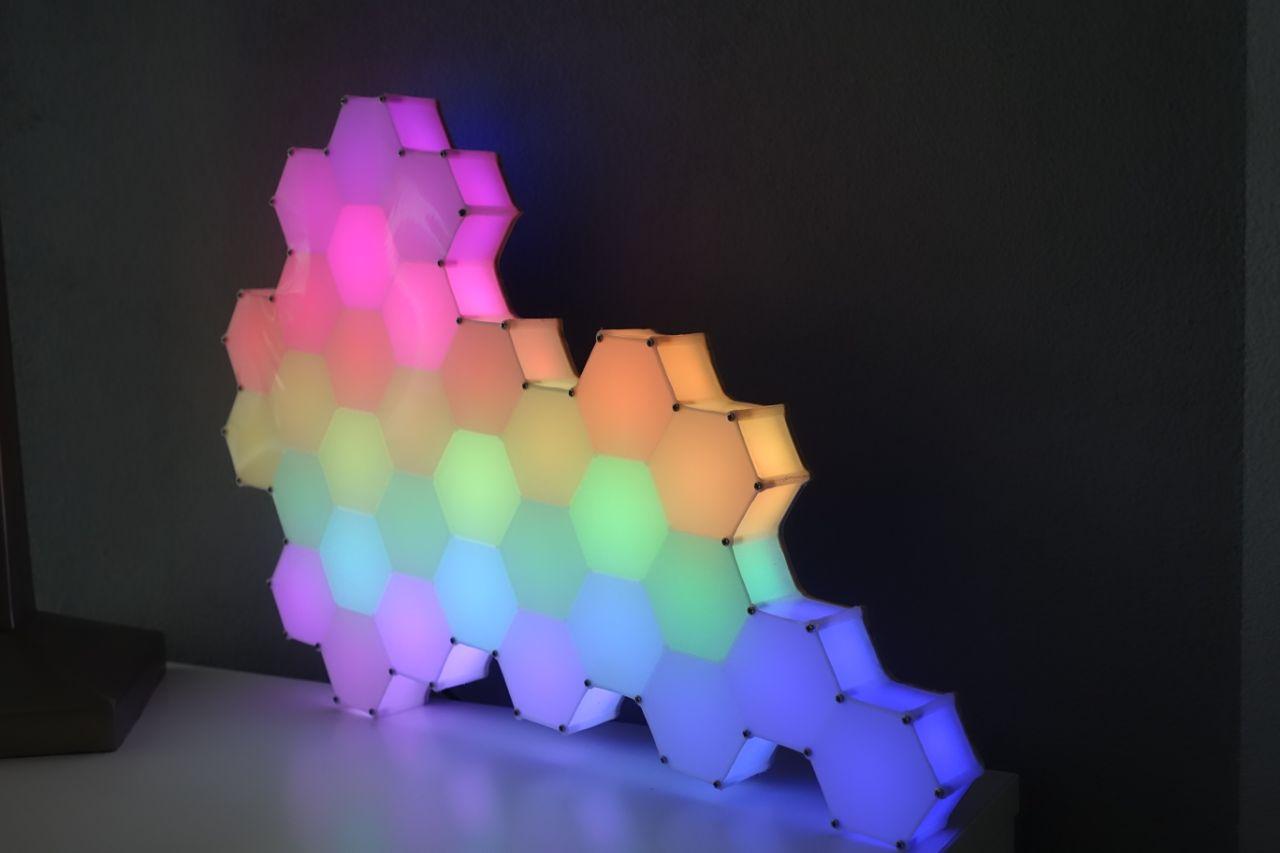
On/Off, Next Favourite, Dimm, Speed, Start Night-Timer ... and so on. There are 10 buttons to use :)
My Project (german):
https://www.maker-forum.net/forum/index.php?thread/161-mein-erstes-wled-projekt/&postID=704#post704
 donabi
on 14 Sep 2020
donabi
on 14 Sep 2020
Thanks to @Jakeler 's PR #1190 this is now included! (you need to compile with the TOUCHPIN T0 flag)
@donabi that looks amazing!
Aircoookie
on 20 Sep 2020
Thanks to @Jakeler 's PR #1190 this is now included! (you need to compile with the
TOUCHPIN T0flag)@donabi that looks amazing!
Can you please help explaining how can I now use touch sensors as button alternative on ESP32? What exactly needs to be done?
I use WLED_0.11.0_ESP32.bin with esp32-wroom module
 Monacoslo
on 5 Dec 2020
Monacoslo
on 5 Dec 2020
@Monacoslo
You have to compile it from source, follow these instructions: https://github.com/Aircoookie/WLED/wiki/Compiling-WLED
Set default_envs = custom32_TOUCHPIN_T0.
You can also scroll down and edit the [env:custom32_TOUCHPIN_T0] or any other definition, notice that build_flags includes the TOUCHPIN flag. Default is T0 (= GPIO4), but T1, T2... up to T9 is possible.
 Jakeler
on 6 Dec 2020
Jakeler
on 6 Dec 2020
Thanks for answer! But unfortunally I can not compile in VSC (latest).
After hitting checkmark, I get
`
Executing task: k:ArduinoWLEDWLED-0.11.0pio.exe run <
The terminal process failed to launch: Path to shell executable "k:ArduinoWLEDWLED-0.11.0pio.exe" does not exist.
Terminal will be reused by tasks, press any key to close it.
`
edit: after a few reboots it worked, but then I got stuck on:
Compiling .pio\build\custom32_TOUCHPIN_T0\src\wled.cpp.o
Compiling .pio\build\custom32_TOUCHPIN_T0\src\wled00.ino.cpp.o
xtensa-esp32-elf-g++: error: wled00\wled00.ino.cpp: No such file or directory
xtensa-esp32-elf-g++: fatal error: no input files
compilation terminated.
*** [.pio\build\custom32_TOUCHPIN_T0\src\wled00.ino.cpp.o] Error 1
Monacoslo
on 6 Dec 2020
Since I have also seen already a few questions on facebook regarding this option, maybe it would be great if you also add the compiled option to downloads list :)
Monacoslo
on 6 Dec 2020
Related issues
 jamestutton
·
31Comments
jamestutton
·
31Comments
 N1nja98
·
212Comments
N1nja98
·
212Comments
 MopheusDG
·
39Comments
MopheusDG
·
39Comments
 Amli2011
·
41Comments
Amli2011
·
41Comments
 yetdog
·
30Comments
yetdog
·
30Comments
Most helpful comment
Sure, especially given that the ESP32 supports touch without additional hardware!