Wire: Syntax highlighting for #ifdef seems borked
Running off Wiremod's version: 'Git 84dcff6'.
(Garry's Mod version: 2018.10.10 - current public branch)
Here is a screenshot of how it looks like (given that, all of the builtin extensions are disabled/off):
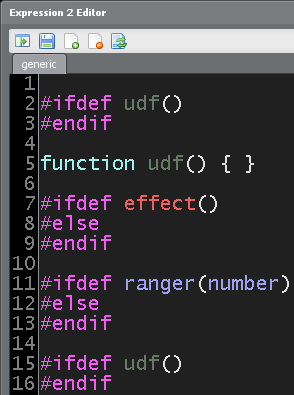
See, effect() is highlighted red as there is no such function, but what's up with ranger(number)?!
There is no ranger(n) function in E2Helper, of course because ranger extension is disabled. But, why is it colored differently then?
Also, you can observe how it picks up the color of UDF. It just makes confusion. #ifdef doesn't even work for UDFs, because it is not even intended to. So, why does it color them?
Syntax highlighter seems borked, and should be cleaned up.
 CaptainPRICE
All 9 comments
Yeah, #ifdef is part of the preprocessor, so it cannot catch UDFs, which are only available at parsing time (or was it run time?)
Anyway, since it doesn't make sense to ifdef a UDF anyway, the tiny mis-highlight doesn't really affect anyone.
If you can fix it and guarantee there are no side-effects, go for it.
Otherwise, better to leave the mis-highlight in.
 TomyLobo
on 15 Nov 2018
TomyLobo
on 15 Nov 2018
Fixing the highlighting just would just a matter of changing how the highlighter works.
 bigdogmat
on 15 Nov 2018
bigdogmat
on 15 Nov 2018
And that is precisely why I worry :)
yeah, probably you need to split udf highlighting from regular function highlighting and only allow regular function highlighting after an #ifdef
TomyLobo
on 15 Nov 2018
Note, this is not just about UDF mishighlighting. See how ranger(number) function is highlighted like it exists, but it doesn't because ranger extension is disabled. It should be red, just like it is for effect; which is the only one correctly highlighted in this case.
CaptainPRICE
on 15 Nov 2018
Did it myself. Needs testing.
TomyLobo
on 15 Nov 2018
They should all be highlighted like they exist, at least that's how I think it should be.
bigdogmat
on 16 Nov 2018
yeah the last thing you described is actually correct behaviour
TomyLobo
on 16 Nov 2018
They should all be highlighted like they exist, at least that's how I think it should be.
Not a good idea.
CaptainPRICE
on 16 Nov 2018
This is how Visual Studio highlights undefined symbols after after an #ifdef:
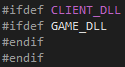
(This is client code, so CLIENT_DLL exists and GAME_DLL doesn't)
I suggest we follow that well-established example.
TomyLobo
on 16 Nov 2018
Related issues
 TAbdiukov
·
5Comments
CaptainPRICE
·
4Comments
TAbdiukov
·
5Comments
CaptainPRICE
·
4Comments
 ghost
·
9Comments
ghost
·
9Comments
 Etothepowerof26
·
5Comments
CaptainPRICE
·
6Comments
Etothepowerof26
·
5Comments
CaptainPRICE
·
6Comments
Most helpful comment
This is how Visual Studio highlights undefined symbols after after an

#ifdef:(This is client code, so
CLIENT_DLLexists andGAME_DLLdoesn't)I suggest we follow that well-established example.