Wire-android: Not receiving audio/video calls + messages notifications AT ALL
As mentionned in the title, neither me, nor a bunch of people that I have managed to convert to wire, receive notifications for audio/video calls and messages AT ALL.
We are all using the last version of wire, on different android devices (Honor 5C, Nexus 5, Nexus 4, Samsung Galaxy S4).
This is really problematic since it makes the app quite useless....
PS : We have all set Wire not to enter Doze or equivalent sleep mode, and authorized notifications .
Please solve this problem, since it is slowly discouraging people from using this awesome app.
 mhham
mhham
All 38 comments
It would be useful to see the log. Can you please contact our customer support and share the log?
 mykola-mokhnach
on 9 Apr 2017
mykola-mokhnach
on 9 Apr 2017
@david-wire FYI
mykola-mokhnach
on 9 Apr 2017
I am forwarding the log to you by mail.
Cheers
mhham
on 10 Apr 2017
Still no news of the support team, FYI
mhham
on 19 Apr 2017
I also had some issues with notifications before, but it seems to be more reliable in recent weeks. Posting just to confirm @mhham is/was probably not unique with this issue.
 shvchk
on 19 Apr 2017
shvchk
on 19 Apr 2017
@mhham Apologies for the delay in responding. We have just released a new version of the app: 3.31.325. Could you give it a try and let us know if you notice any improvements at all? Thanks!
 david-wire
on 19 Apr 2017
david-wire
on 19 Apr 2017
I just noticed today that some messages were still not notified. Overall the behaviour has improved, but it seems that problem is not completely solved.
Thank you for your work !
mhham
on 26 Apr 2017
Hi there.
Well, it seems that the issue is still there ... I am not receiving notifications unless I open the app.
mhham
on 24 Jul 2017
When the app is closed (forced closed). I don't receive any notifications for an incoming call.
When i once started the app, i will receive any incoming call.
Is this this the correct behaviour ?
 peterpanondrugs
on 27 May 2018
peterpanondrugs
on 27 May 2018
This issue explained our problem as well and far oldest. i thought to make this main issue thread, while there many other opened
For users who not receive message notification only when screen turn off
I found android 5.1 device has this problem always (i post here after checked near week randomly)
The Skype automatically get enabled "protected apps" with installation through google play
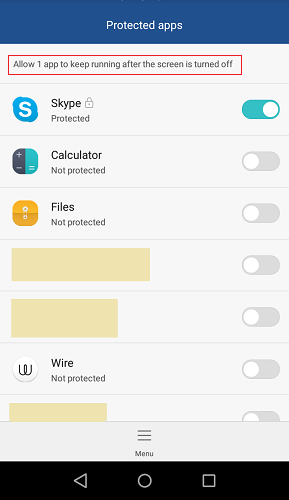
_this's a successful solution for that certain devices_
another solution from telegram but that doesnt helps for android 5.1 and nearby versions (its not self launch for receive notifications)
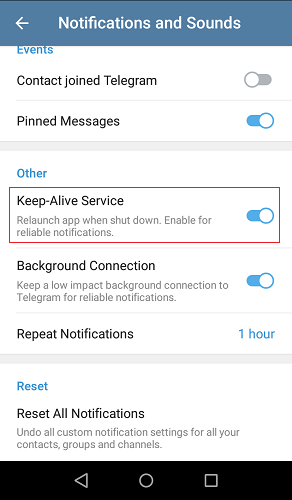
For users who not receive message notification even enabled "protected apps" manually
For users who not receive audio/video calls when app minimized or closed
edit:
**development
modified:
!! explained a additional bug (next comment)
modified:
!! the bug
!! explained additional two bugs
(next comment)
We expect such small bugs may fix soon while exist since 2016/2017 (see referenced issues). To remind this's 2019 :)
 ghost
on 24 Feb 2019
ghost
on 24 Feb 2019
@hub-ch Thank you 🥇
edit: you described first solution worked perfect for audio, video calls during app idle. ago i did not receive any calls at all but nothing happen for notifications
its surprise you showed this issues exist since 2016
ghost
on 25 Feb 2019
Hi @hub-ch ,
Thanks for the great work linking all issues!
And thanks for the suggestions. Since most of those settings can not be changed programmatically in the app, but only manually by going into the system settings, we are exploring ways to guide the user there from the app, potentially linked to a diagnostic report to inform the user what might be the case for them.
 marcoconti83
on 25 Feb 2019
marcoconti83
on 25 Feb 2019
@marcoconti83 no. if read above @hub-ch comment carefully and watch videos, that all issues can be fixed and developed programmatically. Dont try miss us like that although you know well 😅😅 Kindly do not add guides inside app as per my understand you said thing, it will run into more uncomfortable. that's why i write this comment 😊
@hub-ch described all issues related that also explained you all how those work perfect on skype app. there're some other frustrating bugs which clients unable know whether call still active or end [1][2] and about receive old calls bug[2]. (need to watch his two videos for see it)
we really hope fixes for that all
ghost
on 25 Feb 2019
Hi @DropLink ,
I'm basing my comment on posts like these (1, 2), which state that the manufacturer of the OS decides to whitelists certain popular apps (Whatsapp, Skype, Tinder, ...), but other apps require user action to opt-in.
Can you show me an example of an app that manged to do this programmatically even without being whitelisted by the manufacturer? I could not find any.
marcoconti83
on 25 Feb 2019
The main reason force to recheck this issue because of concern from my friends and known users; basically they expect
► Receive notification faster as possible as long as their device connected to internet
► Receive audio/video calls as long as their device connected to internet include even device screen off (as means for example during our device screen off but when receive phone call, it automatically turned on)
► When couldnt get attention by Chat/ Ping etc. The call facility should be work properly as long as device connected to internet
_At the moment i wrote this comment ago, i did not know Wire have barrier on huawei stock ROM. and Sony? for more, if user enabled 'run on background' once completed install (at end of installation wizard) any apps. it added into 'protected apps' list._
@DropLink I could not add to above comment regarding below
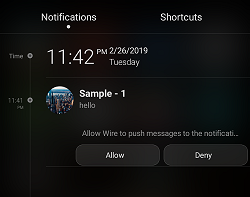
# When send a message while wire minimized then above window appear on notification area and then click "allow". if it doesn't appear reinstall wire and try again.
But that's not necessary unless 'deny' it by mistake. wire notifications and sound works fine _(only while minimized for now, if enabled protected apps then also works even closed)_
@marcoconti83
Since said, "can not be changed programmatically in the app" i thought wire have tried the best so i considered check many times further.
☼ Skype
► receive message/missed call notifications nearly instant.
► receive audio/video calls faster as possible during minimized or even app closed or screen off
[ however if disabled 'protected apps' for it on that certain devices then skype doesnt work :) ]
☼ Wire
► receive message notifications but it could delay compared to skype. another thing notification doesnt show preview on the status bar as wire privacy maybe. that may suspect users it doesnt work (doesnt need 'protected apps' for that as long as app not closed or screen not off)
♣ i could not find if wire have 'missed calls' notification facility
► receive audio/video calls during normal mode also while minimized (sometimes have to wait long might be wire network speed reason or app/ui reason?) [sorry, above had mentioned it as doesnt work during minimized]
► calls not receive if screen off
♣ clients unable know whether call still ringing/not or atleast call to a online client (its better display "connecting" and "ringing")
♣ no fast identification between clients status as skype for calls (connecting/ringing/call end/ or call drop/ reconnecting etc)
# ►notification issue(during closed) ► call window doesnt appear during wire closed and ► during screen off. those all things solves if enable 'protected apps' as i checked all devices
♦ modified:
-----
----------
----------------
ghost
on 27 Feb 2019
@marcoconti83
it seems your email address not exist [email protected]
ghost
on 27 Feb 2019
Hi @hub-ch ,
there is one huge difference between Skype and Wire messages: all Wire content is end-to-end encrypted. Skype supports end-to-end encryption only in "private conversations" (see https://support.skype.com/en/faq/FA34824/what-are-skype-private-conversations). This means that for non-private conversations, Skype servers can access the content of your messages, and just talk "directly" to the operating system of your phone and display the content of your message in a notification without the app having to do anything.
Wire servers don't have access to the content of your messages, so it has to work in a different way. Wire servers will tell the operating system to inform the app that there is new content available. The app will need to start and connect to Wire server to fetch the new content, decrypt it, and then display it on the screen. Wire uses a double ratcheting encryption which has low-tollerance to out-of-order messages, which means we prefer downloading new content directly (as opposed to receive the encrypted content with the notification) to avoid decryption issues in case some notifications were missed because offline.
Due to this, the Wire app has to do at least one network request, so it has a delay compared to other solution that don't require network requests. Also due to this, there is a chance that the notification will fail because the operating system will not allow the app to start or to make a network request if battery optimizations are in place (or for any other reason, like network conditions). If this happens, the notification will be missed or delayed on Wire.
marcoconti83
on 27 Feb 2019
Can you show me an example of an app that manged to do this programmatically even without being whitelisted by the manufacturer? I could not find any.
@marcoconti83 By the way, how can i send you a one? so we may able to solve this main problem. im not prefer add into public comment (due provide a sample than partially provide certain source)
ghost
on 27 Feb 2019
Hi @hub-ch ,
you can write us at [email protected] and put a link to this issue.
marcoconti83
on 27 Feb 2019
@marcoconti83 sent
ghost
on 27 Feb 2019
Thanks @hub-ch ,
we got your email. Thanks for putting together this information. We have a list of issues we want to address regarding notifications; just to set the expectation, we will start looking at solutions that are not vendor-specific first.
marcoconti83
on 27 Feb 2019
sorry @hub-ch i have not realized you https://github.com/wireapp/wire-android/issues/777#issuecomment-466902321 notifications also works.
can you contribute this project than explain solutions and provide samples? perhaps don't have a time. +1 try take my request.
ghost
on 22 Mar 2019
I'm happy to see this bug being reported. I thought that maybe there were some issues with my phone or ISP but it was strange that it was only affecting wire and not other apps.
I wouldn't mind to send debug log but how can I do that? Sometimes I receive messages up to 24h after it was sent. What sort of help “syncing” (30% of the time) is “force stop”, immediately after doing that and lunching app again sometimes messages go through and status is being updated to delivered (form sent).
Most likely it happens because I'm running wire on LOS15.1 without gapps (official version, not the one with microg). Always updating apks directly from wire's website.
With so much effort I convinced some friends to use wire but since they never can get a hold of me in real time it sort of defeating the whole purpose of communicating, so for the time being I switched to riot.
I assume that 95% of all wire users use it with google store etc and default factory settings for the rest ~5% it stopped being a viable option for communication. I use wire since the beginning, dunno for how much longer it doesn't work anymore. Without google is useless.
 bistold
on 30 Mar 2019
bistold
on 30 Mar 2019
@bistold settings > advanced > debug report
we most talking about those problem use nexus, huawei, samsung stock roms. their development not faster as we hope. it might take time for wire to address for users like use lineageos :/
edit: if wire buy google, then no need worry much about LOS😅
ghost
on 30 Mar 2019
Hi all,
in case it was missed, there's a checklist to go through if you notifications are still acting up: https://support.wire.com/hc/en-us/articles/203624294-What-can-I-do-if-I-m-not-getting-any-notifications-on-Android-
marcoconti83
on 8 Apr 2019
Hello,
I'm using Wire to keep contact with my family and friends since I moved to another country, but it was a bit erratic from the start of our expatriation, needed to be killed to show up new text messages or receive calls.
Recently (about a week or so), we have to kill & restart Wire very often. Sometimes it even looses connection just one minute after being restarted, even though the persistent notification is displaying "Connected to Wire server...".
I've started using Wire on my laptop too, and it gets the calls, but my phone (Asus Zenfone Max PRO M1) doesn't. Problem is I'm not always on my laptop.
I must say that since I don't believe in tracking ( ;-) ) I'm using Wire on a LineageOS phone, without Google services. I checked the link and everything is setup as expected, no data saving mode (I'm in on WiFi anyways), no battery saving mode, no silent mode, checked the keepalive option, etc.
Since I figured it could come from the absence of Google Services, and the application's keepalive feature malfunction, I tried adding Wire to an "old" Motorola phone with Android 7.0 stock and Google services, Wire from Play Store, but it looses connection after a while too, on WiFi with all saving related features turned off.
My family seem to have issues too, with various mobile phones and setups, all using Google Play Store Wire version with Google Services. They sometimes stop receiving notifications or don't get our calls.
It's quite problematic, as I chose Wire to stay in touch with everyone, but I can't really tell them to kill Wire everytime to be sure to get news from us, and it keeps us from connecting audio / video calls as we'd have to contact ourselves by another mean before effectively calling each other.
It's very hard to connect with our families, but it's also very important, so what can we do ? ^_^'
Do you have a solution ?
Thank you so much for your help !
 Kyoshiro-san
on 5 May 2019
Kyoshiro-san
on 5 May 2019
I think it's time I chime in here to provide some more feedback on this issue if possible. I've been using Wire for quite some time to keep in touch with family, but it's reached the point where my family couldn't see I've been trying to reach out to them on special occasions. The family members that own iOS based devices have no issues receiving notifications or calls, regardless if Wire is foregrounded, backgrounded, or not running at all.
Those with Android-based devices (Samsung S10, Sony Xperia of some kind) have notification issues. I have a Google Pixel 2XL test device myself, and annoyed with this situation, I installed Wire for the first time on stock Android 8.1.0, logged in with a secondary account, and then tried to call and message myself under the same WLAN connection with both devices next to each other. My results are identical to everyone else in this thread: Wire's background services aren't working correctly and waking the device from sleep, waking the service from background, or running the service persistently (CallWakeService or CallingNotificationsService?)
It shouldn't be necessary to jump through the hoops at https://support.wire.com/hc/en-us/articles/203624294-What-can-I-do-if-I-m-not-getting-any-notifications-on-Android- to get this working on a default install, but made sure to go through and enable them all anyway. No difference, as others have also reported.
The behaviour after following these steps is only such that, if Wire is backgrounded, notifications might sporadically arrive, but no calls will. If Wire is not launched nor backgrounded, then the result is what everyone else has said before: no notifications for either messages or calls.
I've been a big supporter of Wire over the years, recommending it above all other secure alternatives. This issue with Android devices has always left a sour taste in my mouth though, especially since it's been going on for such a long time.
My device is rooted, and I can provide logs if you require them, though I'm certain you can reproduce this issue quite easily, especially if I could on the very first install of Wire on what is the flagship Android device of 2017/2018, running a non-modified Android 8.1.0 ROM.
ghost
on 7 May 2019
Thanks everyone for all the feedback.
We are currently looking at this as a possible (but probably not the only) cause: https://github.com/wireapp/wire-android-sync-engine/pull/534
In addition we added some more logging around notifications.
It would be nice to see what your logs report on the cause for the delay. With the last build (out yesterday), you can enable the logs (Settings -> Advanced -> Collect usage data). Wait a little bit until you encounter the issue again, then export the logs (Settings -> Advanced -> Create debug report). You can then access the log from outside of the app.
Can you please share the section that looks like this:
###### FCMStats:
Stage name | 0-10 s | 10s-30m | 30m+
....
@marcoconti83 Where can we email/send the full log? I had a launch crash which you might find useful too.
###### FCMStats:
Stage name | 0-10s | 10s-30m | 30m+
fetched | 40 | 0 | 0
startedPipeline | 40 | 0 | 0
finishedPipeline | 39 | 1 | 0

--------- beginning of crash
05-07 14:42:49.738 E/AndroidRuntime( 3641): FATAL EXCEPTION: main
05-07 14:42:49.738 E/AndroidRuntime( 3641): Process: com.wire, PID: 3641
05-07 14:42:49.738 E/AndroidRuntime( 3641): java.lang.RuntimeException: Unable to start receiver com.waz.services.websocket.OnBootAndUpdateBroadcastReceiver: java.lang.NullPointerException: Attempt to invoke interface method 'com.waz.utils.events.Signal com.waz.service.AccountsService.zmsInstances()' on a null object reference
05-07 14:42:49.738 E/AndroidRuntime( 3641):     at android.app.ActivityThread.handleReceiver(ActivityThread.java:3194)
05-07 14:42:49.738 E/AndroidRuntime( 3641):     at android.app.ActivityThread.-wrap17(Unknown Source:0)
05-07 14:42:49.738 E/AndroidRuntime( 3641):     at android.app.ActivityThread$H.handleMessage(ActivityThread.java:1672)
05-07 14:42:49.738 E/AndroidRuntime( 3641):     at android.os.Handler.dispatchMessage(Handler.java:106)
05-07 14:42:49.738 E/AndroidRuntime( 3641):     at android.os.Looper.loop(Looper.java:164)
05-07 14:42:49.738 E/AndroidRuntime( 3641):     at android.app.ActivityThread.main(ActivityThread.java:6494)
05-07 14:42:49.738 E/AndroidRuntime( 3641):     at java.lang.reflect.Method.invoke(Native Method)
05-07 14:42:49.738 E/AndroidRuntime( 3641):     at com.android.internal.os.RuntimeInit$MethodAndArgsCaller.run(RuntimeInit.java:438)
05-07 14:42:49.738 E/AndroidRuntime( 3641):     at com.android.internal.os.ZygoteInit.main(ZygoteInit.java:807)
05-07 14:42:49.738 E/AndroidRuntime( 3641): Caused by: java.lang.NullPointerException: Attempt to invoke interface method 'com.waz.utils.events.Signal com.waz.service.AccountsService.zmsInstances()' on a null object reference
05-07 14:42:49.738 E/AndroidRuntime( 3641):     at com.waz.services.websocket.OnBootAndUpdateBroadcastReceiver.onReceive(WebSocketService.scala:99)
05-07 14:42:49.738 E/AndroidRuntime( 3641):     at android.app.ActivityThread.handleReceiver(ActivityThread.java:3187)
05-07 14:42:49.738 E/AndroidRuntime( 3641):     ... 8 more
also a few WebSocket connection has been failed. stacktraces in there.
Just in case it was something local that was prohibiting the notifications from displaying while the screen on the Pixel was locked, I installed Glimpse Notifications from the Play Store, but that didn't help.
ghost
on 7 May 2019
@marcoconti83 I think indeed a PING system like on IRC could solve many issues.
To explain a bit more the context of my usage, when I arrived in my new country, I spent a lot of time using 4G data plan in data saving mode, public wifis, and so on. It was indeed not detecting the change and required killing the app. So this is exactly the issue described in the PR.
Now, I have a WiMAX2 connection in my new home, but it seems connections are unexpectedly closing. When I use SSH on my own server, it hangs after a few minutes and then the SSH socket times out. I think current Wire keepalive implementation does not handle these events properly. The PING system suggested in the PR should solve this kind of problem too.
However, there might still be missed calls, if the ring duration lasts less than the "ping" timeout. But that shall make the app more usable in terms of text communication and ease the organization / rendez-vous for calling back a friend we missed.
Please let us know when there is an APK with the PR !
Thank you for your hard work.
Kyoshiro-san
on 8 May 2019
Hi all,
We recently addressed an issue with notification not working 100% when closing the app in the background. This has been addressed in release 3.33.
However most of the reports in this thread are related to a separate, longer-standing issue. We are looking into adding a fallback to force the app to keep the websocket open even when in background, therefore giving the user an option to rely on the more reliable websocket connection rather than Firebase pushes (see https://github.com/wireapp/wire-android/issues/2100).
marcoconti83
on 5 Jun 2019
@marcoconti83 thank you for your hard work on this.
I'm using version 3.33 and I'm still having notifications issues after a few minutes because I'm on instable WiMAX network and sockets get disconnected a lot. Is it still planned to merge https://github.com/wireapp/wire-android-sync-engine/pull/534 or integrate any similar solution ?
Thank you so much.
Kyoshiro-san
on 7 Jun 2019
@Kyoshiro-san, see https://github.com/wireapp/wire-android-sync-engine/pull/544
 selurvedu
on 7 Jun 2019
selurvedu
on 7 Jun 2019
Ah ! That's great news thank you !
Do you know when it will be included in the public release channel ?
Kyoshiro-san
on 7 Jun 2019
I'm seeing very similar issues on my Moto G6 and Wire 3.37.820:
###### Wire:
time of log: 2019-08-25T18:02:57.787Z
package: com.wire
app version: 820
zms version: 142.0.2319
device: motorola ali_n | moto g(6) | motorola | PPS29.55-37-4
version: 9 | REL
Resetting the notification token doesn't make any difference, nor does the "Maintain connection to server" option. I'm not even getting any notifications when the app is open.
Android notification settings are all on:
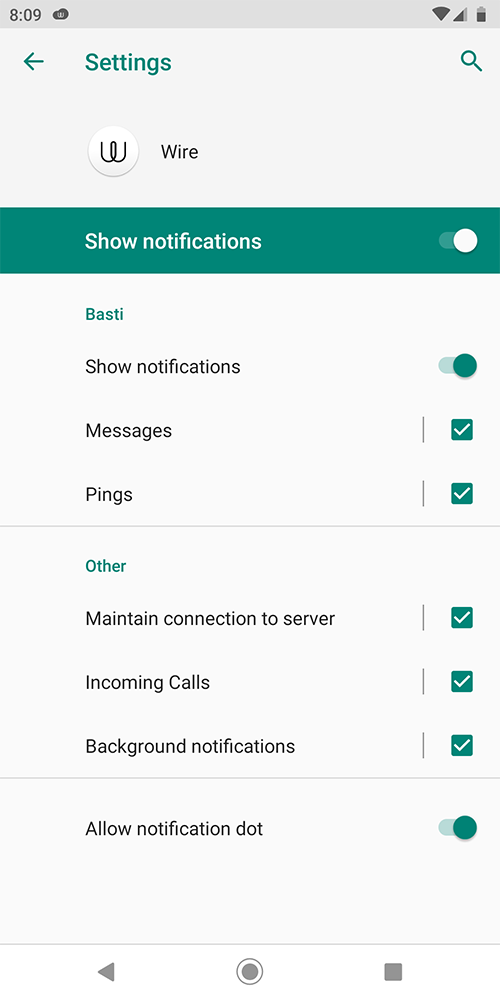
I can upload the debug logs here if that helps.
 pfitzseb
on 25 Aug 2019
pfitzseb
on 25 Aug 2019
Hey everyone, I figured out this issue this evening since I had been running into it for months. I have been using the app since 2017 and recently, I was not receiving any notifications while communicating with my wife, similarly to everyone else. I, of course, had tried every setting and configuration change to no avail, so I went ahead and reviewed my own logs.
The main issue with me not receiving notification of her messages was due to the fact when Wire creates the notification object to display for Android, it uses Glide [https://github.com/bumptech/glide] to pull and display the sender's avatar to the right side of the message snip in the notification. When the user just has a color and no image, we get a Runtime Exception 404 asset not found. Since it doesn't have what it needs to display the notification, no notification is displayed.
The solution is to just have the person put up a new avatar and boom, it's fixed. So one method to handle this exception in a way that makes sense is to swap in a default image of probably the Wire logo or maybe our old friend Tom from Myspace, and then we won't all miss notifications for something so irrelevant.
In short, if you're not getting notifications, especially for a specific person, tell them to change their avatar until we get a real fix.
Kthxbai.
 LNFeltonIII
on 13 Sep 2019
LNFeltonIII
on 13 Sep 2019
Great sleuthing, @LNFeltonIII! Can confirm that setting an avatar makes notifications work again. Would be awesome to get a fix for this (which should be fairly easy now that the problem is identified).
pfitzseb
on 13 Sep 2019
Hi @LNFeltonIII ,
thanks for the info, this is really useful, we will look into a possible fix!
marcoconti83
on 13 Sep 2019
Related issues
 maximbaz
·
4Comments
maximbaz
·
4Comments
 meeDamian
·
3Comments
meeDamian
·
3Comments
 ghsrcgh
·
5Comments
ghsrcgh
·
5Comments
 kroerig
·
4Comments
kroerig
·
4Comments
 Bugsbane
·
4Comments
Bugsbane
·
4Comments
Most helpful comment
Hey everyone, I figured out this issue this evening since I had been running into it for months. I have been using the app since 2017 and recently, I was not receiving any notifications while communicating with my wife, similarly to everyone else. I, of course, had tried every setting and configuration change to no avail, so I went ahead and reviewed my own logs.
The main issue with me not receiving notification of her messages was due to the fact when Wire creates the notification object to display for Android, it uses Glide [https://github.com/bumptech/glide] to pull and display the sender's avatar to the right side of the message snip in the notification. When the user just has a color and no image, we get a Runtime Exception 404 asset not found. Since it doesn't have what it needs to display the notification, no notification is displayed.
The solution is to just have the person put up a new avatar and boom, it's fixed. So one method to handle this exception in a way that makes sense is to swap in a default image of probably the Wire logo or maybe our old friend Tom from Myspace, and then we won't all miss notifications for something so irrelevant.
In short, if you're not getting notifications, especially for a specific person, tell them to change their avatar until we get a real fix.
Kthxbai.