Winforms: Resize grip is missing in PropertyGrid DropDown editor after update to net5.0-windows
.NET Core Version:
.Net 5 (net5.0-windows)Have you experienced this same bug with .NET Framework?:
No
Problem description:
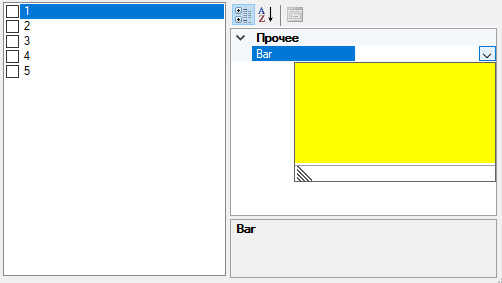
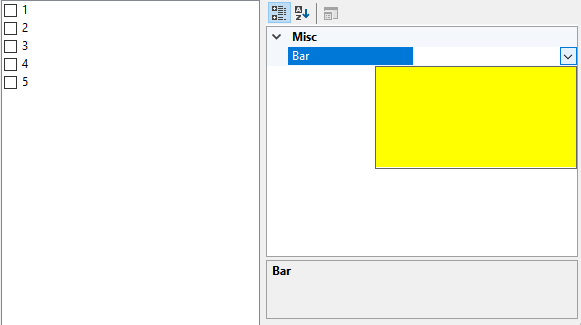
I have simple drop-down editor IsDropDownResizable => true and GetEditStyle => UITypeEditorEditStyle.DropDown. For net472 or netcoreapp3.1 there's resize grip under drop-down editor. After update to net5.0-windows resize grip is missing.
Expected behavior:
Resize grip is displayed under editor control.
Minimal repro:
    public partial class Form1 : Form
    {
        public Form1()
        {
            InitializeComponent();
            propertyGrid1.SelectedObject = new Foo(); // propertyGrid1 added via designer
        }
    }
```csharp
public sealed class Foo
{
[Editor(typeof(FooBarEditor), typeof(UITypeEditor))]
public string Bar { get; set; }
}
```csharp
    public sealed class FooBarEditor : UITypeEditor
    {
        public override bool IsDropDownResizable => true;

        public override UITypeEditorEditStyle GetEditStyle(ITypeDescriptorContext context)
            => UITypeEditorEditStyle.DropDown;

        public override object EditValue(ITypeDescriptorContext context, IServiceProvider provider, object value)
        {
            ((IWindowsFormsEditorService)provider.GetService(typeof(IWindowsFormsEditorService)))
                .DropDownControl(new Panel { BackColor = Color.Yellow });

            return value;
        }
    }
 ds1709
All 8 comments
Do you mind sharing screenshots from .NET Framework/.NET Core and .NET 5.0 to better visualise the issue? Thanks
 RussKie
on 24 Nov 2020
RussKie
on 24 Nov 2020
net472
net5.0-windows
I also noticed that size of windows and controls is different in net472 and net5.0.
ds1709
on 24 Nov 2020
@ds1709
I also noticed that size of windows and controls is different in net472 and net5.0.
https://docs.microsoft.com/en-us/dotnet/core/compatibility/winforms#net-core-30
 kirsan31
on 24 Nov 2020
kirsan31
on 24 Nov 2020
@dreddy-work do you think you could have a look at it?
RussKie
on 25 Nov 2020
This issue appears to partially have something to do with the order in which the ResizeGripSize, ResizeBarSize, and ResizeBorderSizeare being initialized in PropertyGridView.DropDownHolder.
If I change the order from this:
private readonly static int ResizeBarSize = ResizeGripSize + 1; // the thickness of the resize bar
private readonly static int ResizeBorderSize = ResizeBarSize / 2; // the thickness of the 2-way resize area along the outer edge of the resize bar
private readonly static int ResizeGripSize = SystemInformation.HorizontalScrollBarHeight; // the size of the 4-way resize grip at outermost corner of the resize bar
To this:
private readonly static int ResizeGripSize = SystemInformation.HorizontalScrollBarHeight; // The size of the 4-way resize grip at outermost corner of the resize bar.
private readonly static int ResizeBarSize = ResizeGripSize + 1;// The thickness of the resize bar.
private readonly static int ResizeBorderSize = ResizeBarSize / 2;// The thickness of the 2-way resize area along the outer edge of the resize bar.
The drop down resize bar is now displayed and can resize the drop down, but the resize bar is missing the resize grip.
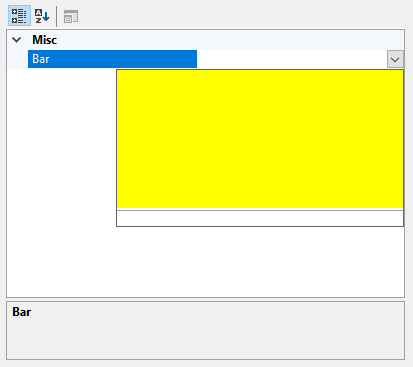
I'll try to figure out why the resize bar is missing the resize grip, any insight would be appreciated.
 willibrandon
on 7 Dec 2020
willibrandon
on 7 Dec 2020
This issue appears to partially have something to do with the order in which the ResizeGripSize, ResizeBarSize, and ResizeBorderSize are being initialized in PropertyGridView.DropDownHolder.
This regressed when moving initialization from static constructor into the property definitions (no PR specified on that commit unfortunately)
I'll try to figure out why the resize bar is missing the resize grip, any insight would be appreciated.
The size grip for this usage is mirrored horizontally to display bottom left instead of the default bottom right
This is a regression caused by PR #3553, previously the glyph was drawn in GDI+ but in order to support callers from WM_PAINT better it was switched to classic GDI drawing. However GDI drawing code only preserves translations and drops all other components of the Transform-Matrix without any warning/exception.
Note that HDC rendering only preserving translation components always has been this way, even before the refactoring, the regression was caused by moving from GDI+ to the HDC rendering with a caller (PropertyGridView DropDownHolder) that uses a nontrivial matrix, which was never supported by WinForms HDC rendering logic.
Since the ControlPaint.DrawSizeGrip method is public the regression may also affect 3rd party callers outside WinForms. In general, if you switched any other public-callable rendering methods from GDI+ to HDC rendering the fact that transforms are not fully supported may also regress for external callers.
/cc @JeremyKuhne
 weltkante
on 8 Dec 2020
weltkante
on 8 Dec 2020
I'm going to move this API back for now as there is no performant way to check if there is a transform that applies. In this particular case, there is not a huge win if you already have a graphics object as drawing will already translate to direct GDI calls.
I've created a new API proposal related to this: https://github.com/dotnet/winforms/issues/4338
 JeremyKuhne
on 8 Dec 2020
JeremyKuhne
on 8 Dec 2020
@RussKie we saw that you market the milestones of this issue as 5.0.2, but it only fixed on .NET 6.0 by PR: https://github.com/dotnet/winforms/pull/4340 , do we need to service it for .NET 5.0? cc: @JeremyKuhne
 Amy-Li03
on 16 Dec 2020
Amy-Li03
on 16 Dec 2020
Related issues
 noseratio
·
5Comments
noseratio
·
5Comments
 jmairboeck
·
5Comments
weltkante
·
4Comments
jmairboeck
·
5Comments
weltkante
·
4Comments
 0x084E
·
3Comments
0x084E
·
3Comments
 Shyam-Gupta
·
4Comments
Shyam-Gupta
·
4Comments
Most helpful comment
This issue appears to partially have something to do with the order in which the
ResizeGripSize,ResizeBarSize, andResizeBorderSizeare being initialized inPropertyGridView.DropDownHolder.If I change the order from this:
To this:
The drop down resize bar is now displayed and can resize the drop down, but the resize bar is missing the resize grip.
I'll try to figure out why the resize bar is missing the resize grip, any insight would be appreciated.