Winforms: What's new documentation is missing
There are no single word (except VB templates) about what's new for WinForms in .net 5.0 :( 1785 commits and absolutely nothing new? The only thing that can be found it's breaking changes, but again no link to it form main what's new article...
People (who don't follow this repo) are starting to think that WinForms died again before being reborn. I am actively convince my friends for switching their WinForms apps to core, telling about future possibilities etc...
And the first thing I always hear in response: _Are you nuts??? What's new? What benefits?_
They only know 3 things about WinForms on core:
- No designer support.
- Absolutely nothing new except removed old controls.
- Pain migration process.
 kirsan31
All 24 comments
Hi @kirsan31 ,
Thanks for pointing out the lack of documentation around WinForms .NET 5 and the designer. We're working with the docs team to get our runtime changes incorporated into the docs as soon as possible. I'd expect to see something merged next week sometime, depending on reviewers. We have made substantial investments in the WinForms runtime, including early in .NET 5 the TaskDialog control, investments in accessibility so that modern Assistive Tech tools can work with WinForms apps (UIA support, specifically), we've tightened up our interop code for more reliability and we've reworked our painting logic for a substantial decrease in allocations and improvement in performance. These are the things that pop to mind about the runtime. You've been a great part of the community for a good part of that time. Is there anything I might be missing that I ought to communicate.
On the designer front we're making great progress, and can begin to see the light at the end of the tunnel. The work there is closer to rewriting the designer rather than just making tweaks to support Core, so there have been some speedbumps along the way. In 16.8 GA we support third party controls (deriving from Control at this point) along with most of your basic design scenarios. We've rearchitected our approach a bit and as a result have significantly improved performance and reduced some of the most annoying issues that we had. We're creating documentation right now to support control vendors as they create third party controls, so they understand the architectural decisions we've had to make, and can update their controls accordingly. We'll keep the repo posted as we move forward there.
I hope this alleviates some of your concerns. Getting a 20+ year old codebase in line with modern development practices has been a lot of fun, but it has been a lot of work too 😊. Let me know if you've got any other questions I can answer. I'll update this thread when the What's New in .NET 5 docs are updated to include us. Thanks for that catch!
 merriemcgaw
on 17 Oct 2020
merriemcgaw
on 17 Oct 2020
For starters something on TaskDialog which is not in Toolbox so very hard to discover. I found it this week and am in love (my wife of 45 years is jealous). But seriously searching for it takes you to Windows Control, I did finally find some samples but they only helped to a point then it was trial and error. For Designer support, it would be nice to know what is fixed, as far as public documents and Feedback Support there is no support for WinForms designer. In reality most forms (without customer controls just work, VS UI for "most" configuration settings just works, and still broken settings designer, Me settings not supported by VS UI get deleted and custom controls on forms to start. This is my list I would like to see the real list at least in new for WinForms and what works for them in Visual Studio. For VB templates, while there they all need cleanup which I would be happy to contribute a PR to but I have no idea where the Repo is. Sorry this is a jumble of things but they all revolve around lack of information.
 paul1956
on 17 Oct 2020
paul1956
on 17 Oct 2020
@merriemcgaw thanks for the answer! About runtime, my main point was that ppl outside of this repo know nothing about work on WinForms, and this is not good for the project and overall :(
As for designer, paul1956 weltkante and me already pointed that it would be nice if its development was more transparent.
For us, the designer is now the most inhibiting link for a complete transition to the cor. We are using <TargetFrameworks>net472;netcoreapp3.1</TargetFrameworks> technique for designer. And if we whant to use c#8+, our code growing with
#if !NET472
#endif
:blush:
kirsan31
on 17 Oct 2020
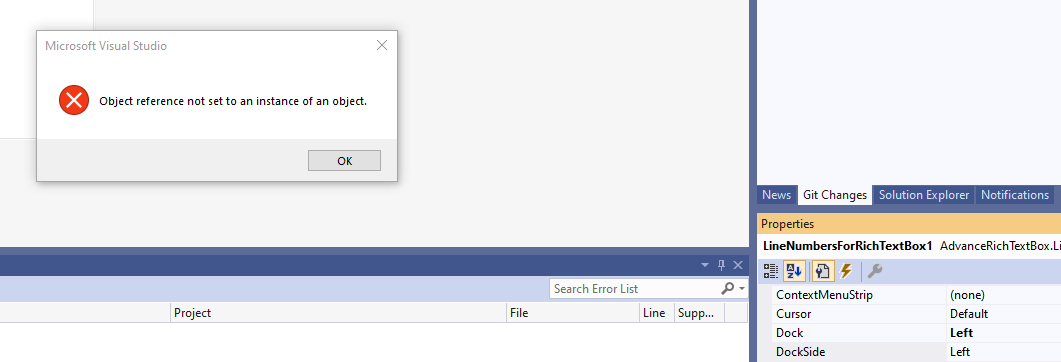
@merriemcgaw I am trying to port some user controls to Core 5 and I would love to get the new documentation (Breaking changes...). For example when I have a local Enum (Right, Left, None) which displays the default value "Left" correctly in designer until I try to change it then I get a popup dialog, "Object reference not set to an instance of an object" or if I try to resize the control I get the same message but there are many other complex properties that just work. When I look at the properties I don't see obvious differences between what works and what doesn't. On some built-in controls I see new attributes (DesignerSerializationVisibility, RefreshProperties) that were there is Framework and things like \
paul1956
on 19 Oct 2020
@merriemcgaw I am trying to port some user controls to Core 5 and I would love to get the new documentation (Breaking changes...). For example when I have a local Enum (Right, Left, None) which displays the default value "Left" correctly in designer until I try to change it then I get a popup dialog, "Object reference not set to an instance of an object" or if I try to resize the control I get the same message but there are many other complex properties that just work. When I look at the properties I don't see obvious differences between what works and what doesn't. On some built-in controls I see new attributes (DesignerSerializationVisibility, RefreshProperties) that were there is Framework and things like
not being used.
While I let @merriemcgaw respond on documentation part, I am curious on the "Object reference exception" in the designer. @paul1956 , is it possible to share a sample app with a 'gif' of operation you are performing that cause this excfeption? By any chance is this happening on a secondary monitor with different DPI setting than primary monitor?
 dreddy-work
on 19 Oct 2020
dreddy-work
on 19 Oct 2020
@dreddy-work Unfortunately for me my HDMI port stopped working after update, so it's on 1 monitor, would be happy to do gif but have no idea how to capture a screen capture GIF. https://github.com/paul1956/AdvanceRichTextBox is a very small repo that shows all issues. Open AdvancedRichTextBox and just try to change properties on LineNumbersForRichTextBox, some work, some give the error and it doesn't matter if you use property window or designer. If you open Form1 in designer you will see Handles clauses deleted in Form1, and sections deleted from designer.vb.
paul1956
on 20 Oct 2020
When you change DockSide or Size
paul1956
on 20 Oct 2020
@paul1956 this has clearly has nothing to do with documentation, please submit a VS Feedback ticket for this issue.
 RussKie
on 20 Oct 2020
RussKie
on 20 Oct 2020
Sorry I was responding to comment by @dreddy-work, forgot what repo I was in.
paul1956
on 20 Oct 2020
would be happy to do gif but have no idea how to capture a screen capture GIF.
@paul1956 you can use any screen recorder program, gif screen recorder for example.
@dreddy-work Yesterday you replied in my issue topic (Steema.TeeChart.NETCore.WinForm control is not fully supported by current version of Windows Forms Designer for .NET Core)
Thanks @bairog for reporting this. We are gradually adding support for third party controls and we expect the primary scenarios to work by now. We will look into this soon and update here.
and today that topic disappeared:
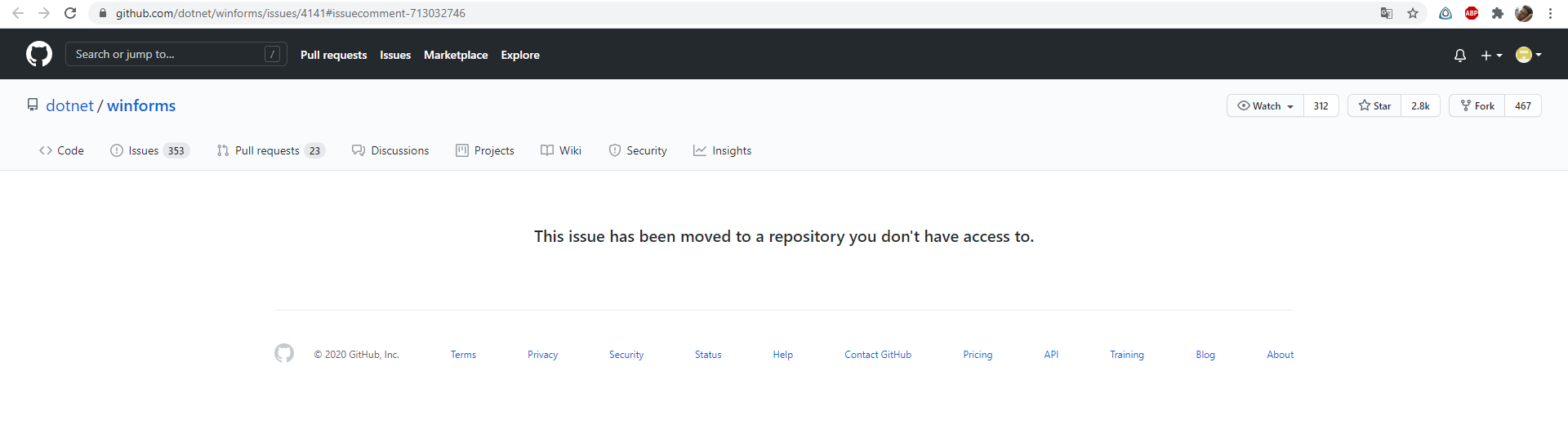
What happened?
 bairog
on 21 Oct 2020
bairog
on 21 Oct 2020
would be happy to do gif but have no idea how to capture a screen capture GIF.
@paul1956 you can use any screen recorder program, gif screen recorder for example.
https://github.com/NickeManarin/ScreenToGif
Thanks @bairog for reporting this. We are gradually adding support for third party controls and we expect the primary scenarios to work by now. We will look into this soon and update here.
and today that topic disappeared:
The issue has been transferred to the designer repo, which is non-public.
RussKie
on 21 Oct 2020
would be happy to do gif but have no idea how to capture a screen capture GIF.
@paul1956 you can use any screen recorder program, gif screen recorder for example.
@dreddy-work Yesterday you replied in my issue topic (Steema.TeeChart.NETCore.WinForm control is not fully supported by current version of Windows Forms Designer for .NET Core)
Thanks @bairog for reporting this. We are gradually adding support for third party controls and we expect the primary scenarios to work by now. We will look into this soon and update here.
and today that topic disappeared:
What happened?
That was my bad. I moved the issue to designer. Will bring it back here. and update status.
dreddy-work
on 21 Oct 2020
@dreddy-work Unfortunately for me my HDMI port stopped working after update, so it's on 1 monitor, would be happy to do gif but have no idea how to capture a screen capture GIF. https://github.com/paul1956/AdvanceRichTextBox is a very small repo that shows all issues. Open AdvancedRichTextBox and just try to change properties on LineNumbersForRichTextBox, some work, some give the error and it doesn't matter if you use property window or designer. If you open Form1 in designer you will see Handles clauses deleted in Form1, and sections deleted from designer.vb.
Thanks @paul1956 . I will go over it soon and see how we can address them if they are related to run-time. At present, we are expecting the designer issues to be reported via Visual Studio feedback tool to track the status in public access.
dreddy-work
on 21 Oct 2020
@dreddy-work as I have said Feedback tool immediately closes designer issue as NOT SUPPORTED so I stopped opening them. But this is not the right place either so feel free to mark Off-Topic.
paul1956
on 21 Oct 2020
Feedback tool immediately closes designer issue as NOT SUPPORTED
@paul1956 thanks for letting me know this! While that was the best course of action for the folks taking incoming feedback tickets months ago, we are far past that point. Yeah, there will be specific features that don't work, but we want to hear about them to help prioritize and sequence our work. One way to make sure it gets on my radar is to post a link to the ticket in here. That will put it on my radar and I'll go directly to the ticket and make sure it gets in our list and not lost somewhere in the ether with a mismarking of the area or something.
merriemcgaw
on 23 Oct 2020
.net 5.0 and VS 16.8 released. But how the new designer should work with user controls did not become clearer :( So, can some one take a clarification on this problem.
New designer doesn't see DataVisualization.Charting.Chart. And will remove all code related to it from *.Designer.cs after changing some thing. It doesn't matter how the link to the chart is added - through a project or a library.
Is this is a documentation lack (what's need to be done to the control to work with new designer), or it's a bug and I need to report it separately?
kirsan31
on 11 Nov 2020
@kirsan31 It should just work otherwise there will be a huge amount of changes in applications. Currently if you don't open the Form in designer then Framework Forms just work in 16.8 (so its not a control issue). If you open the Form lots of stuff related to user controls gets deleted or modified in the designer file and in Preview 1 the event handlers in the form are corrupted as well. This should be documented, without source control its a mess to recover (emphasized multiple time today by Scott Hanselman).
As for this issue both 16.8 and 16.9 Preview 1 both did a equal job of listing what was new for VB and C#. WinForms still lacks any information as to what's new, and what is broken. Preview 1 completely broke the designer for C# (reported elsewhere) and made is slightly worse for VB (not that it matters because of above).
paul1956
on 11 Nov 2020
Can you provide me with links to any reports you have of the designer being completely broken in 16.8GA or 16.9 p1? That's not been our experience, so I really want to follow up.
We're working on follow up documentation on the issue with losing content in your InitializeComponent() if the control doesn't fit the new patterns. Since we're still in progress of refining the new patterns, we can't really provide the documentation yet, things are still changing all the time. Once we've stabilized the overall API for making and distributing custom controls, we will be publishing that broadly. It's currently being vetted by smaller audiences.
@kirsan31 my suggestion for your chart control issue is to move everything related to the chart control from the IntializeComponent() and move it into another method you call before the form displays. What's happening here is that the chart control is marked to have a custom serializer in the control, however when the designer tries to resolve that control it can't. So effectively the designer knows nothing about the control's existence and the next time we serialize the form and contents, poof! IWe're working to figure out what option is best in this situation (none are great). We could render the whole form un-designable (with a White Screen of Drat) and provide instructions for the workaround like I just gave you. Alternatively, we could try to resolve the control with some default serializers - but that's not a good option either since it won't serialize the way the control developers intended. For porting purposes, I'd move the code into another method to avoid the risk of losing what you've done with the Framework Designer in IntializeComponent().
I totally apologize for being behind on getting the What's New and Known Issues content posted. I'll be focusing on these in the coming days so customers know what to expect. I'll keep you posted as I get these off my todo list.
merriemcgaw
on 12 Nov 2020
@merriemcgaw I created an new C# Winforms Project with nothing else, 16.8 behaves as expected for both VB and C#, click on Form and the designer opens reasonably quickly. In Preview 1 it does below. If I kill VS and open in 16.8 it works fine, go back to Preview and for C# you get below.

If I wait a really long time I sometime get
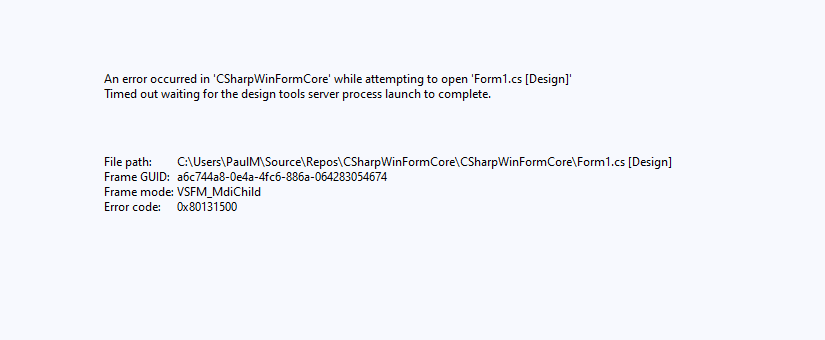
It is hard to report in feedback because in the case that happens most you can't hit feedback because the dialog is open.
I have not seen this with VB since very early previews. With VB Preview 1 it just deletes the VB Handler Clause randomly after the Form Opens in designer, possibly related to third party/User Controls. I have not seen this in 16.8 previews.
paul1956
on 12 Nov 2020
@merriemcgaw as for a User/Custom Controls the provided Templates have worked since VB.Net first shipped and they worked in Framework. I don't understand what "fit the new patterns" means with respect to controls that could be 18 years old. Also I have tried to create a separate project with the User controls where I can design the controls with UI support, and I can see them in the toolbox. It's putting them on the Form and/or opening a Form where they exist is when everything goes wrong. Just putting an X on the form and ignoring them would be a good first step and letting me set some properties would be an OK second step. I would start with getting MenuStrip, ToolStrip, ToolStripMenuItem working like they do under Framework and maybe that will help with User and Custom controls (https://github.com/dotnet/winforms/issues/4219).
paul1956
on 12 Nov 2020
@merriemcgaw thanks for the answer.
my suggestion for your chart control issue is to move everything related to the chart control from the IntializeComponent() and move it into another method you call before the form displays.
IWe're working to figure out what option is best in this situation (none are great). We could render the whole form un-designable (with a White Screen of Drat) and provide instructions for the workaround like I just gave you. Alternatively, we could try to resolve the control with some default serializers - but that's not a good option either since it won't serialize the way the control developers intended. For porting purposes, I'd move the code into another method to avoid the risk of losing what you've done with the Framework Designer in IntializeComponent().
I think that we definitely need some error indication here and may be some tips. For example - try to use old designer ;)
Сoncerning this _workaround_, it's not needed, because no one in their right mind will migrate to new designer and do workarounds for not to make it work, but in order to avoid breaking the current code :astonished: You never will migrate from working designer to not working.
So, I really see only one option here - adapt control itself for new designer. And in the end everything will depend on how much labor-intensive it is. And I'm afraid, based on the fact that so far we have no information at all about this process, that the game will not worth playing... :(
kirsan31
on 12 Nov 2020
Here what's new article:
https://devblogs.microsoft.com/dotnet/whats-new-in-windows-forms-runtime-in-net-5-0/
@RussKie once more - thank you!
It remains to get the documentation with clarifications (about user controls) on new designer and I'm happy 😄
kirsan31
on 11 Dec 2020
Agree about user controls in Forms Designer (including warning about it deleting stuff till fixed), also settings designer not working and for breaking changes new startup order and The changes to \
paul1956
on 11 Dec 2020
@RussKie It would also help if each update of Visual Studio would include what got fixed in Designer. Right now its try it and see how much damage it does to my Forms and which ones now work. 16.9 Preview 2 does a great job at displaying User Controls for the first time but then it destroys the Form and Designer file on save. You still can't design ToolStripMenu, StatusStrip or MenuStrip.
paul1956
on 11 Dec 2020
Related issues
 noseratio
·
5Comments
noseratio
·
5Comments
 jmairboeck
·
5Comments
jmairboeck
·
5Comments
 lonitra
·
5Comments
lonitra
·
5Comments
 vladimir-krestov
·
4Comments
vladimir-krestov
·
4Comments
 Vino-Wang
·
4Comments
Vino-Wang
·
4Comments
Most helpful comment
@RussKie It would also help if each update of Visual Studio would include what got fixed in Designer. Right now its try it and see how much damage it does to my Forms and which ones now work. 16.9 Preview 2 does a great job at displaying User Controls for the first time but then it destroys the Form and Designer file on save. You still can't design ToolStripMenu, StatusStrip or MenuStrip.