Winforms: [Accessibility] Keyboard shortcut key is unavailable to access the buttons(One Page, Two Page...)
.NET Core Version:
.NET SDK 5.0.100-rc.1.20377.7Have you experienced this same bug with .NET Framework?:
Yes
More Info:
- This issue can also repro on Framework project.
- There is a similar bugs: 1156785 in VSO.
- We can just use ‘Enter’ key enter to buttons(One Page, Two Page...).
Minimal repro:
- Extract “WindowsFormsApp3.zip” and open it in VS.
- Build and run the project.
- Using Tab key to navigate to Preview button, then press Enter key to show Print preview dialog.
- Check whether any shortcut key is provided to buttons(One Page, Two Page...) to access.
Expected behavior:
Keyboard shortcut key should be available to access the buttons(One Page, Two Page...).
Actual behavior:
Keyboard shortcut key is unavailable to access the buttons(One Page, Two Page...).
 Jessie-Zhang01
All 8 comments
Perhaps we can use ShortcutKeys property with these buttons.
 Tanya-Solyanik
on 31 Jul 2020
Tanya-Solyanik
on 31 Jul 2020
Hi @Jessie-Zhang01. I have investigated this issue and i see two cases:
- First case - user opens PrintPreviewDialog. In this case user can get access to buttons using "Tab" key.
- Second case - user clicks "Enter" button and focus disappears. This behavior already is fixed in #3598.

@Jessie-Zhang01, probably we should close it as duplicate #3598. Could you please check that it is not reproduced for last 5.0/master?
 SergeySmirnov-Akvelon
on 9 Sep 2020
SergeySmirnov-Akvelon
on 9 Sep 2020
In fact, this issue wants to have some separate shortcut keys to open One page, Two pages, etc. For example, press Ctrl + o to open ‘One page’ that I am thinking of. Here is the comment from @merriemcgaw "I think this is its own issue where we need to add Shortcut keys to the dialog."
In addition, 3598 is fixed on the latest 5.0 RC2.
Jessie-Zhang01
on 10 Sep 2020
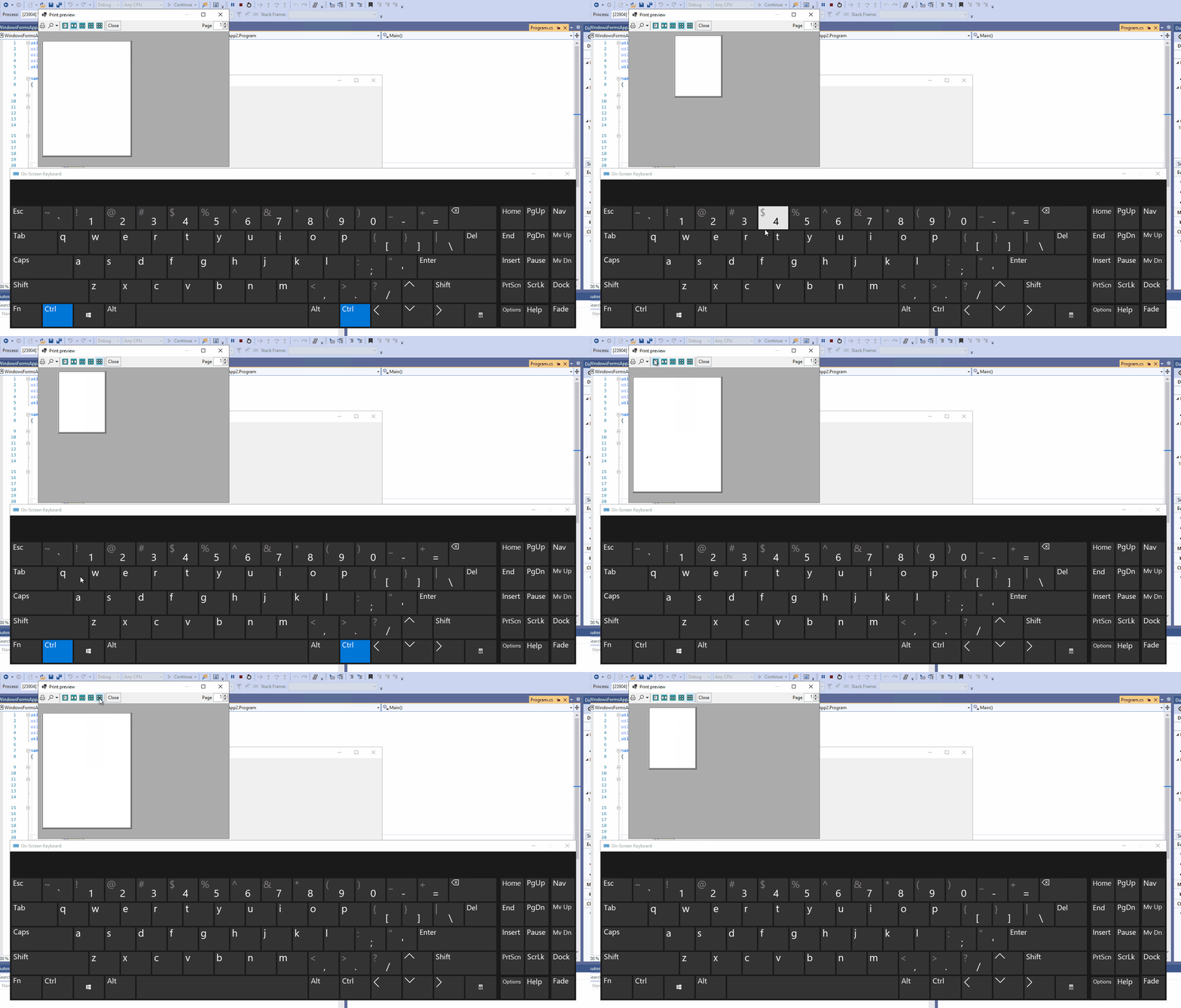
I'd probably go with CTRL+1 for "one page", CTRL+2 for "two page", etc. through to CTRL+5, if we'd go down this route.
 RussKie
on 10 Sep 2020
RussKie
on 10 Sep 2020
I like @russkie's idea. Will that work @Jessie-Zhang01 ?
 merriemcgaw
on 15 Sep 2020
merriemcgaw
on 15 Sep 2020
@merriemcgaw there is no any shortcut key that we can used to access the buttons(One Page, Two Page...). So it would be a good idea to use RussKie's method.
Jessie-Zhang01
on 15 Sep 2020
@SergeySmirnov-Akvelon, looks like we've got consensus on how to do this one. Please add the new shortcuts and make sure they show up in the ToolTip, and Narrator announces.
merriemcgaw
on 15 Sep 2020
Verified the issue with latest NET SDK 6.0.100-alpha.1.20557.2, this issue is fixed. The user will be able to switch between viewing modes using the shortcut keys (Ctrl+1, Ctrl+2, etc) on PrintPreviewDialog.
Jessie-Zhang01
on 9 Nov 2020
Related issues
 Jenna-Zheng
·
3Comments
Jenna-Zheng
·
3Comments
 jmairboeck
·
5Comments
jmairboeck
·
5Comments
 Vino-Wang
·
4Comments
Vino-Wang
·
4Comments
 0x084E
·
3Comments
0x084E
·
3Comments
 M-Lipin
·
4Comments
M-Lipin
·
4Comments