Winforms: SubType is determined slowly or not at all
This is Visual Studio 16.6.5/.NET Core SDK 3.1.302, and it's been a problem for a few versions. It happens with both netcoreapp3.1 and net472 projects using Microsoft.NET.Sdk.WindowsDesktop. Both had been working for a long time with WindowsDesktop.
On one project, you have to wait several minutes for the designer to become available (that is, for form icons to show up in Solution Explorer). On another project, it can sit for hours and the designer never becomes available. We've had to use workarounds like adding SubType to the csproj manually or rename the file and the rename it back.
If a repro is helpful, I will get you one. This is happening even in tiny projects within a larger solution.
In the meantime, is there a workaround we can paste into Directory.Build.props to set SubType appropriately?
Wasn't sure if I should post here or https://github.com/dotnet/windowsdesktop. Related: https://github.com/dotnet/winforms/issues/3510
 jnm2
jnm2
All 14 comments
This approximation works for Directory.Build.targets:
  <!-- Workaround for https://github.com/dotnet/winforms/issues/3619 -->
  <ItemGroup>
    <_DesignerFiles Include="$(MSBuildProjectDirectory)\**\*.Designer.cs" />
    <Compile Update="@(_DesignerFiles->Replace('.Designer.cs', '.cs'))" SubType="Form" />
  </ItemGroup>
@Shyam-Gupta is this related to the work you did with the user file?
@jnm2 are you using a new project or an existing one.
 merriemcgaw
on 24 Jul 2020
merriemcgaw
on 24 Jul 2020
@merriemcgaw Existing, if I understand correctly. These are net472 projects that I converted to SDK-style and later to Microsoft.NET.Sdk.WindowsDesktop. The problem is the same when I change one of them to netcoreapp3.1. There were no issues for a long time this way.
jnm2
on 24 Jul 2020
I am encountering the same issues.
The detection described in #3510 is completely unreliable. Usually .csproj.user files are not supposed to be checked into repositories. Yet with the new SDK-style csproj format they are required for VS to show Forms properly.
I think this system of caching the SubType in some file should be overthought. Now the .csproj is clean because all references of every single code file and their SubType properties are gone, but the problem has somehow just been moved to .csproj.user.
@jnm2
Your workaround seems to be promising, it has a side effect though:
Every time I add new Form to the project, VS adds a line to .csproj
<ItemGroup>
<_DesignerFiles Include="$(MSBuildProjectDirectory)\**\*.Designer.cs" />
<_DesignerFiles Remove="Form4.Designer.cs" /> <---
<Compile Update="@(_DesignerFiles->Replace('.Designer.cs', '.cs'))" SubType="Form" />
</ItemGroup>
**edit
Tested with <TargetFramework>netcoreapp3.1</TargetFramework> and VS 16.6.5
**edit2
Also I just noticed, VS doesn't just add that line, it also changes _DesignerFiles->Replace to _DesignerFiles->Replace
 jwfx
on 24 Jul 2020
jwfx
on 24 Jul 2020
I think that the Idea overall about background process and *.csproj.user is ok, but implementation....
I have done many experiments with:
SDK-style WinForm project (<TargetFrameworks>net472;netcoreapp3.1</TargetFrameworks>) with 33 Forms in sub folder.
VS 16.6.5 and 16.7 preview 5 - no differences.
Deleting and modifying in varius ways (delete some forms, all of them, whole forms section) *.csproj.user. Restarting VS, open solution and waiting (up to 10 minutes and _no background process running_ message), unload+reload project, building navigating etc ...
And found, that:
- The process of detection Forms - is completely broken. During 1 hour of experiments, only 4 times all forms was successfully detected (but only 2 times was usable - see point 4 below). All of 4 was shortly (several seconds after project loaded) after VS start (open solution).
- The process is absolutely non deterministic.
- If Forms not detected during several seconds after startup - they will be not detected any time after - need restart VS.
- In 2 times of 4, I got corrupted
*.csproj.user- lost opening<ItemGroup>tag:
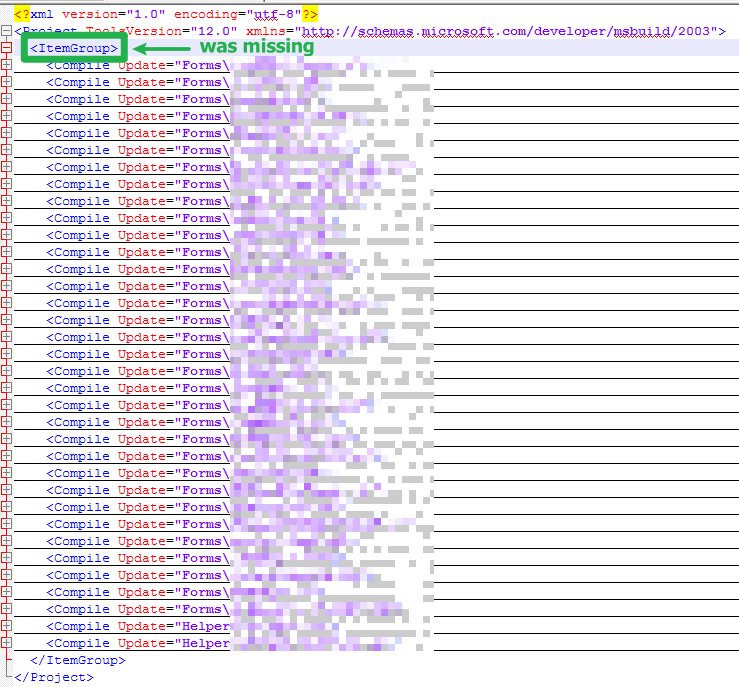
So, forms was not as forms in solution explorer anyway...
 kirsan31
on 24 Jul 2020
kirsan31
on 24 Jul 2020
I'm having this issue and no .csproj.user file exists on disk.
jnm2
on 24 Jul 2020
@jnm2
I'm having this issue and no .csproj.user file exists on disk.
And this is exactly why you having this issue ;) Due to bugs, VS can't properly detect Forms and therefor can't generate this file.
The process overall well described in #3510.
So, if you have *.csproj.user file and in it:
<?xml version="1.0" encoding="utf-8"?>
<Project ToolsVersion="12.0" xmlns="http://schemas.microsoft.com/developer/msbuild/2003">
  <ItemGroup>
    <Compile Update="Forms\form1.cs">
      <SubType>Form</SubType>
    </Compile>
  </ItemGroup>
</Project>
when you load a project you be able to design form1 _immediately_. All other forms that are absent in this file, are subject to analyze process (#3510) and then must be added to *.csproj.user (usually after VS close ). But due to bugs this doesn't happens :(
kirsan31
on 24 Jul 2020
In a nutshell this problem largely lies outside Windows Forms, and mostly with Roslyn/IDE. *.csproj.user file is a temporary bandaid until a proper fix is provided.
 RussKie
on 25 Jul 2020
RussKie
on 25 Jul 2020
Is there something I can do to get this in the right place, or is that already happening?
jnm2
on 25 Jul 2020
This issue is already on their radar.
RussKie
on 25 Jul 2020
@RussKie
This issue is already on their radar.
I found only this and it's related to #3510. Also there are discussing that all other things works greate 🤔
kirsan31
on 25 Jul 2020
There are also internal discussions.
RussKie
on 27 Jul 2020
Adding @Shyam-Gupta to this thread so he can keep us posted on developments as they occur. We're moving forward and asking for a change in how we can determine the SubType to be more efficient.
merriemcgaw
on 29 Jul 2020
The Roslyn team believes this is fixed in VS 16.8 by tweaking delays and no longer persisting winforms data to disk:
https://github.com/dotnet/roslyn/issues/45471#issuecomment-666769047
Should we close this issue now?
jnm2
on 31 Jul 2020
Related issues
 weltkante
·
5Comments
weltkante
·
5Comments
 vladimir-krestov
·
4Comments
kirsan31
·
4Comments
vladimir-krestov
·
3Comments
vladimir-krestov
·
4Comments
kirsan31
·
4Comments
vladimir-krestov
·
3Comments
 Jenna-Zheng
·
3Comments
Jenna-Zheng
·
3Comments
Most helpful comment
The Roslyn team believes this is fixed in VS 16.8 by tweaking delays and no longer persisting winforms data to disk:
https://github.com/dotnet/roslyn/issues/45471#issuecomment-666769047
Should we close this issue now?