Winforms: Disabled DateTimePicker at Design-Time does not have the correct border color when enabled when running
- .NET Core Version: 3.1.400-preview-015178
- Have you experienced this same bug with .NET Framework?: Yes
Problem description:
When using a DateTimePicker which is initialized as Enabled = false in the designer, enabling the control later when the app is running does not change the border color, which stays with a "disabled gray" color.
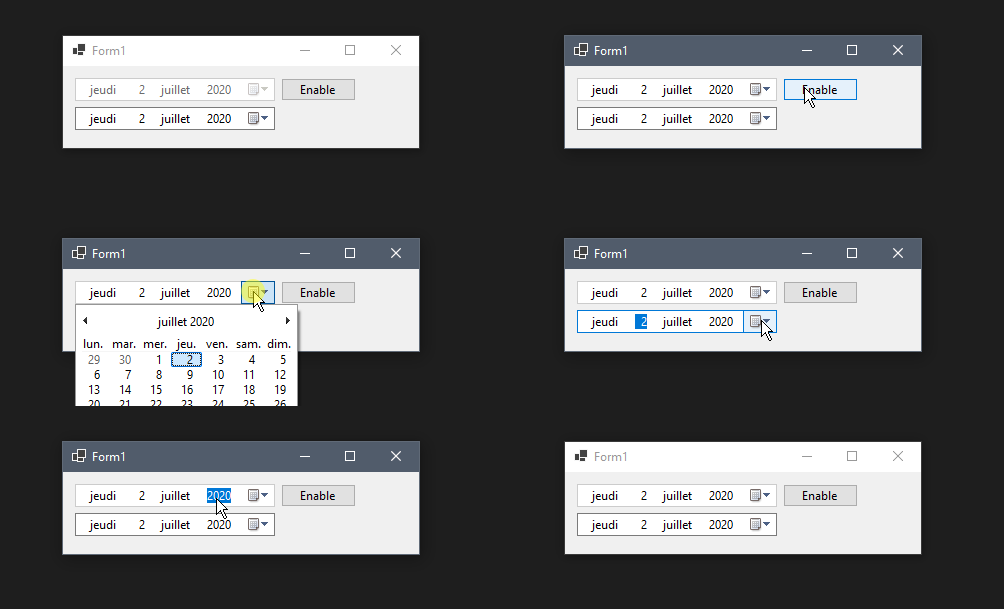
Note: if the control is enabled by default, and you disable/enable it, the border is changed correctly.
Expected behavior:
When enabling the control, the border should change to use the standard border color instead of keeping the disabled one.
Minimal repro:
- Create a new Form
- Drop a
DateTimePickercontrol - Set
Enabledtofalse - Add a button which change the
Enabledstate totrue - Start the project
- Click the button to enable the control.
Edit based on following comments
There seems to be a bug in the way the border color of the control is set and drawn by the .net control or the native control.
- The border color which will be used for the entire existence of the control seems to be set when the handle is created.
- If the control is in an enabled state, a dark gray color will be used. If it is disabled a light gray color will be used instead.
- Once the handle is created, the border color will never change again, despite changing the Enabled property (or sending WM_ENABLE messages)
- The only way to update the border color of the control is to force the recreation of the handle, which will change the border color according to the control state.
- (Not necessary related: there is a strange extended style WS_EX.CLIENTEDGE set on the control, which seems to be useless and break
UpdateStyles()calls)
 tbolon
All 19 comments
I would gladly help, but based on my understanding of the code, this behavior is not coded in the .net control, but is certainly the default behavior of the native control.
Maybe we could force some style message to the native control to force border color check when enabled... But I will need some hints about what to change and how.
tbolon
on 6 Jul 2020
I inspected the "correct" and "incorrect" versions via spy++ hoping to see something obvious, alas there wasn't anything.
You can certainly see a difference in borders for a control disabled in design time and runtime:
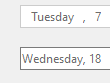
@JeremyKuhne @weltkante any thoughts?
 RussKie
on 7 Jul 2020
RussKie
on 7 Jul 2020
Desktop Framework designer treated the enabled property specially, basically ignores it in design time, I assume to not interfere with user interactions. Not sure what is happening in the new .NET Core designer.
As far as the actual bug is concerned, I wasn't aware of this one, I can confirm there is nothing obvious to see in WinForms source or spy++. Could be a bug in the native control not updating some internal state when switching the enabled flag.
It is possible to work around the problem by subclassing DateTimePicker and calling RecreateHandle when Enabled changes. Not sure if WinForms should integrate that as a general-purpose workaround for everyone and do it automatically. Might be hard to trigger correctly if the enabled state changes indirectly (e.g. disable a parent panel) ? Not sure if there is any hook for child controls to know that they are disabled indirectly and need to recreate their handle to work around a bug.
Also the bug happens in both directions, i.e. you can end up with an enabled control with a disabled border, and a disabled control with an enabled border. Basically the border is stuck in the state it was when the handle was last recreated.
 weltkante
on 7 Jul 2020
weltkante
on 7 Jul 2020
As far as the actual bug is concerned, I wasn't aware of this one, I can confirm there is nothing obvious to see in WinForms source or spy++. Could be a bug in the native control not updating some internal state when switching the enabled flag.
Could it be a bug in the native control? Does the native control still receive fixes as part of OS servicing?
It is possible to work around the problem by subclassing DateTimePicker and calling
RecreateHandlewhen Enabled changes. Not sure if WinForms should integrate that as a general-purpose workaround for everyone and do it automatically. Might be hard to trigger correctly if the enabled state changes indirectly (e.g. disable a parent panel) ? Not sure if there is any hook for child controls to know that they are disabled indirectly and need to recreate their handle to work around a bug.
The OnEnabledChanged() protected method is called even when the enabled state changes indirectly. I have tested adding a custom MyDateTimePicker in a GroupBox and modified the Enabled property on the GroupBox: the OnEnabledChanged() method was called and I was able to fix the border color by calling RecreateHandle() as suggested.
Do you have any hints about the cost of recreating the handle each time this property is changed? We have a lot of forms where this property is used when switching from Read/Edit view.
tbolon
on 8 Jul 2020
It seems that the problem is not only in the design-time/run-time state.
I have created a custom DateTimePicker with the following properties:
public class MyDateTimePicker : DateTimePicker
{
    public bool RecreateHandleOnEnabledChanged { get; set; }

    protected override void OnEnabledChanged(EventArgs e)
    {
        base.OnEnabledChanged(e);

        if (RecreateHandleOnEnabledChanged)
        {
            RecreateHandle();
        }
    }
}
And created a form which allows me to toggle the Enabled state and Recreate (or not) the handle.
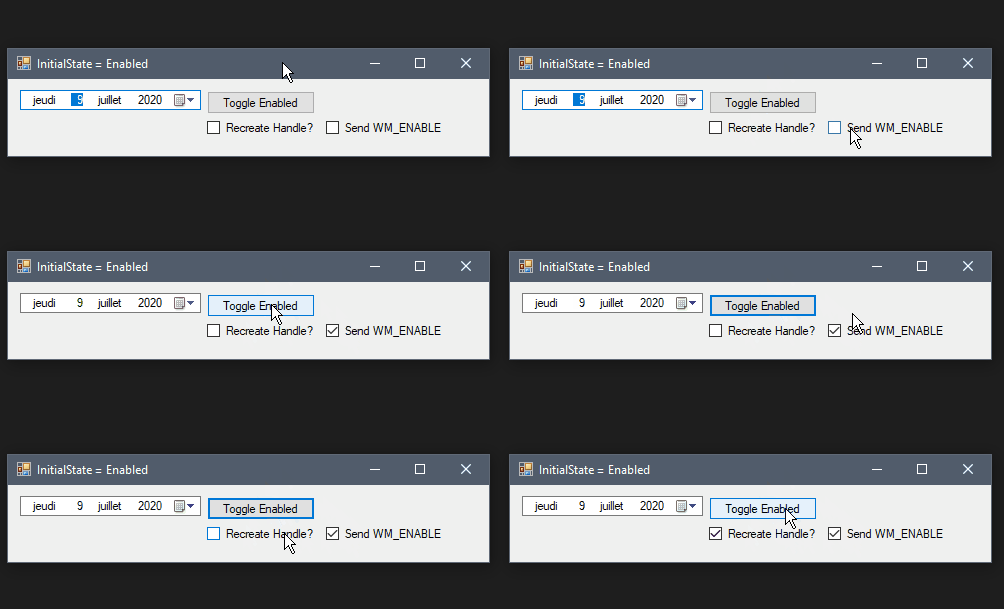
In the following capture, I can show that it's the border color behavior which is buggy: it is never updated when the state change.
If the control was created in the Enabled state, the border will keep the default (dark gray) color. It will receive the disabled border color (light gray) only on Handle creation. My initial bug report was about the opposite case (which is more easy to perceive).

tbolon
on 8 Jul 2020
Does the native control still receive fixes as part of OS servicing?
There is a very little chance of this, unfortunately.
Can you try sending WM_ENABLE message to the control, and see if it makes any difference?
RussKie
on 9 Jul 2020
No change observed:
public class MyDateTimePicker : DateTimePicker
{
    public bool RecreateHandleOnEnabledChanged { get; set; }

    public bool SendWmEnable { get; set; }

    protected override void OnEnabledChanged(EventArgs e)
    {
        base.OnEnabledChanged(e);

        if (RecreateHandleOnEnabledChanged)
        {
            RecreateHandle();
        }

        if (SendWmEnable)
        {
            SendMessageW(this.Handle, 0x000A /* WM_ENABLE */, this.Enabled);
        }
    }

    [DllImport("user32.dll")]
    public static extern IntPtr SendMessageW(IntPtr hWnd, uint msg, bool wParam = default, IntPtr lParam = default);
}
tbolon
on 9 Jul 2020
You might want to do that outside OnEnabledChanged (i.e. send WM_ENABLE instead of setting Control.Enabled) - just to test behavior I assume. Doing it inside means the state already has been changed so you are setting it to the value it already has, which probably ends up returning early in native code and not doing anything. (If you don't get around to testing I can take a look later as well.)
weltkante
on 9 Jul 2020
Thanks @weltkante, I will change my code.
I also found something fishy: I tried calling UpdateStyles() which should be a noop with this code:
var method = typeof(Control).GetMethod("UpdateStyles", System.Reflection.BindingFlags.Instance | System.Reflection.BindingFlags.NonPublic);
method.Invoke(dateTimePicker3, null);
I added a textbox and tried calling this code on both controls. Here are my results:
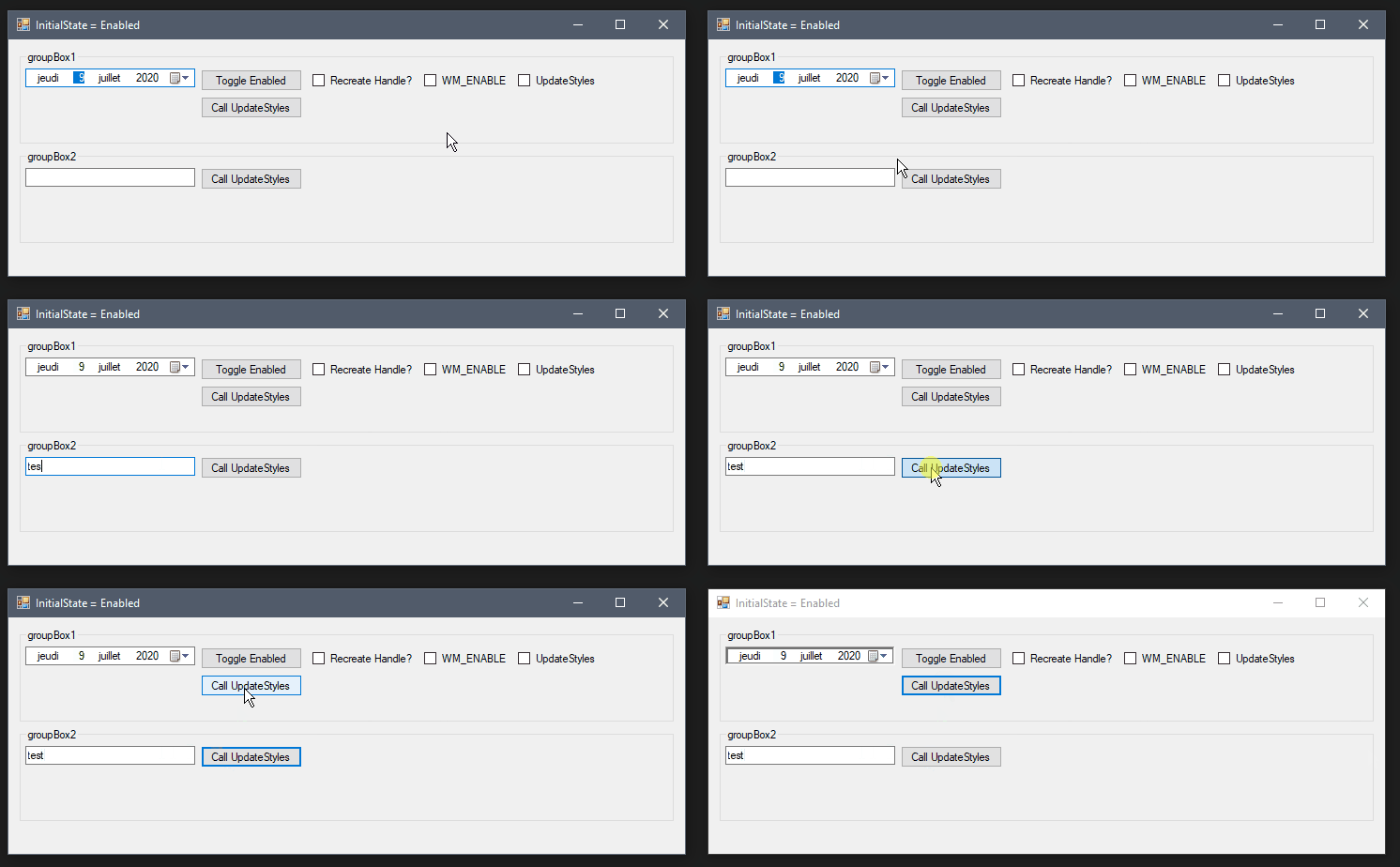
There seems to be something wrong in the way the border is initialized.
tbolon
on 9 Jul 2020
@weltkante the behavior is the same as using the Enabled property (the border color stays the same)
public class MyDateTimePicker : DateTimePicker
{
    public bool RecreateHandleOnEnabledChanged { get; set; }

    public bool SendWmEnable { get; set; }

    public bool CallUpdateStyles { get; set; }

    public void ForceSendWmEnable(bool enable)
    {
        SendMessageW(this.Handle, 0x000A /* WM_ENABLE */, enable);
    }

    protected override void OnEnabledChanged(EventArgs e)
    {
        base.OnEnabledChanged(e);

        if (RecreateHandleOnEnabledChanged)
        {
            RecreateHandle();
        }

        if (SendWmEnable)
        {
            SendMessageW(this.Handle, 0x000A /* WM_ENABLE */, this.Enabled);
        }

        if (CallUpdateStyles)
        {
            UpdateStyles();
        }
    }

    [DllImport("user32.dll")]
    public static extern IntPtr SendMessageW(IntPtr hWnd, uint msg, bool wParam = default, IntPtr lParam = default);
}
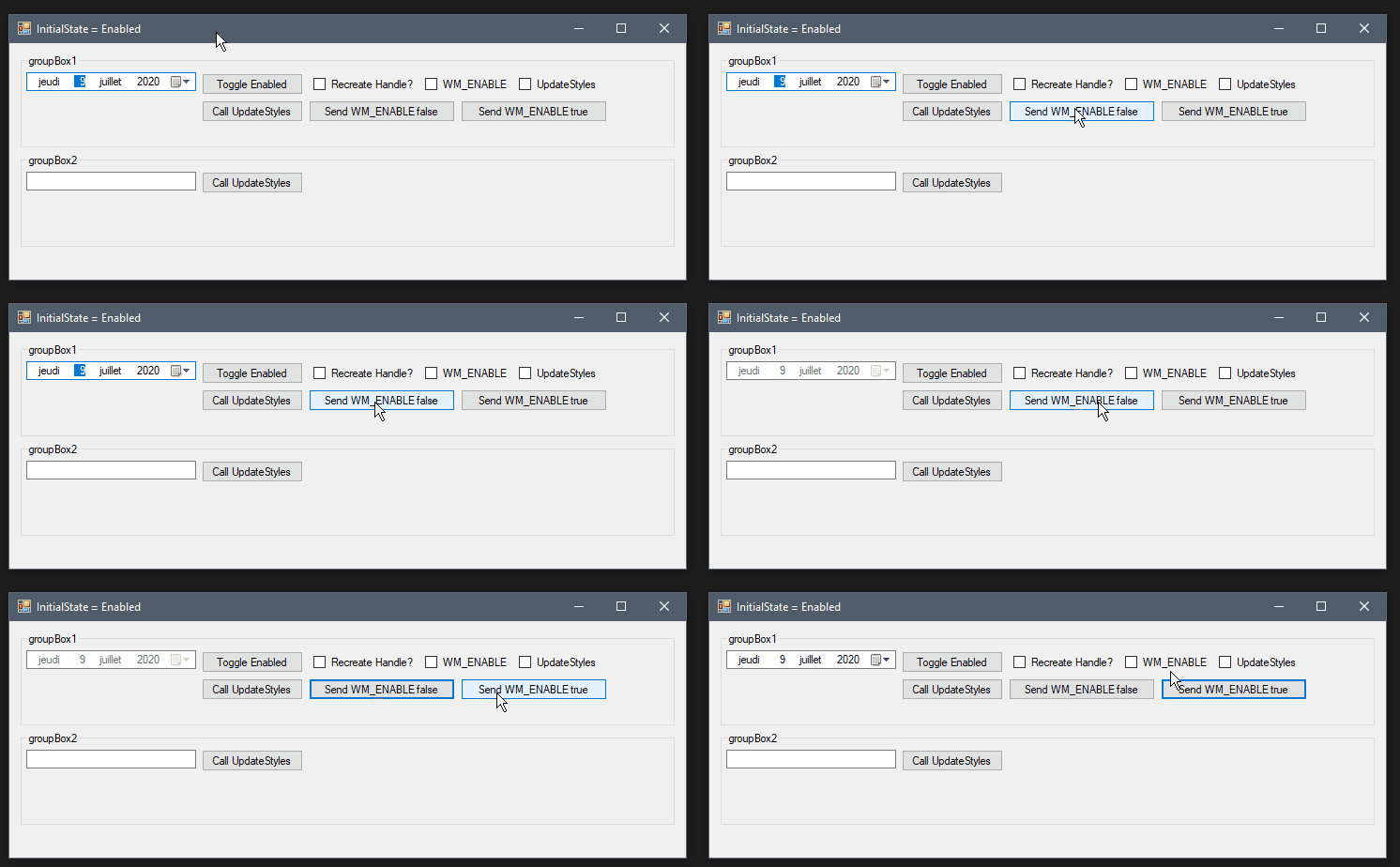
tbolon
on 9 Jul 2020
Thanks for doing the tests
Do you have any hints about the cost of recreating the handle each time this property is changed? We have a lot of forms where this property is used when switching from Read/Edit view.
Its comparable to opening the form (which also needs to create all handles, obviously even more than just the DateTimePickers). If opening the form is an issue for you and you have a lot of DateTimePickers on the form then switching the Enabled state may have similar performance. If opening the form is fine with you then switching Enabled state with this workaround won't be any issue at all.
WinForms already has handle recreation as workaround in other control wrappers, and since OnEnabledChanged is called even on implicit changes, I'd consider it appropriate to add the workaround to WinForms itself if it isn't going to be fixed on the native side.
weltkante
on 9 Jul 2020
Why not perhaps just try to call the UpdateStyles() method ?
I am trying to understand why the border change (see my previous comment) when calling the method for the DateTimePicker.
Perhaps there is something missing in the initialization of the control in the library to set the BorderStyle of the native control which prevent the control from working correctly (and may be the cause of the border style error when calling UpdateStyles()).
tbolon
on 9 Jul 2020
I was able to remove the UpdateStyles bug which change the border style to SunkenEdge by overriding CreateParams and removing the Extended Flag WS_EX.CLIENTEDGE in my subclass: cp.ExStyle &= ~(int)0x00000200; // WS_EX.CLIENTEDGE;
It's explicitly set by the CreateParams of the DateTimePicker control line 457
        /// <summary>
        ///  Returns the CreateParams used to create this window.
        /// </summary>
        protected override CreateParams CreateParams
        {
            get
            {
                CreateParams cp = base.CreateParams;
                cp.ClassName = WindowClasses.WC_DATETIMEPICK;

                cp.Style |= (int)_style;

                switch (format)
                {
                    case DateTimePickerFormat.Long:
                        cp.Style |= (int)DTS.LONGDATEFORMAT;
                        break;
                    case DateTimePickerFormat.Short:
                        break;
                    case DateTimePickerFormat.Time:
                        cp.Style |= (int)TIMEFORMAT_NOUPDOWN;
                        break;
                    case DateTimePickerFormat.Custom:
                        break;
                }

                cp.ExStyle |= (int)User32.WS_EX.CLIENTEDGE;

                if (RightToLeft == RightToLeft.Yes && RightToLeftLayout)
                {
                    //We want to turn on mirroring for DateTimePicker explicitly.
                    cp.ExStyle |= (int)User32.WS_EX.LAYOUTRTL;
                    //Don't need these styles when mirroring is turned on.
                    cp.ExStyle &= ~(int)(User32.WS_EX.RTLREADING | User32.WS_EX.RIGHT | User32.WS_EX.LEFTSCROLLBAR);
                }

                return cp;
            }
        }
I don't understand why this flag is set here.
Saldy, it did not fix the problem of the border color.
tbolon
on 9 Jul 2020
I am now clueless about how to fix this bug without relying on a RecreateHandle call...
WinForms already has handle recreation as workaround in other control wrappers, and since
OnEnabledChangedis called even on implicit changes, I'd consider it appropriate to add the workaround to WinForms itself if it isn't going to be fixed on the native side.
Same conclusion here.
tbolon
on 9 Jul 2020
I pinged the control area owner, will update if I get any response. At this stage I think we should work under an assumption that the native control won't get fixed.
@JeremyKuhne what do you think about calling RecreateHandle upon changing the enable state?
RussKie
on 9 Jul 2020
I updated the first post with a summary of what we have found for now.
tbolon
on 9 Jul 2020
what do you think about calling RecreateHandle upon changing the enable state?
I'm not opposed to it, given we're doing the same thing elsewhere. Before we do it would be good to get the response from the comctl folks. I don't suspect that it would be too outrageous of a perf impact- but it would be nice to know what the cost is. Additionally it would be good to test with visual styles enabled and disabled.
 JeremyKuhne
on 9 Jul 2020
JeremyKuhne
on 9 Jul 2020
@tbolon we had an internal discussion about this and agreed that RecreateHandle is an acceptable solution for .NET 5.0, given there are other controls doing the same or similar things already. Unfortunately this bug won't meet a servicing bar for 3.1.
You're welcome to send a PR with a fix.
RussKie
on 10 Jul 2020
I won't be able to work on this issue until end of next week. I will submit a PR then.
tbolon
on 10 Jul 2020
Related issues
 kirsan31
·
4Comments
kirsan31
·
4Comments
 noseratio
·
5Comments
noseratio
·
5Comments
 Vino-Wang
·
4Comments
RussKie
·
5Comments
Vino-Wang
·
4Comments
RussKie
·
5Comments
 Shyam-Gupta
·
4Comments
Shyam-Gupta
·
4Comments