Winforms: Control.Margin values inside a TableLayoutPanel incorrect
- .NET Core Version:
.NET Core SDK (gemäß "global.json"):
Version: 3.1.201
Commit: b1768b4ae7
Laufzeitumgebung:
OS Name: Windows
OS Version: 10.0.18363
OS Platform: Windows
RID: win10-x64
Base Path: C:Program Filesdotnetsdk3.1.201
Host (useful for support):
Version: 3.1.3
Commit: 4a9f85e9f8
- Have you experienced this same bug with .NET Framework?:
No
Problem description:
Some controls in groupBox1 are misaligned. The TableLayoutPanel inside the GroupBox should align all controls. The controls textBox4 and numericUpDown2 should have same Margin values to the Left and Right, because both have default Margin values.
Why the Margin.Top, Margin.Bottom differ to Margin.Left, Margin.Right ?
Expected behavior:
Margin values should have the Default values in this case.
Minimal repro:
See Project TestControls.zip
TestControls.zip
 harborsiem
All 13 comments
@Vino-Wang can you see if you can help @harborsiem find a workaround where everything maintains alignment.
@harborsiem - we're considering that it may be a factor of your AutoScaleMode=font combined with Anchoring and with the new default font used in WinForms. Instead of the Anchoring you could try Docking. See this article for more information about the change to our default font and how to force the font to be the original one.
 merriemcgaw
on 17 Apr 2020
merriemcgaw
on 17 Apr 2020
@dreddy-work this feels like it may be related to https://github.com/dotnet/winforms/issues/3007
 RussKie
on 17 Apr 2020
RussKie
on 17 Apr 2020
@merriemcgaw, this might not a real issue by referring to this MSDN wiki: https://docs.microsoft.com/en-us/dotnet/api/system.windows.forms.tablelayoutpanel?view=netframework-4.8#remarks
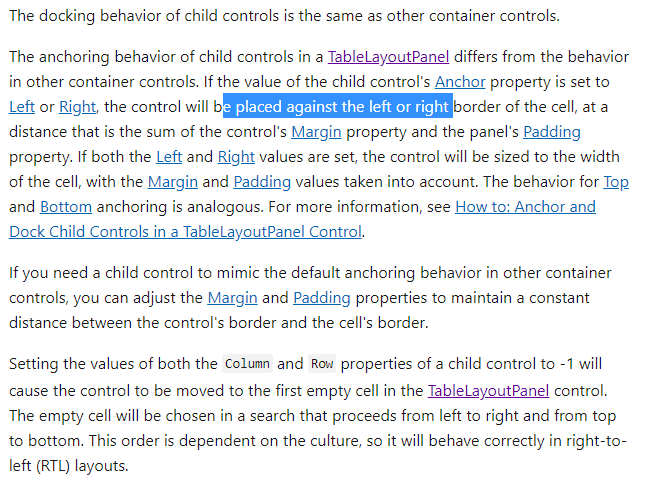
There are 5 workarounds:
- Resize the TableLayoutPanel.
- Change the Anchor property of textBox4 & munericUpDown2 to Top or Top, Bottom.
- Change the Anchor property of textBox4 to Top, Bottom, Left, Right.
- Change the SizeType of the column2 & column3 from Absolute to AutoSize.
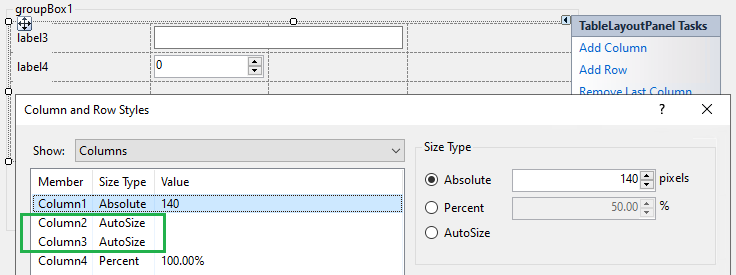
- Change the Absolute SizeType value of the column2 to the same with other columns: 140

 Vino-Wang
on 20 Apr 2020
Vino-Wang
on 20 Apr 2020
If the OP is correct there is still a behavioral difference to Desktop Framework and those would mean there is a regression?
Have you experienced this same bug with .NET Framework?:
No
 weltkante
on 20 Apr 2020
weltkante
on 20 Apr 2020
@Vino-Wang would it be possible to double check and see if the issue described by the OP is present in .NET Framework?
merriemcgaw
on 20 Apr 2020
@merriemcgaw, when i tried to reproduce it in Framework designer. This issue is not occurring.
In addition, double check the core project that provided by user. This issue also cannot reproduce with following steps, it's very strange:
- Run the attached project, build and run. -- Issue reproduce.
- Open the Form1.designer window, select the groupBox1, tableLayoutPanel3, textBox4, numericUpDown2 controls one by one and just go through the properties in Properties window without any changing.
- Run it again. -- Issue is not reproducing.
Vino-Wang
on 21 Apr 2020
I can confirm, copy/pasting the code as-is into a Desktop Framework project does not have the issue.
Open the Form1.designer window, select the groupBox1, tableLayoutPanel3, textBox4, numericUpDown2 controls one by one and just go through the properties in Properties window without any changing.
I cannot reproduce that. Either you accidently changed something or you got a different version of the designer which makes the form dirty just by browsing, so the .designer.cs gets regenerated unintentionally. You might want to diff with the original .designer.cs to see if regenerating it changed something.
Given that copy/paste of the original code does not repro the issue in Desktop Framework this is definitely a regression and can't be explained by referring to the docs.
weltkante
on 21 Apr 2020
@weltkante agreed. I'll add the regression tag and we'll take a look.
merriemcgaw
on 21 Apr 2020
I'm sorry, I should have immediately checked, but this is caused by the default font change. The issue description didn't look like its related to font scaling so I didn't think of it.
The designer.cs apparently comes from Desktop Framework and is missing the this.Font = new System.Drawing.Font("Microsoft Sans Serif", 8f); assignment you have to put in when porting to .NET Core. When adding that Desktop and Core behave identical.
No regression, just another side effect of switching default fonts. Sorry again.
If there's any discrepancy in the margins left then its probably what was quoted from the docs and also happens on Desktop Framework.
weltkante
on 21 Apr 2020
I don't know why I didn't think of that right off the bat @weltkante! Thank you for checking.
@harborsiem if you use the code quoted by @weltkante you'll have things return to as you expect. I'm going to close this issue since it's not a regression per-se and is expected.
@OliaG - it might be worth writing a blog post about all the little things we've uncovered from the default font change and when we do #3001 we will give users the quick and easy way to go back to their previous state if desired.
merriemcgaw
on 21 Apr 2020
I have modified my test with the code quoted by @weltkante. But when I change the Font after InitializeComponent in Form1.cs to SystemFonts.MessageBoxFont I get different Margin values to the Controls in a TableLayoutPanel. In Desktop Framework I see Control Margins values 3, 3, 3, 3. But in .NET Core I see Control Margins values 4, 3, 4, 3. See modified project.
TestControls.zip
harborsiem
on 27 Apr 2020
But when I change the Font after InitializeComponent in Form1.cs
You don't change the font there, thats too late, you need to insert it in the Designer.cs where it would have been placed if you had used a non-default font. I usually insert right after the line assigning this.AutoScaleMode = System.Windows.Forms.AutoScaleMode.Font;
weltkante
on 27 Apr 2020
I don't think that changing the Font of the Form is too late. In MSDN documentation AutoScaling or Font scheme changes is written that one can change the Font of the Form after InitializeComponent. Autoscaling is calling PerformAutoScale when there is a Font change. I can see this when I am looking to the values of AutoScaleDimensions or CurrentAutoScaleDimensions before and after the Font changes. I think the gap of one increment to the left and right Margin is maybe a rounding difference between Framework and Core.
harborsiem
on 27 Apr 2020
Related issues
 SergeySmirnov-Akvelon
·
3Comments
RussKie
·
5Comments
SergeySmirnov-Akvelon
·
3Comments
RussKie
·
5Comments
 jmairboeck
·
5Comments
jmairboeck
·
5Comments
 Olina-Zhang
·
5Comments
weltkante
·
5Comments
Olina-Zhang
·
5Comments
weltkante
·
5Comments
Most helpful comment
I can confirm, copy/pasting the code as-is into a Desktop Framework project does not have the issue.
I cannot reproduce that. Either you accidently changed something or you got a different version of the designer which makes the form dirty just by browsing, so the .designer.cs gets regenerated unintentionally. You might want to diff with the original .designer.cs to see if regenerating it changed something.
Given that copy/paste of the original code does not repro the issue in Desktop Framework this is definitely a regression and can't be explained by referring to the docs.