Winforms: Read me for Visual Studio and Core releases do not highlight breaking changes
There are (breaking) changes between Framework and Core that are hard to discover. Until today I did not know there was a GitHub documentation: breaking tag with some of that information. While this is great for details this is terrible for discovery. So far I have found out Core has new default font, there are significant and great changes in FolderDialogBrowser, DataGridView Heading have different behavior, Version 16.5.0 Preview 1.0 designer supports VB and this is just to name a few. NONE are bugs IMHO, they are improvements that people need to know about and in some cases before installing and not tripped on.
 paul1956
All 9 comments
Thank you @paul1956, appreciate your feedback.
We have official docs living at https://docs.microsoft.com/, including those detailing breaking and other notable changes, e.g.:
- https://docs.microsoft.com/en-us/dotnet/core/porting/winforms-breaking-changes
- https://docs.microsoft.com/en-us/dotnet/core/compatibility/winforms
Would you find it helpful if these links for in our readmes?
The Designer is a somewhat separate topic, this repo contains the Windows Forms runtime.
The Designer is still being ported across, all issues should be reported via the Feedback channcel, and all comms about the Designer are currently done via blogs (@OliaG is on hook for those 😄).
 RussKie
on 13 Dec 2019
RussKie
on 13 Dec 2019
This is the first time I have seen either detailed link above (the top level link is better suited to a searh engine then a human) and I follow dotnet closely. I don't care if the details are in a blog or in the excellent documentation you show above, my issue is how do people find it. If there are breaking changes I would expect to see them in the readme of .Net and VS, along with what's new and what's fixed. Many of the dotnet issues raises on StackOverflow, Gitter... are covered in these documents and they get asked over and over, the default Font issue alone is asked everywhere and often and I only found out about the new FolderBrowserDialog yesterday.
That was a long answer to your question , short answer YES.
paul1956
on 13 Dec 2019
The related links do cover some of these; however, the difference in behavior with the DataGridView; for example, the DataGridView1.EnableHeadersVisualStyles seems to be defaulted to False in .NET Core and True in .NET Framework aren't in these documents. Adding = False to the shared WinForms (between the two projects) in the Load event gives me a consistent result; remarking out this single line I get different behaviors between the two where I'm setting the current and default background color of the column headers to Gray as I'm doing a full-row-select style grid. There also appears to be a slight rendering difference regarding a "button" column that doesn't have any text. I've since changed to an "image" column for these... but figured I'd mention that there does appears to be an issue. Please note that I'm doing this in #VisualBasic (I don't think that will cause the difference in behavior; bug figured I'd mention it).
 DualBrain
on 14 Dec 2019
DualBrain
on 14 Dec 2019
@DualBrain Changing a default from True to False to me is a breaking change and should be highlighted somewhere. I am not saying it is bad, it should just not be a surprise.
paul1956
on 14 Dec 2019
The related links do cover some of these; however, the difference in behavior with the DataGridView; for example, the DataGridView1.EnableHeadersVisualStyles seems to be defaulted to False in .NET Core and True in .NET Framework aren't in these documents.
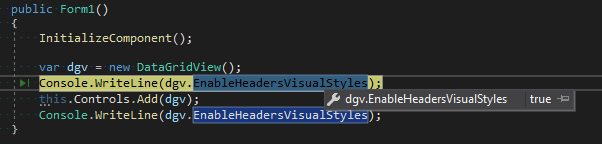
We haven't made any changes in this area.
DataGridView1.EnableHeadersVisualStyles is true by default.
RussKie
on 16 Dec 2019
@RussKie @DualBrain I don't want to debate the DatatgridView issue here. Cory can you open a separate issue. Lets get back to adding the links above to ReadMe for both VS and Core so developers can find the changes.
paul1956
on 16 Dec 2019
I have passed your feedback internally to the relevant people. Hopefully we will be able to provide better comms in the future.
I am also adding links to the breaking changes in https://github.com/dotnet/winforms/pull/2529
the default Font issue alone is asked everywhere and often
Could you please point me to these questions? I'm monitoring few tags on SO, but I guess I may be missing on some tags.
I would expect to see them in the readme of .Net and VS
VS readme's only contains VS-related information. VS is an IDE, and thus it isn't appropriate for it to provide information on all tools and tech stacks that VS may be used for development of.
.NET itself is a large collection of different stacks and tools, so it is impractical (and very difficult) to cover everything in a single document.
RussKie
on 19 Dec 2019
https://gitter.im/VB-NET/community
https://gitter.im/dotnet/corefx
https://stackoverflow.com/
VS is the way many people get .NET Core and upgrades from one release to another. I am not looking for a long list just the two links in https://github.com/dotnet/winforms/issues/2501#issuecomment-565264554 especially for breaking change.
The issue for the font change is things look different and people have no idea why and there is not great support for the Core Gui to fix it.
paul1956
on 19 Dec 2019
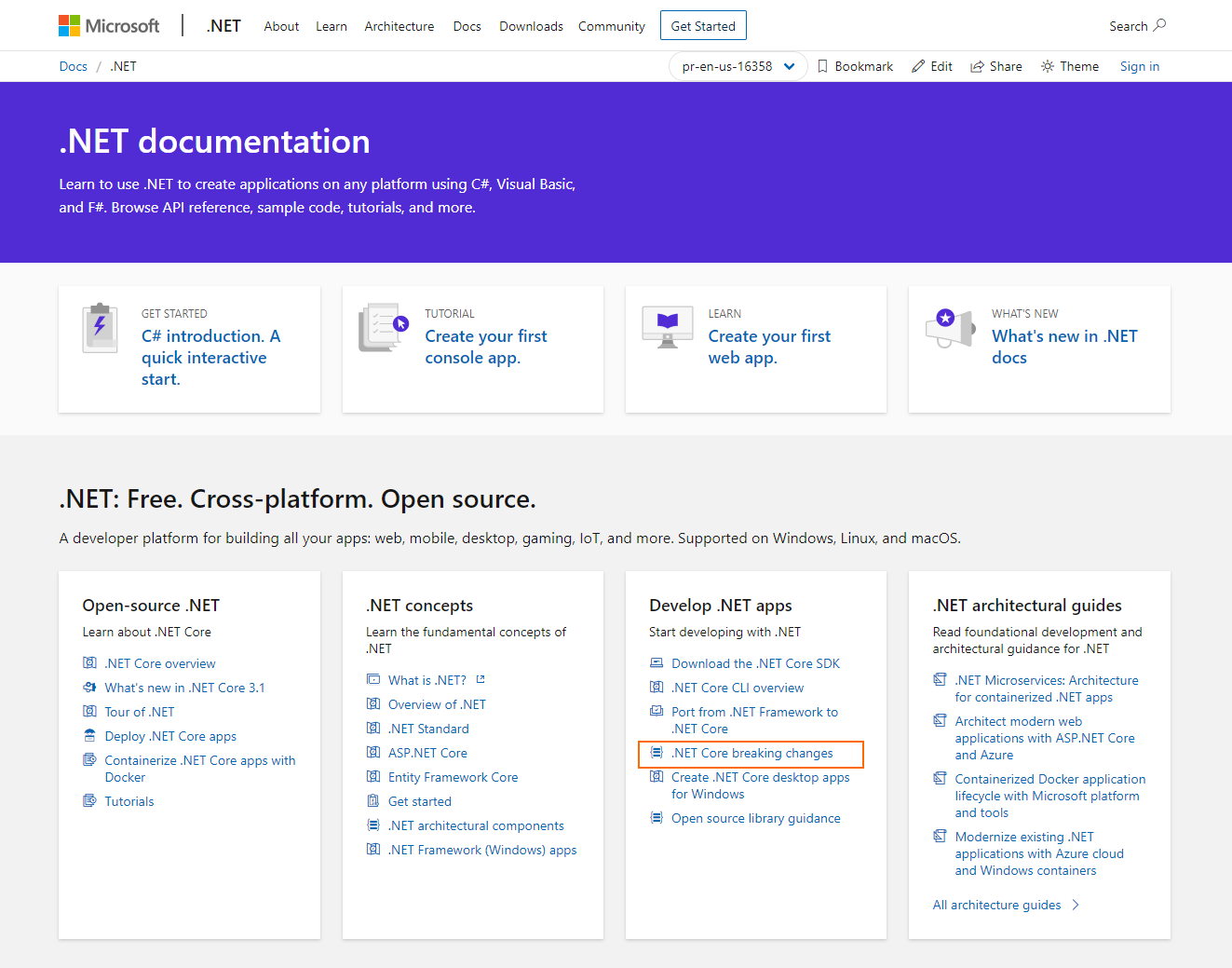
The front page of the docs is being updated too to include a link to breaking changes.
RussKie
on 20 Dec 2019
Related issues
 KlausLoeffelmann
·
3Comments
KlausLoeffelmann
·
3Comments
 noseratio
·
5Comments
noseratio
·
5Comments
 Olina-Zhang
·
5Comments
Olina-Zhang
·
5Comments
 damageboy
·
4Comments
damageboy
·
4Comments
 SergeySmirnov-Akvelon
·
3Comments
SergeySmirnov-Akvelon
·
3Comments
Most helpful comment
Thank you @paul1956, appreciate your feedback.
We have official docs living at https://docs.microsoft.com/, including those detailing breaking and other notable changes, e.g.:
Would you find it helpful if these links for in our readmes?
The Designer is a somewhat separate topic, this repo contains the Windows Forms runtime.
The Designer is still being ported across, all issues should be reported via the Feedback channcel, and all comms about the Designer are currently done via blogs (@OliaG is on hook for those 😄).