Winforms: Support WindowsFormsApplicationBase.IsSingleInstance
Support for "single instance" applications (see WindowsFormsApplicationBase.IsSingleInstance) has not been ported to .NET Core.
The reference source implementation relies on System.Runtime.Remoting to communicate with other instances, and Remoting is not available on .NET Core.
 cston
cston
All 29 comments
cc @KathleenDollard
cston
on 9 Oct 2019
Having taken a quick look it should be possible to use a named pipe instead, if I didn't miss anything it was just sending strings across the remoting.
 weltkante
on 9 Oct 2019
weltkante
on 9 Oct 2019
I think we'll need to refactor that code to use a Mutex instead, e.g. something like https://stackoverflow.com/a/184143
 RussKie
on 10 Oct 2019
RussKie
on 10 Oct 2019
@Russkie That is not enough, there is more to it than the SingleInstace flag, it passes some strings over to the already running application and raises a user-implemented event, so the application can open the newly opened document in the existing instance rather than in a new instance (similar to various Office applications)
weltkante
on 10 Oct 2019
@RussKie take a look at this article as @weltkante wrote passing arguments to already running application is one of the main features.
 Misiu
on 23 Oct 2019
Misiu
on 23 Oct 2019
@Misiu I just had a quick glance at the article, but it seems to suggest to refer to the assembly we are trying to implement here :-)
[edit] sorry, misunderstood your comment, was reading it as you suggesting how to implement it. I guess you just wanted to show usage of the API, never mind
weltkante
on 23 Oct 2019
@weltkante I'm aware of that :) I just wanted to show potential usage. I agree that this functionality should be implemented here and it shouldn't require an extra library. ANd please movie it out of VisualBasic namespace :)
Misiu
on 23 Oct 2019
@Misiu Why do you want it moved out of the Visual Basic namespace (I don't want to guess).
What about the rest of the Application Models?
 KathleenDollard
on 23 Oct 2019
KathleenDollard
on 23 Oct 2019
@KathleenDollard the answer is very simple: because it is confusing.
I remember when I started developing in C# and tried to create a single instance app. I found a tutorial online that used WindowsFormsApplicationBase but I didn't understand why I must use Visual Basic namespace. I thought then: I'm developing in C#, so why do I need VB?
I think that now it is an ideal moment to move this into the right namespace. I didn't think about the rest of the Application Models, but back then and now the usage of Visual Basic namespace is confusing.
Misiu
on 23 Oct 2019
If this is scheduled for core 5.0 and going to happen, I am happy to wait. If you want me to look at a prototype I would like to try. There needs to be guidelines around implementation. After a brief look at the code the easiest solution looks like using gRPC or equivalent and change as little of the code as possible, another alternative is to look at named pipes. There is code going back to Windows 95/98/Me/CE/Windows 2000 with different behaviors, I assume I can ignore that. One question is should the new implementation be per user (my assumption) or per computer or does it vary based on something. The current code also used System,Threading.AccessControl and SystemServiceModel.Primitives is it OK to include those NuGet packages, or is there another way to access that functionality or something else?
 paul1956
on 5 Apr 2020
paul1956
on 5 Apr 2020
@aeikum made a named-pipe-based implementation of this for CodeWeavers 3 years ago. I was thinking of merging it into Wine Mono but couldn't find an application that needed it. It's sitting on our internal bug tracker (bug 14478 for my own future reference). Perhaps it would be useful now?
 madewokherd
on 5 Apr 2020
madewokherd
on 5 Apr 2020
This was the one I was looking at and it is very complete.
https://github.com/AutoItConsulting/examples-csharp/issues/1
paul1956
on 5 Apr 2020
I would like to see this solved as part of WinForms. https://github.com/dotnet/winforms/issues/2056
How much does it depend on the application model?
KathleenDollard
on 6 Apr 2020
If you want me to look at a prototype I would like to try.
This was the one I was looking at and it is very complete.
AutoItConsulting/examples-csharp#1
I don't believe anyone is currently working on an implementation. So you're very welcome to contribute. I had a cursory look over the code from @jonathanbennett73 and looks reasonably straight forward. I'm not an expert in this, so I an currently unable to provide a deeper feedback.
There needs to be guidelines around implementation.
Here's the guide (it is coming to the master in #3042).
First we need an API proposal to discuss. Assume that readers have minimal understanding of the feature, so try and write to that audience.
I remember when I started developing in C# and tried to create a single instance app. I found a tutorial online that used
WindowsFormsApplicationBasebut I didn't understand why I must use Visual Basic namespace. I thought then: I'm developing in C#, so why do I need VB?
I think that now it is an ideal moment to move this into the right namespace. I didn't think about the rest of the Application Models, but back then and now the usage of Visual Basic namespace is confusing.
The reasoning must come as part of the API proposal, explaining the benefits and discussing other options.
_Personally_ I'm not opposed to have the feature in System.Windows.Forms namespace (it can't be used as a reason 😉). Microsoft.VisualBasic.Forms depends on System.Windows.Forms, so it would just re-use the implementation.
There is code going back to Windows 95/98/Me/CE/Windows 2000 with different behaviors, I assume I can ignore that
Yes, .NET Core/.NET supports W7SP1+.
The current code also used System,Threading.AccessControl and SystemServiceModel.Primitives is it OK to include those NuGet packages, or is there another way to access that functionality or something else?
We can't depend on any third-party packages, only on .NET Runtime.
Our projects must contain everything that is required for a developer to build a vanilla Windows Forms app.
RussKie
on 7 Apr 2020
I have posted a Prototype for this feature to https://github.com/paul1956/winforms/tree/SingleInstance
It uses some concepts from https://github.com/AutoItConsulting/examples-csharp/issues/1 which is MIT licensed at https://github.com/AutoItConsulting/examples-csharp/blob/master/LICENSE, code from the ReferenceSource and NamedPipes examples from Microsoft.
I an having trouble running tests on this repo they fail as shown below
[xUnit.net 00:00:00.00] xUnit.net VSTest Adapter v2.4.1 (64-bit .NET Core 5.0.0-alpha1.19514.1)
[xUnit.net 00:00:03.41] System.Windows.Forms.Tests: Catastrophic error during deserialization: System.InvalidOperationException: Could not de-serialize type 'Xunit.Sdk.WinFormsTheoryTestCase' because it lacks a parameterless constructor.
   at Xunit.Serialization.XunitSerializationInfo.DeserializeSerializable(Type type, String serializedValue) in C:\Dev\xunit\xunit\src\common\XunitSerializationInfo.cs:line 213
   at Xunit.Serialization.XunitSerializationInfo.Deserialize(Type type, String serializedValue) in C:\Dev\xunit\xunit\src\common\XunitSerializationInfo.cs:line 110
   at Xunit.Sdk.SerializationHelper.Deserialize[T](String serializedValue) in C:\Dev\xunit\xunit\src\common\SerializationHelper.cs:line 40
   at Xunit.Sdk.XunitTestFrameworkExecutor.Deserialize(String value) in C:\Dev\xunit\xunit\src\xunit.execution\Sdk\Frameworks\XunitTestFrameworkExecutor.cs:line 84
   at Xunit.DefaultTestCaseBulkDeserializer.<BulkDeserialize>b__2_0(String serialization) in C:\Dev\xunit\xunit\src\xunit.runner.utility\Descriptor\DefaultTestCaseBulkDeserializer.cs:line 22
   at System.Linq.Utilities.<>c__DisplayClass2_0`3.<CombineSelectors>b__0(TSource x)
   at System.Linq.Enumerable.SelectListIterator`2.ToList()
   at Xunit.DefaultTestCaseBulkDeserializer.BulkDeserialize(List`1 serializations) in C:\Dev\xunit\xunit\src\xunit.runner.utility\Descriptor\DefaultTestCaseBulkDeserializer.cs:line 22
   at Xunit.Xunit2.BulkDeserialize(List`1 serializations) in C:\Dev\xunit\xunit\src\xunit.runner.utility\Frameworks\v2\Xunit2.cs:line 75
   at Xunit.Runner.VisualStudio.VsTestRunner.RunTestsInAssembly(IRunContext runContext, IFrameworkHandle frameworkHandle, LoggerHelper logger, TestPlatformContext testPlatformContext, RunSettings runSettings, IMessageSinkWithTypes reporterMessageHandler, AssemblyRunInfo runInfo) in C:\Dev\xunit\xunit\src\xunit.runner.visualstudio\VsTestRunner.cs:line 562
Without further direction/feedback this is as far as I plan on taking it.
paul1956
on 7 Apr 2020
This is definitely a WIP and not a fully working Prototype
paul1956
on 8 Apr 2020
I an having trouble running tests on this repo they fail as shown below
WinFormsTheory tests were found troublesome under the VS. This was fixed in https://github.com/AArnott/Xunit.StaFact/pull/37, but I'm not sure if we have updated the referenced package.
Generally in VS I either run selected tests, or run tests from a cli, e.g. .\build -test to run all tests or .\src\System.Windows.Forms\tests\UnitTests\> dotnet test --filter SpecificTestsIWantToExecute
RussKie
on 8 Apr 2020
I have posted a Prototype for this feature to https://github.com/paul1956/winforms/tree/SingleInstance
Could you please open a PR, so we everyone can see the progress and comment on it, if necessary? You can mark it as draft and "WIP:"
RussKie
on 8 Apr 2020
@RussKie for this to work there is going to need UI work in Visual Studio. The Application Events button is disabled/missing for Core applications.
Below is from Framework.
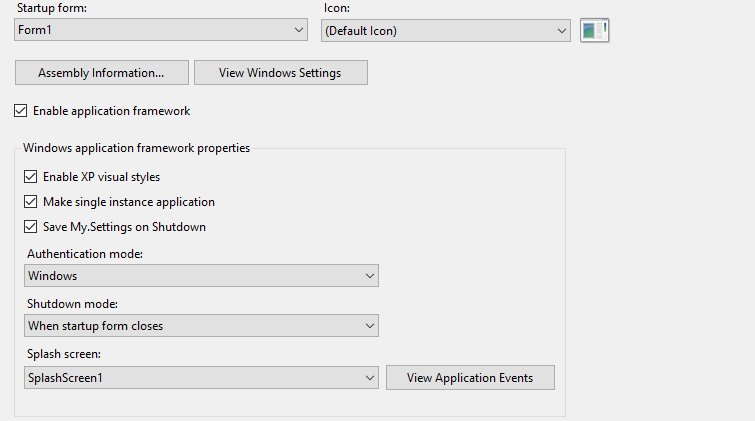
From Core

I have something now that appears to work though without knowing how the option is stored and set in Core and the way to get at application events for 'Me_StartupNextInstance' I don't know how to write tests.
paul1956
on 8 Apr 2020
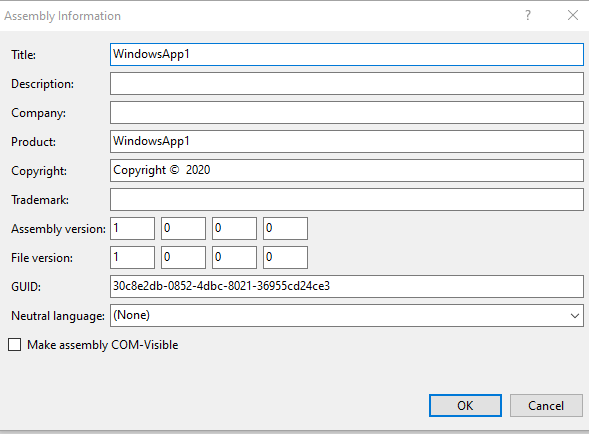
Also to exactly match current behavior there will need to be a Project GUID set by Visual Studio
paul1956
on 8 Apr 2020
for this to work there is going to need UI work in Visual Studio
No thats not necessary, this UI just sets Me.IsSingleInstance = true in the generated Application.Designer.vb and an entry in the xml file Application.myapp. You can just as well set this property to true in the user-defined part of the application class, no need for code generators or UI (of course UI would be nice to keep things consistent for VB developers porting their applications, but for testing/using the implementation its not necessary).
there will need to be a Project GUID set by Visual Studio
The project GUID is the [assembly: Guid("...")] attribute (or <Assembly: Guid("...")> in VB). This used to be set in AssemblyInfo.cs/vb with a random GUID when you created a new project. You usually didn't use the UI to set the GUID here either. Since AssemblyInfo isn't auto generated anymore, for testing you can just add the GUID attribute in a user defined code file (outside any namespace).
I'm not arguing that there shouldn't be any UI, just that the implementation can be tested/used without waiting for VS to provide UI.
To be clear, when in Desktop Framework you could click a "View Application Events" button in your screenshot above and it would generate this code:
Namespace My
    Partial Friend Class MyApplication
    End Class
End Namespace
You can define this manually in a .NET Core project and put the desired code in there (event handlers and the initialization of Me.IsSingleInstance = true).
weltkante
on 8 Apr 2020
@weltkante I figured out the the issue with that was preventing testing (I left out WithEvents when I manually created the Application variable). The issue with needing a constant GUID is Single Instance assumes that an instance is unique as long as the Major and Minor version does not change.
paul1956
on 8 Apr 2020
Yeah its certainly worth discussing about how to improve single instance detection. Maybe its worth adding a new property besides IsSingleInstance, I could imagine having a SingleInstanceKey string property (could be hashed to avoid working with arbitrary long strings), and if none is provided it just falls back to the old GUID logic.
This would allow for example to put the normalized application path into the property, which would result only instances started from the same exe to be considered "same instance". Thats certainly what I'd prefer if I were to use this feature.
Depending on his requirements the user could also put just the assembly name, or the assembly name plus version into that string and get the corresponding behavior of different versions being the same instance or not being the same instance.
This doesn't have to be in the initial implementation, could easily be split off into a separate issue and implemented later, so maybe just stick with the GUID thing for now.
weltkante
on 8 Apr 2020
Right now I try to get GUID from Attribute, If I get it I append Major and Minor Version and it is identical to the way its always worked in VB. If I don't get a GUID then I use Assembly.ManifestModule.ModuleVersionId which supports deterministic builds. There is a comment about making the function Overridable but that was never implemented.
paul1956
on 8 Apr 2020
One of the reasons to not use a constant is to prevent someone spoofing your app especially when some apps that use this functionality open files based based on additional instances. I think most people including me just want 1 copy of app running and never look at the command lines from additional instances.
paul1956
on 8 Apr 2020
One of the reasons to not use a constant is to prevent someone spoofing your app
You can't prevent this, launching an application is not crossing a security boundary if both are running under the same account (and if they aren't you already have a security issue if you can do single instance across accounts). The spoofing app can just copy the source code of the single instance implementation and put any constant in it wants (or in case of Desktop Framework copy the raw IL, reference source or decompiled code and adjust it as required). Instead of adding security not providing customizatbility just makes it harder for legitimate use cases.
Generally this scenario is considered a user attacking himself (or social engineering), which is not a security issue you can solve on the technical level. You have to trust applications you execute before you execute them, sandboxing is not a thing in .NET anymore. Dumbing down applications by removing features only works on the OS level.
Thats just from my understanding, feel free to ask for an official opinion. Personally I'd like at least the use case covered that single instance is based on application path. When loading additional data thats relative to application path and mixing it up during single instancing will just lead to confusing behavior for my applications - but I don't mind copying the source and maintaining my own implementation should I need to.
weltkante
on 8 Apr 2020
@weltkante I made the key function that determines if 2 instances are the same Public Overridable. Copying the code turns out more complicated then I thought that is how I have been testing it. I did a PR to get some comments.
paul1956
on 10 Apr 2020
I use Mutex and NamedPipe solve it,but it's a little trouble.
this issue can be closed.
 zhou881117
on 30 Apr 2020
zhou881117
on 30 Apr 2020
This should be closed or linked to https://github.com/dotnet/winforms/issues/3131
paul1956
on 30 Apr 2020
Related issues
 kirsan31
·
4Comments
weltkante
·
5Comments
kirsan31
·
4Comments
weltkante
·
5Comments
 vladimir-krestov
·
4Comments
vladimir-krestov
·
4Comments
 damageboy
·
4Comments
damageboy
·
4Comments
 jmairboeck
·
5Comments
jmairboeck
·
5Comments