Winforms: Referencing mshtml.dll in a .NET Core 3 WinForms project
- .NET Core Version: 3.0 Preview 7
- Have you experienced this same bug with .NET Framework?: No
Problem description:
I am having an issue with adding Microsoft.mshtml to my converted (net471) .NET Core 3 project. With .NET Framework, I was able to go into Reference Manager -> Assemblies tab -> Extensions sub tab, then find Microsoft.mshtml.  As the assemblies tab does not exist in .NET Core 3 projects, I looked for a package on NuGet, but was unable to find anything from Microsoft (I tried https://www.nuget.org/packages/Unofficial.Microsoft.mshtml/, which compiles, but fails at runtime).
Actual behavior:
Expect to be able to find a NuGet package (or another manner of adding the reference) for Microsoft.mshtml.
Expected behavior:
Unable to find a way to add Microsoft.mshtml to a .NET Core 3 application.
Minimal repro:
N/A.
 MatthewBeardmore
All 10 comments
Can you tell us a bit more about your scenario? Perhaps we can find some existing options.
 merriemcgaw
on 9 Aug 2019
merriemcgaw
on 9 Aug 2019
I am attempting to add events on a WinForms WebBrowser to attach to mouse wheel events, which isn't possible via the normal C# WebBrowser events. So in the past with .NET Framework, I'd do something like the following:
mshtml.HTMLDocumentEvents2_Event docEvents = (mshtml.HTMLDocumentEvents2_Event)webBrowser.Document.DomDocument;
docEvents.onmousewheel += docEvents_onmousewheel;
to attach to any events I needed to hook into. Since I can't reference Microsoft.mshtml (or can't find out how to reference it), I am unable to do so.
MatthewBeardmore
on 9 Aug 2019
@MatthewBeardmore You can use tlbimp.exe to export the type definitions of mshtml.tlb into equivalent definitions in .net assembly.
Then add a reference to the exported dll and in Visual Studio, in the properties of the reference, set Embed Interop Types to Yes.
I've shared all the steps here in this post: Use COM type libraries in .NET CORE Windows Forms Project
 r-aghaei
on 12 Aug 2019
r-aghaei
on 12 Aug 2019
Thanks for the writeup - that is super useful.
MatthewBeardmore
on 12 Aug 2019
@MatthewBeardmore in the original screenshot there is COM tab.
Is there a reason you can't use it?
 RussKie
on 13 Aug 2019
RussKie
on 13 Aug 2019
The COM tab exists in both .NET Framework and .NET Core 3 projects, however, it does not have Microsoft.mshtml in either. Microsoft.mshtml is only available from the Assemblies -> Extensions tab, which only exists for .NET Framework projects.
MatthewBeardmore
on 13 Aug 2019
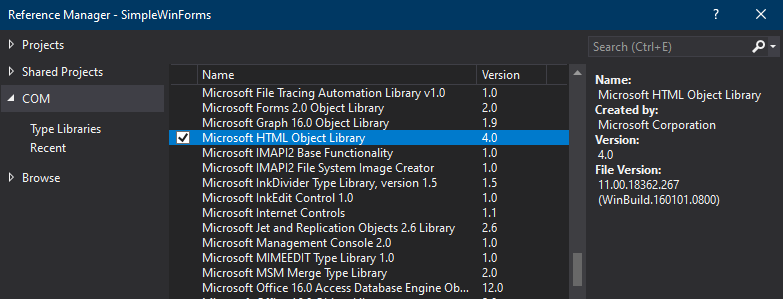
I think this is the same COM object as you get by running tlbimp.
[EDIT]
Here's what you get in the csproj when added:
  <ItemGroup>
    <COMReference Include="MSHTML.dll">
      <Guid>3050f1c5-98b5-11cf-bb82-00aa00bdce0b</Guid>
      <VersionMajor>4</VersionMajor>
      <VersionMinor>0</VersionMinor>
      <WrapperTool>tlbimp</WrapperTool>
      <Lcid>0</Lcid>
      <Isolated>false</Isolated>
    </COMReference>
  </ItemGroup>
This is how I get Reference Manager window when I try to add reference to a .NET Core Class Library or Windows Forms project in VS 2019 16.2.1:
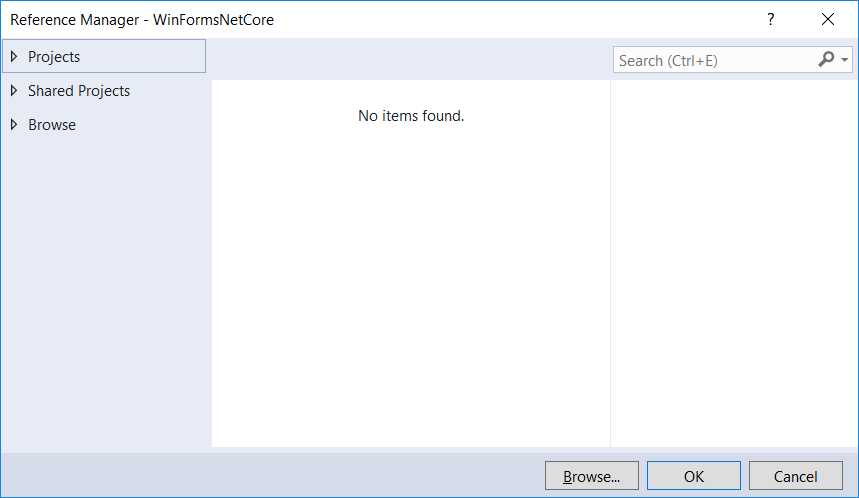
@RussKie Which version of VS/NET Core/Project Template does the screenshot belongs to?
r-aghaei
on 13 Aug 2019
I'm on an internal build, so I presume you will get the same functionality in the next version of VS.
RussKie
on 13 Aug 2019
@r-aghaei You need VS 2019 16.3 preview to get the COM menu with .NET Core 3 projects I believe.
@RussKie You are correct. I saw that, tried it, and moved on as it didn't have the same namespace. The one that I had added in the .NET Framework picture added the namespace as "mshtml", while the one you showed adds it as "MSHTML". We can close this as it just requires modifying the namespace.
MatthewBeardmore
on 13 Aug 2019
Related issues
 Olina-Zhang
·
5Comments
Olina-Zhang
·
5Comments
 weltkante
·
5Comments
weltkante
·
5Comments
 Jenna-Zheng
·
3Comments
Jenna-Zheng
·
3Comments
 lonitra
·
5Comments
lonitra
·
5Comments
 0x084E
·
3Comments
0x084E
·
3Comments
Most helpful comment
@r-aghaei You need VS 2019 16.3 preview to get the COM menu with .NET Core 3 projects I believe.
@RussKie You are correct. I saw that, tried it, and moved on as it didn't have the same namespace. The one that I had added in the .NET Framework picture added the namespace as "mshtml", while the one you showed adds it as "MSHTML". We can close this as it just requires modifying the namespace.