Winforms: Cannot add ElementHost control in project because there’s no Integration namespace in System.Windows.Forms
- .NET Core Version: 3.0.100-preview7-012434 from Master branch
- Have you experienced this same bug with .NET Framework?: No
OS: RS4 X64
VS: Dev16 16.2.0 Preview 3.0 [29014.106.d16.2]
.NET Core: 3.0.100-preview7-012434 from Master branch
More Info:
This issue can repro in 3.0.100-preview7-012361 from Master branch too. But it’s not existed in latest 3.0.100-preview6-012266 from Release branch. It's a regression issue.
Steps to reproduce:
- Install the .NET Core 3.0 SDK from https://github.com/dotnet/core-sdk for Master branch.
- Create a template of Winforms .NET Core app in VS.
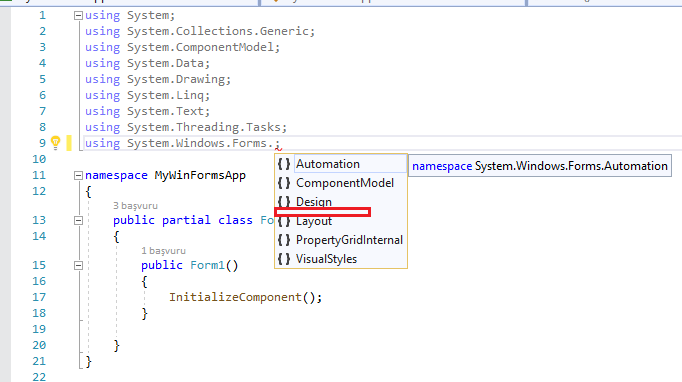
- Open From1.cs file and type System.Windows.Forms.Integration.
Actual:
There’s no Integration namespace exists in System.Windows.Forms, and cannot add ElementHost control in .NET Core project.
Expected:
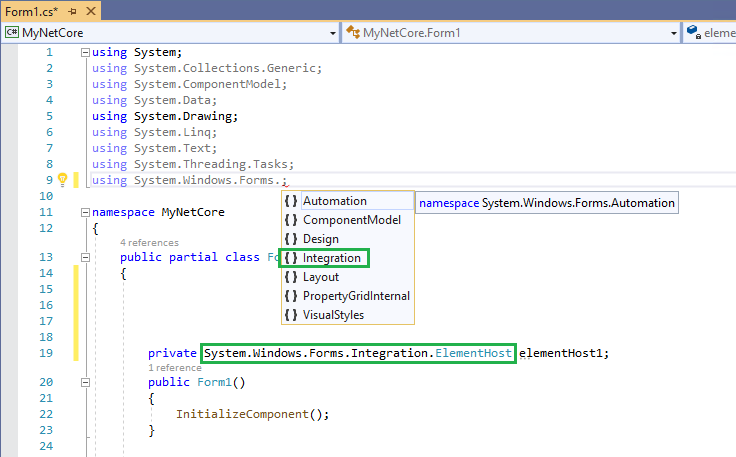
There should has the Integration namespace in System.Windows.Forms and we can create ElementHost object.
 John-Qiao
All 11 comments
This namespace is not part of WinForms, its part of WPF. The Assembly is WindowsFormsIntegration.dll and in Desktop Framework you have to add the reference explicitely.
It's a regression issue
Not sure if this is a regression, could be a bugfix. I wouldn't expect it to be on by default, because that would mean all WinForms projects would have to load WPF "just in case". You probably have to hit some switch in the project file to make the project support both WPF and WinForms and get this feature enabled.
 weltkante
on 19 Jun 2019
weltkante
on 19 Jun 2019
@vatsan-madhavan what are your thoughts on how we ought to get this enabled for the developers using the ElementHost control in their apps, and not have WPF load for all apps?
 merriemcgaw
on 20 Jun 2019
merriemcgaw
on 20 Jun 2019
@John-Qiao can you help narrow down which build it changed in?
merriemcgaw
on 20 Jun 2019
It's not going to _load_ WPF.
Setting both <UseWindowsForms>true</UseWindowsForms> and <UseWpf>true</UseWpf> will switch from Microsoft.WindowsDesktop.App.WindowsForms FrameworkReference profile to Microsoft.WindowsDesktop.App profile.
The _full_ profile will add references to all assemblies in Microsoft.WindowsDesktop.App - yes - but what the app _loads_ is only what intends to _use_. In this instance, it will really only _load_ WindowsFormsIntegration. (That said, if the app intends to use ElementHost in WinForms, I'd imagine that a WPF control may be hosted within...)
I realize that this design could given the _impression_ of a regression. In .NET Framework, the extra reference was WindowsFromsIntegration (no words like 'wpf' in there), whereas in .NET Core, the change being requested to the project looks like <UseWpf>true</UseWpf>, suggesting (perhaps in the extreme) that "all of WPF may be used".
Do we think the problem is sufficiently bad that we have to consider adding a synonym for _use everything in WindowsDesktop.App_ that doesn't involve 'wpf' in the wording? something like UseWindowsFormsIntegration - which will really be a synonym for UseWpf (but it could be less jarring to use in a Windows Forms project) ?
/cc @nguerrera, @dsplaisted
 vatsan-madhavan
on 20 Jun 2019
vatsan-madhavan
on 20 Jun 2019
BTW this would have changed recently (<2 weeks)
FrameworkReference profile refactoring was done in sdk ~month ago (https://github.com/dotnet/sdk/pull/3259), and support for it was just added in WindowsDesktop SDK ~2wks ago:https://github.com/dotnet/wpf/pull/868
vatsan-madhavan
on 20 Jun 2019
I think for now having to set UseWPF is OK, and once we have the Reference support, you should also be able to specifically reference WindowsFormsIntegration without the other WPF references.
 dsplaisted
on 20 Jun 2019
dsplaisted
on 20 Jun 2019
I think for now having to set UseWPF is OK
+1
vatsan-madhavan
on 20 Jun 2019
@John-Qiao can you confirm adding the UseWPF flag to the project file will allow you to add an ElementHost control.
merriemcgaw
on 21 Jun 2019
@merriemcgaw I retested this scenario in .NET Core 3.0.100-preview7-012578 app, after added
John-Qiao
on 24 Jun 2019
Can we close it now?
 RussKie
on 24 Jun 2019
RussKie
on 24 Jun 2019
Yes we can
merriemcgaw
on 28 Jun 2019
Related issues
weltkante
·
5Comments
 kirsan31
·
4Comments
RussKie
·
5Comments
kirsan31
·
4Comments
RussKie
·
5Comments
 vladimir-krestov
·
4Comments
vladimir-krestov
·
4Comments
 Jenna-Zheng
·
3Comments
Jenna-Zheng
·
3Comments
Most helpful comment
I think for now having to set
UseWPFis OK, and once we have theReferencesupport, you should also be able to specifically reference WindowsFormsIntegration without the other WPF references.