Windowstemplatestudio: New WPF project Packaging 'mismatch between the processor architecture'
Describe the bug
On build of new WPF (Prisim) application: "mismatch between the processor architecture "
To Reproduce
Steps to reproduce the behavior:
- New project using WPF, Ribbon, Prism (with all the options ticked)
- Add new certificate to Packaging project
- Right click | Publish > 'Create App Packages'
- Sideloading > Next
- 'Yes, use the current certificate' > Next
- Defaults only (NB packages to create... are 'Architecture'=Neutral: 'Debug (Any CPU)' > Next
Expected behavior
Step 6 'Debug x86' for WPF apps. I believe (please confirm) that there is restriction to x86 for dotnetcore3.1 WPF exe projects wrapped with MSIX for the store.
Screenshots
-
Additional context
Error message:
Error There was a mismatch between the processor architecture of the project being built "MSIL" and the processor architecture of the reference "...test\bin\x86\Debug\netcoreapp3.0\win-x86\test.dll", "x86". This mismatch may cause runtime failures. Please consider changing the targeted processor architecture of your project through the Configuration Manager so as to align the processor architectures between your project and references, or take a dependency on references with a processor architecture that matches the targeted processor architecture of your project. test.Packaging
System
- 2019VS Version: 16.5 p1.0
- WinTS Wizard Version:?
- WinTS Template Version:0.21.20044.1
- Windows Build:1903
 OzBob
OzBob
All 11 comments
fix is to
untick 'Neutral'
tick x86
continue
OzBob
on 13 Feb 2020
After distributing the installer and running the index.html, The Installer error is:
"The .appinstaller file is invalid."
OzBob
on 13 Feb 2020
Sample .appinstaller
<?xml version="1.0" encoding="utf-8"?>
<AppInstaller
    Uri="****test.Packaging.appinstaller"
    Version="1.0.7.0" xmlns="http://schemas.microsoft.com/appx/appinstaller/2017/2">
    <MainBundle
        Name="07ad151b-a614-4a13-aef0-5378d3f98e67"
        Version="1.0.7.0"
        Publisher="CN=****"
        Uri="****test.Packaging_1.0.7.0_x86_Debug.msixbundle" />
    <UpdateSettings>
        <OnLaunch
            HoursBetweenUpdateChecks="0" />
    </UpdateSettings>
</AppInstaller>
OzBob
on 13 Feb 2020
Thanks for reporting, will look into this!
 sibille
on 13 Feb 2020
sibille
on 13 Feb 2020
@ozbob,
We are mimicking what Visual Studio does when you create an WPF project and add a Windows Application Packaging Project.
I could not reproduce the instalation problem and your .appinstaller file looks fine to me. (I suppose you added the * to hide personal information).
What operating system are you running on? Does a VS WPF App + Windows Application Packaging Project work for you? Did you go through https://docs.microsoft.com/en-us/windows/msix/app-installer/troubleshoot-appinstaller-issues?
sibille
on 13 Feb 2020
I would suggest WTS change the packaging project template defaults for WPF dotnetcore 3.1 by following the instructions here
https://docs.microsoft.com/en-us/windows/msix/desktop/desktop-to-uwp-packaging-dot-net
and setting the x86 processor type as the default chosen in the packaging window (if possible - maybe by removing all the other choices??)
OzBob
on 14 Feb 2020
Your package isn't working for me neither. I think the best way to report this is through Visual Studio Report option, but will double check.
I would suggest WTS change the packaging project template defaults for WPF dotnetcore 3.1 by following the instructions here
https://docs.microsoft.com/en-us/windows/msix/desktop/desktop-to-uwp-packaging-dot-net
Agree, we should include this!
sibille
on 14 Feb 2020
Fixed the installer error. I had incorrectly put the source of installer as 'http' rather than 'https', and windows marks that as invalid but doesn't give a useful error message.
In relation to this issue/feature, i would recommend that the default path be the path of the AppPackages folder in the packaging project
OzBob
on 19 Feb 2020
@OzBob, do you refer to this path?
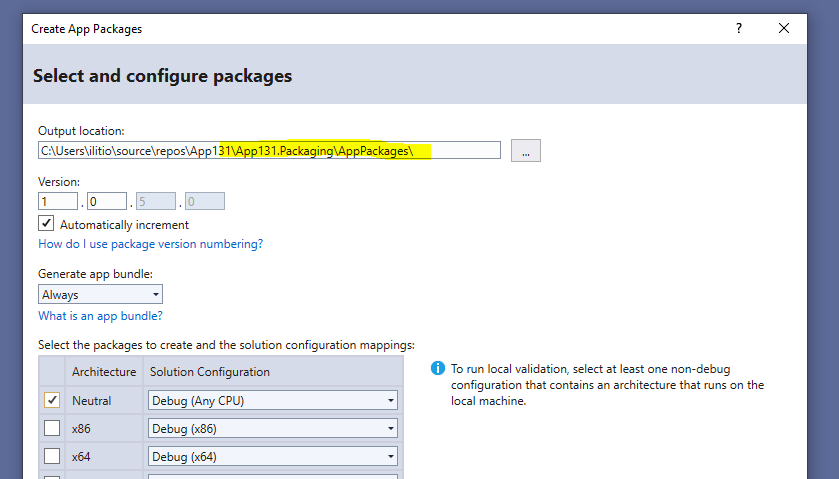
We're already setting this in the latest dev-nightly.
Still figuring out if we can pre-select x86 and x64 ...
sibille
on 19 Feb 2020
yep that's the path.
i'll get the latest nightly.
thanks
OzBob
on 21 Feb 2020
Verified in dev-nightly:
Templates version: 0.21.20062.1
Wizard version: 0.21.20057.1
sibille
on 2 Mar 2020
Related issues
sibille
·
4Comments
 enghch
·
7Comments
enghch
·
7Comments
 touseefbsb
·
6Comments
touseefbsb
·
6Comments
 mrlacey
·
7Comments
mrlacey
·
7Comments
 crutkas
·
8Comments
crutkas
·
8Comments