Windowstemplatestudio: Using datatemplate with NavigationView breaks expected navigation.
For new Features:
- Overview: What you'd think should be added with scenarios
- Links:
For Bugs:
Replacing Hamburger menu with Navigation View using data templates breaks NavigationViewItem.
Repro steps
What did you do? How can someone else reproduce this?
Replaced template generated Hamburger Menu with Navigation View:
<Page.Resources>
        <DataTemplate x:Key="NavigationMenuItemDataTemplate" x:DataType="vm:ShellNavigationItem">
            <NavigationViewItem Content="{x:Bind Path=Label}"
                                Icon="{x:Bind Path=Icon}"
                                ToolTipService.ToolTip="{x:Bind Path=Label}">
            </NavigationViewItem>
        </DataTemplate>
</Page.Resources>
<NavigationView x:Name="NavigationMenu"
                    MenuItemTemplate="{StaticResource NavigationMenuItemDataTemplate}"
                    MenuItemsSource="{x:Bind Path=ViewModel.PrimaryItems}"
                    SelectedItem="{x:Bind ViewModel.Selected, Mode=OneWay}"
                    IsPaneOpen="{x:Bind Mode=TwoWay, Path=ViewModel.IsPaneOpen}"
                    AlwaysShowHeader="False"
                    OpenPaneLength="130">
        <i:Interaction.Behaviors>
            <ic:EventTriggerBehavior EventName="ItemInvoked">
                <ic:InvokeCommandAction Command="{x:Bind ViewModel.ItemSelectedCommand}" />
            </ic:EventTriggerBehavior>
        </i:Interaction.Behaviors>
        <Grid Background="{ThemeResource SystemControlBackgroundAltHighBrush}">
            <Frame x:Name="shellFrame"/>
        </Grid>
        <VisualStateManager.VisualStateGroups>
            <VisualStateGroup x:Name="WindowStates">
                <i:Interaction.Behaviors>
                    <ic:EventTriggerBehavior EventName="CurrentStateChanged">
                        <ic:InvokeCommandAction Command="{x:Bind ViewModel.StateChangedCommand}"/>
                    </ic:EventTriggerBehavior>
                </i:Interaction.Behaviors>
                <VisualState x:Name="PanoramicState">
                    <VisualState.StateTriggers>
                        <AdaptiveTrigger MinWindowWidth="1024"/>
                    </VisualState.StateTriggers>
                </VisualState>
                <VisualState x:Name="WideState">
                    <VisualState.StateTriggers>
                        <AdaptiveTrigger MinWindowWidth="640"/>
                    </VisualState.StateTriggers>
                </VisualState>
                <VisualState x:Name="NarrowState">
                    <VisualState.StateTriggers>
                        <AdaptiveTrigger MinWindowWidth="0"/>
                    </VisualState.StateTriggers>
                </VisualState>
            </VisualStateGroup>
        </VisualStateManager.VisualStateGroups>
</NavigationView>
Expected Behavior
Menu items should work whereever the user clicks.
Actual Behavior
Menu items no longer act as one 'button'.
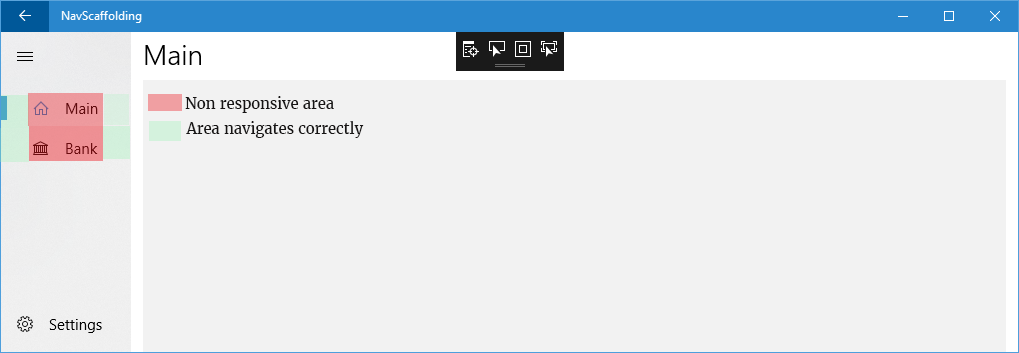
This behavior replicates this issue using either 'Navigation Pane + Code Behind', 'Navigation Pan + MVVMLight' and 'Navigation Pan + Prism.'
System
- VS Version: Microsoft Visual Studio Community 2017 Version 15.6.2
- WTS Wizard Version: 1.7.18030.1
- WTS Template Version: 1.7.18037.1
- Windows Build: Windows 10 Education Version 10.0.16299 Build 16299
 DLBrowne
All 6 comments
Hi @DLBrowne
On the Issue #308 I've created a branch that integrates NavigationView Control on generated navigation pane apps. NavigationView control will be in WTS Apps soon, we are also going to create a documentation that explains how to include the NavigationView in a project that already contains the HamburguerControl.
You can check out on this Issue a reference to NavigationView doc on docs.microsoft.com. And you can download a generated app with NavigationView.
In this generated App you could see that we Stop Using the ShellNavigationItem class and now the MenuItems on the NavigationView were added in Xaml instead of the code behind. The class used to create the MenuItems is the NavigationViewItem.
I hope this can help you until the "update to NavigationView" doc will be created.
 mvegaca
on 20 Mar 2018
mvegaca
on 20 Mar 2018
@DLBrowne The issue you're having is with the way that the NavigationViewItem works. When you set the DataTemplate for the MenuItemTemplate this actually only applies to the Content property which would usually only display text.
By setting the DataTemplate the way you have, you're putting a NavigationViewItem inside another NavigationViewItem. This explains the visuals you're seeing. The reason that not all clicks/taps are handled as you expect is that they are being intercepted by the NavigationViewItem that the template adds, but the handler for processing them is
However, you can work around this by using a data template like the one below.
    <DataTemplate x:Key="NavigationViewMenuItemDataTemplate" x:DataType="vm:ShellNavigationItem">
        <Grid Width="304">
            <NavigationViewItem Content="{x:Bind Label}"
                                Margin="-16,0,0,0"
                                IsHitTestVisible="False"
                                Background="Transparent"
                                Icon="{x:Bind Path=Icon}"
                                ToolTipService.ToolTip="{x:Bind Label}" />
        </Grid>
    </DataTemplate>
Here are the important points in the above:
- The specified width of the grid is the width of the panel minus the area reserved for the selected indicator. Setting this avoids some issues with grid borders sometimes showing.
- The Margin moves everything to the position it would be in if there weren't nested items.
IsHitTestVisible="False"stops the added item from intercepting the click/tap so you can click anywhere and have it trigger navigation.- Setting
Background="Transparent"avoids some strange visual side-effects from having nested controls.
I hope this solves your immediate problems. As @mvegaca mentioned we're working on updated templates to avoid this in the future. Additionally, we'll provide clear documentation to update apps created that use the HamburgerMenu so that they can use the NavigationView.
 mrlacey
on 20 Mar 2018
mrlacey
on 20 Mar 2018
I've added a PR with a documentation to explain that.
Add doc: Update from HamburgerMenu to NavigationView
I hope it can help you @DLBrowne
mvegaca
on 20 Mar 2018
@mrlacey The workaround works great. Do you know if OptionItems Source & Template will make it into the new Navigation View? There doesn't seem to be any reference in the NavigationView Class doc.
DLBrowne
on 20 Mar 2018
@DLBrowne the nearest thing is the "PaneFooter" which can be used to hold anything. It doesn't support a source or template, but you could put a collection of NavigationViewItems in it.
mrlacey
on 21 Mar 2018
Closing in the hope that the PR @mvegaca referenced addresses the issue
mrlacey
on 11 Apr 2018
Related issues
 msavazzi
·
3Comments
msavazzi
·
3Comments
 hupo376787
·
6Comments
hupo376787
·
6Comments
 michael-hawker
·
10Comments
mrlacey
·
4Comments
michael-hawker
·
10Comments
mrlacey
·
4Comments
 touseefbsb
·
6Comments
touseefbsb
·
6Comments
Most helpful comment
@DLBrowne The issue you're having is with the way that the
NavigationViewItemworks. When you set theDataTemplatefor theMenuItemTemplatethis actually only applies to theContentproperty which would usually only display text.By setting the DataTemplate the way you have, you're putting a NavigationViewItem inside another NavigationViewItem. This explains the visuals you're seeing. The reason that not all clicks/taps are handled as you expect is that they are being intercepted by the NavigationViewItem that the template adds, but the handler for processing them is
However, you can work around this by using a data template like the one below.
Here are the important points in the above:
IsHitTestVisible="False"stops the added item from intercepting the click/tap so you can click anywhere and have it trigger navigation.Background="Transparent"avoids some strange visual side-effects from having nested controls.I hope this solves your immediate problems. As @mvegaca mentioned we're working on updated templates to avoid this in the future. Additionally, we'll provide clear documentation to update apps created that use the HamburgerMenu so that they can use the NavigationView.