Windowstemplatestudio: Hamburger button position wrong on latest insider build
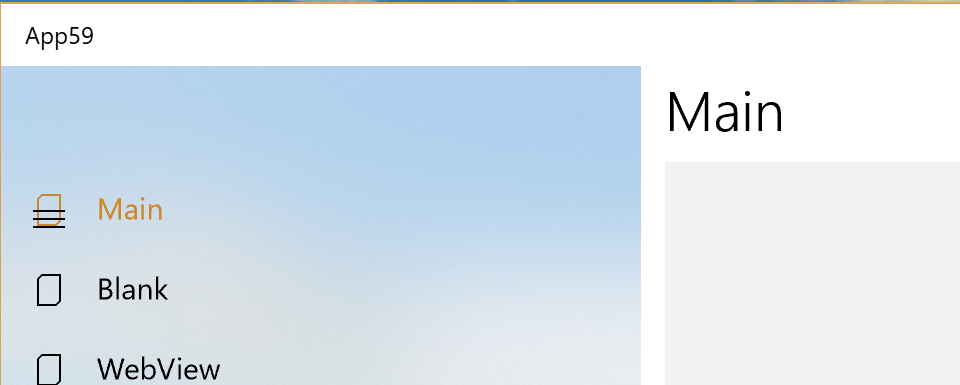
Using latest dev-nightly templates.
When running a SplitView app on a machine running on Windows Insider Build (17074.rs_prerelease.180106-2256) the position of the hamburger button is displayed to low.
This does not occur on a machine running the FCU version of Win10.
I'm unable to identify any other difference between the two machines I have this running on that may be causing the issue.
 mrlacey
All 20 comments
Can anyone else repro this?
mrlacey
on 18 Jan 2018
Me.
Windows Template Studio 1.6.17355.2
Visual Studio 15.5.4
Windows 10 Enterprise Insider Preview version 1709 build 17074.1000
 phraemer
on 18 Jan 2018
phraemer
on 18 Jan 2018
As this only happens on Insider builds, I suggest we monitor and revisit after the next insider build is released.
I can't see an easy fix for this and don't think it's something we should be spending time on.
mrlacey
on 18 Jan 2018
agreed if this is insider builds issue. one question is does this happen on the insider build's normal control without WTS
 crutkas
on 18 Jan 2018
crutkas
on 18 Jan 2018
I can't get a full repro but believe it's due to the control on the insider build putting the back arrow in a different place.
mrlacey
on 19 Jan 2018
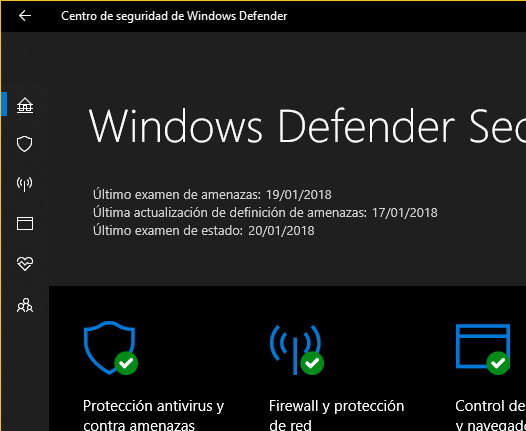
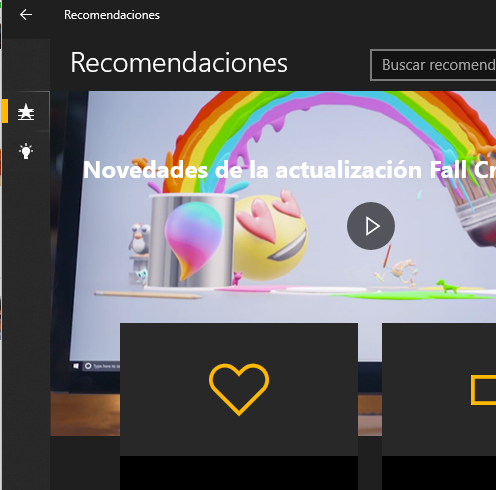
Hi, I can repro this bug in my machine. In fact, it exists since previous build (17073). This bug is also present in some system apps: Windows Defender Security Center and Tips
 eramajarvi
on 20 Jan 2018
eramajarvi
on 20 Jan 2018
@nmetulev you have a contact for this, they aware of the issue in the insider builds?
 michael-hawker
on 23 Jan 2018
michael-hawker
on 23 Jan 2018
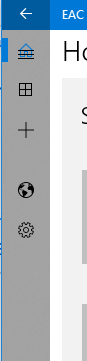
Issue persists in insider rs_release 17101... Also interested in finding a way to push the secondary items to the bottom.
 EdAlexander
on 16 Feb 2018
EdAlexander
on 16 Feb 2018
Problem not manifest when setting UseNavigationViewWhenPossible="False"
EdAlexander
on 16 Feb 2018
@EdAlexander looks to be an issue with the navview for WIP. i'll follow up with the XAML team
crutkas
on 16 Feb 2018
The issue is still present in the RS5 branch in 17604 @crutkas This needs to be fixed before RS4 goes live.
 mdtauk
on 16 Feb 2018
mdtauk
on 16 Feb 2018
@mdtauk yup, bug fixes are still going into the current release which then are also put into the next gen branch.
looking into this now.
crutkas
on 16 Feb 2018
bug is verified and looks to have been fixed. going to see when it will be merged into a public SDK drop.
crutkas
on 16 Feb 2018
Just for clarity: Is this a bug in Template Studio, UWP community toolkit, or W10?
EdAlexander
on 18 Feb 2018
@EdAlexander It's an issue with the native control in the insider builds
mrlacey
on 18 Feb 2018
Bug in the native Navigation view control in WIP builds. It is fixed but hasn’t hit a public build.
The toolkit does a smart flip between their custom and the native control that was introduced in fall creators update.
crutkas
on 18 Feb 2018
From above, I am also interested in pushing the secondary items to the bottom of the pane.... Is this possible? I have confirmed that on production W10 (fall creators update) that the secondary items are listed with no alignment.
EdAlexander
on 19 Feb 2018
@EdAlexander in terms of moving secondary items to the bottom. See an explanation of why and a workaround at https://github.com/Microsoft/WindowsTemplateStudio/issues/1763#issuecomment-363251560
If you want to move more than just the settings, you could add those items to the PaneFooter of the NavigationView.
mrlacey
on 19 Feb 2018
bet this is fixed now
crutkas
on 27 Mar 2018
no longer repos on 17128
mrlacey
on 28 Mar 2018
Related issues
mrlacey
·
9Comments
 enghch
·
7Comments
crutkas
·
7Comments
mrlacey
·
4Comments
enghch
·
7Comments
crutkas
·
7Comments
mrlacey
·
4Comments
 hupo376787
·
6Comments
hupo376787
·
6Comments
Most helpful comment
As this only happens on Insider builds, I suggest we monitor and revisit after the next insider build is released.
I can't see an easy fix for this and don't think it's something we should be spending time on.