Windowsserverdocs: Enable-NetFirewallRule -DisplayGroup "Remote Administration"
This FW group was removed starting with Windows Server 2012.
Document Details
⚠ Do not edit this section. It is required for docs.microsoft.com ➟ GitHub issue linking.
- ID: ebe4d150-8841-b5b8-4762-2383cb3a7163
- Version Independent ID: f57bcc2a-ca9b-eea2-f778-091d7678c6ed
- Content: Manage Server Core
- Content Source: WindowsServerDocs/administration/server-core/server-core-manage.md
- Service: windows-server-threshold
- GitHub Login: @lizap
 eclaypool
All 6 comments
This is from Windows 2019.
So I don't think this group is removed.
PS C:\Users\Administrator> Get-NetFirewallRule -DisplayGroup "Windows Remote management" | fl Displaygroup
Displaygroup : Windows Remote Management
Displaygroup : Windows Remote Management
 Ashish-smiley
on 23 Oct 2018
Ashish-smiley
on 23 Oct 2018
The post by @eclaypool is correct. The display group in this article "Remote Administration" was removed from Windows Server 2012 and beyond. @Ashish-smiley the display group you have mentioned was "Windows Remote Management".
As you can clearly see, these display groups have two completely different names, which is hugely important when dealing with command line or PowerShell commands.
This article should be updated to remove the reference:
Enable-NetFirewallRule -DisplayGroup "Remote Administration" and then replace it with:
Enable-NetFirewallRule -DisplayGroup "Windows Remote Management"
 mbtxau
on 10 Nov 2018
mbtxau
on 10 Nov 2018
That's why I put my comment so article can be updated with correct information.
Thanks,
Ashish
Get Outlook for Androidhttps://aka.ms/ghei36
From: mbtxau notifications@github.com
Sent: Saturday, November 10, 2018 12:35:35 PM
To: MicrosoftDocs/windowsserverdocs
Cc: Ashish-smiley; Mention
Subject: Re: [MicrosoftDocs/windowsserverdocs] Enable-NetFirewallRule -DisplayGroup "Remote Administration" (#821)
The post by @eclaypoolhttps://github.com/eclaypool is correct. The display group in this article "Remote Administration" was removed from Windows Server 2012 and beyond. @Ashish-smileyhttps://github.com/Ashish-smiley the display group you have mentioned was "Windows Remote Management".
As you can clearly see, these display groups have two completely different names, which is hugely important when dealing with command line or PowerShell commands.
This article should be updated to remove the reference:
Enable-NetFirewallRule -DisplayGroup "Remote Administration" and then replace it with:
Enable-NetFirewallRule -DisplayGroup "Windows Remote Management"
—
You are receiving this because you were mentioned.
Reply to this email directly, view it on GitHubhttps://github.com/MicrosoftDocs/windowsserverdocs/issues/821#issuecomment-437563923, or mute the threadhttps://github.com/notifications/unsubscribe-auth/AqWVKzQDKgDKudseIxExiVJv0AkcBPYPks5utnq_gaJpZM4UAMJ2.
Ashish-smiley
on 13 Nov 2018
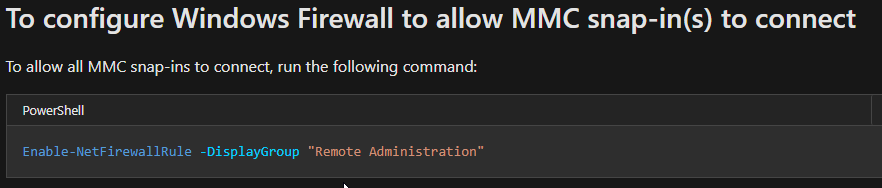
It's September 2020, almost 2 and a half years since this was reported. Why has this still not been fixed?
It's a 5 second change.
 dennish78
on 17 Sep 2020
dennish78
on 17 Sep 2020
Sorry about the delay in finding out more about these details.
This issue has also been reported in issue ticket #4477 Invalid Firewall command for Server 2019 .
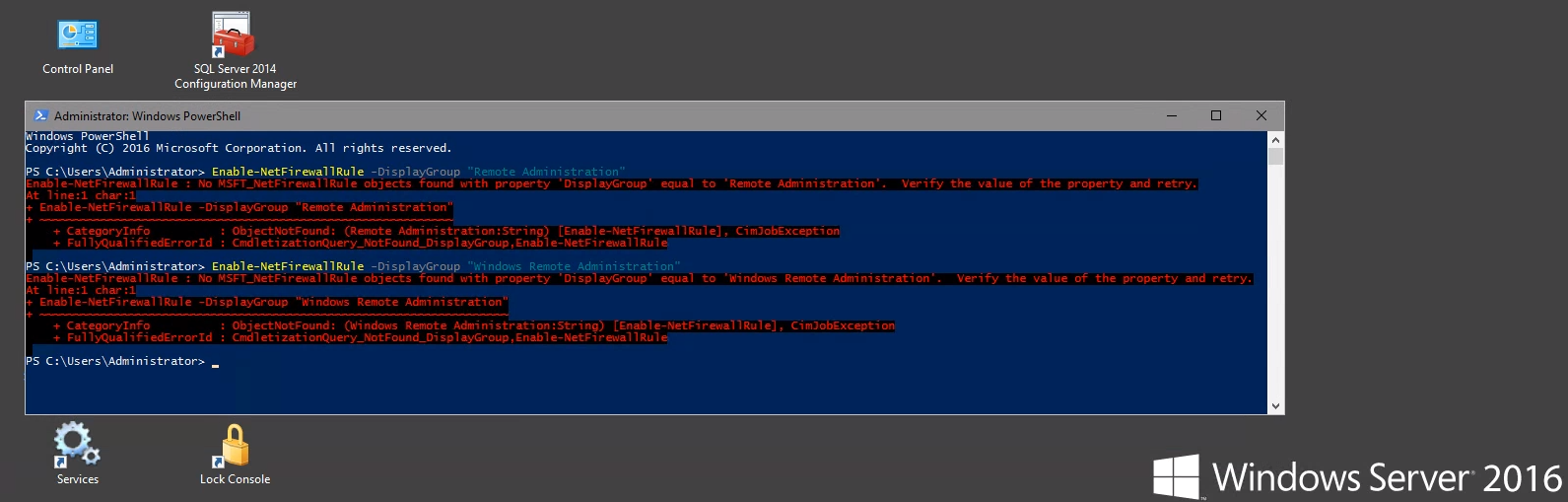
I have been a bit reluctant to propose the change, seeing that neither of the cmdlet strings work on Windows Server 2016 LTS:
 illfated
on 4 Oct 2020
illfated
on 4 Oct 2020
Would this be a more useful change to accommodate for all of the "Applies to:" versions (Windows Server 2019, Windows Server 2016, and Windows Server (Semi-Annual Channel))?
To configure Windows Firewall to allow MMC snap-in(s) to connect
To allow all MMC snap-ins to connect, run the following command:
Enable-NetFirewallRule

To allow only specific MMC snap-ins to connect, run the following:
Enable-NetFirewallRule -DisplayGroup "<rulegroup>"
Where rulegroup is one of the following, depending on which snap-in you want to connect:
| MMC snap-in | Rule group |
| ---------------------------------------- | ------------------------------------------------------- |
| Event Viewer | Remote Event Log Management |
| Services | Remote Service Management |
| Shared Folders | File and Printer Sharing |
| Task Scheduler | Performance Logs and Alerts, File and Printer Sharing |
| Disk Management | Remote Volume Management |
| Windows Firewall and Advanced Security | Windows Firewall Remote Management |
illfated
on 4 Oct 2020
Related issues
 skyflyer
·
3Comments
skyflyer
·
3Comments
 SimonWaters
·
5Comments
SimonWaters
·
5Comments
 Garthmj
·
3Comments
Garthmj
·
3Comments
 janis-veinbergs
·
5Comments
janis-veinbergs
·
5Comments
 alanmreagan
·
5Comments
alanmreagan
·
5Comments
Most helpful comment
The post by @eclaypool is correct. The display group in this article "Remote Administration" was removed from Windows Server 2012 and beyond. @Ashish-smiley the display group you have mentioned was "Windows Remote Management".
As you can clearly see, these display groups have two completely different names, which is hugely important when dealing with command line or PowerShell commands.
This article should be updated to remove the reference:
Enable-NetFirewallRule -DisplayGroup "Remote Administration" and then replace it with:
Enable-NetFirewallRule -DisplayGroup "Windows Remote Management"