Windowscommunitytoolkit: MasterDetailView make app crash on WinUI3 Desktop App
Windows Template Studio Team is working on a WinUI mockup for creating new templates.
I've created an Issue and a mockup with the WinUI3 code.
One of the initial specs was to create a MasterDetailPage with the WCT MasterDetailView control as it already happens in UWP platform templates.
When I've tried to add this control I get an exception and app crash with is info:
(Exception thrown at 0x6F5C3F9E (CoreUIComponents.dll) in WinUIDesktopApp.exe: 0xC0000005: Access violation reading location 0x00000000.)
Please let me know if it's a known Issue or if it will be solved on a new version, We are using the WCT V8.0.0.-preview2.
 mvegaca
All 10 comments
Hello mvegaca, thank you for opening an issue with us!
I have automatically added a "needs triage" label to help get things started. Our team will analyze and investigate the issue, and escalate it to the relevant team if possible. Other community members may also look into the issue and provide feedback 🙌
![msftbot[bot] picture](https://avatars2.githubusercontent.com/in/26612?v=4&s=40) msftbot[bot]
on 14 Aug 2020
msftbot[bot]
on 14 Aug 2020
Hello Martin.
I've downloaded the source from that branch and ran the app just fine:

All the menu options worked perfectly fine (at least no crash).
Do you have a list of steps you did to simulate the crash?
Quick question, which version of .Net 5 Preview are you using? Right now, WinUI3 Preview2 requires Net5 Preview5. you can specify that by using a global.json file:
dotnet new globaljson --sdk-version "5.0.100-preview.5.20279.10"
If you have a newer version (like preview 7, which is the latest), it will pick that one up and it is likely that it will crash.
 azchohfi
on 14 Aug 2020
azchohfi
on 14 Aug 2020
Hi
Sorry, I've just added the master detail page, this is the error I get.

Running
dotnet new globaljson --sdk-version
I get
SDK Version: 5.0.100-preview.5.20279.10
The page is a emptypage with a MasterDetailView control but I would like to add a MasterDetailPage based on Windows Template Studio MasterDetailPage for UWP page.
mvegaca
on 17 Aug 2020
@azchohfi should we pull someone in from the WinUI team on this? Any ideas on what the problem might be and why it works for you but not @mvegaca?
I am noticing the machine keyboard/locale may be different, could that be a problem here?
 michael-hawker
on 18 Aug 2020
michael-hawker
on 18 Aug 2020
I don't think that the keyboard is the problem here.
@mvegaca can you just F5 thru it? Do you have a call stack?
@stevenbrix, any idea?
azchohfi
on 19 Aug 2020
Steps I'm reproducing
Launch the app with debuggin F5 and select MasterDetail Page

App Crash

This is the exception details
Exception thrown at 0x69EC3F9E (CoreUIComponents.dll) in WinUIDesktopApp.exe: 0xC0000005: Access violation reading location 0x00000000.

System.AccessViolationException: 'Attempted to read or write protected memory. This is often an indication that other memory is corrupt.'
The App Crash and I can't catch in a global exception handler to see more details and the stacktrace.
public App()
{
  this.InitializeComponent();
  UnhandledException += App_UnhandledException;
}

private void App_UnhandledException(object sender, UnhandledExceptionEventArgs e)
{
}
I've updated my windows version and now it works, My machine was installed 18362 and now works with version 19041.
mvegaca
on 1 Sep 2020
Not sure, adding @ranjeshj in case this sounds familiar
 stevenbrix
on 2 Sep 2020
stevenbrix
on 2 Sep 2020
Could you try enabling all the exceptions, debug both managed and native (in project properties/debug) and see if you can get a callstack (with symbols resolved) ?
 ranjeshj
on 2 Sep 2020
ranjeshj
on 2 Sep 2020
Reproducing on a different machine with Windows Version 1909 as mvegaca updated his machine.
If I enable all exceptions I get another exception when starting the application before the exception on the Master Detail Page.

but still no stacktrace.
I'm using the following symbol servers:
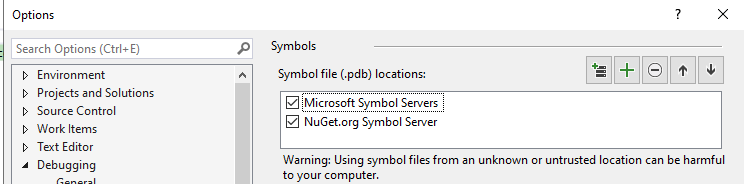
Should I add something else?
 sibille
on 18 Sep 2020
sibille
on 18 Sep 2020
Related issues
 shweaver-MSFT
·
3Comments
shweaver-MSFT
·
3Comments
 nolanblew
·
3Comments
nolanblew
·
3Comments
 Joebeazelman
·
3Comments
Joebeazelman
·
3Comments
 kusanagi2k2
·
4Comments
kusanagi2k2
·
4Comments
 Kyaa-dost
·
3Comments
Kyaa-dost
·
3Comments
Most helpful comment
Hi
Sorry, I've just added the master detail page, this is the error I get.
Running
dotnet new globaljson --sdk-versionI get
SDK Version: 5.0.100-preview.5.20279.10The page is a emptypage with a MasterDetailView control but I would like to add a MasterDetailPage based on Windows Template Studio MasterDetailPage for UWP page.