Windowscommunitytoolkit: TextBoxMask Extension Binding Text Issue
Describe the bug
Applying TextBoxMask on TextBox control is working. However, when the binding value changes, the TextBox UI did not reflect the changes.
- [ ]
Is this bug a regression in the toolkit? If so, what toolkit version did you last see it work:
Steps to Reproduce
Steps to reproduce the behavior (I'm using PRISM 6.x):
- Add these XAML,
<TextBox
    Width="120"
    Padding="0,4,0,0"
    VerticalAlignment="Center"
    extensions:TextBoxMask.CustomMask="5:[0-5]"
    extensions:TextBoxMask.Mask="99:59:59"
    extensions:TextBoxMask.PlaceHolder="--:--:--"
    Header="Opening Time"
    Text="{x:Bind ViewModel.OpeningTime, Mode=TwoWay}"
    TextAlignment="Center" />
<TextBox
    Width="120"
    Padding="0,4,0,0"
    VerticalAlignment="Center"
    extensions:TextBoxMask.CustomMask="5:[0-5]"
    extensions:TextBoxMask.Mask="99:59:59"
    extensions:TextBoxMask.PlaceHolder="--:--:--"
    Header="Closing Time"
    Text="{x:Bind ViewModel.ClosingTime, Mode=TwoWay}"
    TextAlignment="Center" />
- Add the property binding in ViewModel,
```C#
private string _openingTime = "00:00:00";
private string _closingTime = "23:59:59";
private ICommand _resetToDefaultCommand;
public string OpeningTime
{
get { return _openingTime; }
set { SetProperty(ref _openingTime, value); }
}
public string ClosingTime
{
get { return _closingTime; }
set { SetProperty(ref _closingTime, value); }
}
public ICommand ResetToDefaultCommand => _resetToDefaultCommand ??
(_resetToDefaultCommand = new DelegateCommand(() =>
{
OpeningTime = "00:00:00";
ClosingTime = "23:59:59";
}));
``
When Reset Button clicked, theTextBox` did not update the UI. However, if we delete one digit at the back or delete any digit, the value updated.
Expected behavior
When ResetToDefault Button clicked:
OpeningTime should be showing: 00:00:00
ClosingTime should be showing: 23:59:59
Screenshots
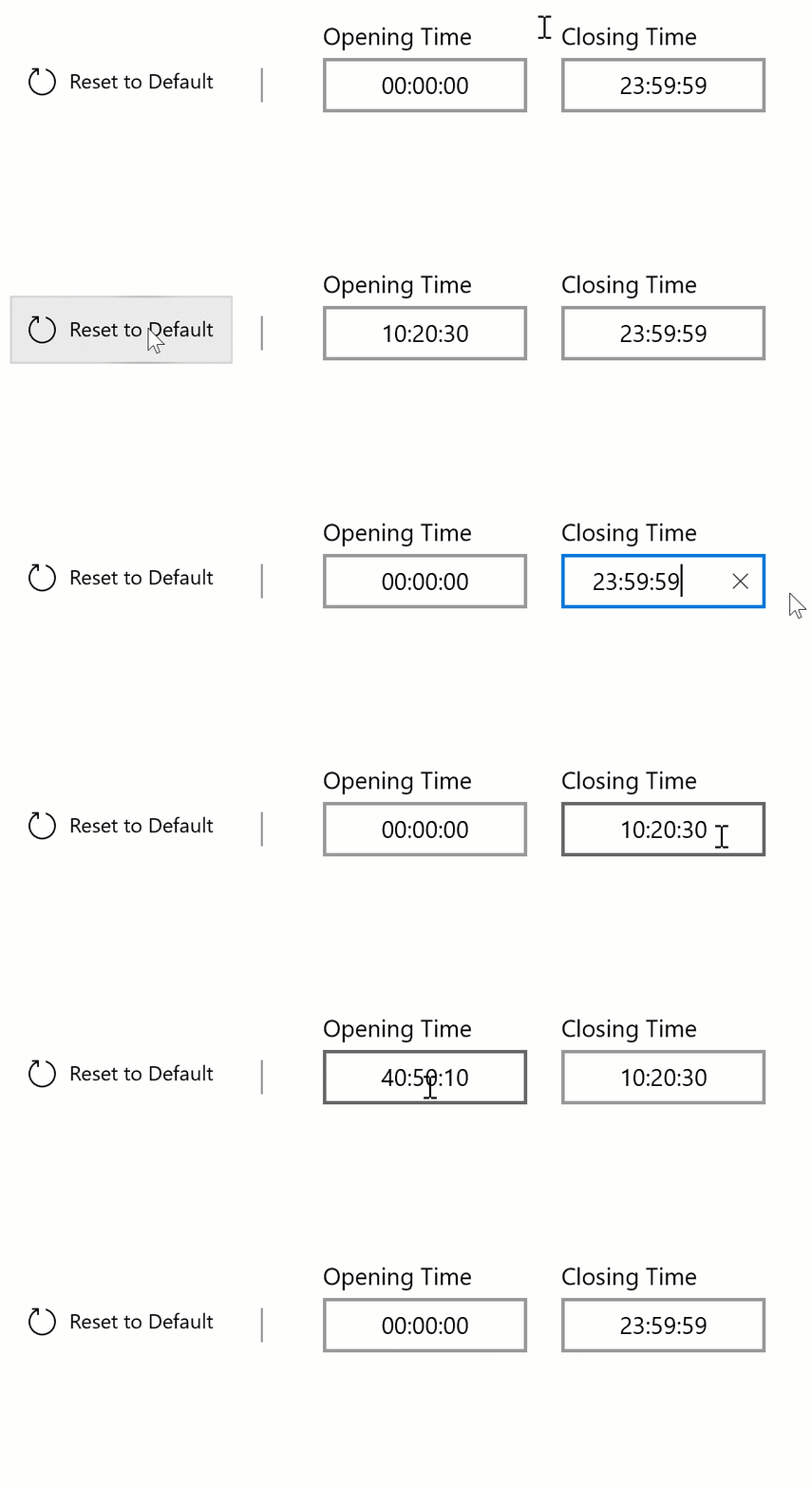
As we can see here, if the value entered following the mask correctly, and then we update the value via binding, the TextBox did not properly reflect the changes. However, if one of the digit is missing, the value is updated perfectly.
Environment
NuGet Package(s):
Package Version(s):
Windows 10 Build Number:
- [x] Version 1909 (18363.778)
App min and target version:
- [x] Version 1909 (18363.778)
Device form factor:
- [x] Desktop
Visual Studio
- [x] 2019 Preview (version: 16.7.0 Preview 2.0)
Additional context
Add any other context about the problem here.
 rizamarhaban
All 12 comments
Hello rizamarhaban, thank you for opening an issue with us!
I have automatically added a "needs triage" label to help get things started. Our team will analyze and investigate the issue, and escalate it to the relevant team if possible. Other community members may also look into the issue and provide feedback 🙌
![msftbot[bot] picture](https://avatars2.githubusercontent.com/in/26612?v=4&s=40) msftbot[bot]
on 8 Jun 2020
msftbot[bot]
on 8 Jun 2020
@rizamarhaban Thanks for highlighting the bug. Is this something you can work on, create a PR ?
 Kyaa-dost
on 8 Jun 2020
Kyaa-dost
on 8 Jun 2020
Okay, will check the code first.
rizamarhaban
on 8 Jun 2020
@Kyaa-dost I found the code. It seems the correct TextBox.Text was overridden by the oldtext. The binding works normally but was overridden. Will try to fix this and create PR later.

rizamarhaban
on 9 Jun 2020
@Kyaa-dost I have fixed the code however I cannot push my branch or create the PR. Need help on this.
rizamarhaban
on 9 Jun 2020
@rizamarhaban sounds like you just cloned the main repo. If you create a fork in GitHub:

You should be able to change your remote to your new fork, then you can push your feature branch to your fork, and then submit a PR to our main repo here with the fix!
Let us know if you need more help submitting the PR! Thanks!
 michael-hawker
on 9 Jun 2020
michael-hawker
on 9 Jun 2020
@michael-hawker I'm getting this failed test when running the unit tests. Is this something that I should leave it? it seems has no relation with my simple changes. Other tests passed.

rizamarhaban
on 10 Jun 2020
@rizamarhaban looks like the tests passed in the CI, but adding @Sergio0694 here for help with understanding why they might fail locally.
michael-hawker
on 10 Jun 2020
Mmmh those crashes are very weird, also I'm pretty sure those FileNotFound are due to some referenced package not being loaded correctly. @michael-hawker have some NuGet packages been updated in the 7.0 branch? I see the CI is running all tests just fine in master 🤔
 Sergio0694
on 10 Jun 2020
Sergio0694
on 10 Jun 2020
@Sergio0694 @michael-hawker maybe this detail will help to resolve this,

My laptop has 32GB memory,

rizamarhaban
on 11 Jun 2020
@rizamarhaban thanks, we've found the issue and it will be resolved by #3365. So, don't worry about those tests failing locally, you should be all good, thanks!
I also was able to repro similar issues with just XAML directly here in the sample app:
                <TextBox Grid.Row="3"
                x:Name="TestText"
                         Text="10:20:30"
                         Header="Source"
                         Style="{StaticResource MaskedTextBoxStyle}"/>

                <TextBox Grid.Row="4"
                         extensions:TextBoxMask.CustomMask="5:[0-5]"
                         extensions:TextBoxMask.Mask="99:59:59"
                         Header="Target"
                         Text="{Binding Text, ElementName=TestText, Mode=TwoWay}"
                         Style="{StaticResource MaskedTextBoxStyle}" />
Taking a look at your PR suggested fix now, thanks!
michael-hawker
on 25 Jun 2020
@michael-hawker Actually the second issue, the OutOfMemoryException from that HighPerformance test, has already been solved (that was in #3350), so if that has been merged into this PR I think it should already be fixed in here as well 👍
Sergio0694
on 25 Jun 2020
Related issues
 deltakosh
·
3Comments
michael-hawker
·
4Comments
deltakosh
·
3Comments
michael-hawker
·
4Comments
 alvinashcraft
·
3Comments
alvinashcraft
·
3Comments
 karmaecrivain94
·
3Comments
karmaecrivain94
·
3Comments
 HardySoftware
·
3Comments
HardySoftware
·
3Comments
Most helpful comment
@michael-hawker Actually the second issue, the
OutOfMemoryExceptionfrom thatHighPerformancetest, has already been solved (that was in #3350), so if that has been merged into this PR I think it should already be fixed in here as well 👍