Windowscommunitytoolkit: Unable to translate English to Japanese
Describe the bug
Unable to translate English to Japanese
- [x] Is this bug a regression in the toolkit? If so, what toolkit version did you last see it work:
Not sure which is the last working version. At least a version of last year worked.
Steps to Reproduce
Steps to reproduce the behavior:
Run the following code:
await TranslatorService.Instance.TranslateAsync("test", "en", "jp").ConfigureAwait(true);
Exception details:
Newtonsoft.Json.JsonSerializationException
  HResult=0x80131500
  Message=Cannot deserialize the current JSON object (e.g. {"name":"value"}) into type 'System.Collections.Generic.IEnumerable`1[Microsoft.Toolkit.Services.MicrosoftTranslator.TranslationResponse]' because the type requires a JSON array (e.g. [1,2,3]) to deserialize correctly.
To fix this error either change the JSON to a JSON array (e.g. [1,2,3]) or change the deserialized type so that it is a normal .NET type (e.g. not a primitive type like integer, not a collection type like an array or List<T>) that can be deserialized from a JSON object. JsonObjectAttribute can also be added to the type to force it to deserialize from a JSON object.
Path 'error', line 1, position 9.
  Source=Newtonsoft.Json
  StackTrace:
   at Newtonsoft.Json.Serialization.JsonSerializerInternalReader.CreateObject(JsonReader reader, Type objectType, JsonContract contract, JsonProperty member, JsonContainerContract containerContract, JsonProperty containerMember, Object existingValue)
   at Newtonsoft.Json.Serialization.JsonSerializerInternalReader.CreateValueInternal(JsonReader reader, Type objectType, JsonContract contract, JsonProperty member, JsonContainerContract containerContract, JsonProperty containerMember, Object existingValue)
   at Newtonsoft.Json.Serialization.JsonSerializerInternalReader.Deserialize(JsonReader reader, Type objectType, Boolean checkAdditionalContent)
   at Newtonsoft.Json.JsonSerializer.DeserializeInternal(JsonReader reader, Type objectType)
   at Newtonsoft.Json.JsonConvert.DeserializeObject(String value, Type type, JsonSerializerSettings settings)
   at Newtonsoft.Json.JsonConvert.DeserializeObject[T](String value, JsonSerializerSettings settings)
   at Microsoft.Toolkit.Services.MicrosoftTranslator.TranslatorService.<TranslateWithResponseAsync>d__37.MoveNext()
   at System.Runtime.ExceptionServices.ExceptionDispatchInfo.Throw()
   at System.Runtime.CompilerServices.TaskAwaiter.HandleNonSuccessAndDebuggerNotification(Task task)
   at Microsoft.Toolkit.Services.MicrosoftTranslator.TranslatorService.<TranslateAsync>d__30.MoveNext()
   at System.Runtime.ExceptionServices.ExceptionDispatchInfo.Throw()
   at System.Runtime.CompilerServices.TaskAwaiter.HandleNonSuccessAndDebuggerNotification(Task task)
   at System.Runtime.CompilerServices.ConfiguredTaskAwaitable`1.ConfiguredTaskAwaiter.GetResult()
Expected behavior
The translation works
Screenshots
If applicable, add screenshots to help explain your problem.

Environment
NuGet Package(s):
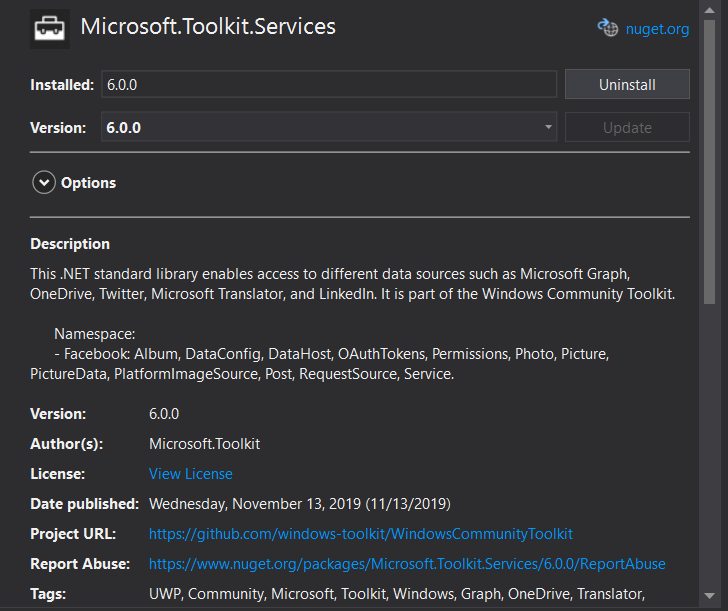
Package Version(s):
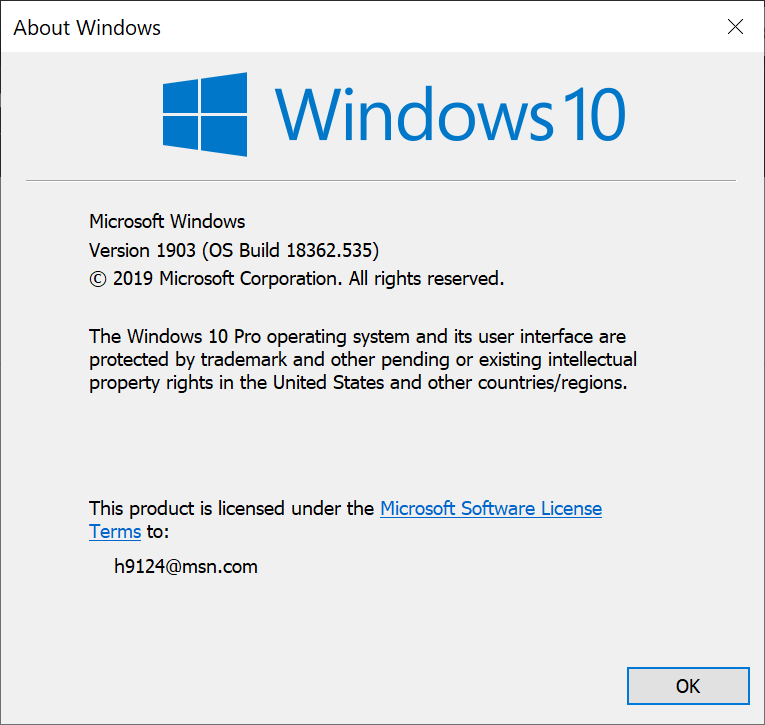
Windows 10 Build Number:
- [ ] Fall Creators Update (16299)
- [ ] April 2018 Update (17134)
- [ ] October 2018 Update (17763)
- [x] May 2019 Update (18362)
- [ ] Insider Build (build number: )
App min and target version:
- [ ] Fall Creators Update (16299)
- [ ] April 2018 Update (17134)
- [ ] October 2018 Update (17763)
- [x] May 2019 Update (18362)
- [ ] Insider Build (xxxxx)
Device form factor:
- [x] Desktop
- [ ] Xbox
- [ ] Surface Hub
- [ ] IoT
Visual Studio
- [ ] 2017 (version: )
- [x] 2019 (version: )
- [ ] 2019 Preview (version: )
Microsoft Visual Studio Enterprise 2019
Version 16.3.10
VisualStudio.16.Release/16.3.10+29519.87
Microsoft .NET Framework
Version 4.8.03752
Installed Version: Enterprise
Architecture Diagrams and Analysis Tools 00433-90000-00004-AA783
Microsoft Architecture Diagrams and Analysis Tools
Visual C++ 2019 00433-90000-00004-AA783
Microsoft Visual C++ 2019
Application Insights Tools for Visual Studio Package 9.1.00913.1
Application Insights Tools for Visual Studio
ASP.NET and Web Tools 2019 16.3.286.43615
ASP.NET and Web Tools 2019
ASP.NET Web Frameworks and Tools 2019 16.3.286.43615
For additional information, visit https://www.asp.net/
Azure App Service Tools v3.0.0 16.3.286.43615
Azure App Service Tools v3.0.0
Azure Functions and Web Jobs Tools 16.3.286.43615
Azure Functions and Web Jobs Tools
C# Tools 3.3.1-beta3-19461-02+2fd12c210e22f7d6245805c60340f6a34af6875b
C# components used in the IDE. Depending on your project type and settings, a different version of the compiler may be used.
Common Azure Tools 1.10
Provides common services for use by Azure Mobile Services and Microsoft Azure Tools.
Extensibility Message Bus 1.2.0 (d16-2@8b56e20)
Provides common messaging-based MEF services for loosely coupled Visual Studio extension components communication and integration.
GitHub.VisualStudio 2.10.8.8132
A Visual Studio Extension that brings the GitHub Flow into Visual Studio.
IntelliCode Extension 1.0
IntelliCode Visual Studio Extension Detailed Info
Microsoft Azure Tools 2.9
Microsoft Azure Tools for Microsoft Visual Studio 0x10 - v2.9.20816.1
Microsoft Continuous Delivery Tools for Visual Studio 0.4
Simplifying the configuration of Azure DevOps pipelines from within the Visual Studio IDE.
Microsoft JVM Debugger 1.0
Provides support for connecting the Visual Studio debugger to JDWP compatible Java Virtual Machines
Microsoft Library Manager 2.0.83+gbc8a4b23ec
Install client-side libraries easily to any web project
Microsoft MI-Based Debugger 1.0
Provides support for connecting Visual Studio to MI compatible debuggers
Microsoft Visual C++ Wizards 1.0
Microsoft Visual C++ Wizards
Microsoft Visual Studio Tools for Containers 1.1
Develop, run, validate your ASP.NET Core applications in the target environment. F5 your application directly into a container with debugging, or CTRL + F5 to edit & refresh your app without having to rebuild the container.
Microsoft Visual Studio VC Package 1.0
Microsoft Visual Studio VC Package
Mono Debugging for Visual Studio 16.3.7 (9d260c5)
Support for debugging Mono processes with Visual Studio.
NuGet Package Manager 5.3.1
NuGet Package Manager in Visual Studio. For more information about NuGet, visit https://docs.nuget.org/
ProjectServicesPackage Extension 1.0
ProjectServicesPackage Visual Studio Extension Detailed Info
Snapshot Debugging Extension 1.0
Snapshot Debugging Visual Studio Extension Detailed Info
SQL Server Data Tools 16.0.61908.27190
Microsoft SQL Server Data Tools
TypeScript Tools 16.0.10821.2002
TypeScript Tools for Microsoft Visual Studio
Visual Basic Tools 3.3.1-beta3-19461-02+2fd12c210e22f7d6245805c60340f6a34af6875b
Visual Basic components used in the IDE. Depending on your project type and settings, a different version of the compiler may be used.
Visual F# Tools 10.4 for F# 4.6 16.3.0-beta.19455.1+0422ff293bb2cc722fe5021b85ef50378a9af823
Microsoft Visual F# Tools 10.4 for F# 4.6
Visual Studio Code Debug Adapter Host Package 1.0
Interop layer for hosting Visual Studio Code debug adapters in Visual Studio
Visual Studio Spell Check Everywhere VSSpellCheckEverywhere
An extension that enables spell checking within any Visual Studio file editor or tool window that uses WPF text boxes.
https://GitHub.com/EWSoftware/VSSpellChecker
Visual Studio Spell Checker VSSpellChecker
An editor extension that checks the spelling of comments, strings, and plain text as you type or interactively with tool windows.
https://GitHub.com/EWSoftware/VSSpellChecker
Visual Studio Tools for Containers 1.0
Visual Studio Tools for Containers
VisualStudio.Mac 1.0
Mac Extension for Visual Studio
VSColorOutput 2.7
Color output for build and debug windows - https://mike-ward.net/vscoloroutput
Windows Template Studio 3.5.19310.1
Windows Template Studio quickly builds a UWP app, using a wizard-based UI to turn your needs into a foundation of Windows 10 patterns and best practices.
Xamarin 16.3.0.281 (d16-3@859f726)
Visual Studio extension to enable development for Xamarin.iOS and Xamarin.Android.
Xamarin Designer 16.3.0.256 (remotes/origin/d16-3@8a223bfd7)
Visual Studio extension to enable Xamarin Designer tools in Visual Studio.
Xamarin Templates 16.3.565 (27e9746)
Templates for building iOS, Android, and Windows apps with Xamarin and Xamarin.Forms.
Xamarin.Android SDK 10.0.6.2 (d16-3/c407838)
Xamarin.Android Reference Assemblies and MSBuild support.
Mono: mono/mono/2019-06@476d72b9e32
Java.Interop: xamarin/java.interop/d16-3@5836f58
LibZipSharp: grendello/LibZipSharp/d16-3@71f4a94
LibZip: nih-at/libzip/rel-1-5-1@b95cf3fd
ProGuard: xamarin/proguard/master@905836d
SQLite: xamarin/sqlite/3.27.1@8212a2d
Xamarin.Android Tools: xamarin/xamarin-android-tools/d16-3@cb41333
Xamarin.iOS and Xamarin.Mac SDK 13.6.0.12 (e3c2b40)
Xamarin.iOS and Xamarin.Mac Reference Assemblies and MSBuild support.
Additional context
Add any other context about the problem here.
 zipswich
All 7 comments
Thanks for filing the bug @zipswich, did it work with other languages you tried still? Wondering if the response from the server has changed...
@marcominerva any thoughts?
 michael-hawker
on 18 Dec 2019
michael-hawker
on 18 Dec 2019
The exception says that JSON has an unexpected format. In fact, it could be caused by a change in the response from the server. Let me double check, I'll keep you informed about any progress.
 marcominerva
on 18 Dec 2019
marcominerva
on 18 Dec 2019
It works perfectly for every other language that I have tested (cs, de, es, et, fr, it, ko, nl, pl, pt, ru, sl, uk, zh).
Thanks for looking into this. Please feel free to let me know if I can assist in any way.
zipswich
on 19 Dec 2019
The correct language code for Japanese is ja, as returned by the GetLanguageNamesAsync method:
await TranslatorService.Instance.TranslateAsync("test", "en", "ja").ConfigureAwait(true);
marcominerva
on 19 Dec 2019
Thanks a lot. Very sorry for the mistake.
I am really surprised. Our hardware partner requested and apparently tested the Japanese translation using "values-jp" folder in an Android app, and this is why "jp" was used.
zipswich
on 19 Dec 2019
@marcominerva Thanks so much for looking into this. @zipswich so are we all clear on this?
 Kyaa-dost
on 19 Dec 2019
Kyaa-dost
on 19 Dec 2019
Yes. I am all set now.
I wanted to add that the reason that I thought it worked before is that I had another app the did Japanese translation last year, but it used the retrieved language code, and I thought it was the same as "jp".
May I make a suggestion: dump the response in the exception message when the json deserialization generates an exception.
zipswich
on 19 Dec 2019
Related issues
michael-hawker
·
4Comments
 miguelarcilla
·
4Comments
miguelarcilla
·
4Comments
 deltakosh
·
3Comments
deltakosh
·
3Comments
 andriihorpenko
·
3Comments
andriihorpenko
·
3Comments
 ilinkmobility
·
4Comments
ilinkmobility
·
4Comments
Most helpful comment
The correct language code for Japanese is ja, as returned by the GetLanguageNamesAsync method:
await TranslatorService.Instance.TranslateAsync("test", "en", "ja").ConfigureAwait(true);