Windowscommunitytoolkit: Extension NavigationViewStyles - the first NavigationViewItem is missing (hidden)
I'm submitting a...
- Bug report (I searched for similar issues and did not find one)
Current behavior
When NavigationViewExtensions.SelectedIndex is set to 0 (e.g. when application starts), the content is displayed, but the icon is not visible and it is not possible to navigate back, when it is left.
Expected behavior
Minimal reproduction of the problem with instructions
See application Windows Community Toolkit Sample App, Extensions, NavigationViewStyles
The bug is clearly seen there, when I've used the provided example code in my project, bug appeared too.
Environment
Nuget Package(s):

Package Version(s):

Windows 10 Build Number:
- [ ] Creators Update (15063)
- [ ] Fall Creators Update (16299)
- [x] April 2018 Update (17134)
- [ ] Insider Build (build number: )

App min and target version:
- [ ] Creators Update (15063)
- [ ] Fall Creators Update (16299)
- [x] April 2018 Update (17134)
- [ ] Insider Build (xxxxx)

Device form factor:
- [x] Desktop
- [ ] Mobile
- [ ] Xbox
- [ ] Surface Hub
- [ ] IoT

Visual Studio
- [x] 2017 (version: 15.7.3)
- [ ] 2017 Preview (version: )
 jahr
jahr
All 10 comments
Ping @michael-hawker
 Vijay-Nirmal
on 13 Jun 2018
Vijay-Nirmal
on 13 Jun 2018
Yeah, I noticed something fishy with this again too. It was working, but I'm wondering if something in the OS changed again. I'll have to dig in and take a look.
 michael-hawker
on 13 Jun 2018
michael-hawker
on 13 Jun 2018
I reproduced this issue and I think that the problem might be in the __VSCodeActivityBarStyle__ style or how the NavigationView uses it. Using the Live Visual Tree, I saw that the item is loaded but is out of the menu.
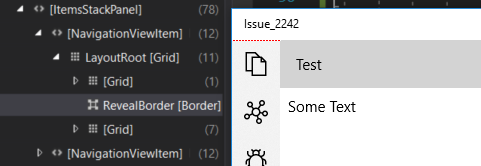
I reduced the menu height to see it better.
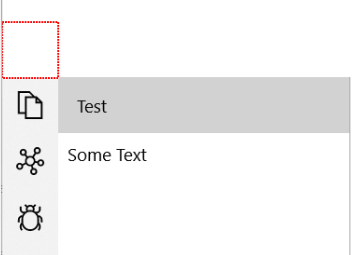
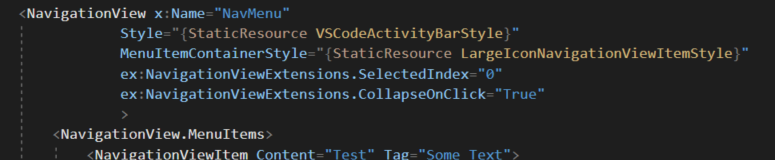
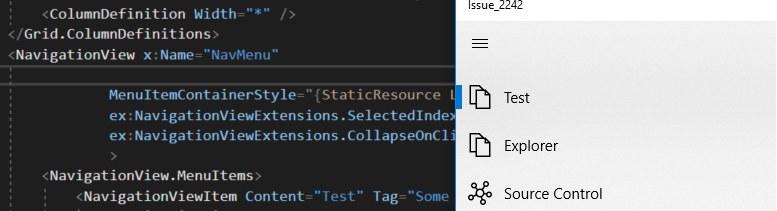
When I removed the " __Style="{StaticResource VSCodeActivityBarStyle}"__ " all the items were loaded correctly.
 lucaasrojas
on 31 Jul 2018
lucaasrojas
on 31 Jul 2018
Thanks for looking into this @lucaasrojas. @michael-hawker, what do you think?
 nmetulev
on 31 Jul 2018
nmetulev
on 31 Jul 2018
@nmetulev the underlying os code is changing each release, so the extensions keep breaking. @JustinXinLiu looked at building them on top of the WinUI preview, but it was looking even more complicated.
Justin ended up re-implementing this for where I was using it. I'll look into creating a sample or something for it instead for 5.0, but we may want to deprecate these extensions specifically.
michael-hawker
on 7 Aug 2018
Agree on deprecating, it's seem more work than it's worth. @lucaasrojas, could you submit a PR deprecating this extension?
nmetulev
on 7 Aug 2018
Could this not be achieved with hiding the Hamburger Toggle Button, and setting the template for the NavigationViewListItems? With the NavigationView now supporting the navigation pane at the top, how does this style make sense for that?
 mdtauk
on 7 Aug 2018
mdtauk
on 7 Aug 2018
It doesn't, it's another reason why we should deprecate this extension.
nmetulev
on 7 Aug 2018
@nmetulev Removing the extension and providing a warning/error message makes sense. But if all you want is a non toggled navigation view, with larger icons. Provide it as a style you can apply, and ensure the top navigation pane orientation items are also styled.
mdtauk
on 7 Aug 2018
You can just change the display mode to dock the pane to the left and it won't go to the top, but this is not where the issue is.
By name, the NavigationView control is designed for page navigation, with built-in menu support. Currently, it's simply not designed for a VS code like menu system and restyling is not always enough. Even it worked in previous builds, newer changes broke the control a few times already.
In general, we shouldn't try to hack around complex controls to achieve something rather simple. Instead, a new control should be built for this case specifically.
 JustinXinLiu
on 7 Aug 2018
JustinXinLiu
on 7 Aug 2018
Related issues
 shweaver-MSFT
·
3Comments
michael-hawker
·
3Comments
shweaver-MSFT
·
3Comments
michael-hawker
·
3Comments
 andriihorpenko
·
3Comments
andriihorpenko
·
3Comments
 nolanblew
·
3Comments
nolanblew
·
3Comments
 karmaecrivain94
·
3Comments
karmaecrivain94
·
3Comments
Most helpful comment
Agree on deprecating, it's seem more work than it's worth. @lucaasrojas, could you submit a PR deprecating this extension?