Windowscommunitytoolkit: Provide Pivot Tab Styling Resources
I'm submitting a...
[ ] Regression (a behavior that used to work and stopped working in a new release)
[ ] Bug report  <!-- Please search GitHub for a similar issue or PR before submitting -->
[x] Feature request <!-- Please file a UserVoice request and include the link below https://wpdev.uservoice.com/forums/110705-universal-windows-platform/category/193402-uwp-community-toolkit -->
[ ] Sample app request
[ ] Documentation issue or request
[ ] Question of Support request => Please do not submit support request here, instead see https://github.com/Microsoft/UWPCommunityToolkit/blob/master/contributing.md#question
Request links
https://github.com/Microsoft/Windows-universal-samples/issues/314
Also related to a subset of requests for the Tab Control #353.
Expected behavior
This item is to provide static resource templates that can restyle a pivot control to behave more like a tab control.
It should look like the sample image in the docs which is mentioned to exist in the platform sample, but is not quite sufficient (see issue filed there).
Ideally I'd like to see three provided templates:
- [ ] System Icon Tabs as in docs page
- [ ] Traditional Document Style Tabs (like Edge, not sure if can add pivot extension helpers for a 'close' style command, but will investigate)
- [ ] Office Style Tabs (like https://github.com/Raamakrishnan/UWP-Styles-Library/tree/master/Pivot/PivotTabbedStyle)
- [x] VSCode style Drawers (done with NavigationView as part of 2.2 release)
- [ ] Provide Pivot Style for tabs on bottom.
 michael-hawker
All 12 comments
No response from the community. ping @nmetulev @Odonno @IbraheemOsama
 windowstoolkitbot
on 8 Dec 2017
windowstoolkitbot
on 8 Dec 2017
@michael-hawker is currently working on this
 nmetulev
on 8 Dec 2017
nmetulev
on 8 Dec 2017
This issue seems inactive. Do you need help to complete this issue?
windowstoolkitbot
on 23 Dec 2017
@uwptoolkitbot working on it here https://github.com/michael-hawker/UWPCommunityToolkit/tree/mhawker/pivot-styles
michael-hawker
on 23 Dec 2017
The VS Code Activity Bar will be a restyling of a NavigationView, so will break that off as a separate item.
I have a couple of bugs and style things to tweak, but otherwise System & Edge styles tabs for Pivot are close.
I should also swap out my Glyph for Icon like NavigationView so it's easier to restyle.
michael-hawker
on 11 Feb 2018
What's the current status?
 lucaasrojas
on 29 Jun 2018
lucaasrojas
on 29 Jun 2018
I have some prototypes that work partially, but getting the Pivot to respond correctly for all scenarios is proving to be more work than this is probably worth. Recommending we close this in favor of #353 again, which I'm actually going to start looking at in more detail.
michael-hawker
on 8 Aug 2018
Whilst it may still be an idea to include these Templates and Resources...
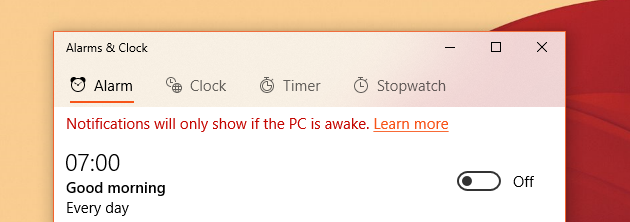
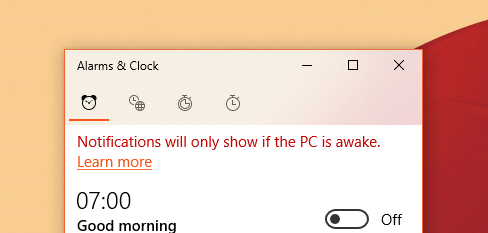
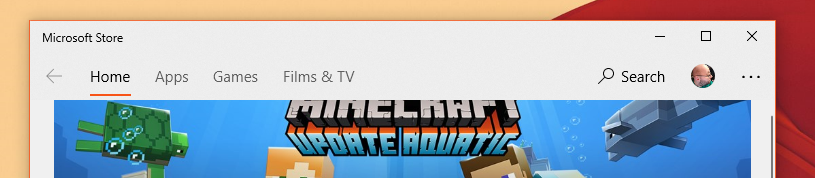
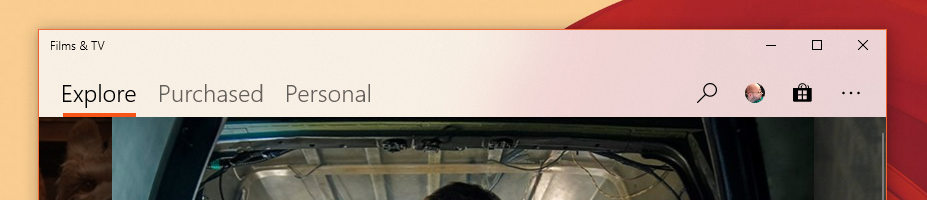
Microsoft has formalised using the NavigationView with the pane set to Top, to do Tab Navigation, instead of using a modified Pivot or set of CheckBoxes.
This doesn't replace a need for a proper Tab Control, in the same vein as the Edge and Sets tabs, but for navigation in Alarms & Clock, Store, Films & TV, or the Phone app - There is new guidance.
 mdtauk
on 8 Aug 2018
mdtauk
on 8 Aug 2018
Agree on closing this and focusing on creating a new control
nmetulev
on 8 Aug 2018
@nmetulev Wait, What!?!?!?
 skendrot
on 8 Aug 2018
skendrot
on 8 Aug 2018
After talking to @michael-hawker in person, I agree that it makes more sense to build something from scratch. The Pivot does a lot of work in code behind that makes it difficult to build a true tab control
nmetulev
on 8 Aug 2018
@skendrot It takes a fair bit of tweaking to get the pivot to work well with a tab design. And now Microsoft themselves are moving away from Pivot as tabs, to the updated NavigationView - I think the effort needs to go in an Edge like TabBar control. With Drag and Drop, re-arranging, new window on release of a tab, Tab close, etc
mdtauk
on 8 Aug 2018
Related issues
 andriihorpenko
·
3Comments
andriihorpenko
·
3Comments
 ilinkmobility
·
4Comments
ilinkmobility
·
4Comments
 nolanblew
·
3Comments
nolanblew
·
3Comments
 IanStorm
·
4Comments
IanStorm
·
4Comments
 karmaecrivain94
·
3Comments
karmaecrivain94
·
3Comments
Most helpful comment
I have some prototypes that work partially, but getting the Pivot to respond correctly for all scenarios is proving to be more work than this is probably worth. Recommending we close this in favor of #353 again, which I'm actually going to start looking at in more detail.