Windowscommunitytoolkit: Add automatic toolbox integration into Visual Studio
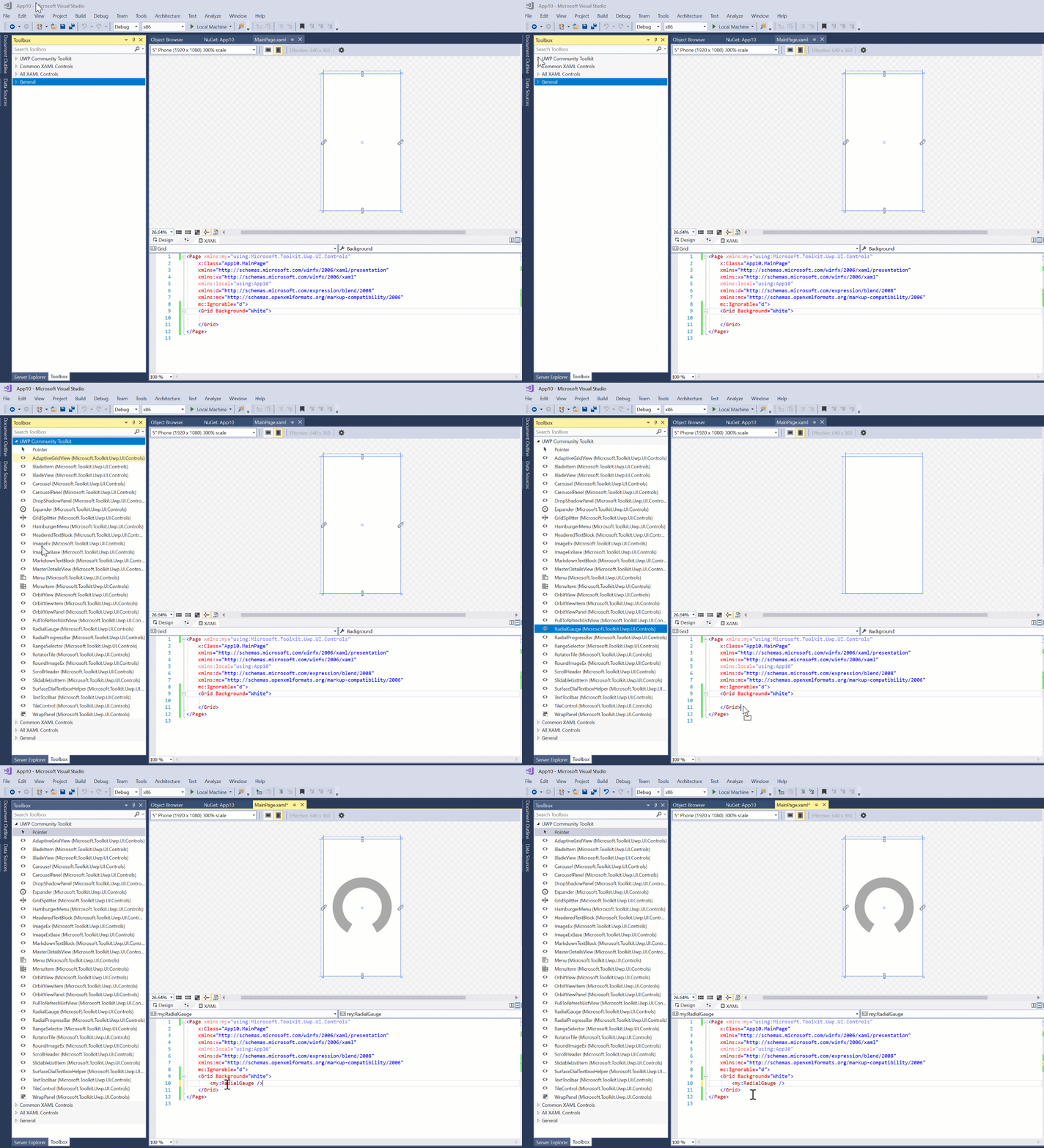
The Controls nuget package needs the tools\VisualStudioToolsManifest.xml file with the following contents:
<FileList>
  <File Reference="Microsoft.Toolkit.Uwp.UI.Controls.dll">
    <ToolboxItems VSCategory="UWP Community Toolkit" BlendCategory="UWP Community Toolkit">
      <Item Type="Microsoft.Toolkit.Uwp.UI.Controls.AdaptiveGridView" />
      <Item Type="Microsoft.Toolkit.Uwp.UI.Controls.BladeItem" />
      <Item Type="Microsoft.Toolkit.Uwp.UI.Controls.BladeView" />
      <Item Type="Microsoft.Toolkit.Uwp.UI.Controls.Carousel" />
      <Item Type="Microsoft.Toolkit.Uwp.UI.Controls.CarouselPanel" />
      <Item Type="Microsoft.Toolkit.Uwp.UI.Controls.DropShadowPanel" />
      <Item Type="Microsoft.Toolkit.Uwp.UI.Controls.Expander" />
      <Item Type="Microsoft.Toolkit.Uwp.UI.Controls.GridSplitter" />
      <Item Type="Microsoft.Toolkit.Uwp.UI.Controls.HamburgerMenu" />
      <Item Type="Microsoft.Toolkit.Uwp.UI.Controls.HeaderedTextBlock" />
      <Item Type="Microsoft.Toolkit.Uwp.UI.Controls.ImageEx" />
      <Item Type="Microsoft.Toolkit.Uwp.UI.Controls.ImageExBase" />
      <Item Type="Microsoft.Toolkit.Uwp.UI.Controls.MarkdownTextBlock" />
      <Item Type="Microsoft.Toolkit.Uwp.UI.Controls.MasterDetailsView" />
      <Item Type="Microsoft.Toolkit.Uwp.UI.Controls.Menu" />
      <Item Type="Microsoft.Toolkit.Uwp.UI.Controls.MenuItem" />
      <Item Type="Microsoft.Toolkit.Uwp.UI.Controls.OrbitView" />
      <Item Type="Microsoft.Toolkit.Uwp.UI.Controls.OrbitViewItem" />
      <Item Type="Microsoft.Toolkit.Uwp.UI.Controls.OrbitViewPanel" />
      <Item Type="Microsoft.Toolkit.Uwp.UI.Controls.PullToRefreshListView" />
      <Item Type="Microsoft.Toolkit.Uwp.UI.Controls.RadialGauge" />
      <Item Type="Microsoft.Toolkit.Uwp.UI.Controls.RadialProgressBar" />
      <Item Type="Microsoft.Toolkit.Uwp.UI.Controls.RangeSelector" />
      <Item Type="Microsoft.Toolkit.Uwp.UI.Controls.RotatorTile" />
      <Item Type="Microsoft.Toolkit.Uwp.UI.Controls.RoundImageEx" />
      <Item Type="Microsoft.Toolkit.Uwp.UI.Controls.ScrollHeader" />
      <Item Type="Microsoft.Toolkit.Uwp.UI.Controls.SlidableListItem" />
      <Item Type="Microsoft.Toolkit.Uwp.UI.Controls.SurfaceDialTextboxHelper" />
      <Item Type="Microsoft.Toolkit.Uwp.UI.Controls.TextToolbar" />
      <Item Type="Microsoft.Toolkit.Uwp.UI.Controls.TileControl" />
      <Item Type="Microsoft.Toolkit.Uwp.UI.Controls.WrapPanel" />
    </ToolboxItems>
  </File>
</FileList>
(Note: We should probably exclude the deprecated controls #1465)
 dotMorten
All 8 comments
issue closed because PR is merged.
 IbraheemOsama
on 19 Sep 2017
IbraheemOsama
on 19 Sep 2017
Will it work for non-UWP projects?
 MikhailTymchukDX
on 11 Jan 2018
MikhailTymchukDX
on 11 Jan 2018
All controls are built for UWP, they wouldn't work in other type of projects.
 nmetulev
on 11 Jan 2018
nmetulev
on 11 Jan 2018
I mean will this approach work for other types of project? For example, if I create an package with ASP.NET controls inside.
MikhailTymchukDX
on 11 Jan 2018
Ah, good question. I believe it would but don't know for sure. @dotMorten might know
nmetulev
on 11 Jan 2018
It works for WPF, so it might work for ASP.NET. @diverdan92 might be able to confirm, (or you could just try it out :)
dotMorten
on 11 Jan 2018
No, it will only work for XAML controls shipped in NuGet packages (UWP + WPF).
 diverdan92
on 11 Jan 2018
diverdan92
on 11 Jan 2018
...this is where you add "...but we're working on it" :-)
dotMorten
on 11 Jan 2018
Related issues
 Kyaa-dost
·
3Comments
Kyaa-dost
·
3Comments
 andriihorpenko
·
3Comments
andriihorpenko
·
3Comments
 jamesmcroft
·
3Comments
jamesmcroft
·
3Comments
 shweaver-MSFT
·
3Comments
shweaver-MSFT
·
3Comments
 deltakosh
·
3Comments
deltakosh
·
3Comments
Most helpful comment
...this is where you add "...but we're working on it" :-)