Windowscommunitytoolkit: Build errors when targeting Windows 10 Anniversary
Our application cannot be built in release when we add Microsoft.Toolkit.Uwp 1.5. We have visual studio 2015 and are targeting Windows 10 Anniversary.
The problem seems to come from BluetoothLEHelper that uses BluetoothAdapter that targets Windows 10 Creators Update.
Errors :
error : ILT0021: Could not resolve method 'Windows.Foundation.IAsyncOperation<$ILT$FakeType1_Windows_Devices_Bluetooth_GenericAttributeProfile_GattDeviceServicesResult> Windows.Devices.Bluetooth.BluetoothLEDevice.GetGattServicesAsync(Windows.Devices.Bluetooth.BluetoothCacheMode)'
21>C:\Program Files (x86)\MSBuild\Microsoft.NetNative\x86\ilc\IlcInternals.targets(936,5): error : Type 'Windows.Devices.Bluetooth.BluetoothAdapter' was not included in compilation, but was referenced in type 'Microsoft.Toolkit.Uwp.BluetoothLEHelper'. There may have been a missing assembly.
21>C:\Program Files (x86)\MSBuild\Microsoft.NetNative\x86\ilc\IlcInternals.targets(936,5): error : Type 'Windows.Devices.Bluetooth.GenericAttributeProfile.GattDeviceServicesResult' was not included in compilation, but was referenced in type 'Microsoft.Toolkit.Uwp.ObservableBluetoothLEDevice'. There may have been a missing assembly.
21>C:\Program Files (x86)\MSBuild\Microsoft.NetNative\x86\ilc\IlcInternals.targets(936,5): error : Type 'Windows.Devices.Bluetooth.GenericAttributeProfile.GattCharacteristicsResult' was not included in compilation, but was referenced in method 'ObservableGattDeviceService.
21>C:\Program Files (x86)\MSBuild\Microsoft.NetNative\x86\ilc\IlcInternals.targets(936,5): error : Method 'BluetoothLEHelper.IsPeripheralRoleSupported.get()' will always throw an exception due to the missing method 'BluetoothAdapter.get_IsPeripheralRoleSupported()'. There may have been a missing assembly.
21>C:\Program Files (x86)\MSBuild\Microsoft.NetNative\x86\ilc\IlcInternals.targets(936,5): error : Method 'BluetoothLEHelper.IsCentralRoleSupported.get()' will always throw an exception due to the missing method 'BluetoothAdapter.get_IsCentralRoleSupported()'. There may have been a missing assembly.
21>C:\Program Files (x86)\MSBuild\Microsoft.NetNative\x86\ilc\IlcInternals.targets(936,5): error : Type 'Windows.Devices.Bluetooth.GenericAttributeProfile.GattProtocolError' was not included in compilation, but was referenced in method 'GattProtocolErrorParser.GetErrorString(Nullable
21>C:\Program Files (x86)\MSBuild\Microsoft.NetNative\x86\ilc\IlcInternals.targets(936,5): error : Method 'GattProtocolErrorParser.GetErrorString(Nullable
21>C:\Program Files (x86)\MSBuild\Microsoft.NetNative\x86\ilc\IlcInternals.targets(936,5): error : Method 'BluetoothLEHelper.
21>C:\Program Files (x86)\MSBuild\Microsoft.NetNative\x86\ilc\IlcInternals.targets(936,5): error : Method 'ObservableBluetoothLEDevice.<
21>C:\Program Files (x86)\MSBuild\Microsoft.NetNative\x86\ilc\IlcInternals.targets(936,5): error : Method 'ObservableGattDeviceService.
21>C:\Program Files (x86)\MSBuild\Microsoft.NetNative\x86\ilc\IlcInternals.targets(936,5): error : Type 'Windows.UI.Text.TextDecorations' was not included in compilation, but was referenced in method 'XamlRenderer.RenderStrikethroughRun(InlineCollection, StrikethroughTextInline, XamlRenderer.RenderContext)'. There may have been a missing assembly.
 Olivier-tl
All 14 comments
Bluetooth LE helper requires 15063 (Creator Update) to work. Are you sure you are not using that piece of code somewhere in your application?
 Code-ScottLe
on 27 Jul 2017
Code-ScottLe
on 27 Jul 2017
Yes. It works with the community toolkit 1.4.
1.5 compiles in Debug, but not release.
Olivier-tl
on 27 Jul 2017
1.4 doesn't contain the Bluetooth LE Helper. What is your minimum target version? Anniversary Update? ( have a project that target 14393 as minimum, I can double check for release mode later)
Code-ScottLe
on 27 Jul 2017
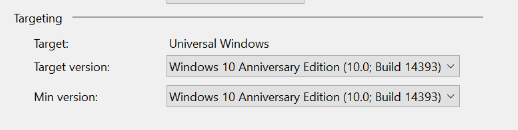
Min version and target version is Windows 10 Anniversary Edition (10.0; Build 14393).
Olivier-tl
on 28 Jul 2017
I can confirm from my end that my release build is all fine.
Code-ScottLe
on 30 Jul 2017
Try setting the target version (not just the min version) to windows 10 anniversary. Like so :
Olivier-tl
on 31 Jul 2017
Just tried with a brand new project. There are warning, but build just fine.
Code-ScottLe
on 31 Jul 2017
Yes, this is true with the package Microsoft.NetCore.UniversalWindowsPlatform v5.3, but those same warnings turn into errors with Microsoft.NetCore.UniversalWindowsPlatform v5.2. Since we have Visual Studio 2015, we can't update to v5.3 because it requires Visual Studio 2017.
Olivier-tl
on 1 Aug 2017
@nmetulev Can you verify this? I don't have 2015 anymore. But having an older nuget version (and potentially older nuget packages for the platform) could cause a build problem (Observed this for my VSTS CI Build before).
Code-ScottLe
on 1 Aug 2017
I don't have 2015, I'll set up a vm to try it out. In the meantime, @Olivier-tl, can you tell me what OS build you have on your machine?
 nmetulev
on 1 Aug 2017
nmetulev
on 1 Aug 2017
Version 1703 (OS Build 15063.483).
Olivier-tl
on 2 Aug 2017
Same issue here. Actually had 13 different release mode native compilation errors resulting from UWP toolkit. Most had bluetooth but there were also some around Windows.UI.Text.TextDecorations and InMemoryQueryModelVisitor.
Changed from:
<TargetPlatformVersion>10.0.14393.0</TargetPlatformVersion>
<TargetPlatformMinVersion>10.0.10586.0</TargetPlatformMinVersion>
To
<TargetPlatformVersion>10.0.15063.0</TargetPlatformVersion>
<TargetPlatformMinVersion>10.0.14393.0</TargetPlatformMinVersion>
and the Release mode errors went away.
 thnk2wn
on 4 Aug 2017
thnk2wn
on 4 Aug 2017
@thnk2wn Apologies for the error. I'm not sure of how this can be fixed in 1.5.x versions however going forward with 2.0 version of toolkit, we consume v5.3 of Microsoft.NetCore.UniversalWindowsPlatform
 hermitdave
on 5 Aug 2017
hermitdave
on 5 Aug 2017
I finally got a machine with VS2015 and was able to verify the issue and run few other test. Unfortunately, we will not be able to resolve this for 1.5. In fact, starting with 2.0, Visual Studio 2015 will no longer be supported across all the toolkit projects - all projects will be updated to target the Creators Update (#1377) and most are using CU APIs in some way. The CU APIs are behind an API check, so developers can continue to target older SDKs that are supported by using VS 2017.
I will close this issue as won't fix. However, feel free to reopen it if needed.
nmetulev
on 10 Aug 2017
Related issues
 shweaver-MSFT
·
3Comments
shweaver-MSFT
·
3Comments
 SmartPolarBear
·
4Comments
SmartPolarBear
·
4Comments
 tibitoth
·
3Comments
tibitoth
·
3Comments
 jamesmcroft
·
3Comments
jamesmcroft
·
3Comments
 IanStorm
·
4Comments
IanStorm
·
4Comments