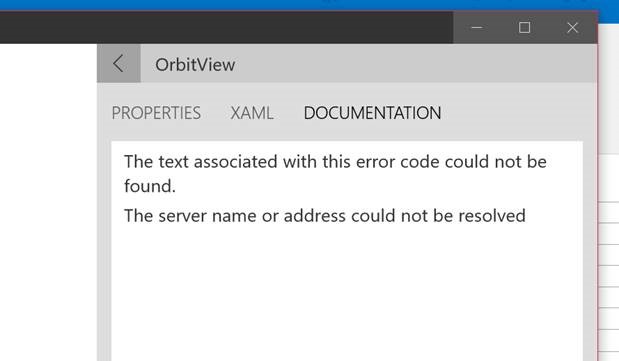
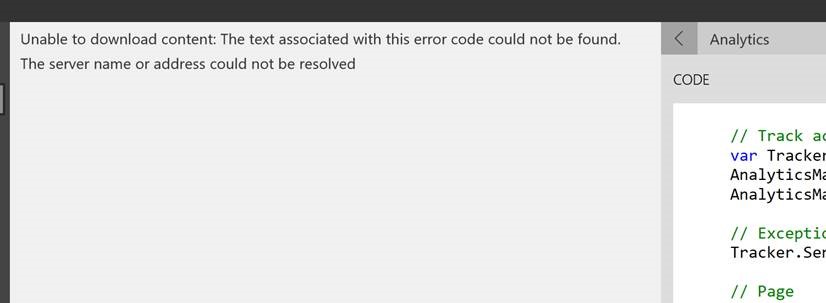
Windowscommunitytoolkit: Add friendlier error messages when SampleApp is offline
Current example:
 nmetulev
All 15 comments
Why not add a Offline Page and whenever there is no connection, navigate to that page? That way when they go back, they can still access offline content if required.
Also another way to do it is, to show a flag that says Internet Required. May be a FontIcon on the GridView that shows that and if there is no internet, Disable the selection.
Just Suggestions.
 avknaidu
on 10 Jul 2017
avknaidu
on 10 Jul 2017
Great suggestions @avknaidu, Offline page would work great for places that always require internet, like the documentation. We could also consider making the documentation offline as well.
nmetulev
on 10 Jul 2017
@nmetulev Are we doing friendlier offline page for 2.0 and leave the full offline documentation to later iteration?
 Code-ScottLe
on 22 Aug 2017
Code-ScottLe
on 22 Aug 2017
I'm going to try to get the offline pages in #1402. I might not get to it, so we can do it for 2.1
nmetulev
on 22 Aug 2017
It's actually be cool if we could pull all the documentation in the background and cache it; so if you're at least online once, we'd have a copy for when you're offline.
 michael-hawker
on 22 Aug 2017
michael-hawker
on 22 Aug 2017
That is a neat idea actually, because I was on the fence about baking the docs in with the app (increase app size). Having a cache option is actually a great idea because user can claim back the space if they want to.
Code-ScottLe
on 22 Aug 2017
BTW, all the docs without images (we don't show images in the docs in the sample app) are a little under 300K, so it wouldn't increase appsize by much
nmetulev
on 22 Aug 2017
I added this commit that adds offline docs: https://github.com/Microsoft/UWPCommunityToolkit/pull/1402/commits/739a119cbb4dd49df4eaeb03f6f282399f484303
I changed the way docs are retrieved from just getting it online to,
- try to get latest from online, if success, cache results
- if not online, or docs not online, try to access cached,
- if not cached, try to read packaged version
I also added code to grab the docs from the master branch when the app is built in release mode.
Thoughts on this approach?
nmetulev
on 23 Aug 2017
@nmetulev I don't know why we should get online docs because if the docs are already packaged with the app, it will work all the time without the need of a network connection.
 Odonno
on 23 Aug 2017
Odonno
on 23 Aug 2017
@Odonno, the idea is to always get and cache latest docs each time in case there has been an update. That way we don't have to update the sample app to update the docs.
nmetulev
on 23 Aug 2017
@nmetulev But users always have to update the sample app if you want to see new controls/helpers/services/etc.. So each version should have its dedicated documentation.
Odonno
on 23 Aug 2017
@Odonno we can still update and improve docs for the existing controls, so the app being able to pull the live ones is useful. The docs will start updating more out-of-band as they get moved to docs.microsoft.com.
michael-hawker
on 23 Aug 2017
@Odonno, the docs in the sample app will always point to master branch, so any changes in the dev branch will not show up in the sample app. But if we fix issues in the docs in the master branch for existing controls, those will show up in the sample app as well
nmetulev
on 23 Aug 2017
@nmetulev That makes sense.
Odonno
on 23 Aug 2017
This is resolved in new sample app
nmetulev
on 26 Aug 2017
Related issues
 alvinashcraft
·
3Comments
alvinashcraft
·
3Comments
 kusanagi2k2
·
4Comments
kusanagi2k2
·
4Comments
 Vijay-Nirmal
·
4Comments
Vijay-Nirmal
·
4Comments
 HardySoftware
·
3Comments
HardySoftware
·
3Comments
 Kyaa-dost
·
3Comments
Kyaa-dost
·
3Comments
Most helpful comment
I added this commit that adds offline docs: https://github.com/Microsoft/UWPCommunityToolkit/pull/1402/commits/739a119cbb4dd49df4eaeb03f6f282399f484303
I changed the way docs are retrieved from just getting it online to,
I also added code to grab the docs from the master branch when the app is built in release mode.
Thoughts on this approach?