Windows-itpro-docs: Typo in "Review Windows Defender Credential Guard performance"
In the "Important" box about running the script on non-english computers in the "Review Windows Defender Credential Guard performance" section, there is a typo in the replacement line.
It reads "$OSAch = $((gwmi win32_operatingsystem).OSArchitecture).tolower()" but should be "$OSArch = $((gwmi win32_operatingsystem).OSArchitecture).tolower()"
Following the current instructions to the letter causes an InvokeMethodOnNull exception as the script uses the $OSArch variable. In the next few lines (line 756 in DG_Readiness_Tool_v3.6.ps1).
Document Details
⚠ Do not edit this section. It is required for docs.microsoft.com ➟ GitHub issue linking.
- ID: 41c2cb44-269d-3334-019a-726eb5432f1c
- Version Independent ID: 251024cc-b818-18c6-a112-4ac0276cb4b1
- Content: Manage Windows Defender Credential Guard (Windows 10) - Microsoft 365 Security
- Content Source: windows/security/identity-protection/credential-guard/credential-guard-manage.md
- Product: w10
- Technology: windows
- GitHub Login: @DulceMontemayor
- Microsoft Alias: dansimp
 bethouxa
All 24 comments
This script realy need a update and also the download link need the update to provide the latest version which also include the fix
 beerisgood
on 3 Feb 2020
beerisgood
on 3 Feb 2020
@bethouxa @beerisgood - Thank you for submitting feedback.
From our understanding, the issue has been resolved based on this merged commit https://github.com/MicrosoftDocs/windows-itpro-docs/commit/4da1f3eb8a5733e53ecb2dea1205a57c3e6280e1.
Thank you for your contribution to make the docs better! Much appreciated!
 mypil
on 20 Feb 2020
mypil
on 20 Feb 2020
@mypil this commit fix the problem.
Now only the download link need to be changed to latest version so users doesn't need do this change manually
beerisgood
on 20 Feb 2020
@beerisgood - Can you please assist us by providing more details on how this content could be edited to incorporate your feedback? If you could suggest what the appropriate text and where it should be placed, I could assign @VLG17 to create a Pull Request to get it added or you may also create a Pull Request to add in your suggestion and just link this issue so I can have the doc owner review and merge the content. Thank you.
mypil
on 20 Feb 2020
@mypil replace the v3.6 script on official download site with latest version which include the fix.
beerisgood
on 20 Feb 2020
See also:
- #5690 ( There is a v3.7 of the 'DG & DC Readiness tool' )
- #6023 ( Using this script breaks WMIC )
- https://docs.microsoft.com/windows/security/identity-protection/credential-guard/dg_readiness_tool
 illfated
on 21 Feb 2020
illfated
on 21 Feb 2020
Greetings! I believe this issue is now resolved with a pull request submitted and merged last night. Changes will be live before noon (Pacific time) today (March 24, 2020). Thanks for the feedback and the help in getting this resolved!
 denisebmsft
on 24 Mar 2020
denisebmsft
on 24 Mar 2020
@denisebmsft - Thanks for your help to get this fixed!
@beerisgood - Issue has been resolved now. Thank you for engaging the community to improve the docs! Keep it coming!
mypil
on 26 Mar 2020
For all of you following this issue topic, please have a look at a new PR #6327 (Remove apostrophes that cause bug)
and its originating issue ticket #6326 (Can't run DG_Readiness_Tool_v3.7). Feel free to comment/suggest/approve.
illfated
on 26 Mar 2020
@denisebmsft
@mypil
Sadly the download page still list v3.6: https://www.microsoft.com/en-us/download/details.aspx?id=53337
beerisgood
on 27 Mar 2020
Hmm, would you say that it is enough to replace the .PS1 file inside the 3.6 version and upload it as the 3.7.1 version?
Or is it necessary to test & make sure that the other files in the package are compliant and working 100% with the script?
illfated
on 27 Mar 2020
Hmm, would you say that it is enough to replace the .PS1 file inside the 3.6 version and upload it as the 3.7.1 version?
Uploading latest version with it's updated version in file name / details on website should be enough.
beerisgood
on 27 Mar 2020
Please test if this file works as intended.
I have only replaced DG_Readiness_Tool_v3.6.ps1 with the new file DG_Readiness_Tool_v3.7.ps1 and kept the other files from v3.6 unchanged.
Folder name: dgreadiness_v3.7
Files:
DefaultWindows_Audit.xmlDefaultWindows_Audit_sipolicy.p7bDefaultWindows_Enforced.xmlDefaultWindows_Enforced_sipolicy.p7bDG_Readiness_Tool_v3.7.ps1ReadMe.txt
ZIP file: dgreadiness_v3.7.zip
illfated
on 27 Mar 2020
Please test if this file works as intended.
I have only replacedDG_Readiness_Tool_v3.6.ps1with the new fileDG_Readiness_Tool_v3.7.ps1and kept the other files from v3.6 unchanged.Folder name:
dgreadiness_v3.7
Files:* `DefaultWindows_Audit.xml` * `DefaultWindows_Audit_sipolicy.p7b` * `DefaultWindows_Enforced.xml` * `DefaultWindows_Enforced_sipolicy.p7b` * `DG_Readiness_Tool_v3.7.ps1` * `ReadMe.txt`ZIP file: dgreadiness_v3.7.zip
Looks good for me:
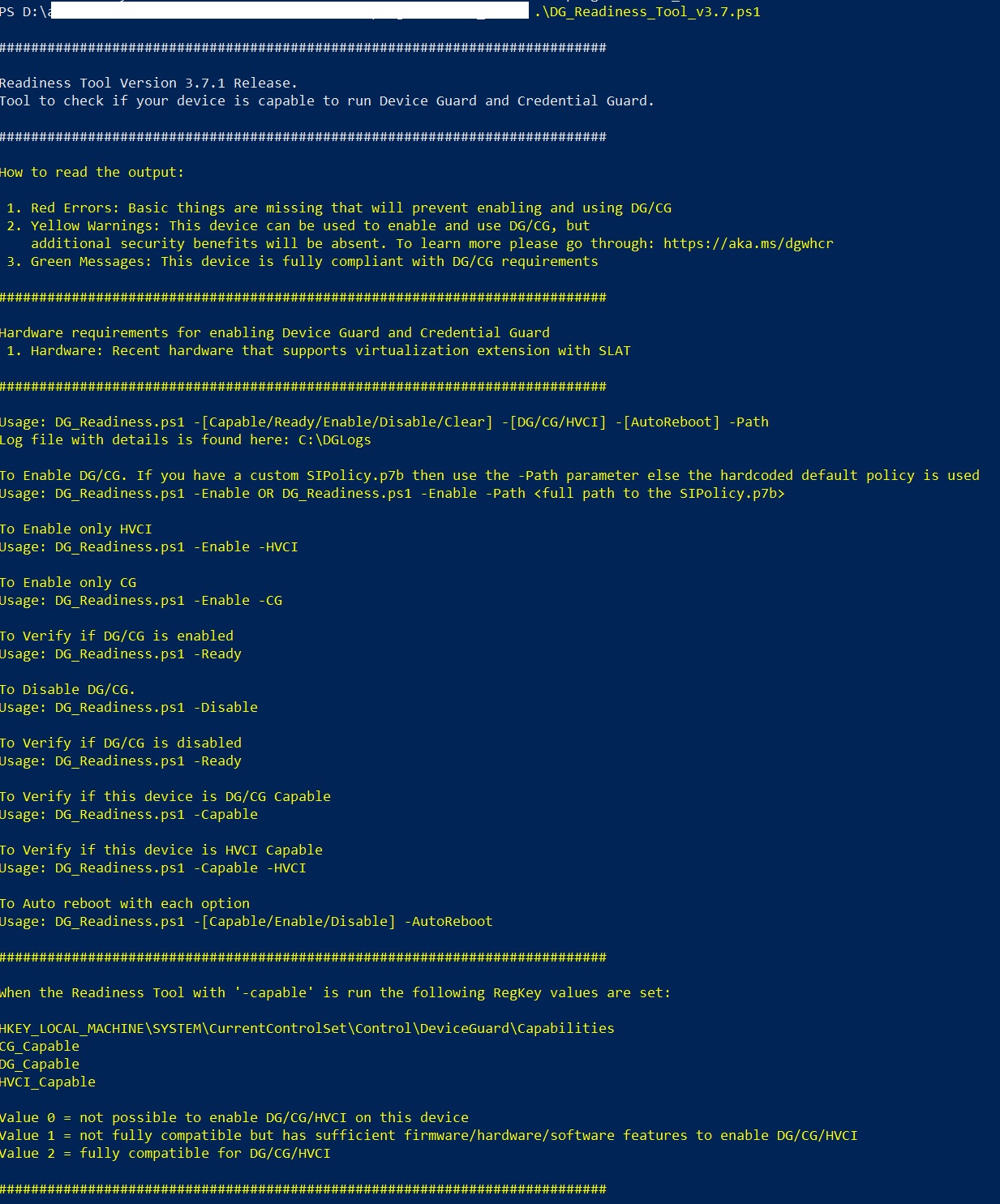
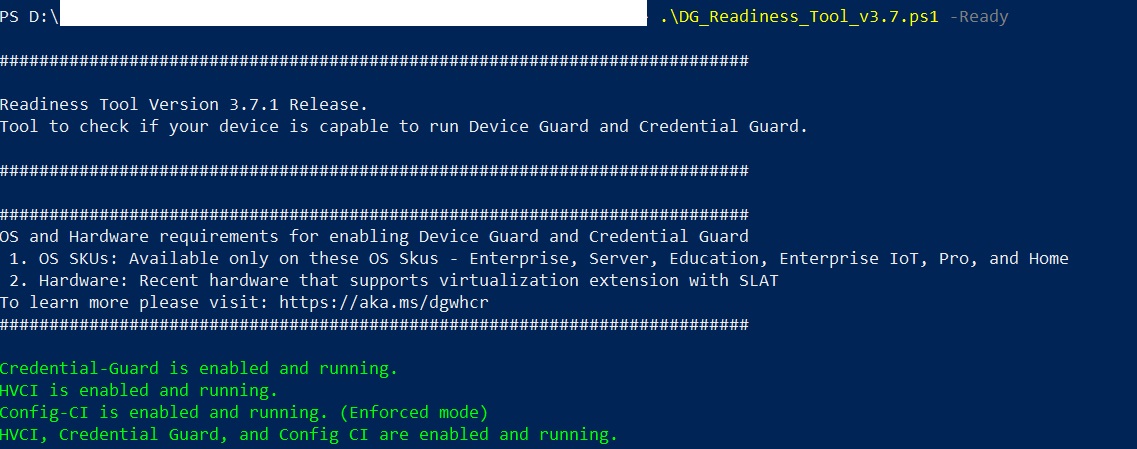
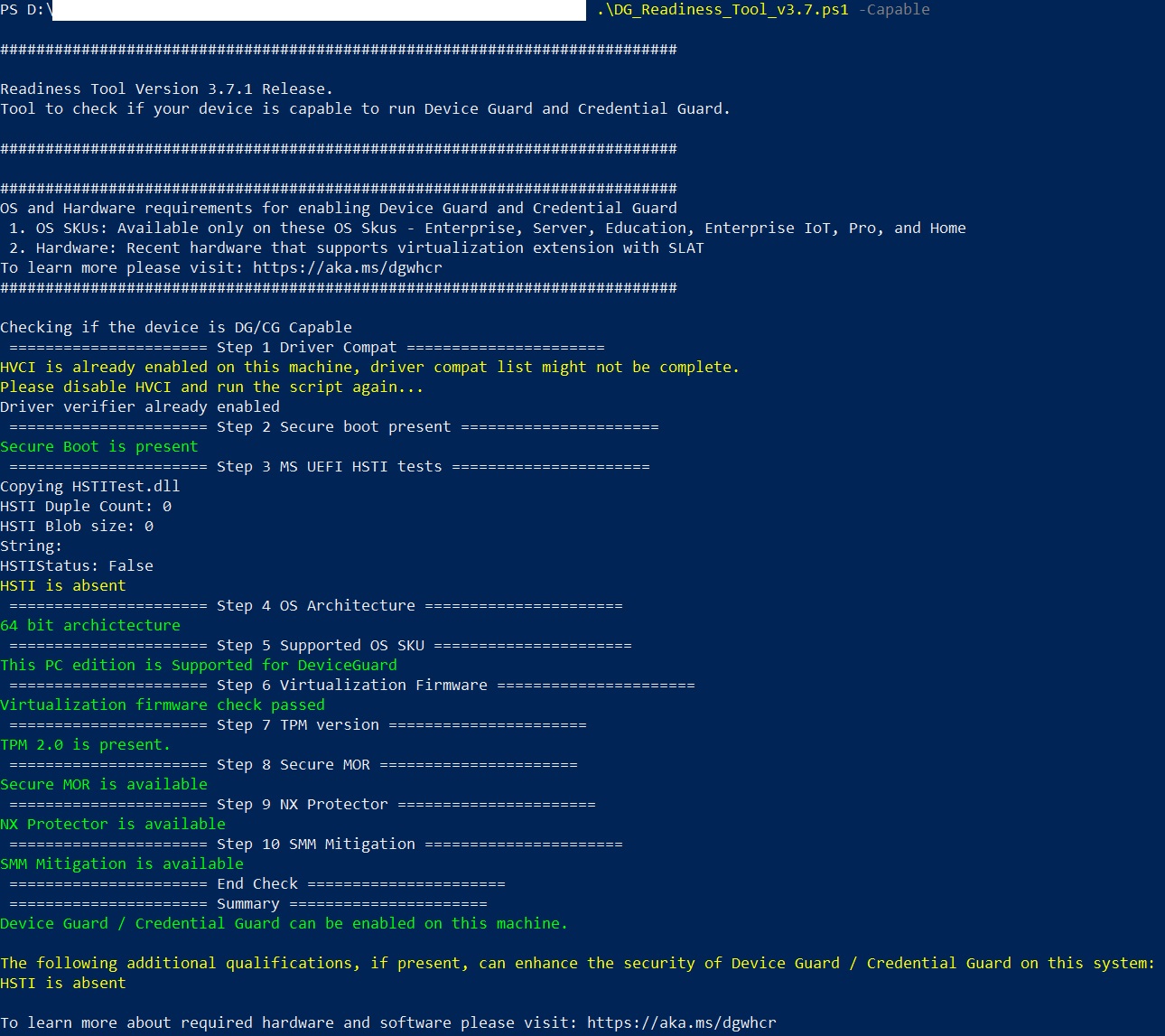
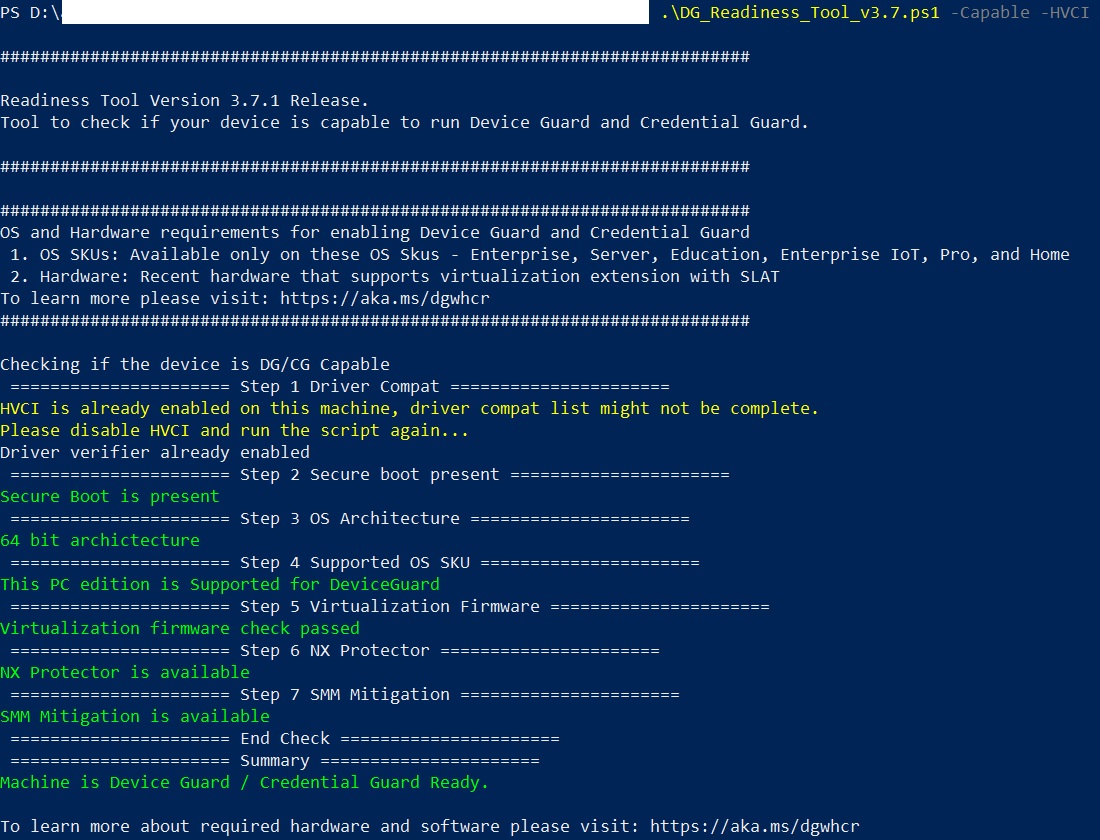
Only the ReadMe.txt need changes:
change line 2 from "3.6 Release" to "3.7.1 Release"
beerisgood
on 27 Mar 2020
Thank you for the useful feedback. I am tempted to upload a new file with that version change, but I am uncertain about how to phrase the changes in 3.7 and the .1 correction.
Would you like to make an attempt at phrasing the 3.7 and 3.7.1 changes to add to ReadMe.txt file?
illfated
on 27 Mar 2020
I would just change the "3.6" with "3.7.1" and maybe add a link to changelog somewhere.
A changelog would be generally nice so user's know what is new.
beerisgood
on 27 Mar 2020
Thanks, I just re-read the ReadMe.txt file and noticed that it does not contain an actual changelog, which would be handy. I was hoping to find something close to a changelog on the script page https://docs.microsoft.com/en-us/windows/security/identity-protection/credential-guard/dg-readiness-tool , but that page only contains the page title, the script itself and the default feedback section. No help there. Neither the v3.6 download page (https://www.microsoft.com/en-us/download/details.aspx?id=53337) nor the v3.6 zip file content contains any change log.
Seeing that the script file page (https://docs.microsoft.com/en-us/windows/security/identity-protection/credential-guard/dg-readiness-tool) editing history here on GitHub (https://github.com/MicrosoftDocs/windows-itpro-docs/commits/public/windows/security/identity-protection/credential-guard/dg-readiness-tool.md) does not offer more than 3 days of history, it becomes increasingly difficult to build a change log based on online changes to the script. This becomes particularly obvious when looking at the commit which added the file to this GitHub repository: https://github.com/MicrosoftDocs/windows-itpro-docs/commit/d44a531e11bc18859984da0489252d0191e69de4#diff-20ce79b8ec664ee9127de938abbd30b5
The script page was added in version 3.7, making it more or less exclusive to the developers to provide a changelog for this script package.
illfated
on 27 Mar 2020
Release 3.7.1 Update:
DG_Readiness_Tool_v3.6.ps1replaced withDG_Readiness_Tool_v3.7.ps1(as before)- Updated
ReadMe.txtto state the correct version (3.7.1) - Remaining files from v3.6 completely unchanged
Folder name: dgreadiness_v3.7
Files:
DefaultWindows_Audit.xmlDefaultWindows_Audit_sipolicy.p7bDefaultWindows_Enforced.xmlDefaultWindows_Enforced_sipolicy.p7bDG_Readiness_Tool_v3.7.ps1ReadMe.txt
ZIP file: dgreadiness_v3.7.zip
illfated
on 27 Mar 2020
You should rename the ps1 file and change the version info in ReadMe to 3.7.1 too instead of 3.7 ;)
But good work!
beerisgood
on 28 Mar 2020
You should rename the ps1 file and change the version info in ReadMe to 3.7.1 too instead of 3.7 ;)
File name:
DG_Readiness_Tool_v3.7.ps1-- There are 2 dots already in the file name, and from my experience, using more than 2 dots in a file name can sometimes make the file name fail to be saved correctly or receive an incorrect extension, especially when using third party software. Or did I misunderstand you, that the file name should not have any underscores, or use underscore in the version number instead of dots?ReadMe.txt, line 1 - 3:
########################################################################### Readiness Tool Version 3.7.1 Release. Tool to check if your device is capable to run Device Guard and Credential Guard.I can't find the version info anywhere else in this file. Could you point me to the line(s) I have missed?
But good work!
Thanks. 😅
illfated
on 28 Mar 2020
There are 2 dots already in the file name, and from my experience, using more than 2 dots in a file name can sometimes make the file name fail to be saved correctly or receive an incorrect extension, especially when using third party software.
Doesn't know that, but then it's fine :)
I can't find the version info anywhere else in this file. Could you point me to the line(s) I have missed?
All looks good 👍
beerisgood
on 28 Mar 2020
@denisebmsft : Is there any way to open a pull request to have the download page updated, or create a new download page based on my uploaded ver. 3.7.1 zip file above (https://github.com/MicrosoftDocs/windows-itpro-docs/issues/5972#issuecomment-605340588)?
illfated
on 28 Mar 2020
The CheckOSArchitecture function still doesn't work on a Dutch Windows 10 Installation... detection function can be adjusted using regex, like:
function CheckOSArchitecture
{
    $OSArch = $(gwmi win32_operatingsystem).OSArchitecture.ToLower()
    Log $OSArch
    if($OSArch -match ("64\-?\s?bits?"))
    {
        LogAndConsoleSuccess "64 bit archictecture"
    }
    elseif($OSArch -match ("32\-?\s?bits?"))
    {
        LogAndConsoleError "32 bit  archictecture"
        $DGVerifyCrit.AppendLine("32 Bit OS, OS Architecture failure.") | Out-Null
    }
    else
    {
        LogAndConsoleError "Unknown architecture"
        $DGVerifyCrit.AppendLine("Unknown OS, OS Architecture failure.") | Out-Null
    }
}
 RvdHout
on 25 Apr 2020
RvdHout
on 25 Apr 2020
Thanks, that looks like something I could make a PR to request changes to the 3.7 version page. There is also an already existing typo in there (don't know how long it has been there, maybe several years) which I would like to see gone, sooner rather than later.
illfated
on 25 Apr 2020
Related issues
 weiss-gal
·
3Comments
weiss-gal
·
3Comments
 KamilSzafarczyk
·
3Comments
KamilSzafarczyk
·
3Comments
 michalzobec
·
3Comments
michalzobec
·
3Comments
 SwiftOnSecurity
·
3Comments
SwiftOnSecurity
·
3Comments
 RAJU2529
·
3Comments
RAJU2529
·
3Comments
Most helpful comment
The CheckOSArchitecture function still doesn't work on a Dutch Windows 10 Installation... detection function can be adjusted using regex, like: