Windows-itpro-docs: Script Wrong on Page
This page provides the following script (below) to run. This script fails on Windows 10 Pro. The command mountvol does not have a switch of /s which is the first line in the list of commands provided. So, the mounting to X: fails which makes the rest of the script commands fail.
mountvol X: /s
copy %WINDIR%\System32\SecConfig.efi X:\EFI\Microsoft\Boot\SecConfig.efi /Y
bcdedit /create {0cb3b571-2f2e-4343-a879-d86a476d7215} /d "DebugTool" /application osloader
bcdedit /set {0cb3b571-2f2e-4343-a879-d86a476d7215} path "\EFI\Microsoft\Boot\SecConfig.efi"
bcdedit /set {bootmgr} bootsequence {0cb3b571-2f2e-4343-a879-d86a476d7215}
bcdedit /set {0cb3b571-2f2e-4343-a879-d86a476d7215} loadoptions DISABLE-LSA-ISO
bcdedit /set {0cb3b571-2f2e-4343-a879-d86a476d7215} device partition=X:
mountvol X: /d
Document Details
⚠ Do not edit this section. It is required for docs.microsoft.com ➟ GitHub issue linking.
- ID: 41c2cb44-269d-3334-019a-726eb5432f1c
- Version Independent ID: 251024cc-b818-18c6-a112-4ac0276cb4b1
- Content: Manage Windows Defender Credential Guard (Windows 10)
- Content Source: windows/security/identity-protection/credential-guard/credential-guard-manage.md
- Product: w10
- Technology: windows
- GitHub Login: @DulceMontemayor
- Microsoft Alias: dansimp
 toddalbers
All 4 comments
Please notice the amount of closed issue tickets regarding this exact issue:
- Disabling Windows Defender Credential Guard is not working with Windows 10 1803 #5190 by ealfan was closed 29 days ago
- none of this worked - I still am unable to run my virtual machine #4952 by OhiosBatman was closed on Sep 23
- Instructions regarding Windows Defender Credential Guard EFI variables do not work #4221 by foxbunny was closed on Jun 23
- variable is incorrect #4084 by lengthmin was closed on Jul 24
- Command line instructions are incorrect #3234 by RichardRanft was closed on Sep 6
- Neither the steps worked and nor the tool worked :-( #3108 by sachinmar was closed on Apr 8
- maybe an extra step is mentioned in the doc? #2663 by sasanmcp was closed on Feb 20
- Windows Sandbox Enables Windows Defender Credential Guard #2612 by hadeernd was closed on May 7
- Instructions for disabling not working... #2569 by darnocian was closed on May 9
- Credential guard enabled but not running... #2327 by haseeb1986 was closed on Apr 16
- [SOLVED] ERROR!! "The device is not valid as specified" ! #2216 by ahmedbr was closed on Jun 3
- **Can't disable Credential Guard #2141 by tomneko was closed on Feb 28
- Terminated Credential Guard #1984 by jkd2020-github was closed on Jun 9
- DOES NOTHING #1924 by cacodemon9000 was closed on Aug 14
- -SOLVED- It doesn't work for me #1915 by 2IRG-FB was closed on Jun 9
- Missing parts for VMWARE and HAXM users #1862 by Vahhab was closed on Oct 16, 2018
- The parameter is incorrect. #1776 by damian123 was closed on Jun 23
- bcdedit missing DISABLE-VBS identity protection security #1623 by mgeatz was closed on Sep 12, 2018
- (Solved) Raw-mode is unavailable courtesy of Hyper-V. (VERR_SUPDRV_NO_RAW_MODE_HYPER_V_ROOT) #1556 by DuggerConsulting was closed on Jun 23
- Credential Guard via Intune #1400 by tmguinn was closed on Apr 11
 illfated
on 21 Nov 2019
illfated
on 21 Nov 2019
@toddalbers. Firstly disable secure boot and enable legacy boot mode in bios
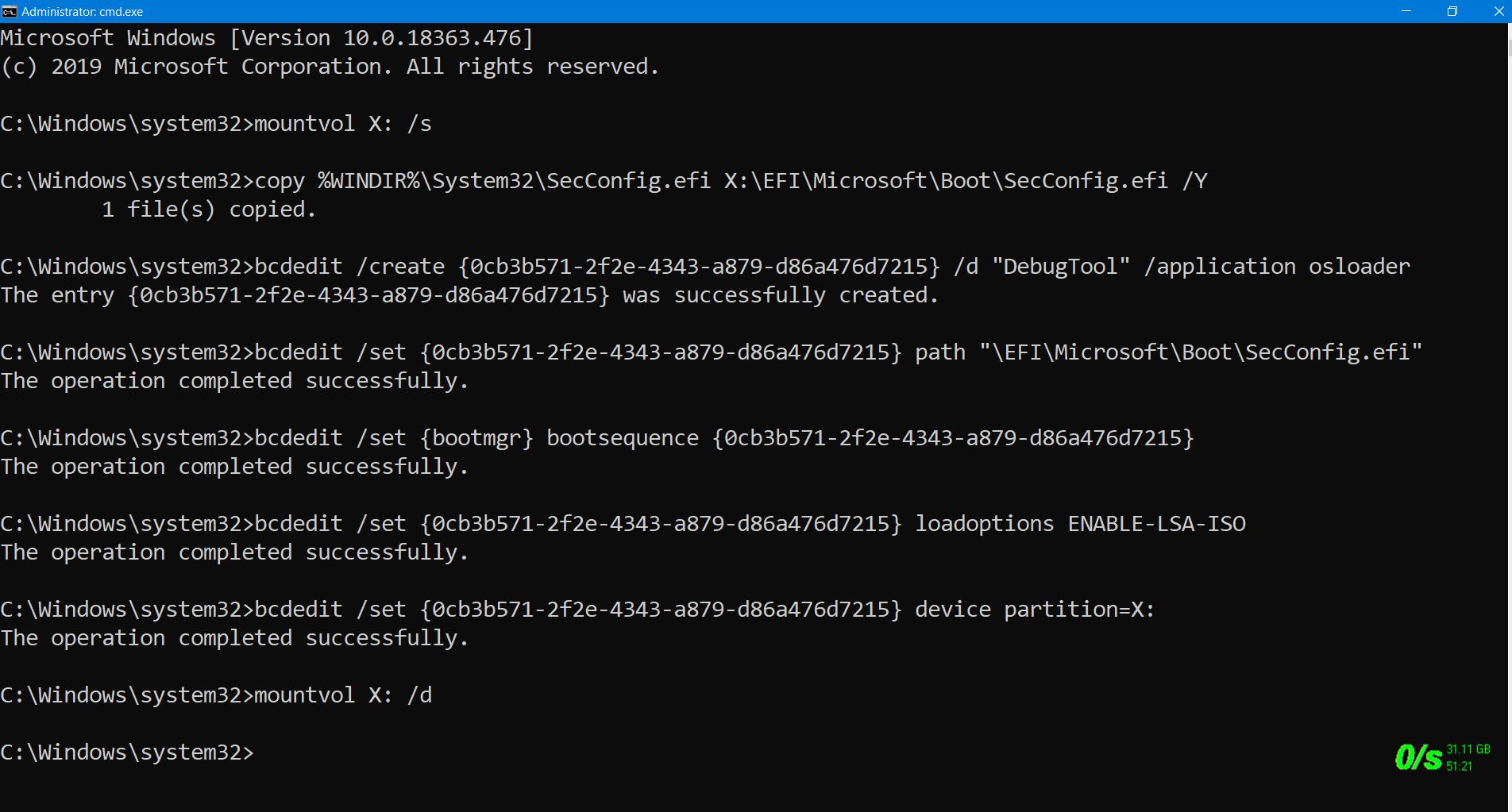
Just now i entered those commands with admin rights, ALL commands worked properly.
i enabled Windows Defender Credential Guard EFI. here is the screenshot
 RAJU2529
on 22 Nov 2019
RAJU2529
on 22 Nov 2019
@toddalbers : is there a chance that you have tried running cmd.exe as a regular user, without selecting to run the program as Administrator?
Another possible explanation for your issue might be that your computer does not have an UEFI BIOS, although that would have to be a relatively old computer.
Anyway, I am fairly certain that your issue does not prove the documentation to be false.
You are also more likely to get help from other Microsoft Social or TechNet forum pages.
illfated
on 22 Nov 2019
@illfated thank you for your help with this!!
 denisebmsft
on 13 Feb 2020
denisebmsft
on 13 Feb 2020
Related issues
illfated
·
3Comments
 iadgovuser1
·
3Comments
iadgovuser1
·
3Comments
 LanceMcCarthy
·
3Comments
LanceMcCarthy
·
3Comments
 thohun
·
3Comments
thohun
·
3Comments
 zjalexander
·
3Comments
zjalexander
·
3Comments