Windows-itpro-docs: Diagnostic logs
Please elaborate on how diagnostic logs can be gathered. I am currently troubleshooting a failed white glove provisioning, and I cannot figure out how to gather and view diagnostic logs. I cannot find this documentation on this page or the page for Troubleshooting Windows Autopilot.
Document Details
⚠ Do not edit this section. It is required for docs.microsoft.com ➟ GitHub issue linking.
- ID: ca5b57d1-61b3-39d4-34ff-d6dcb858c250
- Version Independent ID: 42609104-815f-9e7a-39aa-38d92cc910c9
- Content: Windows Autopilot for white glove deployment
- Content Source: windows/deployment/windows-autopilot/white-glove.md
- Product: w10
- Technology: windows
- GitHub Login: @greg-lindsay
- Microsoft Alias: greglin
 ang216
All 3 comments
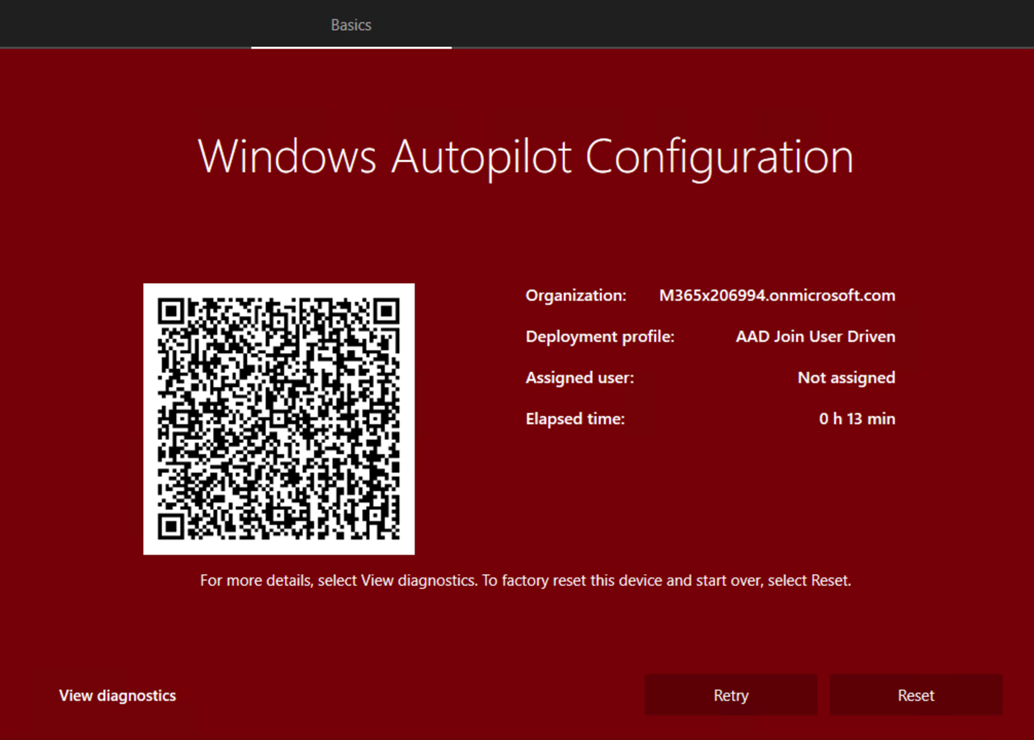
Hi, you should be able to click on a button entitled "View Diagnostics" which will then generate logs and request that you save them to a location. Insert a USB and save them there.
Also, you might find some information in Event logs at Microsoft-Windows-ModernDeployment-Diagnostics-Provider/Autopilot.
 greg-lindsay
on 19 Sep 2019
greg-lindsay
on 19 Sep 2019
Let's see if I can post the example image here.. yes, notice the lower left corner.
greg-lindsay
on 19 Sep 2019
Also, you can go to a command prompt and run the following:
mdmdiagnosticstool.exe -area Autopilot;TPM -cab c:autopilot.cab
greg-lindsay
on 20 Sep 2019
Related issues
 thohun
·
3Comments
thohun
·
3Comments
 SwiftOnSecurity
·
3Comments
SwiftOnSecurity
·
3Comments
SwiftOnSecurity
·
3Comments
SwiftOnSecurity
·
3Comments
 marcnil815
·
3Comments
marcnil815
·
3Comments
 michalzobec
·
3Comments
michalzobec
·
3Comments
Most helpful comment
Also, you can go to a command prompt and run the following:
mdmdiagnosticstool.exe -area Autopilot;TPM -cab c:autopilot.cab