Windows-itpro-docs: [LOC]Showing "**[ファイルの削除のみ行う] **" (extra asterisks appears)
https://docs.microsoft.com/ja-jp/education/windows/use-set-up-school-pcs-app
ドキュメントの詳細
⚠ このセクションを編集しないでください。 docs.microsoft.com で必須です ➟ GitHub の問題のリンク。
- ID: e2ca5807-f011-cdd1-eb80-c74655aa4738
- Version Independent ID: fe016307-69a4-ec63-4979-eac841d13c3c
- Content: 学校用 PC のセットアップ アプリを使用する
- Content Source: education/windows/use-set-up-school-pcs-app.md
- Product: w10
- GitHub Login: @lenewsad
- Microsoft Alias: lanewsad
 hyoshioka0128
All 17 comments
@officedocsbot assign @mypil
@officedocsbot add label localization
 mypil
on 29 Apr 2019
mypil
on 29 Apr 2019
@officedocsbot assign @dongmicro
mypil
on 29 Apr 2019
@dongmicro - Can you please assist with this Translation (Localization) issue?
mypil
on 29 Apr 2019
Looks like the translation (script?) has made a mistake in the 4. line in the second section of "Prepare existing PC account for new setup":
https://docs.microsoft.com/ja-jp/education/windows/use-set-up-school-pcs-app#追加の領域用に-usb-ドライブを構成する
(https://github.com/MicrosoftDocs/windows-itpro-docs/blob/master/education/windows/use-set-up-school-pcs-app.md#prepare-existing-pc-account-for-new-setup)
The asterisks (2 before the text, 2 after) should be read as formatting characters and converted to the code for bold (<strong> </strong>)
Unfortunately, I have been unable, so far, to find out why that happened to only that single line and not any of the other lines.
 illfated
on 1 May 2019
illfated
on 1 May 2019
@officedocsbot unassign @mypil
mypil
on 6 Jun 2019
Follow-up to my comment https://github.com/MicrosoftDocs/windows-itpro-docs/issues/3394#issuecomment-488260618 : It looks like the Machine Translation script added an unwanted space between the Japanese characters and the second set of asterisks (as well as removing the space after the second set of asterisks), making them not work as formatting characters. This is what the text should have looked like:
- [トラブルシューティング] をクリックして、[この PC を初期状態に戻す] を選びます。
- [すべて削除する] を選びます。
- このオプションが表示された場合は、 Windows がインストールされているドライブのみ を選択します。
- [ファイルの削除のみ行う] をクリックします。
- [初期状態に戻す] をクリックします。
(The 4. line is the reported issue, referenced in the issue title.)
illfated
on 8 Jun 2019
@officedocsbot assign @e0i
@officedocsbot assign @MollyMalone
@officedocsbot add label localization
 e0i
on 17 Jul 2019
e0i
on 17 Jul 2019
@officedocsbot unassign @MollyMalone
@officedocsbot assign @TinaMcN
e0i
on 31 Jul 2019
@officedocsbot unassign @dongmicro
e0i
on 1 Aug 2019
Thank you for the feedback. This is a problem with the MT tool. I have reported the problem to the tool owners. I don't expect this issue to be fixed quickly. I will update when we have a fix.
フィードバックをありがとうございました。 これは MT ツールの問題です。 私はツールの所有者に問題を報告しました。 この問題がすぐに解決されるとは思いません。 修正が必要になったときに更新します。
 TinaMcN
on 2 Nov 2019
TinaMcN
on 2 Nov 2019
フィードバックをありがとうございました。 記事は機械翻訳されました。 私は人間の翻訳のためにそれを送った。 翻訳が完了するまでに最大4週間かかります。 (Thank you for the feedback. The article was machine translated. I sent it for human translation. It will take up to 4 weeks to complete the translation.)
TinaMcN
on 18 Dec 2019
@hyoshioka0128 記事は現在、人間が翻訳されています。 修正済みであることを確認してください。 フィードバックのおかげで再び (The article is now human translated. Please verify that it is fixed. Thanks again for the feedback)
TinaMcN
on 8 Jan 2020
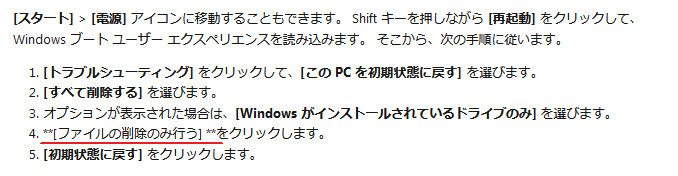
Sorry to disappoint you, but the original issue persists: https://docs.microsoft.com/ja-jp/education/windows/use-set-up-school-pcs-app#追加の領域用に-usb-ドライブを構成する
[スタート] > [電源] アイコンに移動することもできます。 Shift キーを押しながら [再起動] をクリックして、Windows ブート ユーザー エクスペリエンスを読み込みます。 そこから、次の手順に従います。
- [トラブルシューティング] をクリックして、[この PC を初期状態に戻す] を選びます。
- [すべて削除する] を選びます。
- オプションが表示された場合は、[Windows がインストールされているドライブのみ] を選びます。
- *[ファイルの削除のみ行う] *をクリックします。
- [初期状態に戻す] をクリックします。
Notice that line number 4 still contains a space character between the text and the following 2 asterisks, breaking the MarkDown bold formatting.
illfated
on 8 Jan 2020
@TinaMcN - It's not Corrected as @illfated says.
hyoshioka0128
on 9 Jan 2020
そのことについてお詫び申し上げます。 私は翻訳者に問題を調査し、修正するように頼みました。 (I apologise about that. I have asked the translators to investigate and fix the issue.)
TinaMcN
on 9 Jan 2020
@hyoshioka0128 これで問題が修正されました。 フィードバックをありがとう。 (The issue has now been fixed. Thanks again for the feedback.)
TinaMcN
on 28 Jan 2020
@TinaMcN - Corrected.
Closed #3394.
Thanks
hyoshioka0128
on 28 Jan 2020
Related issues
 Ludwig1770
·
3Comments
Ludwig1770
·
3Comments
 thohun
·
3Comments
thohun
·
3Comments
 SwiftOnSecurity
·
3Comments
SwiftOnSecurity
·
3Comments
 arcotek-ltd
·
3Comments
arcotek-ltd
·
3Comments
 andrewpong
·
3Comments
andrewpong
·
3Comments
Most helpful comment
@hyoshioka0128 これで問題が修正されました。 フィードバックをありがとう。 (The issue has now been fixed. Thanks again for the feedback.)