Windows-itpro-docs: Testing steps
Hello,
Seems that Operations Management Suite portal has retired.
Document Details
⚠ Do not edit this section. It is required for docs.microsoft.com ➟ GitHub issue linking.
- ID: 43e35d03-23d6-e006-b083-582bd33d4ae4
- Version Independent ID: 7ab70933-c45e-c601-548b-07ad0c89cd59
- Content: | Microsoft Docs
- Content Source: windows/security/information-protection/windows-information-protection/wip-learning.md
- Product: w10
- Technology: windows
- GitHub Login: @Justinha
- Microsoft Alias: justinha
 lightupdifire
All 14 comments
Confirmed. For reference, see the website https://mms.microsoft.com/ :
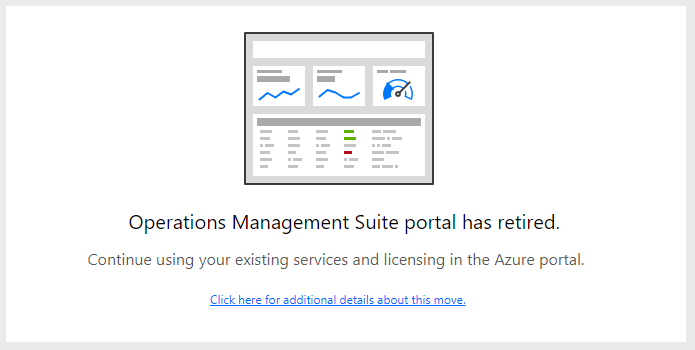
(https://docs.microsoft.com/en-us/azure/azure-monitor/platform/oms-portal-transition)
 illfated
on 11 Apr 2019
illfated
on 11 Apr 2019
@officedocsbot assign @mypil
 mypil
on 15 Apr 2019
mypil
on 15 Apr 2019
@lightupdifire - Thank you for submitting feedback.
We appreciate your efforts to clarify the docs. Could you please assist me by suggesting how this content could be edited to incorporate your feedback?
mypil
on 15 Apr 2019
@mypil,
In my opinion, in this article should be removed all steps related to OMS, else whatever we follow with OMS it goes to message that OMS is retired, but we didn't yet set it up, then as first time reading this, should I do migration of OMS or not....?
I would make this article set to use new solution Device Health for WIP app learning. Maybe have Prerequisites in top article that WIP app learning require Device Health to be setup, else if we try use WIP app learning, we cannot go anywhere now, we have to first setup Device Health, by looking into setup of "Device Health", it is another project that require proper testing and documentation in Test & Production environments.
So in short :) this article, for WIP app learning, should be set to use new solution -> Device Heatlh;
And can be added sub-page, with information about OMS and that it was retired and steps how to migrate/fix OMS.
lightupdifire
on 15 Apr 2019
@lightupdifire - thanks for your quick response. Since your suggestion is quite an extensive change on this article, we would need the insights of @Justinha on how to proceed to address your concern.
@Justinha - Please advise on the next recommended steps. If you need me to assign someone to create a PR for the changes, I can help with that.
Thank you.
mypil
on 15 Apr 2019
@lightupdifire thanks for the correction. @mypil if you can please open a pull request, change the OMS references to Device Health and link to https://docs.microsoft.com/en-us/windows/deployment/update/device-health-using#windows-information-protection
The functionality and steps seem unchanged. Even the link in Intune itself still refers to OMS, still catching up with the brand change.
 Justinha
on 16 Apr 2019
Justinha
on 16 Apr 2019
@Malind19 - as discussed, kindly assist to create a PR for this issue. Thank you.
mypil
on 17 Apr 2019
@mypil The Using Device Health article in the link @Justinha mentioned explains how to use it perfectly. Shall we remove the whole "Use OMS and Intune to adjust WIP protection policy" section from the current article and specify the link to the "Using Device Health" article?
 Malind19
on 20 Apr 2019
Malind19
on 20 Apr 2019
@Malind19 - I believe that is what @Justinha instructs to do but I might be mistaken so let's get the confirmation from Justinha.
@Justinha - kindly confirm and assist by answering the query by Malind19. Thank you.
mypil
on 22 Apr 2019
@Malind19 Good thinking. From what I see, the Device Health topic covers an example of how to obtain the app ID from the log file. The WIP topic should cover how to add that ID to an existing WIP policy in Intune, which is currently steps 3-9 in the "Use OMS and Intune to adjust WIP protection policy" section. So I think most of that section should remain but we could probably make the steps simpler by just listing the info you need to capture from Device Health and add to the WIP policy. The steps currently keep going back and forth between Intune and OMS, seems that can be consolidated. And we should add links between the two sections. Does it make sense @Malind19?
Justinha
on 22 Apr 2019
@Justinha I will be making the changes. The requirements appear to be clear enough, so I will shortly submit changes for you to review. Thanks for the helpful guidance.
 nenonix
on 24 Apr 2019
nenonix
on 24 Apr 2019
@lightupdifire - From our understanding, the issue has been resolved but it may take a few days for the merged content to appear in the article. If you feel it hasn't been resolved, please re-open this issue.
Thank you for your contribution to make the docs better! Much appreciated!
mypil
on 25 Apr 2019
@mypil
Thanks, I will follow steps again after update released.
lightupdifire
on 25 Apr 2019
@officedocsbot close
mypil
on 26 Apr 2019
Related issues
 ruffy91
·
3Comments
ruffy91
·
3Comments
 LanceMcCarthy
·
3Comments
LanceMcCarthy
·
3Comments
 jadelise
·
3Comments
jadelise
·
3Comments
 helloitsliam
·
3Comments
helloitsliam
·
3Comments
 iadgovuser1
·
3Comments
iadgovuser1
·
3Comments
Most helpful comment
@mypil,
In my opinion, in this article should be removed all steps related to OMS, else whatever we follow with OMS it goes to message that OMS is retired, but we didn't yet set it up, then as first time reading this, should I do migration of OMS or not....?
I would make this article set to use new solution Device Health for WIP app learning. Maybe have Prerequisites in top article that WIP app learning require Device Health to be setup, else if we try use WIP app learning, we cannot go anywhere now, we have to first setup Device Health, by looking into setup of "Device Health", it is another project that require proper testing and documentation in Test & Production environments.
So in short :) this article, for WIP app learning, should be set to use new solution -> Device Heatlh;
And can be added sub-page, with information about OMS and that it was retired and steps how to migrate/fix OMS.