Windows-itpro-docs: [LOC] Showing "*図 2. USB サム ドライブの選択*" (extra asterisks appears)
https://docs.microsoft.com/ja-jp/surface/microsoft-surface-data-eraser
Document Details
⚠ Do not edit this section. It is required for docs.microsoft.com ➟ GitHub issue linking.
- ID: 93a0e269-be9b-781a-b9b4-52b94e68618b
- Version Independent ID: 725c2d4a-5397-6c67-7605-93a8cd40cf08
- Content: Microsoft Surface Data Eraser (Surface)
- Content Source: devices/surface/microsoft-surface-data-eraser.md
- Product: w10
- Technology: windows
- GitHub Login: @BRecords
- Microsoft Alias: jdecker
 hyoshioka0128
All 22 comments
@officedocsbot assign @OfficeGlobal
 mypil
on 4 Apr 2019
mypil
on 4 Apr 2019
@OfficeGlobal - Kindly assist with this Translation (Localization) issue. Thank you.
mypil
on 4 Apr 2019
@officedocsbot assign @mypil
mypil
on 5 Apr 2019
@dongmicro - Can you assist with this Translation (Localization) issue?
Thank you.
mypil
on 5 Apr 2019
@dongmicro - I would like to follow up on this. Do you have any updates? Thanks.
cc: @AndreaBarr
mypil
on 8 Apr 2019
@officedocsbot add label localization
mypil
on 9 Apr 2019
@dongmicro - I would like to follow up on this. Can you please assist with this Translation (Localization) issue? Thanks.
mypil
on 15 Apr 2019
Under investigation.
 Maruktruk
on 18 Apr 2019
Maruktruk
on 18 Apr 2019
Oh. I think I can see why this is happening. This is about the image text *Figure 2. USB thumb drive selection* (under image 2 in the section How to create a Microsoft Surface Data Eraser USB stick.
Right above the image, there is a note message. followed by the image and the affected figure text:
Select the USB drive of your choice from the USB Thumb Drive Selection page as shown in Figure 2, and then click Start to begin the USB creation process. The drive you select will be formatted and any existing data on this drive will be lost.
[!NOTE]
If the Start button is disabled, check that your removable drive has a total capacity of at least 4 GB.
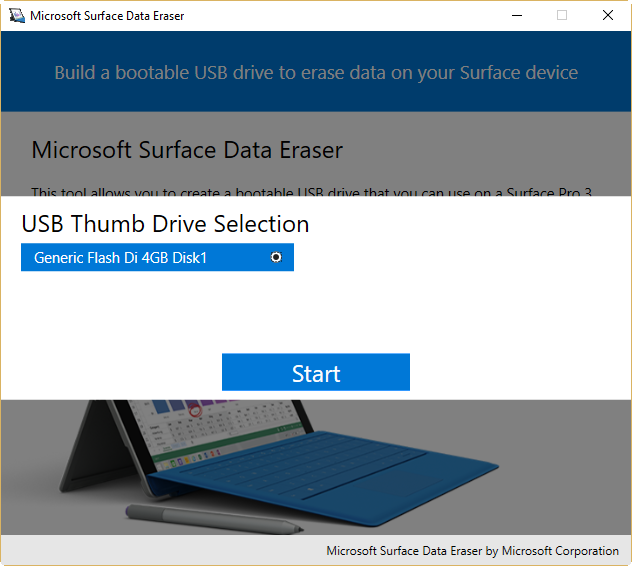
*Figure 2. USB thumb drive selection*
To me, it looks like the Github indentation, along with the asterisks used to format the text as italics, puts the image text in a code block instead of showing it as formatted text, hence making the asterisks show up on the Github page. This looks like the note above the image, along with the following indentation, makes this happen instead of showing the text as regular formatted text.
The weird thing to me is that the format issue does not show up on the docs.microsoft.com page, neither the Japanese version nor the en-us version of the page, neither in MS Edge nor in Chrome.
I admit I am a little bit confused now, seeing that I can only reproduce it using Github, not the docs.microsoft.com page.
 illfated
on 19 Apr 2019
illfated
on 19 Apr 2019
@Maruktruk @dongmicro - Any updates on this?
mypil
on 24 Apr 2019
Looking forward to hear from you, @Maruktruk & @dongmicro.
illfated
on 25 Apr 2019
@officedocsbot unassign @OfficeGlobal
@officedocsbot assign @dongmicro
mypil
on 2 May 2019
Similar: #3394 #3453 #3452 #3451
 e0i
on 3 May 2019
e0i
on 3 May 2019
@officedocsbot unassign @mypil
mypil
on 6 Jun 2019
@officedocsbot assign @e0i
e0i
on 19 Jun 2019
@officedocsbot assign @MollyMalone
e0i
on 17 Jul 2019
@officedocsbot unassign @MollyMalone
@officedocsbot assign @TinaMcN
e0i
on 31 Jul 2019
@e0i : Looking back at the pages now, this specific issue seems to be resolved, both for the Japanese and Github pages:
- https://docs.microsoft.com/ja-jp/surface/microsoft-surface-data-eraser#microsoft-surface-data-eraser-usb-%E3%82%B9%E3%83%86%E3%82%A3%E3%83%83%E3%82%AF%E3%81%AE%E4%BD%9C%E6%88%90%E6%96%B9%E6%B3%95
- https://github.com/MicrosoftDocs/windows-itpro-docs/blob/master/devices/surface/microsoft-surface-data-eraser.md#how-to-create-a-microsoft-surface-data-eraser-usb-stick
May I ask for you and @hyoshioka0128 to confirm that this is the case, testing several of your browsers as well?
If this issue really is solved, would you like to collect the remaining open linked issues in a different issue page?
illfated
on 31 Jul 2019
@officedocsbot unassign @dongmicro
e0i
on 1 Aug 2019
@officedocsbot close
This issue appears to be fixed.
 TinaMcN
on 17 Oct 2019
TinaMcN
on 17 Oct 2019
@TinaMcN Thank you. Would you confirm that associated group of issues have also been fixed?
Manually run through associated issues and closed the ones that have been fixed. Thanks.
e0i
on 17 Oct 2019
@e0i thanks so much for doing that - much appreciated 👍
TinaMcN
on 18 Oct 2019
Related issues
 LanceMcCarthy
·
3Comments
LanceMcCarthy
·
3Comments
 ang216
·
3Comments
illfated
·
3Comments
ang216
·
3Comments
illfated
·
3Comments
 michalzobec
·
3Comments
michalzobec
·
3Comments
 jadelise
·
3Comments
jadelise
·
3Comments
Most helpful comment
@officedocsbot close
This issue appears to be fixed.