Windows-itpro-docs: WIP and SharePoint
Hi,
How about those addresses:
"westeurope1-mediap.svc.ms|northeurope1-mediap.svc.ms|euc-word-edit.officeapps.live.com|euc-excel.officeapps.live.com|euc-powerpoint.officeapps.live.com"
Via SharePoint we can for Word/Excel/PowerPoint do File->Save As->Download as PDF, then WIP not apply.
Via OneDrive we can select multiple files and download as ZIP folder multiple files, then WIP not apply.
If add above URL's in "Cloud resources", then saved PDF's or ZIP's are being protected by WIP...
Document Details
⚠ Do not edit this section. It is required for docs.microsoft.com ➟ GitHub issue linking.
- ID: 255d1c9b-6b79-cb49-c230-84570daae489
- Version Independent ID: a2dcf5fd-c20d-c219-13f9-3e936036b368
- Content: Recommended Enterprise Cloud Resources and Neutral Resources network settings with Windows Information Protection (WIP) (Windows 10)
- Content Source: windows/security/information-protection/windows-information-protection/recommended-network-definitions-for-wip.md
- Product: w10
- GitHub Login: @Justinha
- Microsoft Alias: justinha
 lightupdifire
All 29 comments
@lightupdifire thanks for the feedback. You're right, if work data is being marshalled across to a service that’s not listed in the cloud resources, then Edge, etc. won’t know to protect the content. Can you share what you want to achieve? Or possibly clarify the question?
 Justinha
on 8 Feb 2019
Justinha
on 8 Feb 2019
Hello,
Can we add custom URL in the "Cloud Resources" section to be protected by wip, like box.com, or other ?
Thanks,
Best regards, Nicolas
 dbznico
on 8 Feb 2019
dbznico
on 8 Feb 2019
Hello @Justinha,
We try to set in our company:
- SharePoint as primary document storage
- Easy to use collaboration and to have easy to work with solution
- If data is accessed from non-managed PC's -> block download
- If data is downloaded to managed PC -> encrypt data
One of solution we did:
- Set SharePoint sites to limited access and added conditional access
- Set OWA policy to block Download
- Set App Protection for Mobile Phones
- Set Conditional Access policy for Outlook app on Windows PC's so only managed PC can access.
Then we try apply WIP (+Azure RMS) but seems not work yet together,
WIP is targeted to Enrolled devices,
From Enrolled device we browse to SharePoint or OneDrive site, then from there we can:
- Select multiple files and click Download -> this generate a ZIP file, but "download source" is actually from: westeurope1-mediap.svc.ms (Tenant location), if we don't add this address "westeurope1-mediap.svc.ms" in our WIP policy, then ZIP is saved as NOT protected. If I would try to steal data, would I try download file one by one, or select multiple and download ZIP? :)
- Open Word/Excel/PowerPoint via Online, then from Word we can:
a) Go to menu File->Save->Download as PDF, when you do that, the PDF file is generated and ready to download from source: euc-word-edit.officeapps.live.com; If you save file, file is NOT protected.
b) Go to menu File->Save-Save a copy (as Word), still download source is from "euc-word-edit.officeapps.live.com" and file is NOT protected
c) Same applies for PowerPoint and Excel, if using combinations from Online->File->Save a copy-> files are saved from one of the locations: "euc-word-edit.officeapps.live.com|euc-excel.officeapps.live.com|euc-powerpoint.officeapps.live.com"
Would be here BIG question, can WE BE SURE that those addresses will not change? ->
euc-word-edit.officeapps.live.com|euc-excel.officeapps.live.com|euc-powerpoint.officeapps.live.com|westeurope1-mediap.svc.ms|northeurope1-mediap.svc.ms
I'm also a little bit curious what other hidden options could be.. because by testing policy somehow I was limited at one moment to Copy mail content from Outlook desktop app from any mail to "New created mail", the fix was only to stop policy, sync PC, and apply new policy using same CER., also maybe there is any other process, that could allow save file and saved file is not protected by WIP because we didn't include that DNS in the "Cloud resources", are there any?
And I still have case with Microsoft ProDirect open regards Azure RMS + WIP, according to article, if we use Azure RMS template ID in WIP, and we save file from protected source, the file should receive a template ID protection, but somehow it is not working. Maybe some more information from you please? :)
Best regards,
Oscar
lightupdifire
on 10 Feb 2019
@dbznico passing along this comment from engineering...
Yes, you you absolutely could put something like box.com on the Cloud Resource list. You could likewise put the EXE for box in the app list and it would protect every file it creates or modifies. In fact, if either method can access Box, you probably would want to add both. Assuming Box Drive is a work-only app, this should be just fine. You might want to get a support statement from Box, though.
Justinha
on 11 Feb 2019
@lightupdifire Thanks Oscar. I've shared with our engineering team and I'll pass along what I learn.
Justinha
on 11 Feb 2019
@Justinha Thanks i have protected box.com with success, but not the box drive app.
I retreive the publisher information with the "getapplockerfileinformation" powershell command and add this to the protected desktop app but it doesn't work even after reinstalling the box drive app.
There is any tip for add custom app ?
here is the result of powershell applocker command :
O=BOX, INC., L=REDWOOD CITY, S=CALIFORNIA, C=US
Thanks a lot
dbznico
on 12 Feb 2019
@dbznico That looks good to get publisher name. Do you have the correct exe name too? Add the path parameter to get that:
Get-AppLockerFileInformation -Path "
This is covered here: https://docs.microsoft.com/en-us/windows/security/information-protection/windows-information-protection/create-wip-policy-using-intune-azure
I'll pass along what I learn. You might want to also open a case with Microsoft Customer Support.
Justinha
on 12 Feb 2019
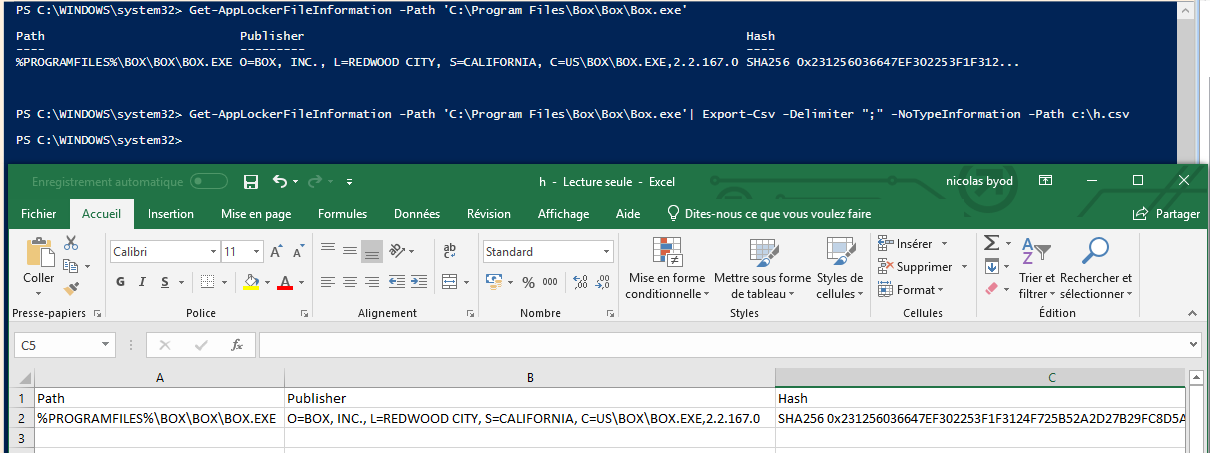
That's the result of my command and my azure portal
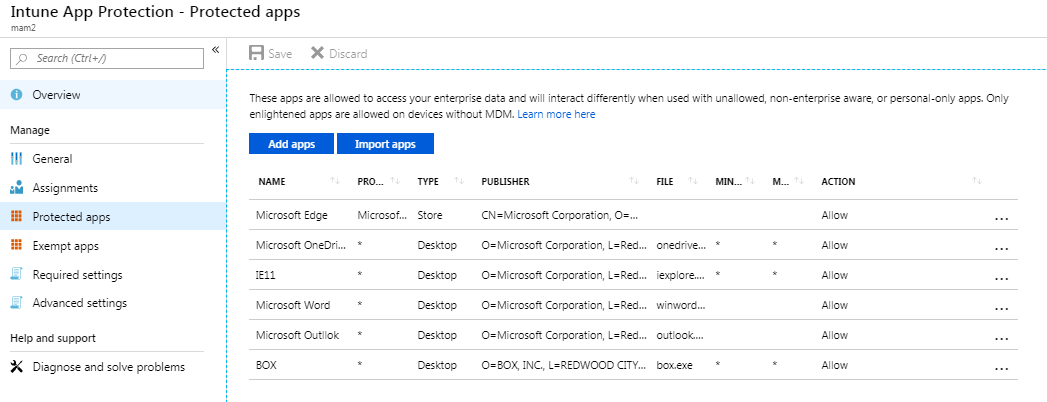
i try to reinstall box drive app but doesn't work.
dbznico
on 13 Feb 2019
@dbznico You need to add the desktop app by using AppLocker. You can create either a publisher rule or exe rule but publisher rule is preferable. See this section for an example of each type of rule. https://docs.microsoft.com/en-us/windows/security/information-protection/windows-information-protection/create-wip-policy-using-intune-azure#add-desktop-apps
Justinha
on 14 Feb 2019
@Justinha i try with applocker.
With publisher rule, box is not in the list, and with exe rule it's ok but when i import the xml file to intune i have an error when saving :
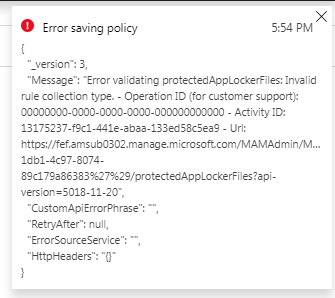
:(
dbznico
on 14 Feb 2019
i try everything i always have the same error code like the screenshot in my previous post. Can you help me please ?
Thanks in advance
dbznico
on 19 Feb 2019
@dbznico sorry you are getting an error. Try creating an EXE rule and on the Conditions page choose Publisher rather than Path. If that still returns an error you should contact Microsoft customer support for better help with troubleshooting.
Justinha
on 19 Feb 2019
@officedocsbot close
 mypil
on 20 Mar 2019
mypil
on 20 Mar 2019
The original question has nothing to do with dbznico one, he just sneaked in this question to ask his. The original question is from lightupdifire and it is HUGE security issue. How can we trust WIP if we only have to ZIP or PDF corporate files to unprotect them? At least you need to provide us all the URLs to add in our Cloud Resource boundary. this issue should not be closed until you give the original poster an answer or at least a workaround.
 Martony78
on 20 Mar 2019
Martony78
on 20 Mar 2019
@
Justinha
on 20 Mar 2019
@lightupdifire @Martony78 sorry to miss. I might need to follow up here again after I confirm with engineering but I think this is by design because the URLs are not listed in the cloud resources. The URLS do change so I'm trying to understand if there is a second level domain to add or something like that.
Justinha
on 20 Mar 2019
@Martony78 I wanted raise one more related point we recently added to https://docs.microsoft.com/en-us/windows/security/information-protection/windows-information-protection/protect-enterprise-data-using-wip
While WIP can stop accidental data leaks from honest employees, it is not intended to stop malicious insiders from removing enterprise data.
Justinha
on 20 Mar 2019
I agree with your statement but in this case even honest employees can inadvertently leak enterprise data. If it is by design I suggest to update the documentation to warn people about this and declare this issue as a bug which needs to be resolved ASAP
Martony78
on 20 Mar 2019
I verified this and fully agree. We understand that malicious behaviour can prevent WIP from protecting content (e.g. if a user intentionally changes file extension on a corporate fileshare to *.exe or *.sys and then copies the data it bypasses WIP too...(not that that excluded extensions are document anywhere?…)). Bur for God’s sake - downloading a copy of a file from SharePoint Online??? This is a serious problem that you should look into, and we ask you to do so.
 PaFkaCZE
on 21 Mar 2019
PaFkaCZE
on 21 Mar 2019
OK, thanks for the feedback @PaFkaCZE and thanks to everyone for standing by on this. Here's what I've learned so far:
- Office Online is distinct from other services. You could use SharePoint Online without using Office Online, you just wouldn't be able to view/edit docs in the browser. So if you want to view/edit docs in the browser from any of the O365 services that support it (SPO, ExcelOnline, Teams, etc), you have to also allow the IPs/FQDNs (depending on your preferred filtering mechanism) listed under Office Online.
- All O365 endpoints are defined at https://docs.microsoft.com/en-us/office365/enterprise/urls-and-ip-address-ranges. These do change and are updated monthly.
- Allow the domains listed in section number 46 and the list of apps to include should be on that page also.
- Regarding the RMS template ID, WIP doesn't change the file to Azure RMS. It only uses the Azure RMS keys when storing WIP files to removable media.
I'll pass along more as I get it and add these points to the doc.
Justinha
on 21 Mar 2019
@Justinha Unfortunately, such a workaround is not possible. You cannot put a wildcard subdomain into WIP rules so the list of endpoints is useless for this. Please have a look at the first post and see that the domains of the Office Web App servers differ based on location. The only real solution is for you to admit it to be a bug and route the files through tenant.sharepoint.com when downloaded...
PaFkaCZE
on 21 Mar 2019
@PaFkaCZE I think you can wildcard subdomains by using just the dot. Can you add .svc.ms?
Justinha
on 21 Mar 2019
@Justinha My appologies, I was too hasty - it's all just single level subdomains so .svs.ms + .officeapps.live.com seems to do the trick. Good enough for me (I'm concered the .officeapps.live.com is targeting some personal OneDrive stuff too but thats not any issue in my environment). Thanks!
PaFkaCZE
on 21 Mar 2019
@PaFkaCZE I'm super grateful to hear this thanks! @lightupdifire @Martony78 Does this answer your questions? I will be adding everything to the docs.
Justinha
on 21 Mar 2019
Great news! It should do the trick, let me try and I will get back here.
The only last concern is officeapps.live.com also stores personal data but if the doc mention it I think it is acceptable for now
Martony78
on 22 Mar 2019
@Justinha,
We have to run tests.
Waiting then for this document to be updated :)
lightupdifire
on 22 Mar 2019
@lightupdifire @Martony78
The changes that @Justinha has mentioned have been incorporated into the documentation via the following commit:
(ed8719c) added feedback from readers
Thank you for providing feedback and engaging in discussion.
 e0i
on 13 Apr 2019
e0i
on 13 Apr 2019
@officedocsbot assign @e0i
e0i
on 13 Apr 2019
@officedocsbot close
e0i
on 13 Apr 2019
Related issues
 LanceMcCarthy
·
3Comments
LanceMcCarthy
·
3Comments
 weiss-gal
·
3Comments
weiss-gal
·
3Comments
 ATR-Master
·
3Comments
ATR-Master
·
3Comments
 marcnil815
·
3Comments
marcnil815
·
3Comments
 ruffy91
·
3Comments
ruffy91
·
3Comments