Windows-itpro-docs: Citrix in Kiosk Edge
Hello I am working on delivering applications to end users via Citrix through Edge. In normal mode this runs smoothly, I would like to leverage the security advantage of kiosk in 1809. however in Kiosk mode I receive a .ica file error. Is there a way to allow the Edge Kiosk to load the .ica files?
Document Details
⚠ Do not edit this section. It is required for docs.microsoft.com ➟ GitHub issue linking.
- ID: f840fa14-a379-d297-c3f7-ada05ec299d6
- Version Independent ID: 81396f7b-7506-43cd-fd9a-4066719a6eb2
- Content: Deploy Microsoft Edge kiosk mode
- Content Source: browsers/edge/microsoft-edge-kiosk-mode-deploy.md
- Product: edge
- GitHub Login: @shortpatti
- Microsoft Alias: pashort
 A-Everson
All 22 comments
Hi @A-Everson, I'll reach out to the engineering team about your question.
 shortpatti
on 11 Oct 2018
shortpatti
on 11 Oct 2018
@A-Everson Doesn't the .ICA file call the installation of the Citrix client? It's leveraging either ActiveX or a Plugin to use Citrix. Are you attempting to use the HTML5 citrix client?
Here's a discussion on the CITRIX forums referencing the issue:
https://discussions.citrix.com/topic/383915-windows-10-edge-browser-prompts-for-opening-ica-file/
Back in 2015 Citrix had a blog post talking about issues with Edge in Citrix and the article mentions that the workarounds that were suggested broke in 2017 due to additional security added to Edge.
https://www.citrix.com/blogs/2015/08/10/storefront-3-0-and-windows-10-edge-browser
 OftKilted
on 11 Oct 2018
OftKilted
on 11 Oct 2018
You are correct, these options can fix the issue I am seeing however, how can they be applied to the Kiosk login? without the Kiosk enabled in Edge I am able to use Citrix seamlessly, but when using Kiosk Edge through Assigned Access I get this error. There must be some way to enable the plugins under Assigned Access
A-Everson
on 11 Oct 2018
Are you trying single-app or multi-app?
shortpatti
on 11 Oct 2018
I have attempted both, I would prefer single-app. It will not function on either.
A-Everson
on 12 Oct 2018
@A-Everson, I'll pass this on to the engineering team for assistance :)
shortpatti
on 12 Oct 2018
Hi @A-Everson,
Single app as the name suggests only allows a single app to run. Citrix Receiver is a second app, hence not possible. This is by design.
It should work in multi-app. Can you give me specific details about what doesn't work with multi-app?
shortpatti
on 12 Oct 2018
In both single and multi-app modes I receive the error:
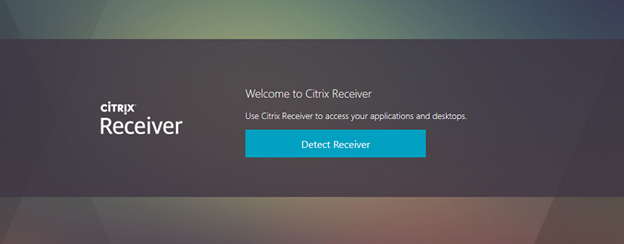
I can click "Detect"
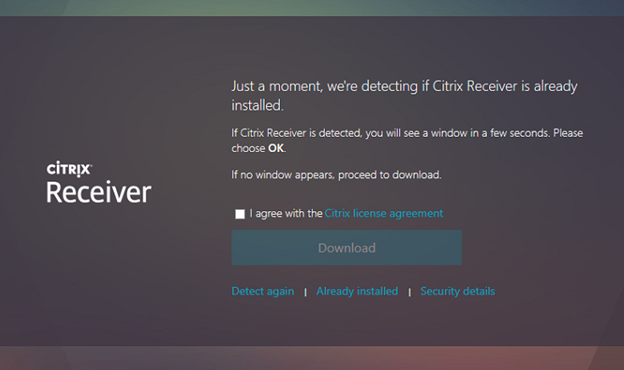
Then click "already installed" and it will load the storefront screen as usual
when attempting to run a app from storefront I receive:

Presumably because kiosk mode will not allow the plugin to load.
This all works outside of Kiosk in Edge. Is there a way to install the plugin under the Kiosk user so I can use this resource?
A-Everson
on 16 Oct 2018
@A-Everson, try creating the kiosk user account and then log into the account to install Citrix Receiver before setting up assigned access.
shortpatti
on 17 Oct 2018
@A-Everson, the engineering team is aware of this issue and they are working to resolve it.
shortpatti
on 19 Oct 2018
Is there any update to this?
 bsod2k
on 7 Jan 2019
bsod2k
on 7 Jan 2019
I would be interested in a solution to this also..
 therealchrisrooney
on 5 Feb 2019
therealchrisrooney
on 5 Feb 2019
Any updates on this @shortpatti ? We would also be interested in this solution.
 DomiOder
on 13 Feb 2019
DomiOder
on 13 Feb 2019
Still no fix or answer for this. Disappointing; my organization has begun looking into Linux based environments that can do this function. It would be nice if Microsoft had a fix for this.
A-Everson
on 18 Feb 2019
@shortpatti Any updates on this issue, we would like to follow up. Thanks.
 e0i
on 5 Mar 2019
e0i
on 5 Mar 2019
@e0i as always Microsoft (@shortpatti) is just ignoring this. No updates, no solution...
So disappointing and bad customer service!
DomiOder
on 6 Mar 2019
@shortpatti Any updates on this issue, we would like to follow up. Thanks.
@e0i Please reach out to engineering team again. As @shortpatti is no longer working at Microsoft
 andrefboliveira
on 27 Jun 2019
andrefboliveira
on 27 Jun 2019
There was no response to my query from Microsoft. I have given up utilizing Windows and purchased a Linux option to provide the desired desktop experience on the 3000+ endpoints. 8+ months without even an acknowledgement from Microsoft is unacceptable customer service experience.
A-Everson
on 27 Jun 2019
@a-everson Did you ever try handling this via IE11 and Kiosk mode?
OftKilted
on 27 Jun 2019
There was no response to my query from Microsoft. I have given up utilizing Windows and purchased a Linux option to provide the desired desktop experience on the 3000+ endpoints. 8+ months without even an acknowledgement from Microsoft is unacceptable customer service experience.
@A-Everson did you try to contact _Microsoft Support_? There is also _Business Support_ for business scenarios as seems to be your case.
I am sure that you would get a better Customer Service Experience there 😊.
andrefboliveira
on 27 Jun 2019
@A-Everson i know a lot of time has passed since you asked and according to the thread you did not receive an appropriate answer, but do you still want us to look into this/test it and come back to you?
 VLG17
on 18 Dec 2019
VLG17
on 18 Dec 2019
Hello @A-Everson ,
The issue is being closed since your question seems to be answered. Feel free to re-open this issue if you feel that it hasn't been answered or that there are further suggestions to improve the documentation itself.
Thanks.
e0i
on 22 Dec 2019
Related issues
 helloitsliam
·
3Comments
helloitsliam
·
3Comments
 jadelise
·
3Comments
jadelise
·
3Comments
 marcnil815
·
3Comments
marcnil815
·
3Comments
 ATR-Master
·
3Comments
ATR-Master
·
3Comments
 LanceMcCarthy
·
3Comments
LanceMcCarthy
·
3Comments