Windows-itpro-docs: Configure kiosk account and app error
I'm trying to follow "Set up a kiosk using the kiosk wizard in Windows Configuration Designer" and I'm stuck at "Configure kiosk account and app" step.
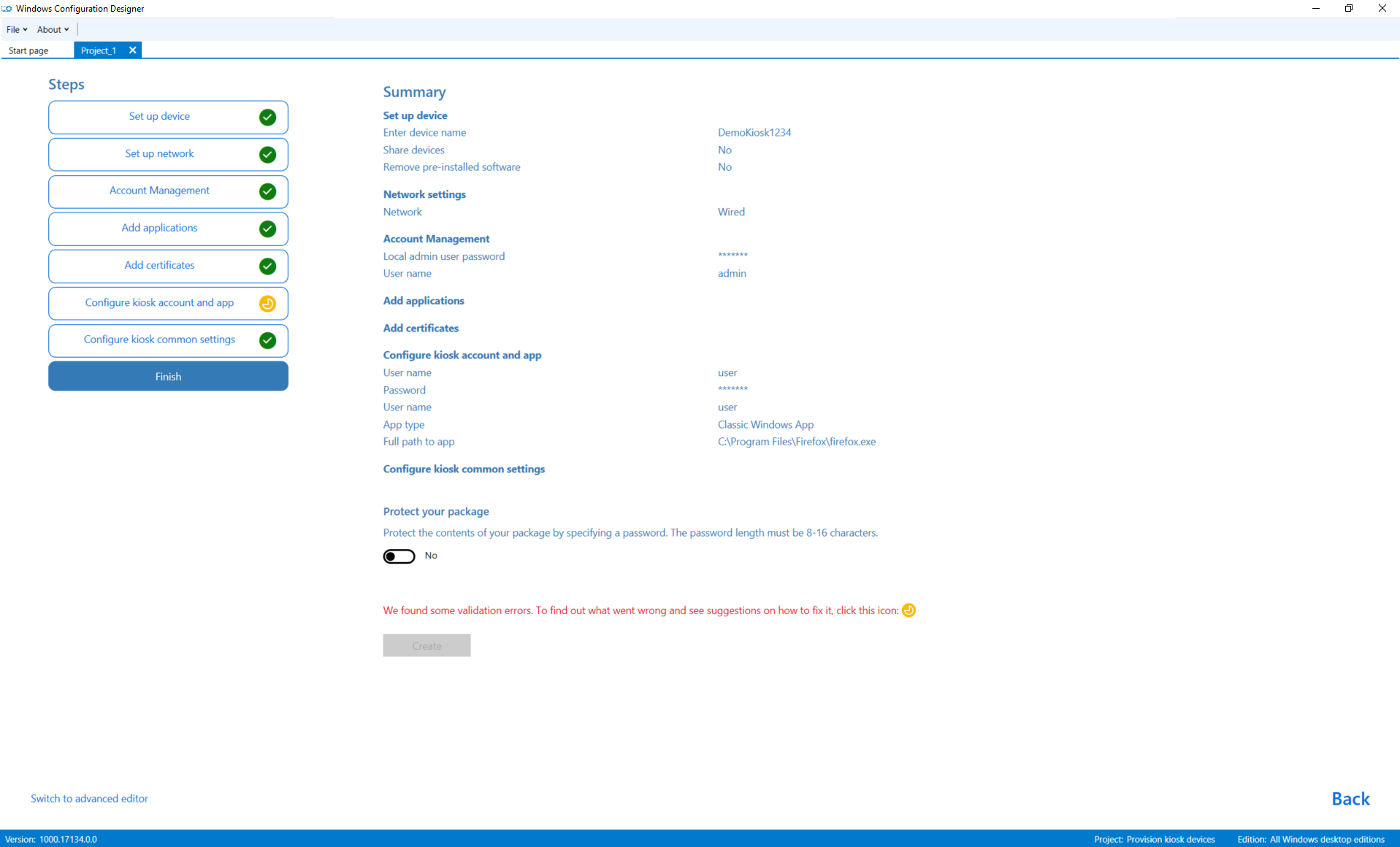
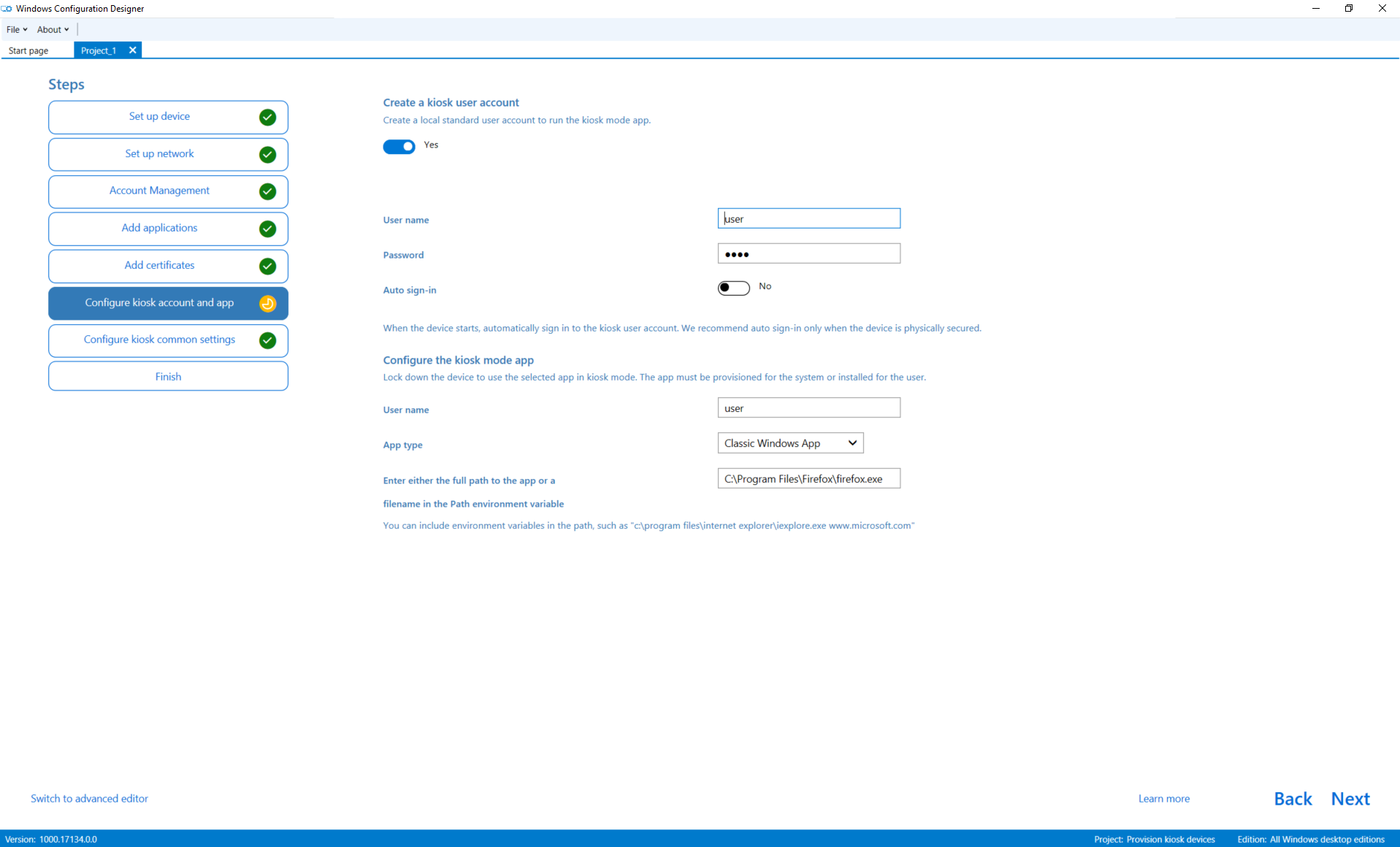
"Finish" step informs me about validation errors and so I click the yellow icon in "Configure kiosk account and app" step. I don't see any errors or red text in this step. Is there a way to find out what is wrong? I can provide you with additional information if you specify them.
Podrobnosti dokumentu
⚠ Neupravujte tuto část. Vyžaduje se k propojení problémů docs.microsoft.com ➟ GitHub.
- ID: f8f49c3f-ba5c-49e9-fad2-88cac155920a
- Version Independent ID: dc5e1f7e-61a8-bf2c-34b8-4046d024f4c2
- Content: Set up a single-app kiosk (Windows 10)
- Content Source: windows/configuration/kiosk-single-app.md
- Product: w10
- GitHub Login: @jdeckerMS
- Microsoft Alias: jdecker
 rysavfi1
All 9 comments
rysavfi1
on 22 Aug 2018
@rysavfi1 I ran through the kiosk wizard and used the same settings that you have, and it validated. However, I was using the desktop version of WCD (from the ADK at https://go.microsoft.com/fwlink/?linkid=873065). If I use the Microsoft Store version of WCD, I have the same experience as you.
If you would, please submit your experience in the Feedback Hub, attaching both of your screenshots, so the engineering team can be notified of the problem, and specify in your feedback that you're using the Microsoft Store version of Windows Configuration Designer.
You can install the desktop version of WCD to complete your package. (https://docs.microsoft.com/en-us/windows/configuration/provisioning-packages/provisioning-install-icd#install-windows-configuration-designer-1)
 jdeckerms
on 22 Aug 2018
jdeckerms
on 22 Aug 2018
I have experienced the error using the Microsoft Store version. I have no validation errors using the desktop version. Thanks.
rysavfi1
on 22 Aug 2018
This issue still exists on Windows 10 1803
 HunterDG
on 2 Nov 2018
HunterDG
on 2 Nov 2018
Issue exists on windows 10 Home v. 1709
 yosefsun
on 5 Nov 2018
yosefsun
on 5 Nov 2018
issue exists on windows 10 enterprise 1809.
 Eric-ITaaS
on 19 Dec 2018
Eric-ITaaS
on 19 Dec 2018
Same issue using Store version of WICD 2019.314.0.0
 Marctwain-Marcellos
on 15 May 2019
Marctwain-Marcellos
on 15 May 2019
Same issue on windows 10 Pro 1903
 cadlebe
on 10 Oct 2019
cadlebe
on 10 Oct 2019
I have this issue on 1903.
 duel007
on 12 Jun 2020
duel007
on 12 Jun 2020
Related issues
 jadelise
·
3Comments
jadelise
·
3Comments
 ang216
·
3Comments
ang216
·
3Comments
 RAJU2529
·
3Comments
RAJU2529
·
3Comments
 SwiftOnSecurity
·
3Comments
SwiftOnSecurity
·
3Comments
 KamilSzafarczyk
·
3Comments
KamilSzafarczyk
·
3Comments
Most helpful comment
I have experienced the error using the Microsoft Store version. I have no validation errors using the desktop version. Thanks.