Winappdriver: Not able to inspect element - Grid/Table
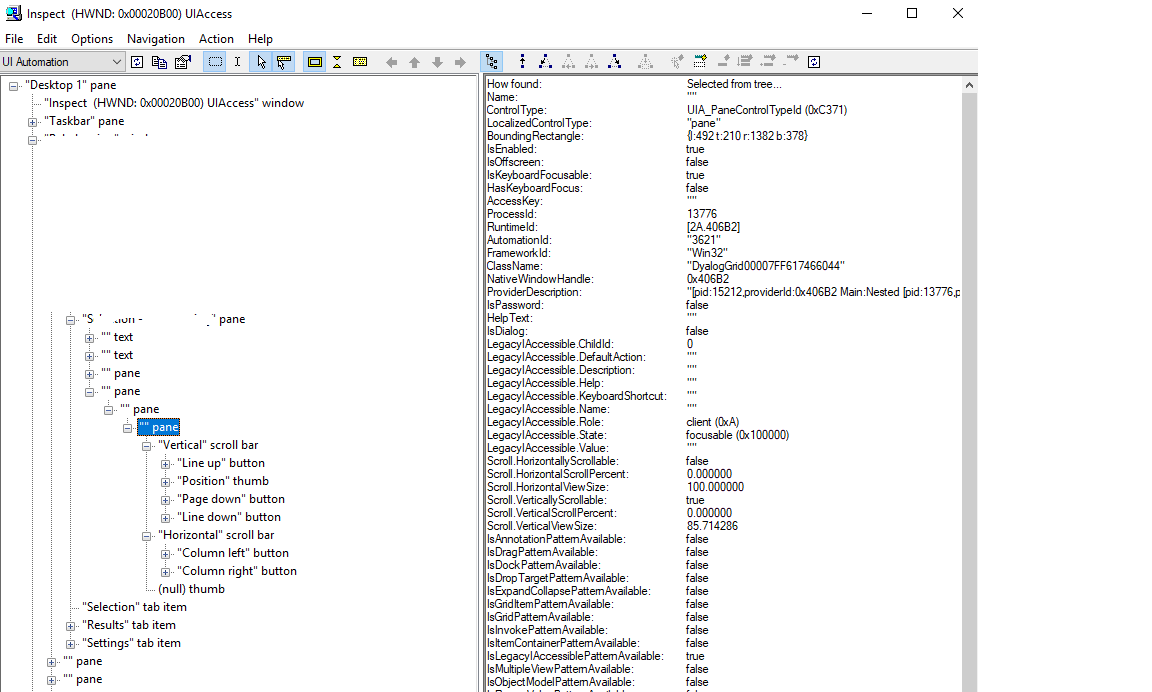
I am not able to inspect one table or grid on application under test. I am getting only 'pane' element but no rows are getting inspected. Attached screenshot of inspect tool
How can i work on grid or table rows. Is there any workaround.
 varun210619
All 20 comments
Automation properties are not implemented for the grid items ask the developer to implement.
 anunay1
on 17 Mar 2021
anunay1
on 17 Mar 2021
Hi @anunay1
I cannot ask developer to implement it since we are not developing it. Could you please let me know how can i use grid items-gettext from any cell, click on any row if its not implemented by developer.
Other table/grid in application is clearly showing all the rows and I am able to use all grid methods.
varun210619
on 17 Mar 2021

varun210619
on 17 Mar 2021
You can't unless the automation properties are implemented
anunay1
on 18 Mar 2021
@varun210619 , Hi. I'm also facing the same issue. I'm working on a desktop application, where a data table has no values at all. Just has a pane. No elements inside it. Could you please let me know if you found any solution or any suggestions. Thanks in advance.
 Purushotham230
on 20 Mar 2021
Purushotham230
on 20 Mar 2021
I am not able to inspect one table or grid on application under test. I am getting only 'pane' element but no rows are getting inspected. Attached screenshot of inspect tool
How can i work on grid or table rows. Is there any workaround.
Excatly, as show in that screenshot, I'm also getting same problem.
just like your's "I cannot ask developer to implement it since we are not developing it. Could you please let me know how can i use grid items-gettext from any cell, click on any row if its not implemented by developer."
We are not the developer also. If you found any solutions. please let me know. Thanks in advance.
Purushotham230
on 20 Mar 2021
I haven't tried this yet, but there was an Appium project that would take an image from the screen and use machine learning to find elements within it. They are currently using it for game testing.
I have not done it yet because we have access to most of our items. But, windows optimization could decide not to render some of them on the visual tree. So was considering making a backup search method to work around this known limitation.
 liljohnak
on 20 Mar 2021
liljohnak
on 20 Mar 2021
@liljohnak yes there is an api find element by image but it only click, your cannot get the text out of its and also if the data in the grid is dynamic it will be of no use
anunay1
on 21 Mar 2021
I think many people are facing this issue. There should be an alternative implemented in WinAppDriver to work on grids where developers have not implemented automation properties.
Could Microsoft have a look on the issue.
We are using WinAppDriver for automating a major application used across our enterprise. The tool can work on almost all the elements- C# and dyaloq based. But it is not able to work on dyaloq grids - resulting in partial automation in these cases.
varun210619
on 22 Mar 2021
Yeah @varun210619 , I'm also working on a desktop app tools using in my project are : selenium + winapp . where developers didn't given any properties to the grid table. if you found any solutions, please let me know. Thanks in advance.
Purushotham230
on 22 Mar 2021
1247 This bug gives a workaround for your problem @varun210619 @Purushotham230 Altough I have not tried it
anunay1
on 22 Mar 2021
HI @anunay1,
is there any way to get a screenshot of only the "data table" of my desktop application, because I can get an entire screen, but unable to capture a particular element?.
If I can get a screenshot of a particular element, I will use tesseract-OCR with English, to get text and will compare it with the actual text. So I need to know, just, how to capture a particular element on-screen or my desktop application which on screen.
if anyone knows, how to capture the windows element, please let me know, Thanks in advance.
Purushotham230
on 22 Mar 2021
There no direct method to get the screenshot of a particular element, but yes it's possible in some other way,get the screenshot of the entire desktop and then crop the images based on the dimension of the data table, And tesseract-OCR is pathetic, and I will not recommend that. Better to go with paid OCR or else if you have azure subscription, then use azure cognitive services. The have open API for OCR and it's pretty good.
anunay1
on 22 Mar 2021
In case if you want any other support you can ping me [email protected]
anunay1
on 22 Mar 2021
sure, will check Azure or OCR then, Thanks @anunay1
Purushotham230
on 22 Mar 2021
Hi @anunay1 @Purushotham230
i think above comments are somewhat not directly related to issue or am i missing anything.
How can i click on any row of dynamic grid - I mean fetching text row by row and then clicking on required cell.
varun210619
on 22 Mar 2021
Hi @kat-y
could you please add this issue to high priority issues list and include some workaround in next release.
We are using the tool for automating our whole regression suite. We are able to automate many complex elements for the application. But with the current grid issue, it is resulting in partial automation of test cases.
I am working in Nordics Bank and would love to share this issue with you and your team, if any meetings or call is required.
Looking forward your response.
varun210619
on 22 Mar 2021
@varun210619 , As you mentioned, if a grid table has no property values of desktop application, designed by developers but I cannot ask developers to implement it since we are not developing it. So , how can i get grid table data even there is no properties individually of grid table data.
Purushotham230
on 23 Mar 2021
Hi @kat-y we have numerous use cases where the table or data grid is not identified by inspect or workable by winapp driver.
There are numerous tools (paid) that are able to edit those tables and cells. Is it possible to get this on the development roadmap soon?
 ashkaps
on 23 Mar 2021
ashkaps
on 23 Mar 2021
@varun210619 @alakshmi1030 the challenge here is that the elements to be tested are not visible to WinAppDriver. The optimal solution is to ask the developer to add it to the AutomationPeer. If this has been done, then I think it should be a Huge priority for the WinAppDriver driver team to address. If adding the grid to the AutomationPeer cannot be done we are only left with image comparison work arounds.
liljohnak
on 24 Mar 2021
Related issues
 vnabokit
·
3Comments
vnabokit
·
3Comments
 SimonKirkhamCL4U
·
3Comments
SimonKirkhamCL4U
·
3Comments
 quincycs
·
3Comments
quincycs
·
3Comments
 didhddldlq
·
3Comments
didhddldlq
·
3Comments
 sandeepdroid
·
3Comments
sandeepdroid
·
3Comments
Most helpful comment
@liljohnak yes there is an api find element by image but it only click, your cannot get the text out of its and also if the data in the grid is dynamic it will be of no use