Wiki: What is missing in config.yml to complete setup
as shown below i couldn't complete setup after node server command

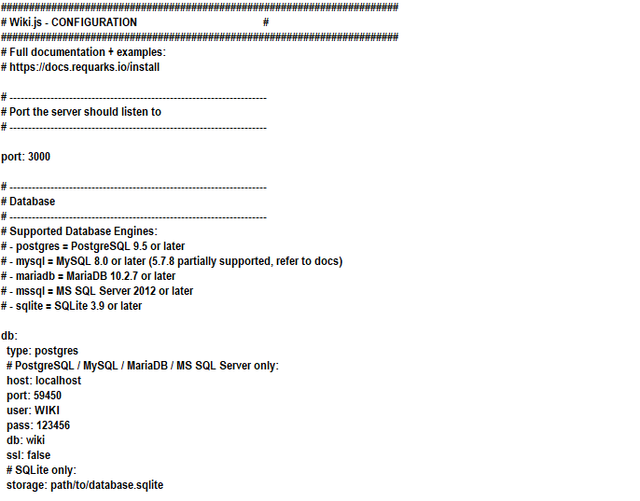
and here is my config.yml settings
Host Info
Windows
Wiki.js version: 2.0.12
Database engine: postgres 10.11-3
 M-LE-2020
All 12 comments
You need to put quotes around your password value if it starts with a number.
 NGPixel
on 26 Dec 2019
NGPixel
on 26 Dec 2019
it didn't work, also i changed the pass to normal text with no numbers and got the same result!!!
M-LE-2020
on 26 Dec 2019
Have you actually tested that you can connect to your postgresql instance (e.g. using the psql client)?
NGPixel
on 28 Dec 2019
Also please try using port 5432 for Postgres; that is the default port for a PostgreSQL install. If you did not explicitly change the port in your configuration, the port you listed is incorrect. If you need help finding the config file with port information, I'll be happy to help.
 ssimontis
on 29 Dec 2019
ssimontis
on 29 Dec 2019
Also please try using port 5432 for Postgres; that is the default port for a PostgreSQL install. If you did not explicitly change the port in your configuration, the port you listed is incorrect. If you need help finding the config file with port information, I'll be happy to help.
Hi Simon,
Many thanks for your reply.
well as you see i left the default port for postgresql as it is
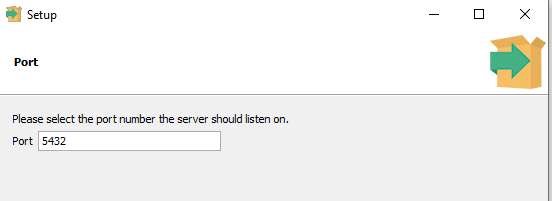
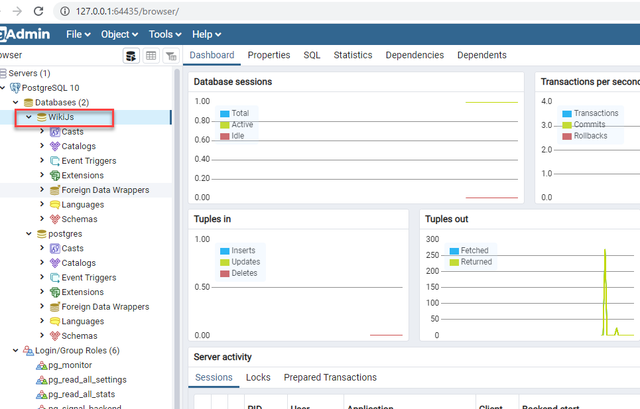
meanwhile after finishing install ion and open the pgadmin i found the port changed

could you please advise!!
M-LE-2020
on 29 Dec 2019
Have you actually tested that you can connect to your postgresql instance (e.g. using the psql client)?
yes and it seems connected well, also i have created the DB for wiki to connect it while installation and config the yml file
M-LE-2020
on 29 Dec 2019
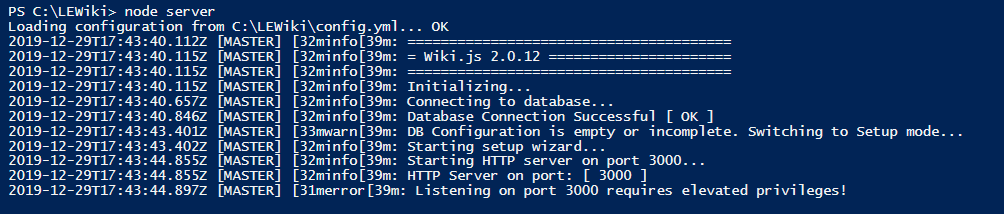
This is the final result i got after changing port of postgre to be 5432 but it didn't continue
M-LE-2020
on 29 Dec 2019
Thanks a lot guys, it works well now.
solution:
change the port at yml config from 3000 to 80
and postgre port to be 5432
M-LE-2020
on 29 Dec 2019
For future reference, the reason that you saw the port in the 60,000s in your browser is because the pgAdmin interface uses that port to run the web server. pgAdmin is totally separate from your Postgres installation -- you will definitely use it to connect to your installation, but you can use it to connect to many servers.
You will see in the errors that it failed to start at port 3000 because you need elevated privileges -- you need to either run the command from an elevated command prompt, or choose a larger value for port. I'm honestly kind of shocked 3000 requires elevated permissions on Windows, typically it is only ports < 1024. My preference is to use ports above 50,000 for any development instances as those ports are almost never used by applications.
If you don't want to manually start the node server process, you can create a scheduled task to do so or look into utilities like PM2 to set it up as a service.
Glad you got it working and let me know if you have additional questions I can help out with!
ssimontis
on 29 Dec 2019
Glad you got it working and let me know if you have additional questions I can help out with!
your prompt response is highly appreciated really, well i have another two questions
i'm seeing this coming soon note on almost most of features at Wiki, are we about to receive a new update for the wiki soon ?or is there something wrong about my installation ?

The other thing what about those Skipped things, excuse me i'm still beginner for this and wanna be sure from its accurate before i initialize it to my company
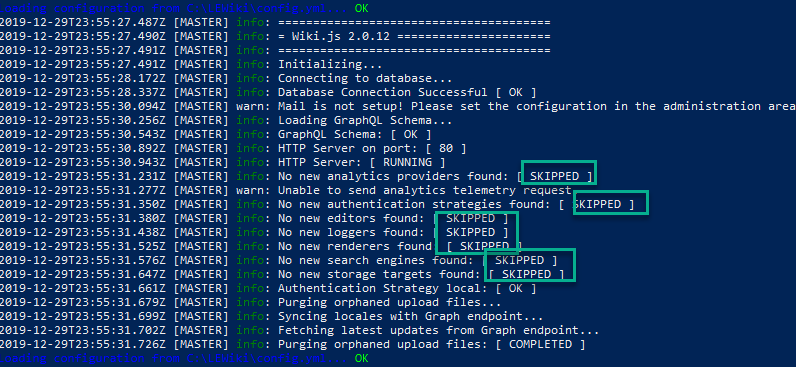
The last question, are there any advises you can tell me before install the wiki to windows server instead of the local host?
Many thanks in Advance for your generous help
M-LE-2020
on 30 Dec 2019
I think a major Proposed release is coming up soon. I am not actually on the core team, I just try to answer questions here when I can (although I have asked about contributing more :) ).
Those lines would not be skipped in a situation where an update made a new editor, or a new search interface, or some other pluggable piece of functionality available for use.
In addition to using pm2, I would also highly recommend using a reverse proxy, which is basically a web server sitting in front of your web server. You can look into how to do so with IIS, but I am not a big fan of IIS and personally prefer NGinx. Caddy is another web server which is very easy to configure, but they aren't fully open-source if that is a concern to you. And of course there's always Apache, but I am not very familiar with Apache; I literally always use Nginx.
A reverse proxy will let you assign a TLS certificate so you can have HTTPS, it can load balance, improve logging, optimize requests and caching, and protects the identity of your original web server (you can have the reverse proxy set up on another server).
Here are Microsoft's standards for hardening Windows Server, I would consider following these for any Production deployment. Other than that, make sure that you have backups set up and that they work! Good luck with the deployment!
ssimontis
on 30 Dec 2019
@M-LE-2020 [ SKIPPED ] are normal and can be ignored.
You can check the upcoming release here:
https://docs.requarks.io/releases
NGPixel
on 30 Dec 2019
Related issues
 thinkh
·
4Comments
thinkh
·
4Comments
 SharkProgramming
·
4Comments
SharkProgramming
·
4Comments
 sleepadru
·
4Comments
sleepadru
·
4Comments
 ahkimkoo
·
4Comments
ahkimkoo
·
4Comments
 p-se
·
3Comments
p-se
·
3Comments