Wiki: Documentation lack db setup explanation
Question
I cannot start wiki.js in a docker. It fails to connect to a database
Host Info (please complete the following information):
OS: Docker
Wiki.js version: latest docker from docker hub
Database engine: sqlite
Starting with
docker run -d -p 8080:3000 --name wiki --restart unless-stopped -e "DB_TYPE=sqlite" -e "DB_FILEPATH=/db" requarks/wiki:beta
This fails with:
PS C:\Users\d00476485> docker logs wiki
Loading configuration from /wiki/config.yml... OK
2019-11-12T10:24:39.951Z [MASTER] info: =======================================
2019-11-12T10:24:39.954Z [MASTER] info: = Wiki.js 2.0.0-rc.17 =================
2019-11-12T10:24:39.955Z [MASTER] info: =======================================
2019-11-12T10:24:39.955Z [MASTER] info: Initializing...
2019-11-12T10:24:40.391Z [MASTER] info: Connecting to database...
2019-11-12T10:24:40.408Z [MASTER] error: Database Connection Error: SQLITE_CANTOPEN undefined:undefined
2019-11-12T10:24:40.408Z [MASTER] warn: Will retry in 3 seconds... [Attempt 1 of 10]
2019-11-12T10:24:43.412Z [MASTER] info: Connecting to database...
2019-11-12T10:24:43.414Z [MASTER] error: Database Connection Error: SQLITE_CANTOPEN undefined:undefined
2019-11-12T10:24:43.414Z [MASTER] warn: Will retry in 3 seconds... [Attempt 2 of 10]
2019-11-12T10:24:46.415Z [MASTER] info: Connecting to database...
2019-11-12T10:24:46.416Z [MASTER] error: Database Connection Error: SQLITE_CANTOPEN undefined:undefined
2019-11-12T10:24:46.416Z [MASTER] warn: Will retry in 3 seconds... [Attempt 3 of 10]
2019-11-12T10:24:49.420Z [MASTER] info: Connecting to database...
2019-11-12T10:24:49.421Z [MASTER] error: Database Connection Error: SQLITE_CANTOPEN undefined:undefined
I have no idea what you expect me to put in DB_FILEPATH. Should I create the file first? Where? on my docker host?
If I want to use postgress or mysql, should I first set up a database docker?
The installation instructions and requirements do not say anything about what wiki.js expects, and how to set it up
I'd appreciate some assistance
Dan
 dan-bar-dov
All 6 comments
@dan-bar-dov I would recommend hopping in to the slack channel for help with this type of issue - that's where I've had success with responses both from NGPixel and community help.
That said, I ran into the same issue. I used postgresql, not sqlite, and I didn't set it up in a docker container. I configured postgresql on my server (Ubuntu 18.04) and created a database intended for the wiki.
I then configured postgres to accept remote connection per this article at NGPixel's recommendation in Slack (and perhaps one other found via Google).
My docker compose file with some inline comments is as follows:
```version: '3'
services:
wiki:
image: requarks/wiki:beta
restart: always
environment:
DB_TYPE: postgres
DB_HOST: 172.17.0.1 #this tells docker to connect to host server
DB_PORT: 5432 #default port postgres listens on
DB_USER: dbusername
DB_PASS: dbpsswd
DB_NAME: databasename
ports:
- 3001:3000 #as explained to me, this binds port 3001 on the host and exposes 3000 on the container -- for my purposes, I was setting up multiple docker containers each with a separate wiki instance. You may be able to use the default port (8080) as recommended in the wiki docs in your case```
 XerqJon
on 12 Nov 2019
XerqJon
on 12 Nov 2019
The SQLite docs will be improved. In your case, you're pointing to a non-existing folder location. You usually mount a folder with a file to the docker container and then reference that path (e.g. /db.sqlite).
However, for other database engines, it's expected that you have one setup already. Installing and setting up of a database is out of scope of this wiki. You can easily find tutorials and detailed examples on how to install PostgreSQL on Google and on the PostgreSQL website itself.
 NGPixel
on 14 Nov 2019
NGPixel
on 14 Nov 2019
I just want to point out that if setting up a database is a requirement, it should be at least mentioned in the requirements page.
dan-bar-dov
on 14 Nov 2019
It's already mentioned in the requirements page... Are you looking at the correct page?
NGPixel
on 14 Nov 2019
I have tried to install wiki.js using the docker method. The idea is that the docker packs everything I need, at least that's how I understand it as a docker user. The fact that the requirements for a system state that wiki.js is compatible with a lust of databases, tells me nothing when I try to install the docker.
What I'm saying is that there's a big disconnect between the requirements page, and the installation methods page. I do not expect instructions hou to install a database, but I do expect sothing to tell me, if you want to install using the docker method, first make sure you have a database installed, on the system, or in another docker.
It boils down to instructions that failed to make me, a simple prospective user, successful in getting wiki.js to work.
dan-bar-dov
on 14 Nov 2019
The very first line on the Docker installation page states that you need to meet all the requirements listed on the Requirements page.
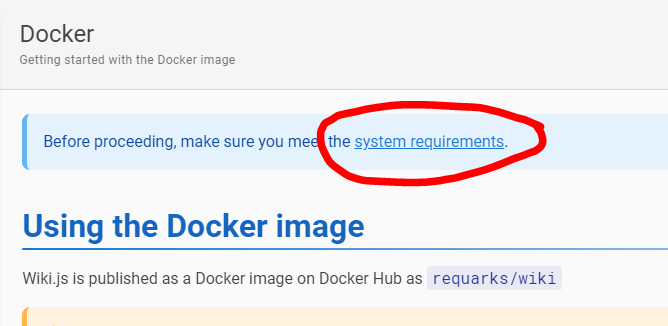
which lists one of the 5 supported databases as a requirement:
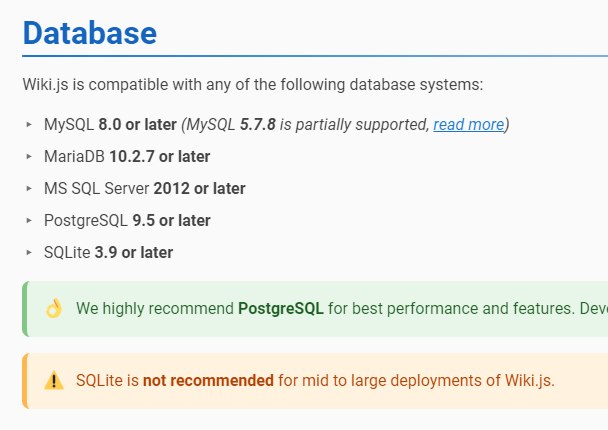
It's completely standard for a docker app to require a database to be already installed and be external to the application. It's definitely not the idea behind docker to have absolutely all dependencies package together in the same container, especially not when it comes to database.
NGPixel
on 15 Nov 2019
Related issues
 thinkh
·
4Comments
thinkh
·
4Comments
 axisofentropy
·
4Comments
axisofentropy
·
4Comments
 raikoug
·
3Comments
raikoug
·
3Comments
 ccolella-mdc
·
3Comments
ccolella-mdc
·
3Comments
 touhoku-japan
·
3Comments
touhoku-japan
·
3Comments
Most helpful comment
I have tried to install wiki.js using the docker method. The idea is that the docker packs everything I need, at least that's how I understand it as a docker user. The fact that the requirements for a system state that wiki.js is compatible with a lust of databases, tells me nothing when I try to install the docker.
What I'm saying is that there's a big disconnect between the requirements page, and the installation methods page. I do not expect instructions hou to install a database, but I do expect sothing to tell me, if you want to install using the docker method, first make sure you have a database installed, on the system, or in another docker.
It boils down to instructions that failed to make me, a simple prospective user, successful in getting wiki.js to work.