Wiki: Using smtp port 25 with a STARTTLS server results in an error if the server uses a self-signed certificate
Describe the bug
I can't seem to be able to use localhost as a SMTP server, even tough TLS is unchecked and I'm specifying port 25:
The server supports STARTTLS, so I'm assuming that the underlying library for email handling detects the feature and attempts to use it. This will result in an error about the self-signed certificate.
Further more, if you DO have a valid certificate for host.domain.tld, but you are using localhost to connect to your server, you still get an error about a hostname mismatch.
To Reproduce
Steps to reproduce the behavior:
- Postfix with default Ubuntu or Debian Configuration, which uses the default "snakeoil" certificate
- Try to setup Wiki.js's mail feature with
localhostand port25. Also disableTLS. - Attempt to send a test email
- You will get an error about the self-signed certificate
Expected behavior
I would expect that if I'm using localhost and port 25 with TLS specifically disabled, that it should not attempt to use STARTTLS when connecting to the server
Screenshots
https://i.imgur.com/zcFBRYU.png
Host Info (please complete the following information):
- OS: Ubuntu 17.10
- Wiki.js version: 2.0-rc1 (issue was present in the previous beta, too)
- Database engine: sqlite
 Znuff
Znuff
All 5 comments
I was fixed adding this option to transport, as specify nodemailer in your webpage, to allow self-signed certificates:
https://nodemailer.com/smtp/#3-allow-self-signed-certificates
In server/core/mail.js in line 17 added:
        tls: {
                rejectUnauthorized: false
        }
Please, don't miss the trailing comma at secure: WIKI.config.mail.secure,
  init() {
    if (_.get(WIKI.config, 'mail.host', '').length > 2) {
      let conf = {
        host: WIKI.config.mail.host,
        port: WIKI.config.mail.port,
        secure: WIKI.config.mail.secure,
        tls: {
                rejectUnauthorized: false
        }
      }
So I think wiki must have this switch option in email settings.
Regards
 NormandoHall
on 24 Dec 2019
NormandoHall
on 24 Dec 2019
I'm also running into this issue – as a workaround I've edited server/core/mail.js inside the Docker container and it now can send e-mail, but obviously this will be overwritten when a new release is pushed out.
 seanlano
on 1 Apr 2020
seanlano
on 1 Apr 2020
I ran into the same issue. I run my own mail server on the same server that Wiki.js runs on, and the Docker container needs to access it via the IP address, making it think the certificate is invalid. My current solution, after reading about it here, is that I modified mail.js to have tls.rejectUnauthorized get its value from WIKI.config.mail.secure, and set my docker-compose.yml to replace the file in the container with my modified copy. This prevents it from being overwritten during an upgrade (there is, of course, the issue of incompatibilities, but I really hope this issue can just be fixed soon, given how simple it was for me to patch).
 mpfaff
on 7 May 2020
mpfaff
on 7 May 2020
Added option for 2.4 (2ff0e42c1d48e9ac779a10c96360cb7a79847d97)
 NGPixel
on 8 May 2020
NGPixel
on 8 May 2020
I'm sorry to re-open this issue, but is there a solution to add my internal CA into any sort of trust store inside the docker container i'm using?
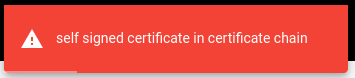
The image being used is requarks/wiki:2, and the error i get typically means the CA is not recognized.
The workaround that @NormandoHall mentionned is doing the job, but according to me its doing it the wrong way, by ignoring the CA verifications.
Is that a way to properly add a self signed certificate authority on the docker ? I'm using docker-compose atm and the best way, according to me, would be sharing the truststore (ex on Centos 7 : "/etc/pki/ca-trust/" )of the host (by mount point or volume). Any idea/suggestions?
 Blyyyn
on 24 May 2020
Blyyyn
on 24 May 2020
Related issues
 den1622
·
3Comments
den1622
·
3Comments
 ramirahikkala
·
3Comments
ramirahikkala
·
3Comments
 LionNatsu
·
3Comments
LionNatsu
·
3Comments
 D3mon86
·
4Comments
D3mon86
·
4Comments
 thinkh
·
4Comments
thinkh
·
4Comments
Most helpful comment
I was fixed adding this option to transport, as specify nodemailer in your webpage, to allow self-signed certificates:
https://nodemailer.com/smtp/#3-allow-self-signed-certificates
In server/core/mail.js in line 17 added:
Please, don't miss the trailing comma at secure: WIKI.config.mail.secure,
So I think wiki must have this switch option in email settings.
Regards